원인
auth.ts 파일의 NextAuth의 authorize 함수로그인 api 실행는 서버 사이드에서 실행된다.
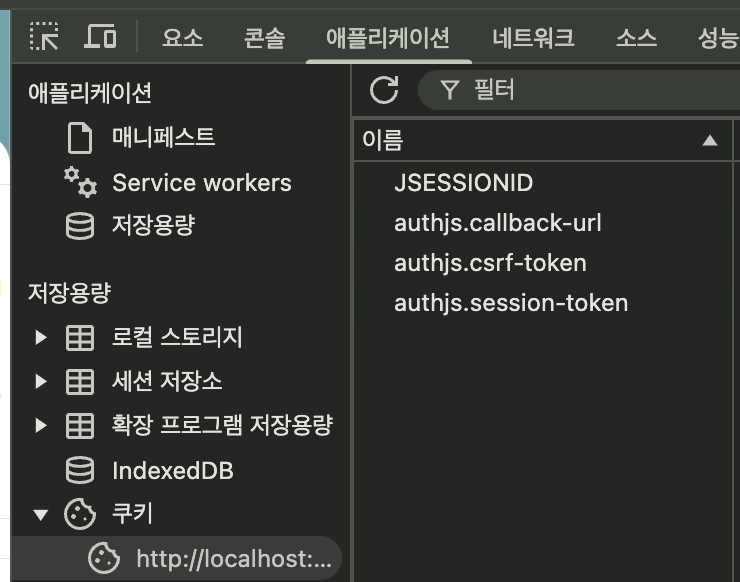
서버 사이드에서 받은 Set-Cookie 헤더서버가 발급해준 http-only JSESSIONID 쿠키가 클라이언트(브라우저)까지 전달되지 않아 문제가 된다.
틀린 코드
📁 frontend/src/app/(nonAuth)/login/_component/LoginForm.tsx
"use client";

import { useForm } from "react-hook-form";
import { zodResolver } from "@hookform/resolvers/zod";
import * as z from "zod";
import { Input } from "@/components/ui/Input";
import { Button } from "@/components/ui/Button";
import IdIcon from "@/assets/icons/id.svg";
import PwIcon from "@/assets/icons/pw.svg";
import { loginSchema } from "../_libs/auth";
import { signIn } from "next-auth/react";
import { useRouter } from "next/navigation";
import { useState } from "react";

type LoginFormValues = z.infer<typeof loginSchema>;

export default function LoginForm() {
  const {
    register,
    handleSubmit,
    formState: { errors, isSubmitting },
  } = useForm<LoginFormValues>({
    resolver: zodResolver(loginSchema),
  });
  const router = useRouter();
  const [loginErrorMessage, setLoginErrorMessage] = useState("");

  const onSubmit = async (data: LoginFormValues) => {
    // try {
    setLoginErrorMessage("");

    // API 호출 로직
    const result = await signIn("credentials", {
      username: data.id,
      password: data.password,
      redirect: false,
    });

    console.log("result", result);

    if (result?.error === null) {
      // 로그인 성공
      router.replace("/wms/dashboard");
    } else {
      setLoginErrorMessage("아이디 또는 비밀번호를 다시 확인해주세요.");
    }
    // } catch (error) {
    //   console.error("로그인 에러: ", error);
    //   setLoginErrorMessage("로그인 중 오류가 발생했습니다. 다시 시도해주세요.");
    // }
  };

  return (
    <div className="mt-16">
      <form
        onSubmit={handleSubmit(onSubmit)}
        className="w-full flex flex-col gap-6"
      >
        {/* ID 입력 영역 */}
        <section className="flex flex-col gap-2">
          <label className="text-md-sm text-gray">Id</label>
          <div className="relative">
            <Input
              {...register("id")}
              type="text"
              placeholder="아이디를 입력하세요"
              className="w-full h-14"
            />
            <div className="absolute right-3 top-1/2 -translate-y-1/2">
              <IdIcon className="h-6 w-6" />
            </div>
          </div>
          {errors.id && (
            <span className="text-md-xs text-danger mt-1">
              {errors.id.message}
            </span>
          )}
        </section>

        {/* Password 입력 영역 */}
        <section className="flex flex-col gap-2">
          <label className="text-md-sm text-gray">Password</label>
          <div className="relative">
            <Input
              {...register("password")}
              type="password"
              placeholder="비밀번호를 입력하세요"
              className="w-full h-14"
            />
            <div className="absolute right-3 top-1/2 -translate-y-1/2">
              <PwIcon className="h-6 w-6" />
            </div>
          </div>
          {errors.password && (
            <span className="text-md-xs text-danger mt-1">
              {errors.password.message}
            </span>
          )}
        </section>

        {loginErrorMessage && (
          <div className="text-danger text-md-sm">{loginErrorMessage}</div>
        )}

        <div className="mt-4">
          <Button
            type="submit"
            className="w-full bg-primary02 h-14"
            size="lg"
            disabled={isSubmitting}
          >
            {isSubmitting ? "로그인 중..." : "Sign In"}
          </Button>
        </div>

        <button className="my-4 text-center text-gray/50 text-md-sm">
          비밀번호를 잊어버리셨나요?
        </button>
      </form>
    </div>
  );
}
📁 frontend/src/auth.ts
import { IUser } from "@/custom";
import NextAuth, { Session } from "next-auth";
import CredentialsProvider from "next-auth/providers/credentials";
import { NextResponse } from "next/server";
import { JWT } from "next-auth/jwt";

export const {
  handlers: { GET, POST },
  auth,
  signIn,
} = NextAuth({
  pages: {
    signIn: "/login",
  },
  callbacks: {
    // 최초 로그인 시에만 user 데이터가 전달
    async jwt({ token, user }) {
      if (user) {
        const userData = user as IUser;
        token.userId = userData.userId;
        token.role = userData.role;
        token.phoneNumber = userData.phoneNumber;
        token.id = userData.id;
        token.name = userData.name;
      }
      return token;
    },

    async session({ session, token }: { session: Session; token: JWT }) {
      // token의 정보를 session.user에 매핑
      session.user = {
        userId: token.userId,
        name: token.name,
        role: token.role,
        phoneNumber: token.phoneNumber,
        id: token.id,
      };
      console.log("session callback:", session); // 데이터 확인

      return session;
    },
  },
  providers: [
    CredentialsProvider({
      // 최초 로그인 시에만 실행
      async authorize(credentials): Promise<IUser> {
        const authResponse = await fetch(
          "http://localhost:8080/v1/auth/login", //TODO api 수정
          {
            method: "POST",
            headers: {
              "Content-Type": "application/json",
            },
            body: JSON.stringify({
              id: credentials.username,
              password: credentials.password,
            }),
            credentials: "include",
          }
        );

        const user = await authResponse.json();

        console.log("user 정보:", user);

        // INFO 로그인 실패
        if (!authResponse.ok) {
          console.log("로그인 API 응답: ", user);
          // 서버 에러 응답 그대로 전달
          throw new Error(JSON.stringify(user));
        }

        // return {
        //   id: user.userId,
        //   email: user.id,
        //   name: user.name,
        //   ...user,
        // };
        return user;
      },
    }),
  ],
  secret: process.env.AUTH_SECRET,
});
해결방법
로그인 페이지클라이언트 컴포넌트에서 직접 API를 호출하는 방식으로 변경한다.
auth.ts는 백엔드 호출로그인 api 없이 사용자 정보만 처리하도록 수정한다.
- 변경 전: NextAuth의 authorize 함수에서 모든 것을 처리
- 변경 후: 클라이언트에서 직접 백엔드 호출 후 NextAuth 처리
1단계: 백엔드 API 직접 호출 (JSESSIONID 쿠키 설정)
2단계: NextAuth 세션 설정
실제 백엔드 인증은 로그인 페이지에서 직접 처리하여 JSESSIONID는 첫 번째 fetch 요청에서 자연스럽게 설정이 된다. 그리고 NextAuth는 단순히 클라이언트 상태 관리 용도로만 사용된다.
결론
백엔드 서버와의 통신을 위한 세션JSESSIONID, 프론트에서 사용자 상태를 관리하기 위한 클라이언트 세션authjs.session-token 총 2개의 세션이 독립적으로 관리되고 있다. 즉, 백엔드와의 실제 인증은 JSESSIONID로 하고, NextAuth는 프론트엔드의 상태 관리 도구로 사용되는 것이다.
- 백엔드 세션 (JSESSIONID)
백엔드 서버와의 통신을 위한 세션
직접 API 호출할 때 credentials: "include"로 인해 자동으로 쿠키가 포함됨
실제 인증 상태를 관리
- NextAuth 세션
프론트엔드에서 사용자 상태를 관리하기 위한 클라이언트 세션
next-auth.session-token 쿠키로 관리됨
사용자 정보(이름, 역할 등)를 프론트엔드에서 쉽게 접근할 수 있게 해줌
React 컴포넌트에서 useSession 훅으로 사용자 정보를 쉽게 가져올 수 있음
NextAuth vs. 로컬스토리지
보안성
로컬스토리지는 XSS 공격에 취약한 반면, NextAuth의 세션은 httpOnly 쿠키로 관리됨
CSRF 보호가 기본적으로 제공됨
편의성
useSession 훅을 통한 간편한 상태 관리
미들웨어를 통한 route 보호가 쉬움
페이지 새로고침시에도 상태가 유지됨
기능성
세션 만료 관리가 자동으로 됨
여러 탭/윈도우 간의 동기화가 자동으로 처리됨
Next.js와의 통합이 잘 되어있음