터미널 소프트웨어인 secureCRT 6.5.4를 사용하여 Ubuntu 20.04.1 LTS 버전이상에 ssh 접속을 시도 시 아래와 같이 에러가 발생.
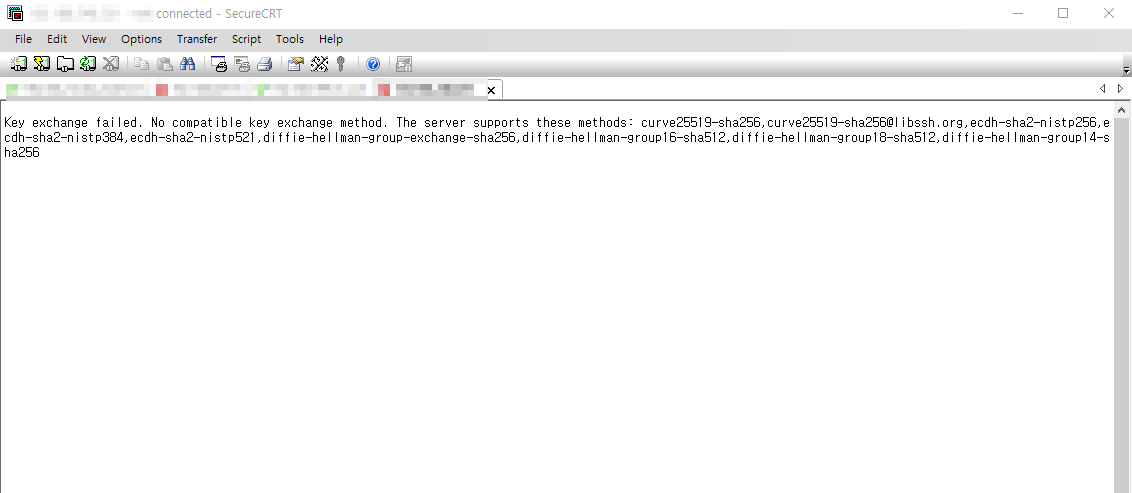
최신 Ubuntu의 ssh의 key를 제공하지 않아 접속이 되지 않습니다.
Key exchange failed. No compatible key exchange method.
The server supports these methods: curve25519-sha256,curve25519-sha256@libssh.org,ecdh-sha2-nistp256,ecdh-sha2-nistp384,ecdh-sha2-nistp521,diffie-hellman-group-exchange-sha256,diffie-hellman-group16-sha512,diffie-hellman-group18-sha512,diffie-hellman-group14-sha256
위의 말 그대로 구버전의 secureCRT에서
최신 버전 Ubuntu의 ssh key를 제공하지
않아서 접속에 실패하게 되는데요.
해결 방법으로는 secureCRT의 버전을 업데이트 또는 구버전의 secureCRT에서 지원하는
SSH key를 추가
아래와 같은 방법으로 추가가 가능합니다.
#vi /etc/ssh/sshd_config <-- sshd conf 수정
아래의 두줄을 맨 아래에 추가
KexAlgorithms +diffie-hellman-group1-sha1
Ciphers +aes128-cbc
#systemctl restart sshd
● ssh.service - OpenBSD Secure Shell server
Loaded: loaded (/lib/systemd/system/ssh.service; enabled; vendor preset: enabled)
Active: active (running) since Wed 2022-09-21 14:59:28 KST; 3 months 27 days ago
Docs: man:sshd(8)
man:sshd_config(5)
Main PID: 853 (sshd)
Tasks: 1 (limit: 9454)
Memory: 4.3M
9월OpenBSD Secure Shell server...
9월 21 14:59:28 pa-virtual-machine sshd[853]: Server listening on 0.0.0.0 port 22.
9월 21 14:59:28 22.
#cat /etc/ssh/sshd_config
#$OpenBSD: sshd_config,v 1.103 2018/04/09 20:41:22 tj Exp $
#This is the sshd server system-wide configuration file. See
#sshd_config(5) for more information. # This sshd was compiled with PATH=/usr/bin:/bin:/usr/sbin:/sbin
openSSH is to specify options with their default value where
#/etc/ssh/sshd_config.d/*.conf #Port 22
#AddressFamily any
#ListenAddress 0.0.0.0
#ListenAddress ::
#HostKey /etc/ssh/ssh_host_rsa_key
#HostKey /etc/ssh/ssh_host_ecdsa_key
#HostKey /etc/ssh/ssh_host_ed25519_key # Ciphers and keying
#RekeyLimit default none # Logging
#SyslogFacility AUTH
#LogLevel INFO
#Authentication:
#LoginGraceTime 2m
#PermitRootLogin prohibit-password
#StrictModes yes
#MaxAuthTries 6
#MaxSessions 10
#PubkeyAuthentication yes
#Expect .ssh/authorized_keys2 to be disregarded by default in future.
#AuthorizedKeysFile .ssh/authorized_keys .ssh/authorized_keys2
#AuthorizedPrincipalsFile none #AuthorizedKeysCommand none
#AuthorizedKeysCommandUser nobody
#For this to work you will also need host keys in /etc/ssh/sshknown_hosts
#HostbasedAuthentication no
#Change to yes if you don't trust ~/.ssh/known_hosts for
#HostbasedAuthentication
#IgnoreUserKnownHosts no
#Don't read the user's ~/.rhosts and ~/.shosts files
#IgnoreRhosts yes # To disable tunneled clear text passwords, change to no here!
#PasswordAuthentication yes
#PermitEmptyPasswords no # Change to yes to enable challenge-response passwords (beware issues with
#some PAM modules and threads)
ChallengeResponseAuthentication no # Kerberos options
#KerberosAuthentication no
#KerberosOrLocalPasswd yes
#KerberosTicketCleanup yes
#KerberosGetAFSToken no # GSSAPI options
#GSSAPIAuthentication no
#GSSAPICleanupCredentials yes
#GSSAPIStrictAcceptorCheck yes
#GSSAPIKeyExchange no # Set this to 'yes' to enable PAM authentication, account processing,
#and session processing. If this is enabled, PAM authentication will
#be allowed through the ChallengeResponseAuthentication and
#PasswordAuthentication. Depending on your PAM configuration,
#PAM authentication via ChallengeResponseAuthentication may bypass
#the setting of "PermitRootLogin without-password".
#If you just want the PAM account and session checks to run without
#PAM authentication, then enable this but set PasswordAuthentication
#and ChallengeResponseAuthentication to 'no'.
UsePAM yes #AllowAgentForwarding yes
#AllowTcpForwarding yes
#GatewayPorts no
X11Forwarding yes
#X11DisplayOffset 10
#X11UseLocalhost yes
#PermitTTY yes
PrintMotd no
#PrintLastLog yes
#TCPKeepAlive yes
#PermitUserEnvironment no
#Compression delayed
#ClientAliveInterval 0
#ClientAliveCountMax 3
#UseDNS no
#PidFile /var/run/sshd.pid
#MaxStartups 10:30:100
#PermitTunnel no
#ChrootDirectory none
#VersionAddendum none # no default banner path
#Banner none # Allow client to pass locale environment variables
AcceptEnv LANG LC* # override default of no subsystems
Subsystem sftp /usr/lib/openssh/sftp-server # Example of overriding settings on a per-user basis
#Match User anoncvs
#X11Forwarding no
#AllowTcpForwarding no
#PermitTTY no
#ForceCommand cvs server
<추가된 부분>
KexAlgorithms +diffie-hellman-group1-sha1
Ciphers +aes128-cbc
