[Android] SNS앱 안드로이드 클라이언트 개발-2
📖 SNS 앱을 만들면서 배우는 안드로이드 클라이언트 개발
04. Gson으로 JSON을 다뤄보자
1. JSON이란
1) JSON
JSON은 다양한 데이터 포맷 중 REST API에서 주로 사용하는 데이터 표현 방식이다.
➡️ 이전에 정리한 JSON과 관련한 블로그 글 : 백엔드 1주차
2) JSON을 사용한 코드
class TodayFragment : BaseFragment() {

    var _binding : FragmentTodayBinding? = null
    val binding get() = _binding!!

    override fun onCreateView(
        inflater: LayoutInflater, container: ViewGroup?,
        savedInstanceState: Bundle?
    ): View? {
        _binding = FragmentTodayBinding.inflate(inflater, container, false)
        return binding.root
    }

    override fun onViewCreated(view: View, savedInstanceState: Bundle?) {
        super.onViewCreated(view, savedInstanceState)

        Thread{

            val url = URL("http://10.0.2.2:5000/v1/hello-world")

            val conn = url.openConnection() as HttpURLConnection
            conn.connectTimeout = 5000
            conn.readTimeout = 5000
            conn.requestMethod = "GET"
            //JSON응답 받기
            conn.setRequestProperty("Accept","application/json")
            //파싱해서 날짜와 메시지를 표시하는 기능.

            conn.connect()

            val reader = BufferedReader(InputStreamReader(conn.inputStream))
            val body = reader.readText()
            reader.close()
            conn.disconnect()

            val json = JSONObject(body)
            val date = json.getString("date")
            val message = json.getString("message")


            activity?.runOnUiThread {
                binding.date.text = date
                binding.question.text = message
            }
        }.start()

    }

    override fun onDestroy() {
        _binding = null
        super.onDestroy()
    }
}
① HttpURLConnection의 setRequestProperty 메서드로 요청에 헤더를 추가할 수 있다. 이 메서드를 사용해 Accept 헤더를 추가한다.
- "Hello, world!" API는 요청의 Accept 헤더에 따라 text/plain과 application/json 타입의 응답을 보내준다.
② API 응답으로 받은 문자열을 JSONObject의 생성자로 넘겨 JSON 오브젝트로 만든다.
③ JSON 오브젝트에서 키의 값을 가져올 땐 값의 타입에 맞는 메서드를 사용한다. 예를 들어 문자열 값을 가져올 땐 getString(), 정수는 getInt(), 값이 오브젝트라면 getObject()를 사용하면 된다.
2. Gson 사용
'Hello, world!' API는 응답의 구조가 단순해 JSONObject를 사용했다. JSONObject를 사용하는 것이 일반 문자열을 사용하는 것보다는 편하지만 여전히 몇 가지 문제가 존재하는데 수십개가 되는 API의 응답 구조를 항상 기억하고 있는 것이 쉽지 않다는 점이다. 응답 구조가 바뀌었을 때 사용하는 부분을 일일이 찾아 수정해야하면 실수하기도 쉬우며 또한 JSONObject에서 지원하는 타입으로만 값을 가져올 수 있기 때문에 다른 타입을 사용하려면 매번 변환하는 작업이 필요하다.
이런 문제들을 쉽게 해결하기 위해 GSON을 사용한다. Gson은 JSON 표현을 자바 객체로, 자바 객체를 JSON 표현으로 변환해주는 라이브러리로 오픈소스 배포가 되어있다.
1) Gson 라이브러리 추가
dependencies {

	//gson 의존성 추가
    implementation ("com.google.code.gson:gson:2.11.0")

    implementation(libs.androidx.core.ktx)
    implementation(libs.androidx.appcompat)
    implementation(libs.material)
    implementation(libs.androidx.activity)
    implementation(libs.androidx.constraintlayout)
    testImplementation(libs.junit)
    androidTestImplementation(libs.androidx.junit)
    androidTestImplementation(libs.androidx.espresso.core)
}
2) Gson 클래스
먼저 Gson에서 사용할 모델을 만들어야한다. Gson에서 사용할 모델은 API의 응답과 같은 구조, 이름, 타입을 가진다. 'Hello, World!" API의 JSON 응답을 보고 모델을 작성해주면 된다.
(1) HelloWorld.kt
package com.example.dailyq.Ui.Api

import java.util.*

data class HelloWorld (val date:Date, val message : String)
Gson을 사용하는 것은 JSONObject를 사용하는 것보다 더 간단하다. Gson을 초기화 하고 fromJson() 메서드에 JSON 문자열과 클래스를 넘겨주면 객체를 만들고 값을 채워 반환한다.
이때 date의 타입을 미리 Date로 변경하면 자동으로 변환되기 때문에 편하다.
Date는 시간을 담기위한 객체로, Date를 원하는 형식의 문자열로 만들기 위해서 DateFormat이라는 라이브러리를 사용한다. DateFormat의 getDateInstance() 메서드는 스타일과 로케일을 인자로 받아 그에 맞는 DateFormat 객체를 생성한다. 로케일이 Locale.KOREA일 때 스타일에 따라 다음의 형식을 반환한다.
- FULL : 2022년 1월 12일 수요일
- LONG : 2022년 1월 12일 (수)
- MEDIUM : 2022.1.12
- SHORT : 22.1.12
(2) TodayFragment.kt
package com.example.dailyq.Ui.today

import android.os.Bundle

import android.view.LayoutInflater
import android.view.View
import android.view.ViewGroup
import com.example.dailyq.Ui.Api.HelloWorld
import com.example.dailyq.Ui.base.BaseFragment
import com.example.dailyq.databinding.FragmentTodayBinding
import com.google.gson.Gson
import java.io.BufferedReader
import java.io.InputStreamReader
import java.net.HttpURLConnection
import java.net.URL

import java.util.*
import java.text.DateFormat

class TodayFragment : BaseFragment() {

    var _binding : FragmentTodayBinding? = null
    val binding get() = _binding!!

    override fun onCreateView(
        inflater: LayoutInflater, container: ViewGroup?,
        savedInstanceState: Bundle?
    ): View? {
        _binding = FragmentTodayBinding.inflate(inflater, container, false)
        return binding.root
    }

    override fun onViewCreated(view: View, savedInstanceState: Bundle?) {
        super.onViewCreated(view, savedInstanceState)

        Thread{

            val url = URL("http://10.0.2.2:5000/v1/hello-world")

            val conn = url.openConnection() as HttpURLConnection
            conn.connectTimeout = 5000
            conn.readTimeout = 5000
            conn.requestMethod = "GET"
            //JSON응답 받기
            conn.setRequestProperty("Accept","application/json")
            //파싱해서 날짜와 메시지를 표시하는 기능.

            conn.connect()

            val reader = BufferedReader(InputStreamReader(conn.inputStream))
            val body = reader.readText()
            reader.close()
            conn.disconnect()

            val gson = Gson()
            val dateFormat = DateFormat.getDateInstance(DateFormat.MEDIUM, Locale.KOREA)
            val helloWorld =gson.fromJson(body, HelloWorld::class.java)

            activity?.runOnUiThread {
                binding.date.text  = dateFormat.format(helloWorld.date)
                binding.question.text = helloWorld.message
            }
        }.start()

    }

    override fun onDestroy() {
        _binding = null
        super.onDestroy()
    }
}
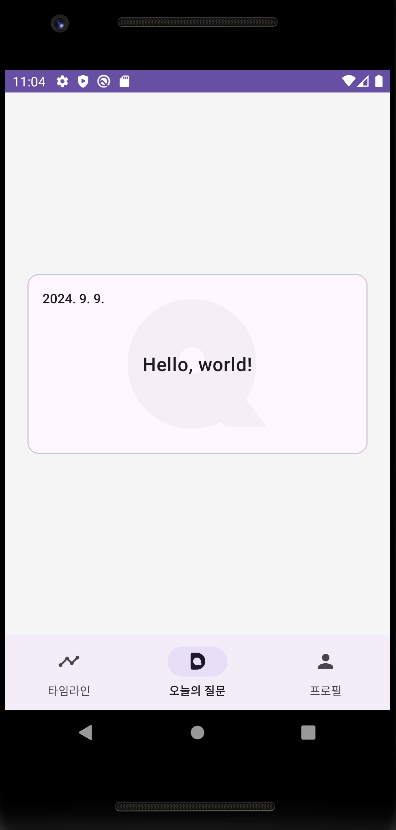
🌟 결과 화면
이후 코드를 실행하면 이렇게 날짜가 원하는 형식으로 바뀐 것을 확인할 수 있다.