객체와 배열을 이용한 데이터 처리

괴발개발·2025년 1월 12일

LG CNS AM Inspire Camp 1기

목록 보기
15/17
post-thumbnail
  • 실습 예제

      <h1>객체와 배열을 이용한 데이터 처리</h1>
      <script>
        // 학생별 점수를 아래 형식에 맞춰서 콘솔에 출력
    
        let scores = [];
        /* 학생별 점수 데이터
        0: {name: '홍길동', korean: 80, math: 90, english: 100}
        1: {name: '고길동', korean: 90, math: 80, english: 80}
        2: {name: '신길동', korean: 70, math: 80, english: 70}
    
        출력 형식
        --------- ----- ----- ----- ----- -----
        학생이름   국어   영어  수학   합계   평균
        --------- ----- ----- ----- ----- -----
        홍길동      80    90    90    260   86.7
          :        :      :     :     :      :
        */
      </script>

  • 코드

    <!DOCTYPE html>
    <html lang="en">
    <head>
      <meta charset="UTF-8">
      <meta name="viewport" content="width=device-width, initial-scale=1.0">
      <title>Document</title>
    </head>
    <body>
      <h1>객체와 배열을 이용한 데이터 처리</h1>
      <script>
        let scores = [];
    
        // 배열에 학생별 점수 데이터 추가
        scores.push({name: '홍길동', korean: 80, math: 90, english: 100});
        scores.push({name: '고길동', korean: 90, math: 80, english: 80});
        scores.push({name: '신길동', korean: 70, math: 80, english: 70});
        console.log(scores);
    
        // 타이틀 출력
        console.log('----------\t----\t----\t----\t----\t----');
        console.log(' 학생이름\t국어\t영어\t수학\t합계\t평균');
        console.log('----------\t----\t----\t----\t----\t----');
    
        // 학생별 점수 출력
        scores.forEach(score => {
          const total = score.korean + score.math + score.english;
          const average = total / 3;
         
          // 합계와 평균 계산
          console.log(`  ${score.name}\t ${score.korean}\t\t ${score.math}\t\t${score.english}\t\t${total}\t\t${average.toFixed(1)}`);
        });
      </script>
    </body>
    </body>
    </html>

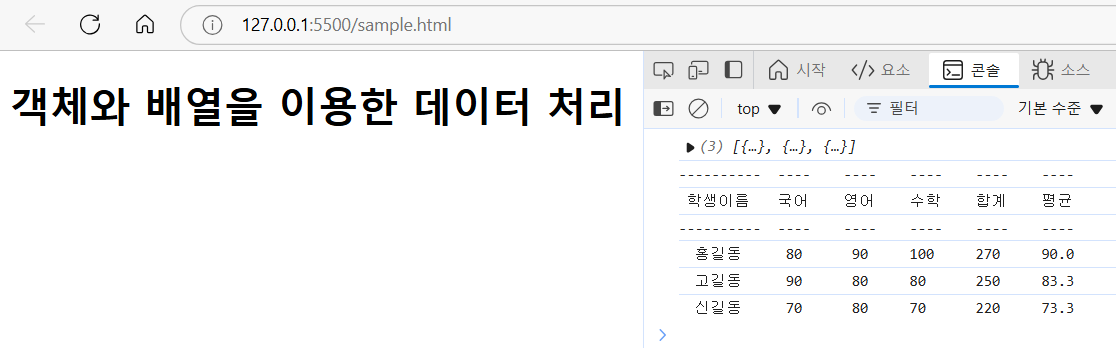
  • 실행 결과

0개의 댓글