Intro
댓글 생성, 수정, 삭제 기능을 만들고 있는데 문제가 하나 발생했다.
댓글 생성, 수정, 삭제 기능은 잘 되는데 생성된 댓글을 보기위해서는 새로고침이 필요한 것.
하지만 댓글을 수정하거나 생성할 때마다 새로고침을 하게되면 사용자 경험이 안좋아진다.
또한, 문제점이 하나가 더 있는데 댓글 수정 버튼을 누르면 댓글 창에서 바로 수정 폼이 나타나게 해야된다. 이것도 새로고침이 발생해야 수정 폼을 띄울 수 있는데 이것 또한 사용자 경험이 굉장히 안좋아짐...
결국, 새로고침 없이 화면을 수정하는 ajax 비동기 통신을 이용해야한다.
댓글 생성하기
댓글만 화면을 다시 출력해야하니 댓글 부분만 따로 빼서 html을 만들어준다.
th:fragment에 원하는 이름을 넣어준다.
나는 좋아요순, 최신순 기능을 위해 입력창이 있는 부분은 그대로 냅두고 댓글 부분만 다시 출력하는 기능도 넣을 것이기 때문에 두 부분으로 분리하였다.
입력창 부분

<div th:fragment="comment-header" class="comment-header">
    <h2 class="a11y"> 답변 입력창 </h2>
    <div class="comment-info">
        <h2>답변 <strong class="comment-number" th:text="${comments.size()}"></strong></h2>
        <div class="comment-sort-selector">
            <span class="recommend" onclick="clickOrderByLikeCount()">좋아요순</span>
            <span class="recent sorted" onclick="clickOrderByCreatedAt()">최신순</span>
        </div>
    </div>
    <div class="comment-editor-opener" onclick="clickCommentEditorOpener(this)">
        <!-- 로그인 한 유저로 수정 필요-->
        <p class="comment-editor-text">
            답변을 작성해주세요.
        </p>
    </div>


    <div class="comment-editor hidden">
        <form class="comment-form" th:action="@{/comment/add}" th:method="post" th:object="${newComment}">
            <input type="hidden" name="postId" th:value="${postId}"/>
            <input type="hidden" name="type" th:value="*{type}"/>

            <label th:if="${newComment.type eq 'QUIZ'}">
                <input type="checkbox" class="display-check" th:field="*{display}"/>
                비공개
            </label>
            <div th:unless="${newComment.type eq 'QUIZ'}">
                <input type="hidden" name="display" class="display-check" th:value="false"/>
            </div>

            <textarea class="answer-input" placeholder="정답을 작성해보세요" rows="30"
                      th:field="*{contents}"
                      onchange="commentWordCount(this);"
                      oninput="commentWordCount(this);"></textarea>

            <div class="comment-text-count">0/1500</div>

            <div class="comment-editor-bottom">
                <button class="cancel-button" type="button" onclick="clickCommentCancel()">취소</button>
                <button class="submit-button" type="button" onclick="clickCommentSubmitButton(this)">등록</button>
            </div>
        </form>
    </div>
</div>
댓글 목록 부분
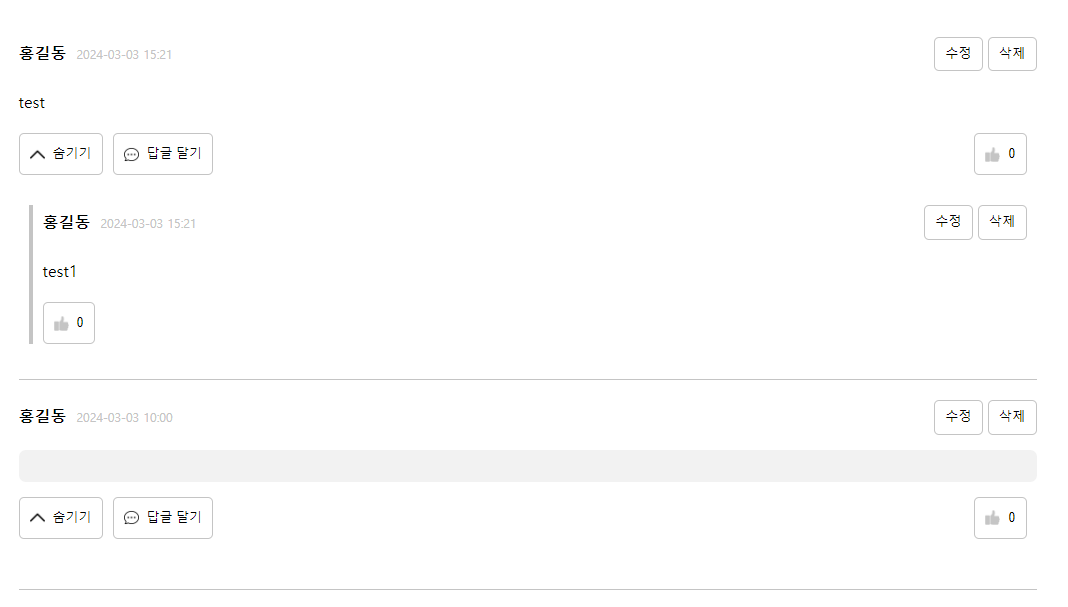
<div th:fragment="comment-main" class="comment-main">
    <h2 class="a11y"> 댓글 목록 </h2>
    <div class="comment-item-container" th:each="comment: ${comments}">
        <input type="hidden" class="comment-id" th:value="${comment.id}"/>
        <input type="hidden" class="type" th:value="${comment.type}"/>
        <div class="comment-item-header">
            <div class="comment-info">
                <a href="" class="comment-writer-name" th:value="${comment.userId}" th:text="${comment.author}"></a>
                <p class="comment-createdAt" th:text="${#dates.format(comment.createdAt,'yyyy-MM-dd HH:mm')}"></p>
            </div>
            <div class="comment-edit-container">
                <button onclick="switchEditCommentForm(this)">수정</button>
                <button onclick="clickDeleteButton(this)">삭제</button>
            </div>
        </div>
        <div th:if="${comment.display==0}" class="comment-item-body">
            <div class="comment-item" th:text="${comment.contents}"></div>
        </div>
        <div th:unless="${comment.display==0}" class="comment-item-body hide-place"
             onclick="clickComment(this)">
            <div class="comment-item hide-text" th:text="${comment.contents}"></div>
        </div>
        <div class="comment-item-bottom">
            <div class="etc-button-container">
                <button class="comment-button re-comment-display-control" onclick="clickHideReComment(this)">
                    <img th:src="@{/images/icon_up_arrow.png}" alt="숨기기 버튼"> 숨기기
                </button>
                <button class="comment-button re-comment-editor-opener"
                        onclick="clickReCommentEditorOpener(this)">
                    <img th:src="@{/images/icon_recomment.png}" alt="답글달기 버튼">답글 달기
                </button>
            </div>
            <button class="likes-button comment-button comment-likes" onclick="clickLike(this, 'COMMENT')">
                <input class="post-id hidden" name="postId" th:value="${comment.id}"/>
                <img th:class="${comment.liked} ? 'liked' : 'like-img'" th:src="@{/images/icon_like_normal.png}" alt="좋아요 버튼">
                <p class="likes-number" th:text="${comment.likeCount}"></p>
            </button>
        </div>


        <div class="re-comment-editor hidden">
            <form class="re-comment-form" th:action="@{/comment/add}" th:method="post" th:object="${newComment}">
                <input type="hidden" name="postId" th:value="${postId}"/>
                <input type="hidden" name="type" th:value="*{type}"/>
                <input type="hidden" name="display" th:value="false"/>
                <input type="hidden" name="parentCommentId" th:value="${comment.id}"/>

                <textarea class="answer-input" placeholder="댓글을 작성해보세요" rows="30"
                          th:field="${newComment.contents}"
                          onchange="reCommentWordCount(this)"
                          oninput="reCommentWordCount(this)"></textarea>
                <div class="re-comment-text-count">0/1500</div>

                <div class="comment-editor-bottom">
                    <button class="re-comment-cancel-button" type="button" onclick="clickReCommentCancel(this)">
                        취소
                    </button>
                    <button class="re-comment-submit-button" type="button"
                            onclick="clickReCommentSubmitButton(this)">등록
                    </button>
                </div>
            </form>
        </div>


        <div class="re-comment-items-container">
            <div class="re-comment-item-container" th:each="reComment:${comment.reComments}">
                <input type="hidden" class="comment-id" th:value="${reComment.id}"/>
                <input type="hidden" class="type" th:value="${reComment.type}"/>
                <div class="comment-item-header">
                    <div class="comment-info">
                        <a href="" class="comment-writer-name" th:value="${reComment.userId}"
                           th:text="${reComment.author}"></a>
                        <p class="comment-createdAt"
                           th:text="${#dates.format(reComment.createdAt,'yyyy-MM-dd HH:mm')}"></p>
                    </div>
                    <div class="comment-edit-container">
                        <button onclick="switchEditReCommentForm(this)">수정</button>
                        <button onclick="clickDeleteButton(this)">삭제</button>
                    </div>
                </div>
                <div class="comment-item-body" th:text="${reComment.contents}">
                </div>
                <div class="comment-item-bottom">
                    <button class="likes-button comment-button comment-likes" onclick="clickLike(this, 'COMMENT')">
                        <input class="post-id hidden" name="postId" th:value="${reComment.id}"/>
                        <img th:class="${reComment.liked} ? 'liked' : 'like-img'" th:src="@{/images/icon_like_normal.png}" alt="좋아요 버튼">
                        <p class="likes-number" th:text="${reComment.likeCount}"></p>
                    </button>
                </div>
            </div>
        </div>
    </div>
</div>
생성은 게시판을 출력할 때 미리 새 댓글 생성을 처리할 수 있게 Comment 객체를 모델에 추가한다. 이러면 뷰에서 새 댓글 생성을 처리할 수 있다.
    @GetMapping("/board")
    public String getQuizDetail(@RequestParam("id") Long id, Model model){

        long userId = 1;
        //글의 상세 정보 가져오기
        QuizDto quiz = quizService.getQuiz(id, userId);
        //글에 연결된 댓글들 가져오기
        List<CommentDto> comments = commentService.getAllComments(id, userId);

        model.addAttribute("quiz",quiz);
        model.addAttribute("postId", quiz.getId());
        model.addAttribute("comments",comments);
        model.addAttribute("newComment",new Comment("QUIZ"));

        return "quiz/board";
    }
new Comment("QUIZ")에 Quiz를 넣어주는 이유는 댓글을 적용하는 부분이 여러부분이라 어느 부분에서 사용하는 지 구분하기 위해서 넣어주었다. (댓글에 비공개 체크박스가 있는 폼이 있고, 아닌 폼이 있어서)
사용자가 등록 버튼을 눌렀을 때, 서버로 comment객체에 데이터를 담고 전송한다.
comment 데이터를 받은 서버는 데이터베이스에 comment 데이터를 저장하고,
해당 글에 달려있는 모든 comment를 담아 comment.html를 보내준다.
(댓글 부분을 다시 출력하기 위해 모든 comment들을 다시 보내주는 것이다.)
    @PostMapping("/add")
    public String addComment(@ModelAttribute("newComment") Comment comment, Model model) {
        long userId = 1;

        commentService.saveComment(comment, 1);

        long post_id = comment.getPostId();
        //글에 연결된 댓글들 가져오기
        List<CommentDto> comments = commentService.getAllComments(post_id, userId);

        model.addAttribute("comments", comments);
        model.addAttribute("postId", post_id);

        if (comment.getType().equals("QUIZ")) {
            model.addAttribute("newComment", new Comment("QUIZ"));
        } else {
            model.addAttribute("newComment", new Comment("COTE"));
        }

        return "comment/comment";
    }
성공적으로 서버에서 comment.html을 받으면 해당 데이터를 사용하여 .comment-contianer를 업데이트한다.
만약 .comment-container까지 대체하고 싶으면 .html 대신 .replaceWith를 쓰면 된다.
function submitCommentForm(commentForm) {
    const formData = new FormData(commentForm);
    $.ajax({
        url: commentForm.action,
        type: "POST",
        data: formData,
        processData: false,
        contentType: false,
        success: function (data) {
            $('.comment-container').html(data);
        },
        error: function (error) {
            console.log(error);
        }
    });
}
이러면 새로고침 없이 댓글을 작성할 수 있다.
좋아요 순으로 댓글 보여주기
생성하기처럼 좋아요 순으로 정렬한 댓글 데이터만 보여주면 된다.
차이점은 댓글창 section 업데이트를 하지않고, 댓글 목록을 보여주는 section만 업데이트한다.
comment/comment 까지는 templates에 저장된 대로 주소를 입력해주고
그 뒤에 대체하고 싶은 section 태그 class 이름을 넣어주면 된다.
나의 경우 class 이름을 사용하였지만 id도 가능하다
id로 하려면
return "comment/comment:#{id 이름}"으로 사용하면 된다.
    @PostMapping("/orderlike")
    public String orderCommentByLikeCount(@RequestParam("id") long postId, @RequestParam("type") String type, Model model) {
        long userId = 1;

        List<CommentDto> comments = commentService.getAllCommentsOrderByLikeCount(postId, userId);

        model.addAttribute("comments", comments);
        model.addAttribute("postId", postId);
        if (type.equals("QUIZ")) {
            model.addAttribute("newComment", new Comment("QUIZ"));
        }else{
            model.addAttribute("newComment", new Comment("POST"));
        }
        return "comment/comment::.comment-main";
    }
글이 너무 길어져서
수정 버튼을 눌렀을 때 수정 폼 불러오는 것은 다음 글에서..
