저번 글에서는 댓글 생성까지 해보았다.
이번에는 수정 버튼을 눌렀을 때, 수정 폼이 나오고 수정 폼안에 해당 댓글 데이터가 들어가있는 형태를 만들어야된다.
수정이 생성보다 더 어려웠음..
삭제는 생성과 비슷하게 해주면 되니 패스.
댓글 수정하기
일단은 댓글 수정 버튼을 눌렀을 때 수정폼이 튀어나와야되니, 수정폼을 만들어주자
나의 경우 조금 어려웠는데, 퀴즈 페이지의 경우 비공개 체크 박스가 있고, 코테 페이지인 경우 비공개 체크박스가 없기 때문이다.
또한 퀴즈, 코테 둘 다 대댓글에는 비공개 체크 박스가 없다.
(퀴즈에 경우 댓글이 곧 답변 제출란인데 다른 사람들 정답을 볼 수 있으면 다른사람들이 풀때 불편하니까.. 대댓글에 정답 제출할 경우는 없을 거라 생각해서 만들지 않았다.)
commentEditForm.html
<form class="comment-form" th:action="@{/comment/edit}" th:method="post"
      th:object="${comment}">

    <input type="hidden" th:field="*{postId}"/>
    <input type="hidden" th:field="*{userId}"/>

    <!--  comment.parentCommentId가 0이 아닐 경우일 경우(대댓글일 경우)-->
    <div th:if="*{parentCommentId!=0 or type!='QUIZ' }">
        <input type="hidden" th:field="*{parentCommentId}"/>
        <input type="hidden" th:field="*{display}"/>
    </div>

    <!--  comment.parentCommentId가 0일 경우(댓글일 경우)-->
    <label th:if="*{parentCommentId==0 and type=='QUIZ'}">
        <input type="checkbox" class="display-check"
               th:field="*{display}"> 비공개
    </label>


    <textarea class="answer-input" placeholder="정답을 작성해보세요" rows="30"
              name="contents"
              onchange="commentWordCount(this);"
              oninput="commentWordCount(this);"
              th:field="*{contents}"
    ></textarea>

    <div class="comment-text-count">0/1500</div>

    <div class="comment-editor-bottom">
        <button class="cancel-button" type="button"
                onclick="clickCommentEditCancelButton(this)">취소</button>
        <button class="submit-button" type="button"
                onclick="clickCommentEditButton(this)">등록</button>
    </div>
</form>
parentCommentId가 0이면 댓글인 것이다. 아니라면 대댓글(부모 댓글이 있기 때문에)
그리고 comment의 type이 Quiz일 경우에만 비공개 체크박스가 나오게 설정하였다.
이렇게 수정폼을 만들었으니, 적용해 볼 차례이다.
수정폼에 댓글 데이터를 넣어줘야하니 프론트에서 필요한 데이터를 서버에 전달해줘야한다.
데이터 정제하기
function getCommentData(commentItemContainer, type) {
    const postId = document.querySelector('.post-id').value;
    //a 속성에는 value 속성이 적용 되지 않아 getAttribute로 가져왔다.
    const userId = commentItemContainer.querySelector('.comment-writer-name').getAttribute('value');
    const commentType =commentItemContainer.querySelector('.type').value;

    let commentContent;
    let parentCommentId;

    if(type==="comment"){
        parentCommentId=0;
        commentContent=commentItemContainer.querySelector('.comment-item');
    }else{
        parentCommentId=1;
        commentContent=commentItemContainer.querySelector('.comment-item-body');
    }

    const contents = commentContent.textContent;
    const display = commentContent.classList.contains('hide-text');

    return {
        userId: userId,
        postId: postId,
        type: commentType,
        contents: contents,
        parentCommentId: parentCommentId,
        display: display,
    };
}
필요한 데이터들을 html에서 찾아서 가져온다.
html에 parentCommentId 값은 없기 때문에 어쩔 수 없이 더미 데이터를 넣어줘야된다.
type이 comment라면 댓글이므로 parentCommentId를 0을 넣어주고 아니라면 1을 넣어준다.
수정 폼 요청하기
function requestEditCommentForm(commentItemContainer, comment){
    $.ajax({
        url: '/comment/editForm',
        type: "POST",
        data: JSON.stringify(comment),
        processData: false,
        contentType: 'application/json',
        success: function (data) {
            $(commentItemContainer).children('.comment-item-body').replaceWith(data);
            commentEditFormWordCount(commentItemContainer);
        },
        error: function (error) {
            errorHandler(error);
        }
    });
}
내가 설정한 controller에 요청을 보내준다.
이번에 보낼 데이터는 formdata가 아니므로 json으로 정제하여 body로 보내준다.
프론트에서 데이터와 함께 요청을 받은 controller는 아까 만든 수정폼에 받은 데이터를 넣고 그 수정폼을 보내준다.
controller
    @PostMapping("/editForm")
    public String getEditForm(@RequestBody Comment comment, Model model,HttpSession session) {

        long userId = (long)session.getAttribute("userId");

        if(userId!=comment.getUserId()){
            throw new NotValidateUserException();
        }

        model.addAttribute("comment", comment);

        return "comment/commentEditForm";
    }
서버로부터 받은 수정 폼을 대체하고 싶은 곳에 대체한다.
받은 수정폼 html에 대체하기
function requestEditCommentForm(commentItemContainer, comment){
    $.ajax({
        url: '/comment/editForm',
        type: "POST",
        data: JSON.stringify(comment),
        processData: false,
        contentType: 'application/json',
        success: function (data) {
            $(commentItemContainer).children('.comment-item-body').replaceWith(data);
            commentEditFormWordCount(commentItemContainer);
        },
        error: function (error) {
            errorHandler(error);
        }
    });
}
$(commentItemContainer).children('.comment-item-body'): commentItemContainer에는 여러개의 comment-item-body가 있다.
(댓글의 경우에는 대댓글을 감싸고 있기 때문에 comment-item-body가 여러개임)
그래서 제일 직속 자식만 찾는 것. 댓글의 경우에도 직속 자식의 comment-item-body는 하나이기 때문commentEditFormWordCount(): 글자수 세는 함수
이렇게 하면 잘되는 것을 확인 할 수 있다.

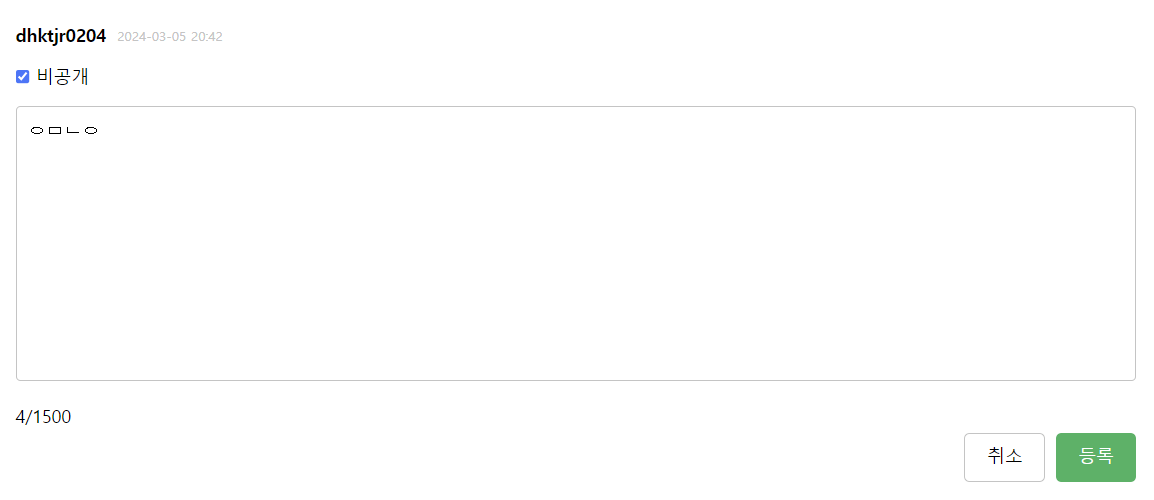
비공개일 경우 비공개 체크박스가 체크되어 있다.
수정 취소 버튼을 누른다면?
만약 취소 버튼을 누를 경우엔 다시 원래대로 복구시켜놔야되는데,
다시 서버에 요청해서 원본 댓글 데이터를 받아온 다음 html대체하는 건 좀 귀찮기도하고 성능에도 별로일 것같아서 js로 div 요소를 직접 만들어준다음 html대체하였다.
//댓글 div 생성
function createCommentItemBody(commentItemContainer, type){
    //comment-item-body div 생성
    const commentItemBody= document.createElement('div');
    commentItemBody.classList.add('comment-item-body');

    //댓글 contents 가져오기
    const textContent=commentItemContainer.querySelector('.answer-input').textContent;

    if(type==="comment"){
        //댓글에 경우 체크박스가 있다.
        const checked= commentItemContainer.querySelector('.display-check').checked;

        //comment-item div 생성
        const commentItem= document.createElement('div');
        commentItem.classList.add('comment-item');

        //체크박스 여부로 비공개, 공개 상태 변경
        if (checked){
            commentItemBody.classList.add('hide-place');
            commentItem.classList.add('hide-text');

            commentItemBody.onclick= function() {
                clickComment(commentItemBody);
            };
        }

        commentItem.textContent=textContent;
        commentItemBody.append(commentItem);

    }else{
        //대댓글일 때는 그냥 content만 body에 넣어주면 된다.
        commentItemBody.textContent=textContent;
    }

    return commentItemBody;
}
뭔가 백엔드의 기본은 crud기도하고 이게 제일 쉬우니까 crud하고 싶었는데 막상하니까 프론트만 하는 것같다..
