dnd-kit, Tanstack Query 트러블 슈팅 (Tanstack Query의 상태 변경은 언제 이뤄질까?)
문제상황
zustand에서 tanstack query로 마이그레이션을 하며 겪었던 문제에요. 로직의 변경이 없었는데 drag & drop을 하면서 렌더링의 한박자 늦게 일어나며 즉각적인 변화가 일어나지 않았어요. 깃허브의 이슈를 살펴보니 저와 같은 일을 겪은 다른 분들도 있었어요. 관련 이슈
깃허브의 이슈를 살펴보니 dnd-kit의 maintainer의 의견은 다음과 같았어요.
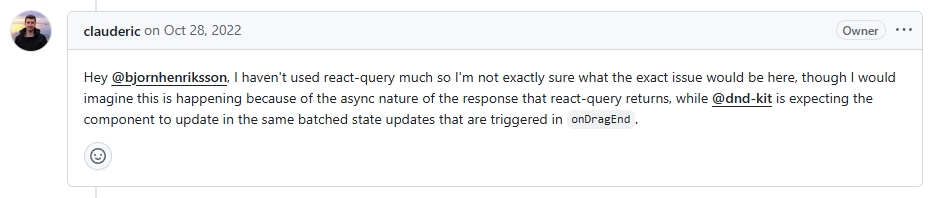
@dnd-kit은 onDragEnd에서 트리거되는 것과 동일한 일괄 상태 업데이트로 구성 요소가 업데이트되기를 기대하는 반면, react-query가 반환하는 응답의 비동기 특성 때문에 이런 일이 발생한다고 생각됩니다.
Tanstack Query를 살펴보자
저는 useMutation 의 onMutate 내부에서 queryClient.setQueryData를 사용해 optimistic update를 하는 코드를 작성했었어요.
해당 코드가 비동기라면 원인은 둘 중 하나일 것이라 판단했었어요.
setQueryData는 비동기적으로 동작한다.onMutate는 비동기적으로 동작한다.
결과적으로는 1번, 2번 모두 비동기적으로 동작했어요. ㅠㅠ
setQueryData 내부 흐름 (상태 변경은 언제 감지될까?)
setQueryData에 대한 설명은 다음과 같아요.
setQueryData is a synchronous function that can be used to immediately update a query's cached data.
즉각적으로 query cached data가 업데이트되는 동기적인 함수라고 저는 받아들였어요. 하지만 tasntack query의 상태변화의 감지는 기본적으로 비동기적으로 동작했어요.
구현체를 살펴보니 그곳에서의 흐름은 다음과 같았어요.
1. QueryClient의 setQueryData 호출!
2. QueryClient에서 적절하게 데이터를 추가하여 Dispatch(상태 변경 요청 호출) 후 상태 변경
3. 상태 변경 후에 listeners 호출 (변경를 알려줌)
이때 변경을 알려주는 구현체는 NotifyManager에요.
notifyManager 는 tanstack query 내부에서 여러 작업들을 스케줄링하는 역할을 해요. 한번에 작업을 처리하게 묶기도 하고, 작업들을 언제 스케줄링할지까지 정하기도 해요.
또, notifyManager.setScheduler 는 작업을 스케줄링하는 기준을 설정해요. tanstack query의 동작이 언제 listeners에게 알려질지 말이에요. 그리고 기본값은 setTimeout(callback, 0) 였어요.
즉, tanstack query의 모든 상태 변경 감지는 비동기적으로 동작하는 것이죠.
onMutate 내부 흐름
onMutate 에 대한 설명은 다음과 같아요.
This function will fire before the mutation function is fired and is passed the same variables the mutation function would receive
mutate function이 동작하기 전에 동작하지만 비동기인지 동기인지 알 수 없어요.
mutate 라는 함수를 호출하면 무슨 일이 벌어질까요? 내부를 들어가보니 확인할 수 있었어요.
// packages/query-core/src/mutation.ts execute 함수 내부입니다.
try {
  if (!restored) {
    this.#dispatch({ type: 'pending', variables, isPaused })
    // Notify cache callback
    await this.#mutationCache.config.onMutate?.(
      variables,
      this as Mutation<unknown, unknown, unknown, unknown>,
    )
    const context = await this.options.onMutate?.(variables)
      if (context !== this.state.context) {
        this.#dispatch({
          type: 'pending',
            context,
            variables,
            isPaused,
          })
        }
      }
 const data = await this.#retryer.start()
...onMutate가 동기든 비동기든 await으로 감싸서 동작해요.
해당 코드를 흉내내보니 비동기적으로 동작하는 걸 알 수 있었어요.
const returnLog = () => {
  return 'print log';
};

const asyncFunc = async (func) => {
  const a = await func();
  console.log(a);
};

asyncFunc(returnLog);
console.log('동기적 코드');

// result
// 동기적 코드
// print log
해결
결국 문제의 원인은 다음과 같아요.
1. 변경된 상태를 비동기적으로 알린다.
2. 상태 변경 트리거가 비동기적으로 작동한다.
tanstack query가 비동기적으로 상태를 변경하고 알렸기에 즉각적인 UI update가 일어나지 않았던 것이에요. zustand와의 차이점이 바로 여기에 있었어요.
그래서 이 문제를 해결하기 위해 특정 로직에 관해서 상태변경을 마음대로 정할 수 있게 다음과 같은 방식을 사용했어요.
dnd나 즉각적인 상태 변경이 필요할 때, 다음과 같은 방식을 좋을 것 같아서 공유드려요.
type UpdateType = 'sync' | 'microtask' | 'animationFrame' | 'default';

type ScheduleFunction = (callback: () => void) => void;

/**
 * tanstack query에서의 작업들은 비동기적으로 이뤄집니다.
 * @example
 * default: setTimeout(callback, 0)
 *
 * @description
 * UI 인터렉션이나 더 빠른 상태 변경을 위해서 만들었습니다.
 */
const createTaskScheduler = () => {
  let currentUpdateType: UpdateType = 'default';

  const taskScheduler: ScheduleFunction = (callback) => {
    const wrappedCallback = () => {
      callback();
      currentUpdateType = 'default';
    };

    switch (currentUpdateType) {
      case 'sync':
        wrappedCallback();
        break;
      case 'microtask':
        queueMicrotask(wrappedCallback);
        break;
      case 'animationFrame':
        requestAnimationFrame(wrappedCallback);
        break;
      default:
        setTimeout(wrappedCallback, 0);
    }
  };

  const setUpdateType = (type: UpdateType) => {
    currentUpdateType = type;
  };

  return { taskScheduler, setUpdateType };
};

export const { taskScheduler, setUpdateType } = createTaskScheduler();

export const syncUpdate = (callback: () => void) => {
  setUpdateType('sync');
  taskScheduler(callback);
};

export const microtaskUpdate = (callback: () => void) => {
  setUpdateType('microtask');
  taskScheduler(callback);
};

export const animationFrameUpdate = (callback: () => void) => {
  setUpdateType('animationFrame');
  taskScheduler(callback);
};
export const QueryProvider = ({ children }: PropsWithChildren) => {
  const queryClient = getQueryClient();
  notifyManager.setScheduler(taskScheduler);

  return (
    <QueryClientProvider client={queryClient}>
      {children} <ReactQueryDevtools />
    </QueryClientProvider>
  );
};
import { syncUpdate } from '@/libs/@react-query/taskScheduler';
/**
* onMutate가 동기적으로 동작하고 listener가 동기적으로 반응하게 합니다.
*/
export function useMutationWithSyncUpdate<
TData = unknown,
TError = unknown,
TVariables = void,
TContext = unknown,
>(options: MutationOptions<TData, TError, TVariables, TContext>) {
const mutate = async (
variables: TVariables,
callbacks?: {
onSuccess?: (
data: TData,
variables: TVariables,
context?: TContext,
) => void;
onError?: (
error: TError,
variables: TVariables,
context?: TContext,
) => void;
},
): Promise<TData> => {
const { mutationFn, onMutate, onError, onSettled } = options;
let context: TContext | undefined;
try {
if (onMutate) {
syncUpdate(() => {
context = onMutate(variables);
});
}
const data = await mutationFn(variables);
callbacks?.onSuccess?.(data, variables, context);
onSettled?.(data, null, variables, context);
return data;
} catch (error) {
callbacks?.onError?.(error as TError, variables, context);
onError?.(error as TError, variables, context);
onSettled?.(undefined, error as TError, variables, context);
throw error;
}
};
return { mutate };
}
interface MutationOptions<TData, TError, TVariables, TContext> {
mutationFn: (variables: TVariables) => Promise<TData>;
onMutate?: (variables: TVariables) => TContext;
onError?: (error: TError, variables: TVariables, context?: TContext) => void;
onSettled?: (
data: TData | undefined,
error: TError | null,
variables: TVariables,
context?: TContext,
) => void;
}