
Object 클래스 메서드
equals()
두 인스턴스의 주소값을 비교하여 객체가 같은지 다른지 반환해줌
참조변수가 파라미터
객체를 생성할 때, 메모리의 비어있는 공간을 찾아 생성하므로 서로 다른 두개의 객체가 같은 주소를 갖는 일은 X
두 개 이상의 참조변수가 같은 주소값을 갖는 것은 가능
public static void main(String[] args)
{
	Value v1 = new Value(10);
    Value v2 = new Value(10);

    if(v1.equals(v2))
    	System.out.println("v1과 v2는 같습니다.");
    else
    	System.out.println("v1과 v2는 다릅니다.");
}

class Value
{
	int value;

    Value(int value)
    {
    	this.value = value;
    }
}
v1과 v2는 다릅니다.equals() 오버라이딩
두개의 주소값 비교가 아닌 Value인스턴스가 가지는 value 값을 비교하도록 해보자!
package ch09;

class Person
{
	long id;

	public boolean equals(Object obj)
	{
		if(obj instanceof Person)
        //	id 값을 참조하기위해선 Person타입으로 형변환 필요
			return id == ((Person)obj).id;
		else
			return false;
	}

	Person(long id)
	{
		this.id = id;
	}
}
public class Ex9_2 {

	public static void main(String[] args) {
		Person p1 = new Person(801108111111222L);
		Person p2 = new Person(801108111111222L);

		if(p1.equals(p2))
			System.out.println("p1과 p2는 같은 사람입니다.");
		else
			System.out.println("p1과 p2는 다 사람입니다.");
	}

}
p1과 p2는 같은 사람입니다.hashCode()
찾고자하는 값 입력 시 값의 저장 위치를 알려주는 해시코드 반환
hashCode메서드는 객체의 주소값을 이용하여 해시코드를 만들어 반환한다
-> 즉 서로 다른 두 객체는 결코 같은 해시코드 가질수 없다.
인스턴스 변수 값으로 객체의 같고 다름을 판단하는 경우
equals + hashCode 오버라이딩 하는 것이 좋음
class Ex9_3
{
	public static void main(String[] args)
    {
    	String str1 = new String("abc");
        String str2 = new String("abc");

        /* String클래스는 문자열의 내용이 같으면, 동일한 해시코드 반환하도록 hash
        Code 메서드가 오버라이딩 되어있음 */

        System.out.println(str1.equals(str2));
        System.out.println(str1.hashCode());
        System.out.println(str2.hashCode());

 		// 모든 객체에 대해 항상 다른 해시코드값 반환할것을 보장!!!!!
 		System.out.println(System.identityHashCode(str1));
        System.out.println(System.identityHashCode(str2));
    }
}
true
87654
87654
2343252352
141213toString()
인스턴스에 대한 정보를 문자열로 제공할 목적으로 정의
public String toString(){
	return getClass().getName() +"@"+ Integer.toHexString(hashCode());

// Card@19e0bfd 같은 형태를 리턴
오버라이딩
class Card2{
	String kind;
    int number;

    Card2(){
    	this("SPADE", 1);
    }

    Card2(String kind, int number){
    	this.kind = kind;
        this.number = number;
    }

    // 오버라이딩 시 조상 접근 범위보다 같거나 더 넓어야 한다!! 따라서 public
    public String toString(){
    	return "kind : " + kind + ", number: " +number;
    }
}

class Ex9_5{
	public static void main(String[] args){
    	Card2 c1 = new Card2();
        Card2 c2 = new Card2("HEART", 10);
        System.out.println(c1.toString());
        System.out.println(c2.toString("HEART, 10));
    }
}
kind : SPADE, number : 1
kind : HEART, number : 10String 클래스
문자열을 다루기 위한 클래스
immutable 클래스
public final class String implements java.io.Serializalbe, Comparable{
	private char[] value;
...
}
문자열을 다루는 작업이 많이 필요한 경우엔 StringBuffer클래스를 사용하는 것이 좋음
만드는 방법
String str1 = "abc"; // 문자열 리터럴 "abc"의 주소가 str1에 저장
String str2 = new String("abc"); // 새로운 String인스턴스 생성
String str1 = "abc";
String str2 = "abc";
String str3 = new String("abc");
String str4 = new String("abc"); str1 == str2 ? true -> ==는 인스턴스의 주소를 등가비교연산자로 비교
str1.equals(str2) ? true
str3 == str4 ? false
str3.equals(str4) ? true위의 "abc"와 같이 같은 내용의 문자열 리터럴은 한번만 저장된다.
클래스 파일이 클래스 로더에 의해 메모리에 올라갈 때, 파일의 리터럴들이 JVM내 constant pool에 저장됨
초기화
String s = ""; // 보통 빈 문자열로 초기화
char c = ' '; // 보통 공백으로 초기화
생성자와 메서드
출처 : https://velog.io/@yummygyudon/JAVA-String-클래스-생성자-메서드


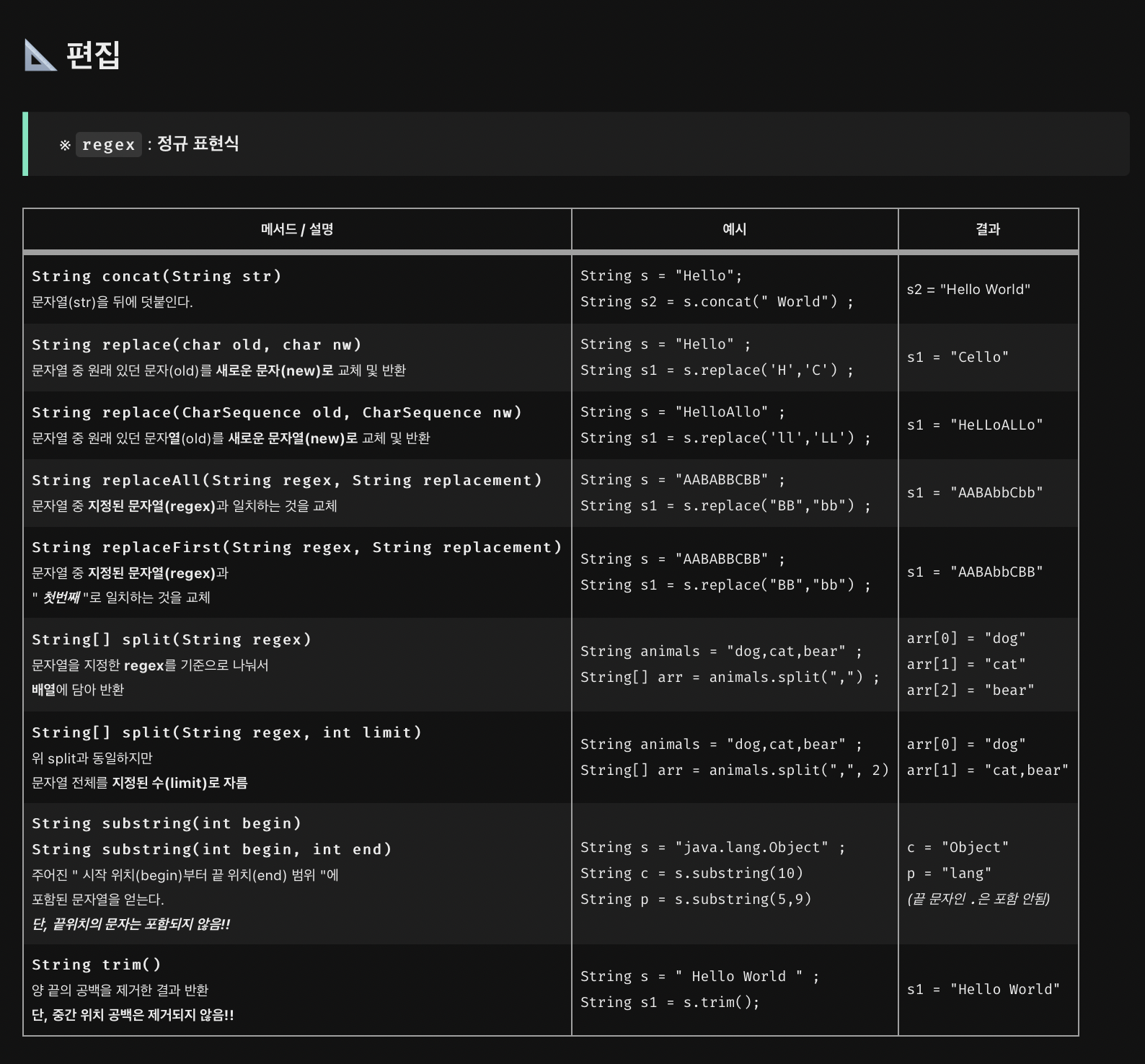
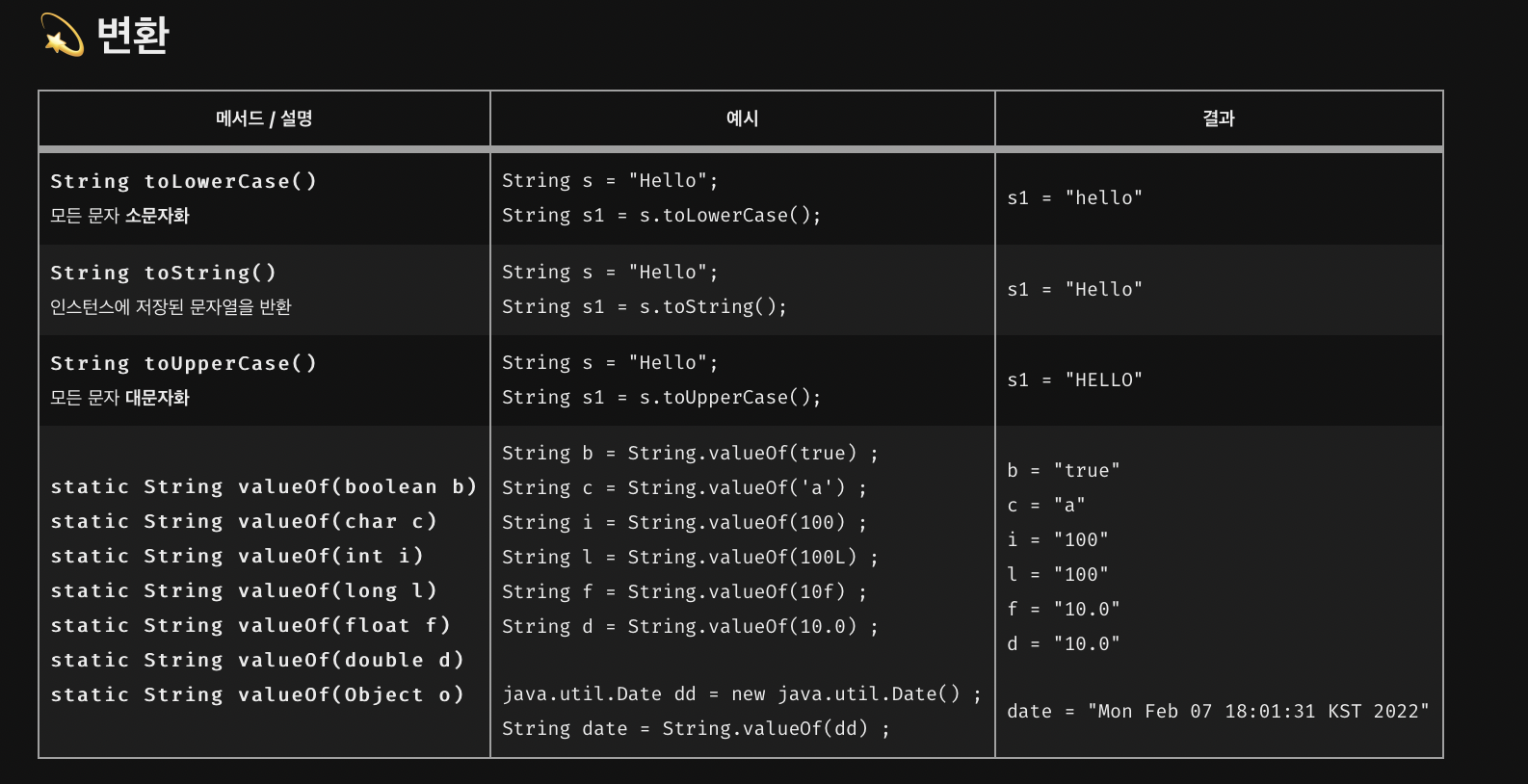
기본형 -> 문자열은 위의 표 참고
String str1 = i +"" ; // 와 같은 방법도 가능문자열 -> 기본형
boolean Boolean.parseBoolean(String s)

byte Byte.parseByte(String s)

int Integer.parseInt(String s)

float Float.parseFloat(String s)

...
join()과 StringJoiner
여러 문자열 사이에 구분자를 넣어서 결합!
spilt과 반대 작업 한다는 느낌
import java.util.StringJoiner;

class Ex9_9
{
	public static void main(String[] args)
    {
    	String animals = "dog.cat.bear";
        String[] arr = animals.spilt(",");

        System.out.println(String.join("-",arr));

        StringJoiner sj = new String Joiner("/", "[", "]");
        for(String s :arr)
        	sj.add(s);

        System.out.println(sj.toString());
    }
}
dog-cat-bear
[dog/cat/bear]package ch09;
public class Ex9_10 {
public static void main(String[] args) {
int iVal = 100;
String strVal = String.valueOf(iVal);
double dVal = 200.0;
String strVal2 = dVal + "";
double sum = Integer.parseInt("+"+strVal) + Double.parseDouble(strVal2);
double sum2 = Integer.valueOf(strVal) + Double.valueOf(strVal2);
System.out.println(String.join("", strVal, "+",strVal2,"=")+sum);
System.out.println(strVal+"+"+strVal2+"="+sum2);
}
}
문자열을 숫자로 변환하는 과정에서는 예외가 잘 발생하기에 처리를 적절히 해주자!

Journey for Backend Developer