#1 What is the SHA1 hash of triage.mem (memory dump)?
Answer : C95E8CC8C946F95A109EA8E47A6800DE10A27ABD
#2 What volatility profile is the most appropriate for this machine? (ex: Win10x86_14393)
vol6_4.exe -f [File name] imageinfo
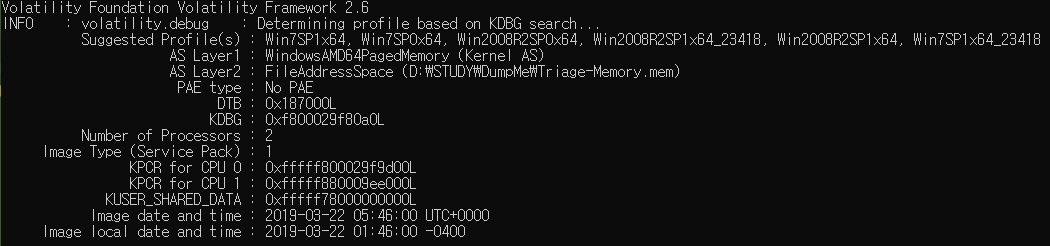
= Win7SP1x64
#3 What was the process ID of notepad.exe?
vol6_4.exe -f [File name] pslist
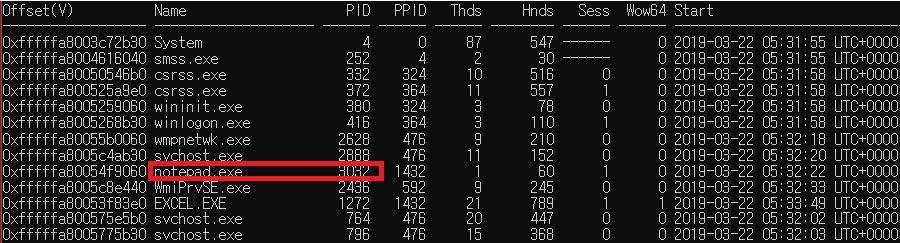
= notepad.exe's PID is 3032
#4 Name the child process of wscript.exe.
We need to know PPID, PPID is child process
We should input command 'vol6_4.exe -f [File name] pslist'

= wscript.exe's PID is 5116, UWkpjFjDzM.exe's PPID is 5116
#5 What was the IP address of the machine at the time the RAM dump was created?
vol6_4.exe -f [File name] netscan
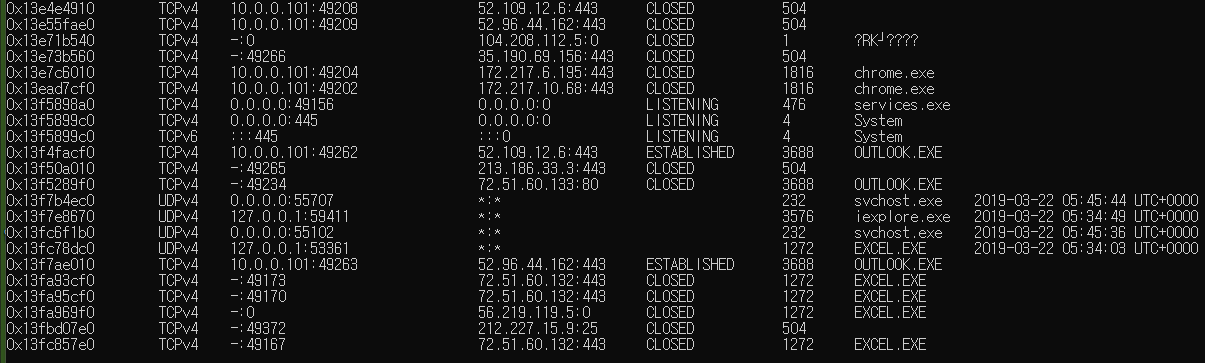
netscan 플러그인을 이용하여 해당 PC가 몇 번 아이피에 어떤 서비스와 포트를 열었는지 확인한다.
=> 10.0.0.101
#6 Based on the answer regarding the infected PID, can you determine the IP of the attacker?
우리는 다음과 같은 친구가 의심스러운 것을 알 수 있다.
- UWkpjFjDzM.exe PID : 3496
감염된 PID를 기초로 공격자의 IP를 찾아내야한다. netscan 명령과 pslist를 확인하면 되겠다.
이미 문제를 풀면서 PID는 3496이며 해당 netscan 결과 공격자의 IP는 10.0.0.106라는 것을 알 수 있다.

#7 How many processes are associated with VCRUNTIME140.dll?
dlllist를 이용하여 VCRUNTIME140.dll과 관련있는 프로세스는 문서관련임을 알 수 있다.
엑셀, 파워포인트 등 5개임을 알 수 있다.
#8 After dumping the infected process, what is its md5 hash?
procdump -p 3496 -D [경로] 를 통하여 추출된 .exe를 확인할 수 있다.
#9 What is the LM hash of Bob's account?
hashdump 플러그인을 통해 알 수 있다. 결과는 아래와 같이 나오는 것을 알 수 있다.
Administrator:500:aad3b435b51404eeaad3b435b51404ee:31d6cfe0d16ae931b73c59d7e0c089c0:::Guest:501:aad3b435b51404eeaad3b435b51404ee:31d6cfe0d16ae931b73c59d7e0c089c0:::Bob:1000:aad3b435b51404eeaad3b435b51404ee:31d6cfe0d16ae931b73c59d7e0c089c0:::
빨간색 부분이 LM 부분이고 그 뒤가 NT부분이다.
#10 What memory protection constants does the VAD node at 0xfffffa800577ba10 have?
vadinfo > vadinfo.txt 파일로 꺼내서 확인해보면 편하다.

protection은 PAGE_READONLY임을 알 수 있다.
#11 What memory protection did the VAD starting at 0x00000000033c0000 and ending at 0x00000000033dffff have?
풀이는 10번과 같다.

#12 There was a VBS script that ran on the machine. What is the name of the script? (submit without file extension)
공격자가 사용한 vbs 스크립트는 cmdline | findstr ".vbs" 명령으로 쉽게 얻어낼 수 있다.

#13 An application was run at 2019-03-07 23:06:58 UTC. What is the name of the program? (Include extension)
디지털 포렌식에서 실행된 응용 프로그램 또는 프로그램 타임스탬프를 심캐시 혹은 AppCompatCache라고한다. volatility에서는 shimcache 플러그인을 사용하면 된다.

#14 What was written in notepad.exe at the time when the memory dump was captured?
첫 번째로 memdump를 통해서 notepad.exe를 덤프하였다.
cmd에서 해당 덤프 파일 내 string을 알아낼 수 있는 도구로는 아래의 Microsoft Docs에서 다운받을 수 있다.Strings - Windows Sysinternals | Microsoft Docs해당 프로그램으로 strings [덤프파일] > [추출할 파일이름]으로 열심히 찾아봤다.
내리던 도중 flag가 있었고, flag라고 검색을 해볼 생각을 못했다.
1147번 라인에 있어서 다행이었다.
flag<REDBULL_IS_LIFE>
#15 What is the short name of the file at file record 59045?
file record = MFT record이다. 즉 mftparser를 이용할 때이다.
mftparser를 xls 로 빼내면 아래와 같이 볼 수있다.
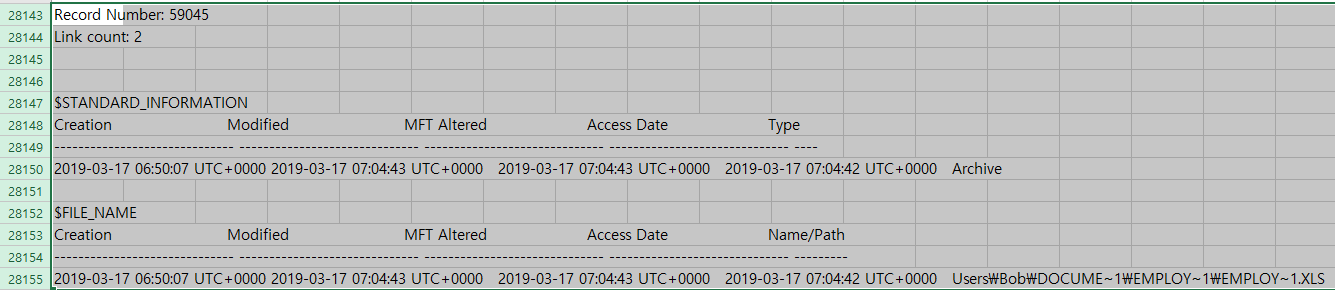
EMPLOY~1.XLS
#16 This box was exploited and is running meterpreter. What was the infected PID?
meterpreter를 실행중이라고 한다. metasploit은 4444번 포트를 사용한다. 즉, netscan으로 4444번 포트를 실행하는 것을 찾으면 될 것 같다.

해당 PID는 3496이다.