웹개발 1주차 : 로그인 페이지 만들기
로그인 페이지 만들기
<html lang="en">
	<head>
		<meta charset="UTF-8">
		<title>로그인페이지</title>
	</head>
	<body>
		<h1>로그인 페이지</h1>
		<p>ID: <input type="text"/></p>
		<p>PW: <input type="text"/></p>
		<button>로그인하기</button>
	</body>
</html>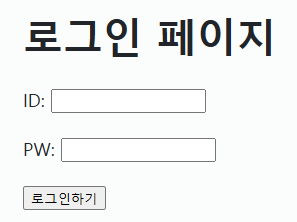
로그인 페이지 꾸미기
<!-- 스타일 정의 -->
<head>
    <style>
        .mytitle {
            color: red;
            font-size: 40px;
        }

        .mybtn {
            font-size: 12px;
            color: white;
            background-color: green;
        }

        .mytxt {
            color: red;
        }
    </style>
</head>


<!-- html 엘리먼트에 적용할 스타일 지정 -->
<body>
    <h1 class="mytitle">로그인 페이지</h1>
    <p class="mytxt">ID: <input type="text" /></p>
    <p class="mytxt">PW: <input type="text" /></p>
    <button class="mybtn">로그인하기</button>
</body>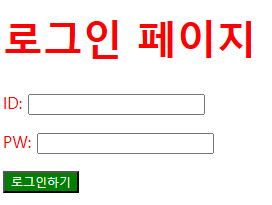
로그인 페이지 배경
<head>
    <style>
        .mytitle {
            width: 300px;
            border-radius: 10px;
            color: white;
            text-align: center;

            /* padding : 안쪽 여백, 크기 그대로. margin : 바깥쪽 여백, 크기 변경 */
            padding: 30px 0px 0px 0px;

			/* 배경 이미지 넣을 때 항상 쓰는 3줄 세트 */
            background-image: url('https://www.ancient-origins.net/sites/default/files/field/image/Agesilaus-II-cover.jpg');
            background-position: center;
            background-size: cover;
        }
        .wrap {
            width: 300px;
            margin: 20px auto 0px auto;
        }
    </style>
</head>

<body>
    <div class="wrap">
        <div class="mytitle">
            <h1>로그인 페이지</h1>
            <h5>아이디, 비밀번호를 입력하세요</h5>
        </div>
        <p>ID : <input type="text" /></p>
        <p>PW : <input type="text" /></p>
        <button>로그인하기</button>
    </div>
</body>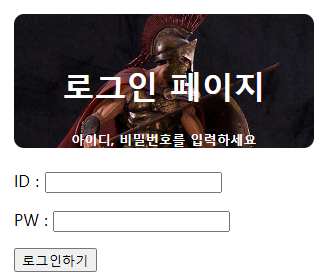
구글 폰트 사용법
-
크롬에서 google fonts 검색 (https://fonts.google.com/?subset=korean)
-
Filter - Language - Korean으로 변경
-
원하는 폰트 누르고 Get font 클릭
-
<>Get embed code 클릭 후 @import 틀릭
-
Embed code in the of your html -> 코드 복사해서 내 코드 style 태그 안에 붙여넣기
-
CSS classes -> 코드 복사해서 내 코드 스타일 정의 부분에 붙여넣기
-
전체 적용 *{ [코드 붙여넣기] }
<style>
      @import url('https://fonts.googleapis.com/css2?family=Jua&family=Nanum+Pen+Script&display=swap');

      * {
          font-family: "Jua", sans-serif;
          font-weight: 400;
          font-style: normal;
      }
</style>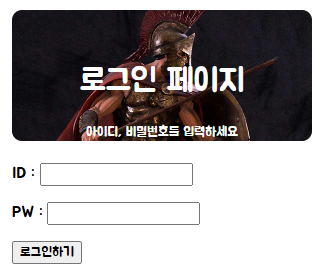

갓겜만들어야지