s3와 cloudfront를 사용하여 https로 배포하는 방법
- 단 이방법은 브라우저가 백엔드로 보내는 통신 프로토콜이 https여야함.
- 브라우저는 http 혹은 https 둘중 하나만 사용가능하다.(mixed content 에러 발생)
- 현재 bigint는 이를 해결하기위해서 백엔드 서버 앞단에 cloudfront를 배치하여서 브라우저가 백엔드 서버에게 https로 요청할수있게 하였고, 이 요청을 다시 cloudfront가 ec2에 http로 보내는 방식을 사용하고있다.
왜 굳이 백엔드 앞단을 cloudfront로 하나요?
- Aws의 인증서 서비스인 Acm의 경우 ssl 인증서를 다운받는 기능을 제공하고 있지 않다. 대신 Acm 인증서의 경우 aws 서비스와 연동하여서 사용가능하게 만들어놨다.
- 로드밸런서, cloudfront 같은곳에 ssl 인증서를 연동하여서 쓸수있지만 , ec2의 경우 연동되지않는다. 따라서 생성한 무료 ssl 인증서를 ec2에 적용하는게 어렵다.
- 따라서 앞단에 로드밸런서를 두고 ssl 인증서를 거기서 처리하게 할수도 있지만, 로드밸런서의경우 public ipv4 비용이 든다.
- 현재는 인스턴스를 하나만 사용하고있기때문에 로드밸런서가 아직 필요가없고, 트래픽도 많지않다. 그래서 cloudfront와 ec2를 1대1 매핑시켜서 https 연결만을 목적으로 사용하고있다.
통신 flow
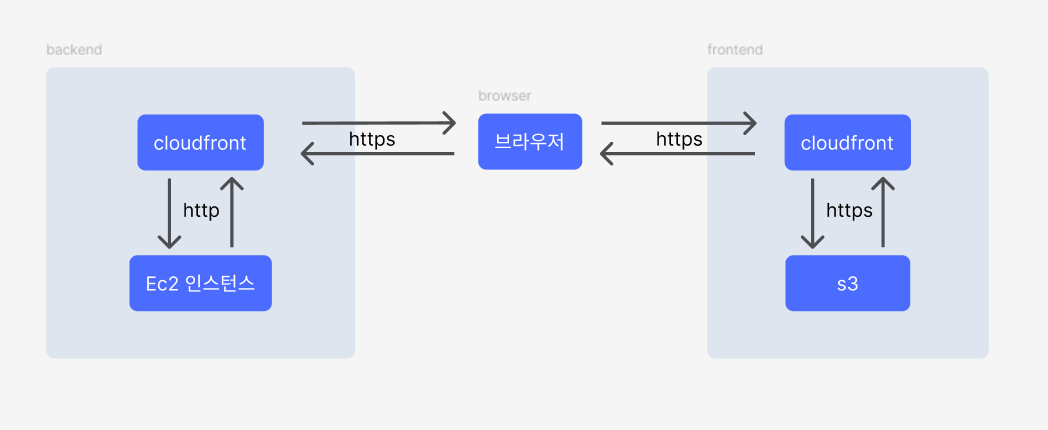
- cloudfront와 s3의 https 설정은 필요없다. default로 설정되어있다.
- cloudfront와 브라우저의 https 통신을 위해 cloudfront에서 ssl 인증서를 가지고 있어야한다.
- 프론트의 경우 cloudfront는 s3를 바라보고 있으며, s3의 정적파일을 캐싱하고있는 프록시 서버로 볼수있다.
- 백엔드의 경우 cloudfront는 https 통신만을 위함이다.
- 각각의 cloudfront는 도메인 주소와 매핑되어있다. (브라우저는 해당 도메인에 request)
→ 백엔드 : api.edumax-kr.com 이 backend cloudfront를 바라보도록 되어있음
→ 프론트 : edumax-kr.com 이 frontend cloudfront를 바라보도록 되어있음
aws 설정
s3 설정
- 퍼블릭엑세스 차단 비활성화
- 권한 - 버킷정책
- s3에 cloudfront만 get 할수있도록, put delete는 git action 및 admin만 가능
 {
     "Version": "2012-10-17",
     "Statement": [
         {
             "Effect": "Allow",
             "Principal": {
                 "Service": "cloudfront.amazonaws.com"
             },
             "Action": "s3:GetObject",
             "Resource": "{s3 arn}/*",
             "Condition": {
                 "StringEquals": {
                     "AWS:SourceArn": "{클라우드 프론트 Origin access control arn}"
                 }
             }
         },
         {
             "Effect": "Allow",
             "Principal": {
                 "AWS": [
                     "i am arn 1",
                     "i am arn 2"
                 ]
             },
             "Action": [
                 "s3:PutObject",
                 "s3:DeleteObject"
             ],
             "Resource": "{s3 arn}/*"
         }
     ]
 }
- s3에 cloudfront만 get 할수있도록, put delete는 git action 및 admin만 가능
- 속성 - 정적웹사이트 호스팅 비활성화
cloudfront 설정-fe
origin
- origin domain : s3의 버킷이름 선택
- origin path: s3에서 가져올 path (우리는 root 이므로 무시)
- 원본엑세스 - 원본 엑세스 제어 설정 : 없으면 만들어서 s3 버킷 정책에 붙이기. 버킷에 access 할수있는 권한임.
- enable origin shield - 예 - 한국 region 선택( s3 리전)
기본 캐시동작
- 뷰어 프로토콜정책: redirect http to https
- 허용된 http 방법: GET HEAD
- 웹 애플리케이션 방화벽(WAF) - 보안보호 비활성화 (활성화 하면 돈듦, 활성화시 ddos 공격 등 쓰레기 트래픽을 다막아줌)
설정
- 대체 도메인 이름(CNAME) : 프론트 도메인 주소 입력- edumax-kr.com( 안해주면 route53 A타입에서 못선택함)
- ssl 인증서 선택 - 없으면 만들기.
- 만드는법
- 인증서 요청클릭
- 완전히 정규화된 도메인 이름: 도메인 주소 입력(프론트)
- 요청후 Route 53에서 레코드 생성 클릭
- route 53에 새로 생성됐다면 완료된거임.
- 만드는법
- 기본값 루트 객체: spa 는 무조건 index.html
생성완료후 메뉴탭의 “오류페이지” 로 이동
-
403, 404 redirect를 index.html로 설정후 저장( 브라우저의 뒤로가기, refresh때문)
cloudfront에서 자동으로 s3에 있는 데이터를 캐시해서 가져오지만 시간이 좀 걸린다.
바로 가져오고 싶을경우 메뉴탭의 “무효화” 생성할것. 경로는 /* 로 하면된다.
cloudfront 설정-be
origin
- origin domain : ec2의 퍼블릭 IPv4 DNS 입력
- 프로토콜: http만 해당 선택 (ec2와의 프로토콜을 의미함)
- origin path: 무시
- enable origin shield - 예 - 한국 region 선택(ec2 리전)
기본 캐시동작
- 뷰어 프로토콜정책: https만 선택
- 허용된 http 방법: GET, HEAD, OPTIONS, PUT, POST, PATCH, DELETE
- 웹 애플리케이션 방화벽(WAF) - 보안보호 비활성화 (활성화 하면 돈듦, 활성화시 ddos 공격 등 쓰레기 트래픽을 다막아줌)
설정
- 대체 도메인 이름(CNAME) : 백엔드 도메인 주소 입력- api.edumax-kr.com ( 안해주면 route53 A타입에서 못선택함)
- ssl 인증서 선택 - 없으면 만들기. 만드는법은 프론트 와 동일
- Default root object: 무시

상황에 맞는 최선의 선택을 지향합니다