최종수정일 : 2023.08.28(월)
- mlflow
- optuna
- mlflow <-- hpo + best model
mlflow
절차:
- mlflow 환경 설정
- mlflow Run
- 파라미터 로깅
- 매트릭 로깅
import mlflow
from sklearn.datasets import load_iris
from sklearn.model_selection import train_test_split
from sklearn.ensemble import RandomForestClassifier
from sklearn.metrics import accuracy_score


# 1. mlflow 환경설정
mlflow.set_tracking_uri("http://0.0.0.0:5001")
mlflow.set_experiment("tutorial")


# 2. mlflow run 시작
with mlflow.start_run():

    # 3. 파라미터 로깅
    params = {"n_estimators": 100, "max_depth": 5}
    mlflow.log_params(params)

    # load data
    iris = load_iris(as_frame=True)
    X, y = iris["data"], iris["target"]
    X_train, X_valid, y_train, y_valid = train_test_split(X, y, test_size=0.3, random_state=2024)

    # train model
    clf = RandomForestClassifier(
    	n_estimators=params["n_estimators"],
        max_depth=params["max_depth"],
        random_state=2024
    )
    clf.fit(X_train, y_train)


    # evaluate train model
    y_pred = clf.predict(X_valid)
    acc_score = accuracy_score(y_valid, y_pred)

    # 4. 매트릭 로깅
    print("Accuracy score is {:.4f}".format(acc_score))
    mlflow.log_metric("accuracy", acc_score)
mlflow 시작할 때, with mlflow.start_run(): 구문 안에 넣어줘야 mlflow 실험에 등록/관리된다.
Optuna
절차:
- objective 함수 작성
- study 생성
- 파라미터 탐색
import optuna
from sklearn.datasets import load_iris
from sklearn.model_selection import train_test_split
from sklearn.ensemble import RandomForestClassifier
from sklearn.metrics import accuracy_score

# 1. objective 함수 작성
def objective(trial):
    trial.suggest_int("n_estimators", 100, 1000, step=100)
    trial.suggest_int("max_depth", 3, 10)

    # load data
    iris = load_iris(as_frame=True)
    X, y = iris["data"], iris["target"]
    X_train, X_valid, y_train, y_valid = train_test_split(X, y, test_size=0.3, random_state=2024)

    # train model
    clf = RandomForestClassifier(
        n_estimators=trial.params["n_estimators"],
        max_depth=trial.params["max_depth"],
        random_state=2024
    )
    clf.fit(X_train, y_train)


    # evaluate train model
    y_pred = clf.predict(X_valid)
    acc_score = accuracy_score(y_valid, y_pred)
    return acc_score


if __name__ == "__main__":
    # 2. study 생성
    sampler = optuna.samplers.RandomSampler(seed=2024)
    study = optuna.create_study(
        sampler=sampler,
        study_name="hpo-tutorial",
        direction="maximize"
    )

    # 3. 최적 파라미터 탐색
    study.optimize(objective, n_trials=5)
    best_params = study.best_params
    best_clf = train_best_model(best_params)
참고. Hyperparameter Optimization (HPO)란?
- 주어진 목적 함수를 최대/최소로 만드는 최적 파라미터를 탐색하는 행위
- 머신러닝 모델에 맞는 최적 파라미터가 데이터마다 다르기 때문에 탐색 필요
HPO + BestModel을 mlflow 관리
import optuna
import mlflow
import uuid
from sklearn.datasets import load_iris
from sklearn.ensemble import RandomForestClassifier
from sklearn.model_selection import train_test_split
from sklearn.metrics import accuracy_score

UNIQUE_PREFIX = str(uuid.uuid4())[:8]

# 1. objective 함수 작성
def objective(trial):
    # recommend params
    trial.suggest_int("n_estimators", 100, 1000, step=100)
    trial.suggest_int("max_depth", 3, 10)

    # setting run_name

    run_name = f"{UNIQUE_PREFIX}-{trial.number}"

    with mlflow.start_run(run_name=run_name):
        # logging parameter
        mlflow.log_params(trial.params)

        # load dataset
        iris = load_iris(as_frame=True)
        X, y = iris["data"], iris["target"],
        X_train, X_test, y_train, y_test = train_test_split(X, y, test_size=0.3, random_state=2024)

        # train a model
        clf = RandomForestClassifier(
            n_estimators=trial.params["n_estimators"],
            max_depth=trial.params["max_depth"],
            random_state=2024
        )
        clf.fit(X_train, y_train)

        # evaluate train model
        y_pred = clf.predict(X_test)
        acc_score = accuracy_score(y_test, y_pred)

        # log metrics
        mlflow.log_metric("accuracy", acc_score)

    return acc_score


# 4. Best Model 반환 함수 작성
def train_best_model(params):

    run_name = f"{UNIQUE_PREFIX}-best-model"

    with mlflow.start_run(run_name=run_name):
        # logging parameter
        mlflow.log_params(params)

        # load dataset
        iris = load_iris(as_frame=True)
        X, y = iris["data"], iris["target"]

        # train a model
        clf = RandomForestClassifier(
            n_estimators=params["n_estimators"],
            max_depth=params["max_depth"],
            random_state=2024
        )
        clf.fit(X, y)
        return clf


if __name__ == "__main__":
    # set mlflow
    study_name = "hpo-tutorial"
    mlflow.set_tracking_uri("http://0.0.0.0:5001")
    mlflow.set_experiment(study_name)

    # 2. Study 생성
    # optuna: study
    sampler = optuna.samplers.RandomSampler(seed=2024)
    study = optuna.create_study(sampler=sampler, study_name=study_name, direction="maximize")

    # 3. 최적 파라미터 탐색
    # optuna: optimize
    study.optimize(objective, n_trials=5)

    best_params = study.best_params
    best_clf = train_best_model(best_params)
결과 mlflow
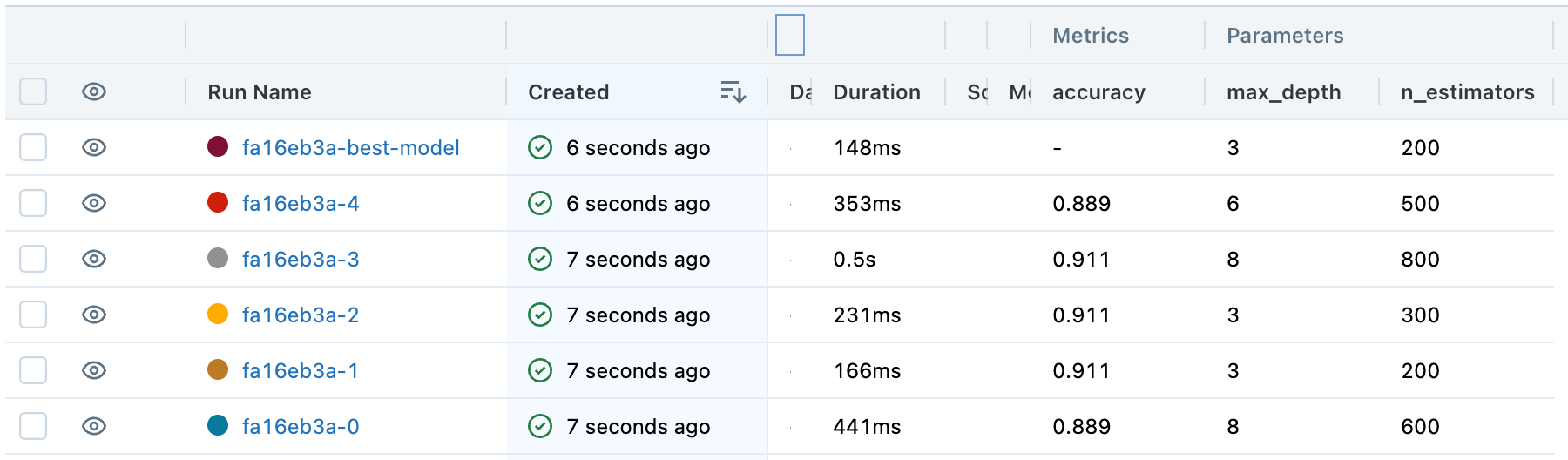
- 실험 후에 최적 모델을 찾아서 결과를 mlflow에서 관리 가능

[Code.ZIP] macOS - install, setting, tutorial