
1. Post 방식
10_get.mjs
import express from "express";
import fs from "fs";

const app = express();

app.get("/", (req, res) => {
  fs.readFile("login.html", (err, data) => {
    if (err) {
      res.status(500);
      return res.send("파일 읽기 오류");
    }
    res.status(200).set({ "Content-Type": "text/html" });
    res.send(data);
  });
});

//http://127.0.0.1:3000/login?userid=apple&userpw=1234
app.get("/login", (req, res) => {
  console.log("login 호출!(GET)");
  console.log(req.query);
  console.log("아이디: ", req.query.userid);
  console.log("비밀번호: ", req.query.userpw);
});

app.listen(3000, () => {
  console.log("서버 실행 중");
});
login.html
<!DOCTYPE html>
<html lang="en">
  <head>
    <meta charset="UTF-8" />
    <meta name="viewport" content="width=device-width, initial-scale=1.0" />
    <title>로그인</title>
  </head>
  <body>
    <h2>로그인</h2>
    <form action="/login" method="post">
      <p>아이디: <input type="text" name="userid" id="userid" /></p>
      <p>비밀번호: <input type="text" name="userpw" id="userpw" /></p>
      <p><button>로그인</button></p>
    </form>
  </body>
</html>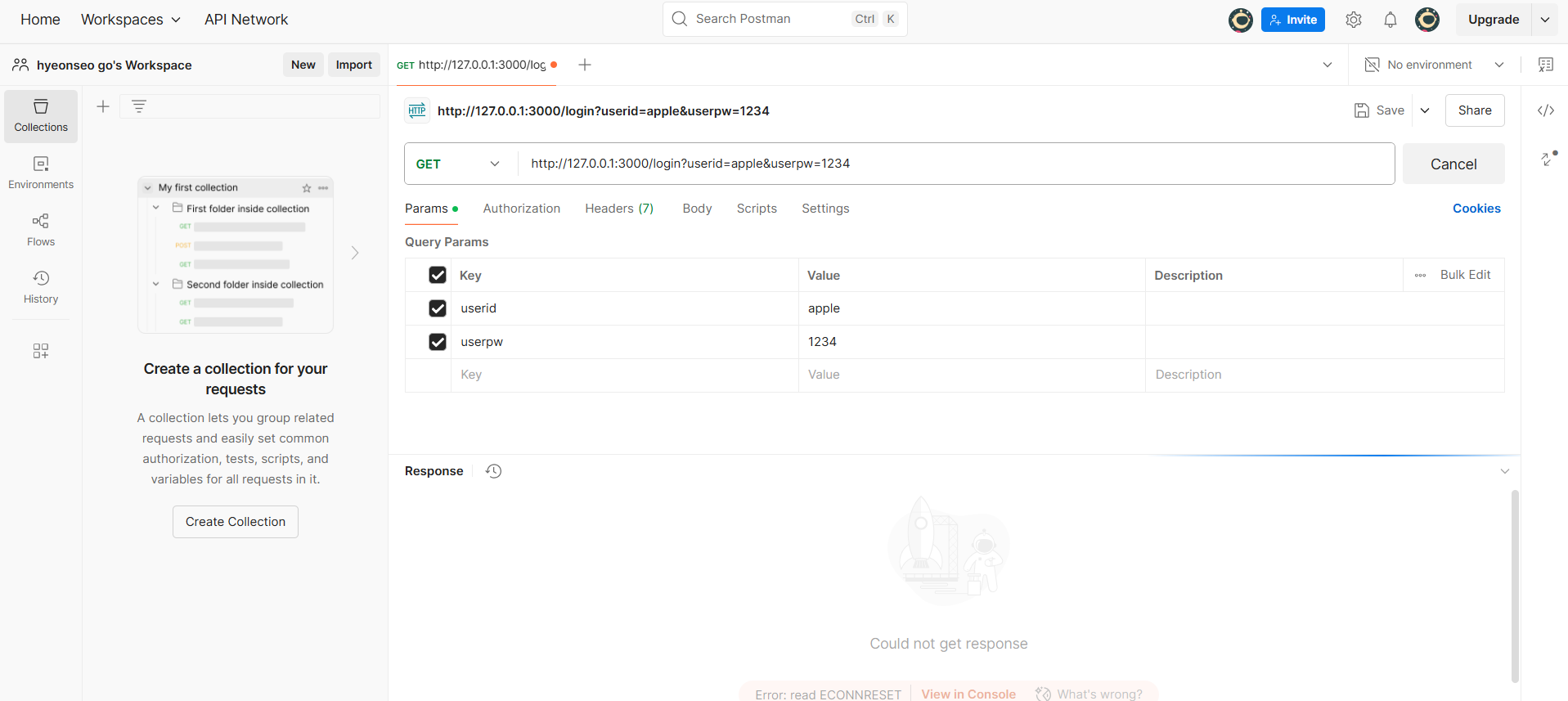
이 사이트에서 get방식으로 로그인 정보를 vscode에 보낼 수 있다.
url에 로그인 정보를 실을 수 있기 때문에 캡쳐 화면과 같이 해서 send버튼을 누르면 vscode에 로그인 결과 정보가 뜬다.
서버 실행 중
login 호출!(GET)
[Object: null prototype] { userid: 'apple', userpw: '1234' }
아이디:  apple
비밀번호:  1234
Post 방식에서는
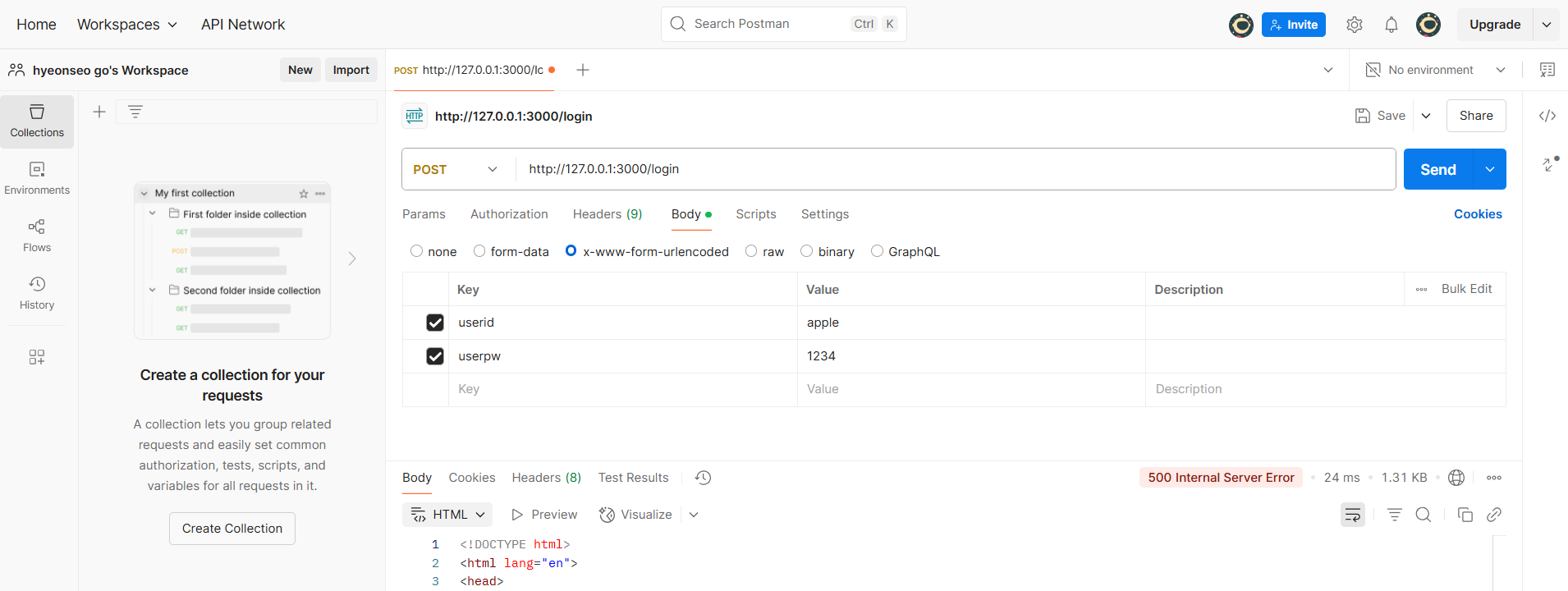
app.use(express.urlencoded({ extended: true })); // post 요청용이 코드가 있어야 Post를 요청할 수 있다.
파일 11_post.mjs을 새로 만들어서 실행.
import express from "express";

const app = express();
app.use(express.urlencoded({ extended: true })); // post 요청용

app.post("/login", (req, res) => {
  const { userid, userpw } = req.body;
  console.log("아이디: ", userid);
  console.log("비밀번호: ", userpw);
  res.send(`아이디: ${userid}, 비밀번호: ${userpw}`);
});

app.listen(3000, () => {
  console.log("서버 실행 중");
});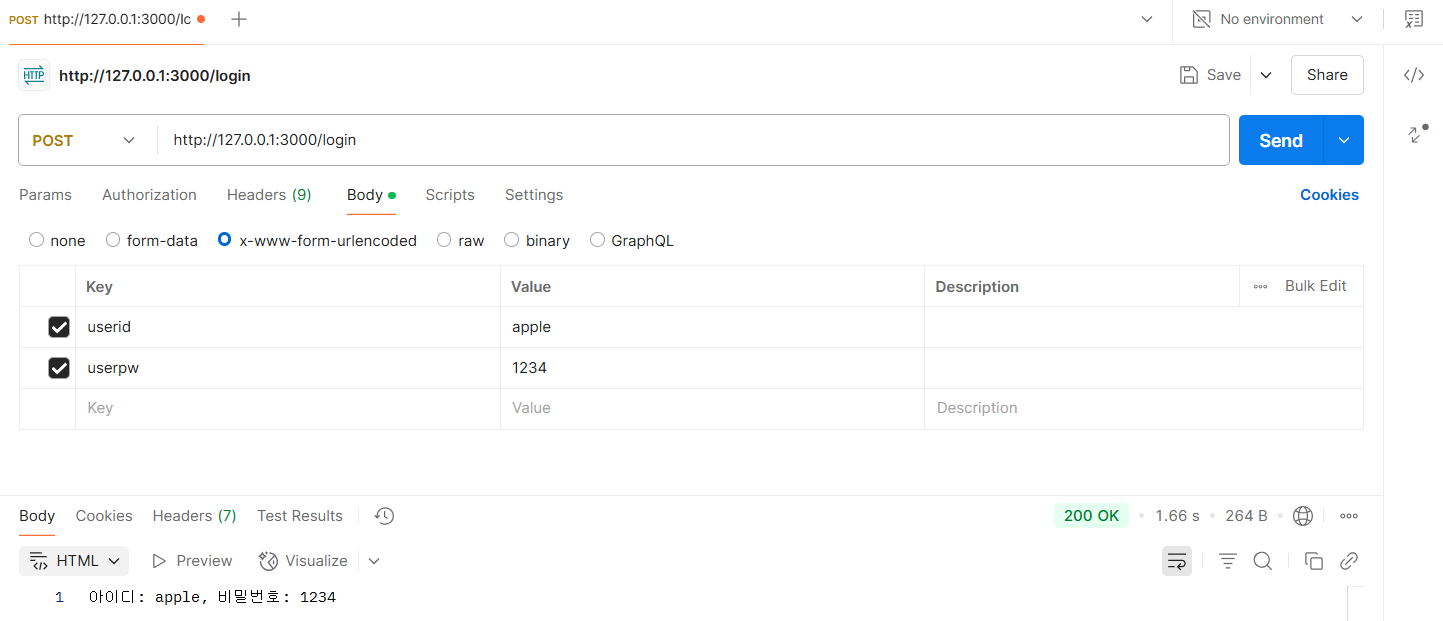
그러면 이렇게 HTML에 뜬다.
| 개념 | 기억 포인트 요약 |
|---|---|
| GET | 사용자에게 화면(HTML) 보여주는 요청 |
| POST | 사용자가 보낸 데이터를 처리하는 요청 |
| HTML 파일 | 화면이 필요할 때만 읽어오면 됨 |
| express.urlencoded() | 폼 데이터 받아야 할 때 꼭 필요 |
| res.send() | 텍스트나 결과 바로 응답 |
| res.sendFile() | HTML 파일을 직접 응답할 때 사용 |
| res.render() | 템플릿 엔진(EJS 등) 사용 시 HTML 생성 |
2. Express
Node.js 위에서 동작하는 웹 애플리케이션 프레임워크이다.
Node.js만으로도 웹서버를 만들 수 있지만,
Express를 쓰면 더 빠르고 간단하고 구조적으로 서버를 만들 수 있다.
| Node.js만 썼을 때 | Express 썼을 때 |
|---|---|
| 라우팅 직접 처리해야 함 | 라우팅 쉽게 처리 가능 (app.get, app.post) |
| 요청 파싱 직접 해야 함 | express.json(), express.urlencoded() |
| 코드 구조 복잡함 | 미들웨어 기반으로 깔끔하게 분리 가능 |
✅ 라우팅(Routing)이란?
클라이언트가 보낸 URL 요청에 대해 서버가 어떻게 응답할지를 정하는 작업.
“이 URL로 요청이 오면 어떤 코드를 실행할지”를 정의
🔧 주요 기능 요약
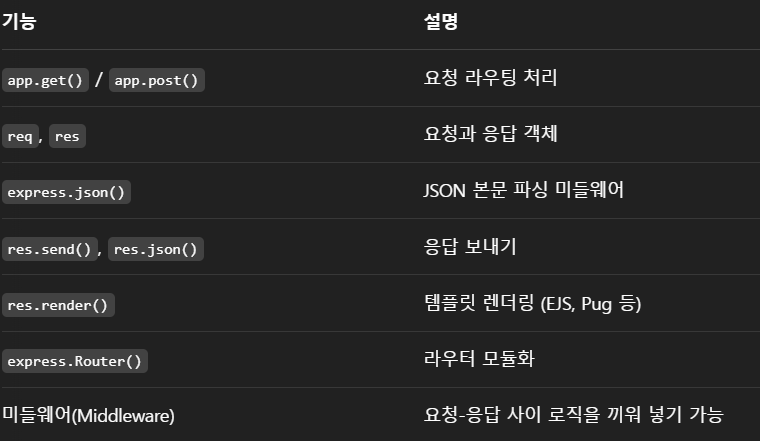
💡 Express의 핵심 개념
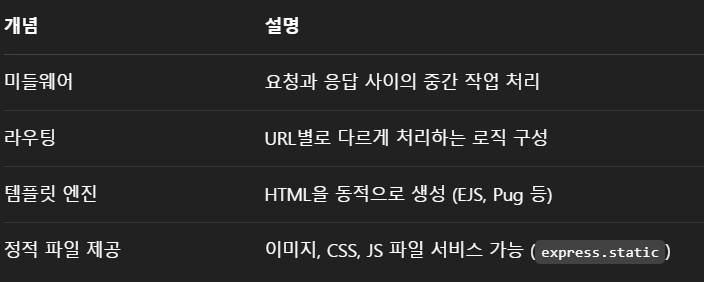
설치
npm install express12_total.js
const express = require("express");
const path = require("path");
const app = express();
const port = 3000;

app.use(express.urlencoded({ extended: true }));
// http://127.0.0.1:3000/test.html
// app.use(express.static("public")); // 실제 폴더 이름
app.use("/static", express.static("public")); // /static URL 접근, public 실제폴더

app.set("view engine", "ejs");
// views: C:\Hsgo\Nodejs\views
app.set("views", path.join(__dirname, "views"));

// http://127.0.0.1:3000/
app.get("/", (req, res) => {
  res.send("<h2>홈페이지입니다. 다양한 기능을 테스트해보세요.</h2>");
});

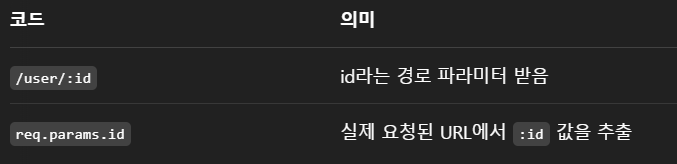
// http://127.0.0.1:3000/user/10
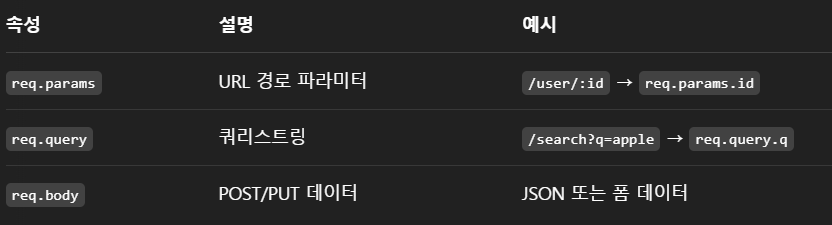
app.get("/user/:id", (req, res) => {
  res.send(`요청한 사용자 ID는 ${req.params.id} 입니다.`);
});

// http://127.0.0.1:3000/search?keyword=%EC%95%88%EB%85%95%ED%95%98%EC%84%B8%EC%9A%94&number=10
app.get("/search", (req, res) => {
  const { keyword, number } = req.query;
  res.send(`검색어: ${keyword}, 숫자: ${number}`);
});

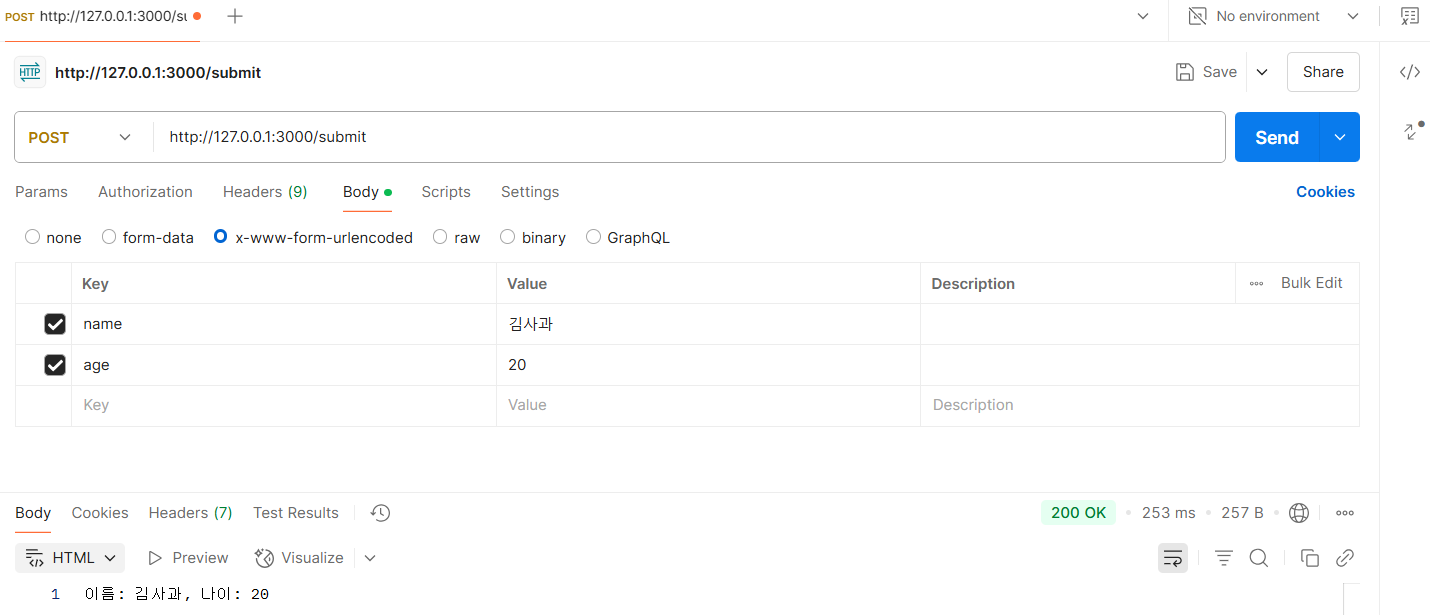
app.post("/submit", (req, res) => {
  const { name, age } = req.body;
  res.send(`이름: ${name}, 나이: ${age}`);
});

app.get("/hello", (req, res) => {
  res.render("hello", { name: "김사과" });
});

app.get("/posts", (req, res) => {
  const posts = [
    { title: "첫 번째 글", content: "내용입니다" },
    { title: "두 번째 글", content: "Express는 정말 편하네요~!!" },
  ];
  res.render("posts", { posts });
});

app.listen(port, () => {
  console.log("서버 실행 중");
});
views 폴더 안에 있는 hello.ejs
<!DOCTYPE html>
<html lang="en">
  <head>
    <meta charset="UTF-8" />
    <meta name="viewport" content="width=device-width, initial-scale=1.0" />
    <title>안녕하세요 :)</title>
  </head>
  <body>
    <h2>안녕하세요 <%=name%>님!</h2>
  </body>
</html>



🤯 지난 시간 복습
package.json 에서
{
  "name": "nodejs",
  "version": "1.0.0",
  "main": "index.js",
  "scripts": {
    "start": "node 6_json.js",
    "dev": "nodemon 12_total.js"
  },
  "keywords": [],
  "author": "",
  "license": "ISC",
  "description": "",
  "dependencies": {
    "ejs": "^3.1.10",
    "express": "^5.1.0"
  },
  "devDependencies": {
    "nodemon": "^3.1.9"
  }
}
scripts 안에 dev를 파일명으로 설정해두면,
npm run dev라고 터미널에 치고 엔터하면 업데이트된 내용이 자동으로 불러와진다.

이것은... 지피티에게 또 물어봤던 흔적.
이러한 경로이면 public 폴더 안에 있는 것들을
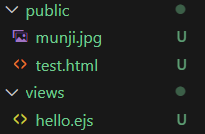
app.use("/static", express.static("public")); // /static URL 접근, public 실제폴더
이렇게 불러올 수 있다.
🫤 Node.js에서 static으로 접근하는 이유?
- 정적 파일들(HTML, CSS, JS, 이미지 파일 등)을 서버가 별도 처리 없이 그대로 클라이언트(브라우저)에게 보내주기 위함!
- HTML, CSS, JS 파일들은 서버가 따로 계산하거나 가공할 필요 없이, 그냥 파일 그대로 브라우저에 보내주면 된다고 함.
- Node.js에서는 express.static()같은 기능을 써서, 특정 폴더를 "여기에 있는 파일들은 그냥 요청 오면 바로 보내!" 라고 설정함.
2. RESTful
REST 원칙에 충실하게 따르는 API 설계 방식
✅ REST (REpresentational State Transfer)
웹에서 데이터를 주고받을 때 자원을 명확하게 표현하고,
HTTP 메서드를 사용해 의미에 맞는 방식으로 요청하는 원칙이다.
13_restful.js
const express = require("express");
const app = express();
const port = 3000;

app.use(express.json()); // 클라이언트 <-> 서버 간의 데이터를 json으로 처리

// 게시글 목록 조회
app.get("/posts", (req, res) => {
  res.send("모든 게시물 조회합니다.");
});

// 게시글 등록
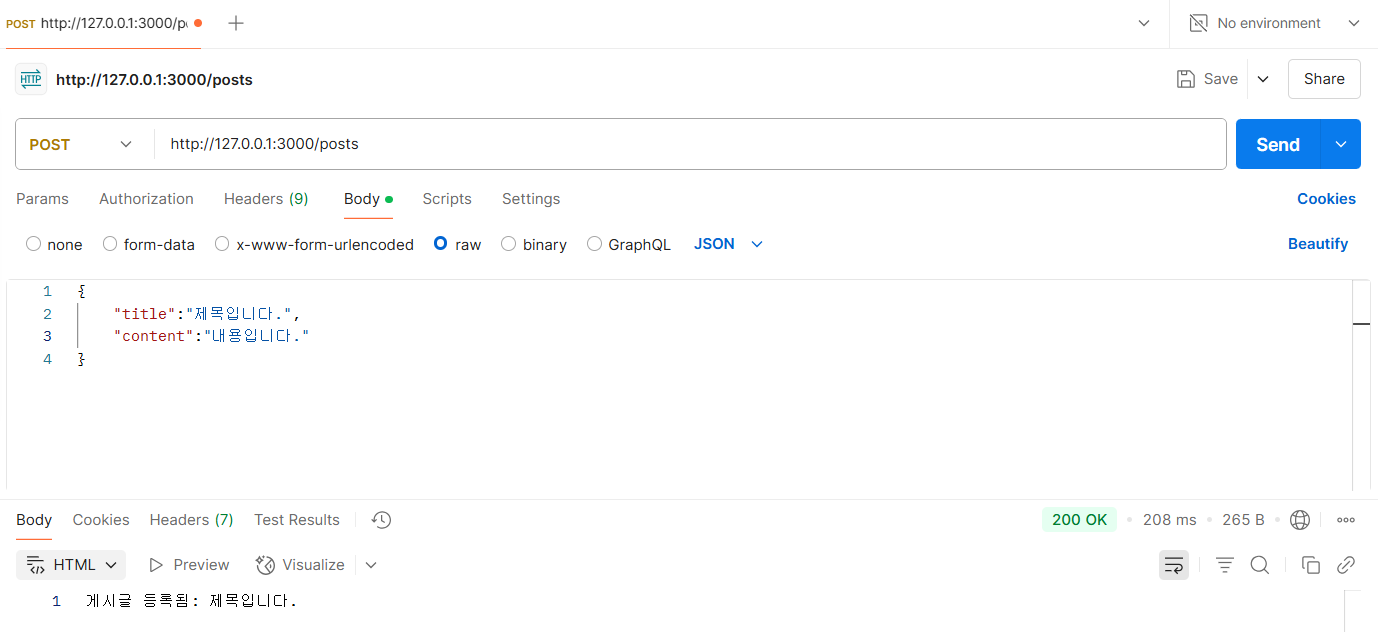
app.post("/posts", (req, res) => {
  const { title, content } = req.body;
  res.send(`게시글 등록됨: ${title}`);
});

// 게시글 하나 조회
app.get("/posts/:id", (req, res) => {
  res.send(`${req.params.id}번 게시글을 조회합니다.`);
});

// 게시글 수정
app.put("/posts/:id", (req, res) => {
  const { title, content } = req.body;
  res.send(`${req.params.id}번 게시글을 수정했습니다.(${title})`);
});

// 게시글 삭제
app.delete("/posts/:id", (req, res) => {
  res.send(`${req.params.id}번 게시글을 삭제했습니다.`);
});

app.listen(port, () => {
  console.log("서버 실행 중");
});

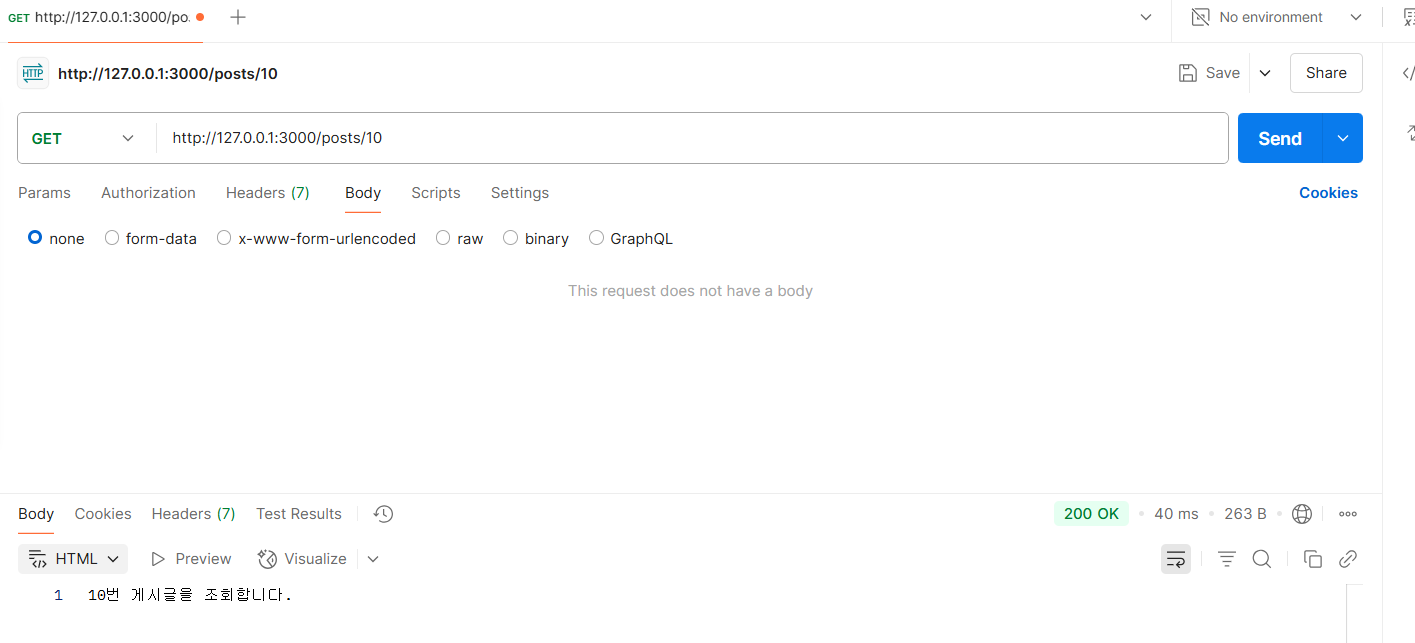
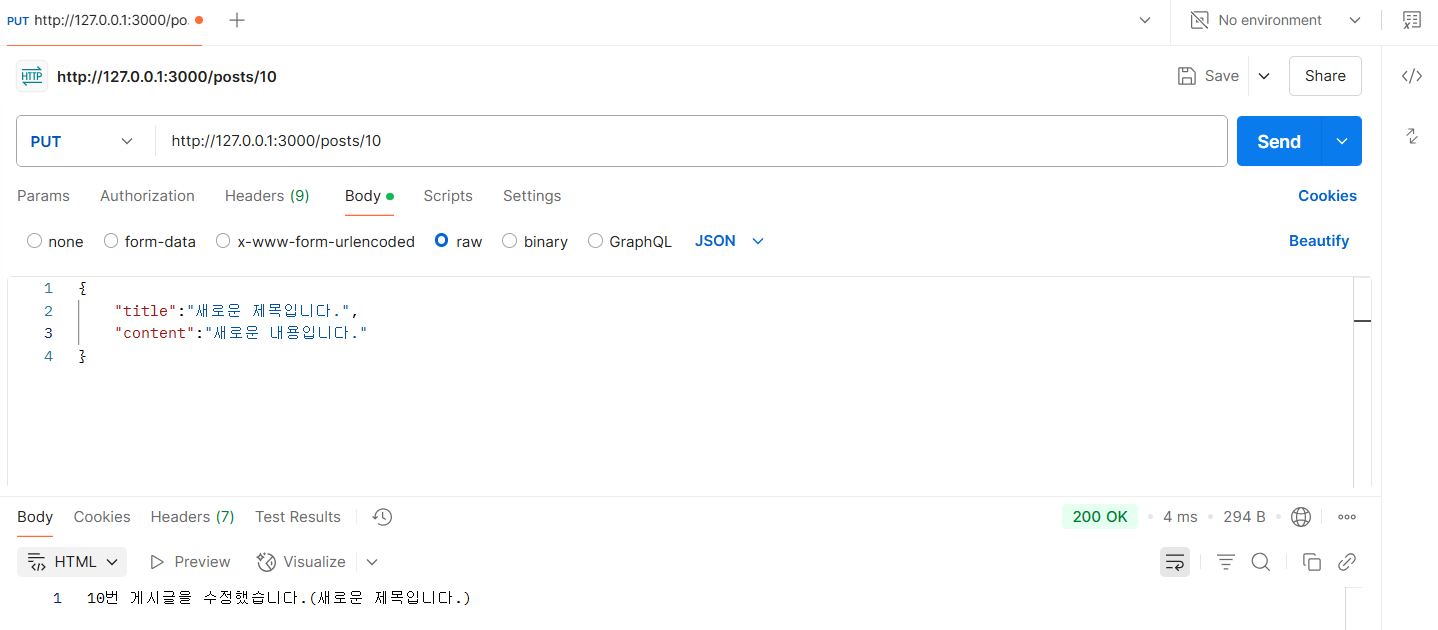
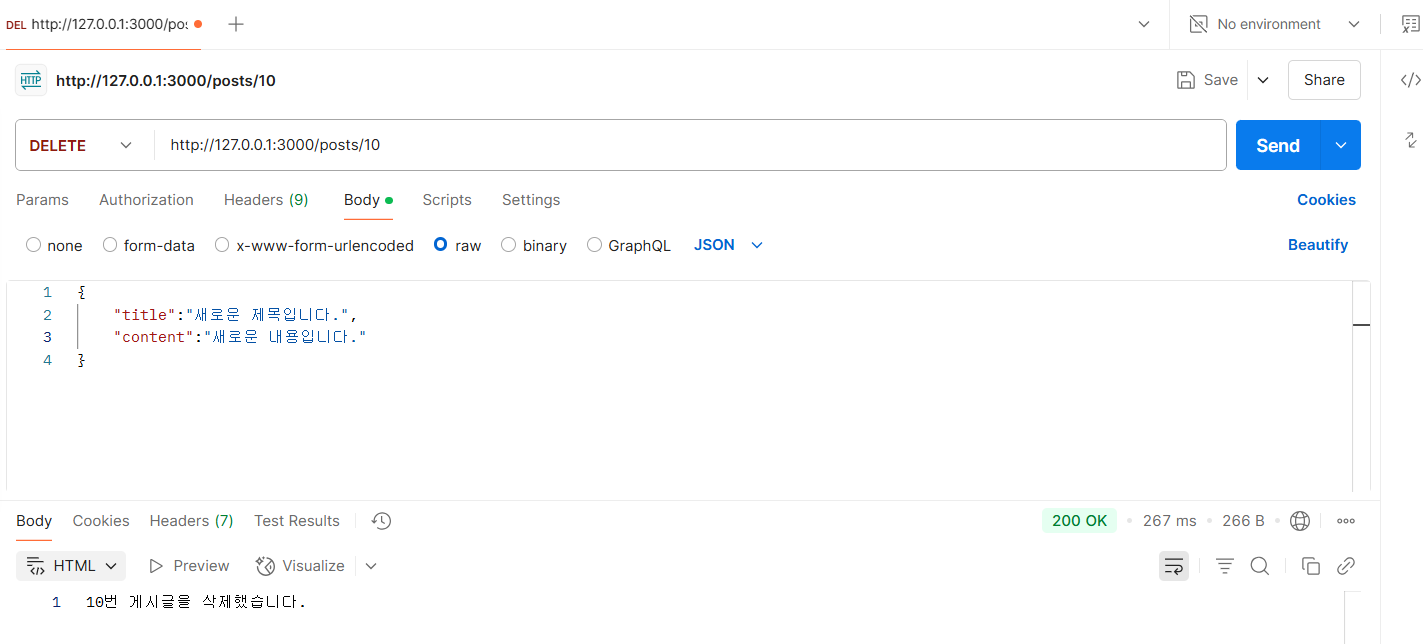
| 목적 | URL | 메서드 | 의미 |
|---|---|---|---|
| 게시글 전체 보기 | /posts | GET | 목록 가져오기 |
| 게시글 하나 보기 | /posts/:id | GET | 특정 글 가져오기 |
| 게시글 작성 | /posts | POST | 새 글 생성 |
| 게시글 수정 | /posts/:id | PUT | 글 전체 수정 |
| 게시글 삭제 | /posts/:id | DELETE | 글 삭제 |
GET    /posts        → 글 전체 목록 조회
GET    /posts/3      → ID가 3인 글 조회
POST   /posts        → 새 글 작성
PUT    /posts/3      → ID가 3인 글 수정
DELETE /posts/3 → ID가 3인 글 삭제| 용어 | 의미 |
|---|---|
| 자원(Resource) | URL로 표현되는 대상 (ex: /users, /products) |
| 행위(Verb) | HTTP 메서드(GET, POST, PUT, DELETE 등) |
| 표현(Representation) | 응답으로 보내는 형식 (보통 JSON) |
✅ RESTful API의 장점
✔️ 직관적이고 이해하기 쉬움
✔️ HTTP 표준을 그대로 활용
✔️ 프론트와 백엔드 분리 구조에 최적화
✅ RESTful API 요약
| 구성 요소 | 예 |
|---|---|
| 자원(Resource) | /users, /posts |
| HTTP 메서드 | GET, POST, PUT, DELETE |
| 표현 방식 | JSON |
