
1. 패키지 매니저(package manager)
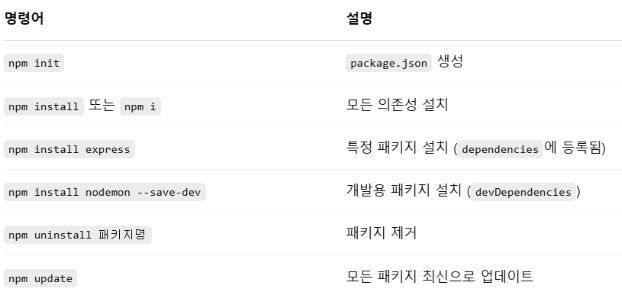
Node.js 프로젝트에서 필요한 라이브러리(패키지)를 설치, 관리, 업데이트할 수 있게 도와주는 도구.
1. npm (Node Package Manager)
Node.js 설치 시 자동으로 같이 설치된다.
npm 공식 홈페이지
2. yarn
- Facebook에서 만든 npm의 대안
- npm보다 더 빠르고 안정적인 패키지 관리를 목표로 만들어졌다.
- yarn.lock 파일을 이용해 버전 일관성을 더 엄격하게 보장
- 설치가 병렬로 진행되어 속도가 빠르다.
- 별도로 설치해야 한다. (npm install -g yarn)
2. package.json
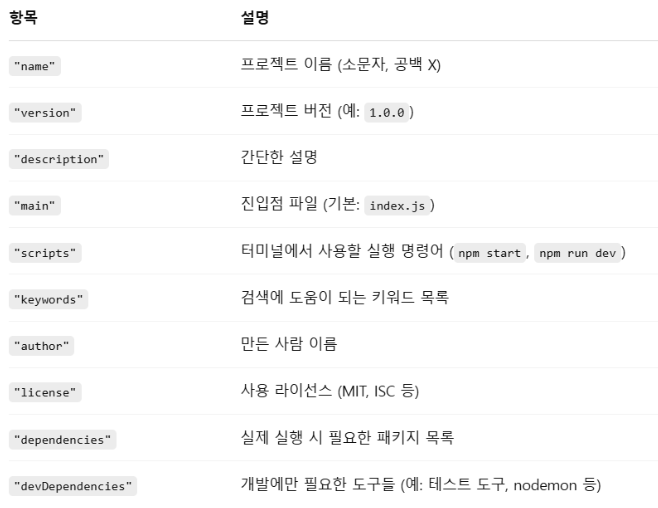
Node.js 프로젝트의 정보를 담고 있는 핵심 파일이다.
Node.js 프로젝트를 만들 때 npm init 명령어를 실행하면 이 파일이 자동으로 생성된다.
1. package.json의 역할
- 프로젝트 이름, 설명, 버전 등을 저장한다.
- npm install 시 어떤 패키지를 설치할지 지정한다.
- npm start처럼 프로젝트를 실행하는 명령어를 설정할 수 있다.
- package.json만 있으면 같은 환경을 복원할 수 있다.
💥(npm install만 하면 됨.)
2. 기본 구조
{
  "name": "my-app",
  "version": "1.0.0",
  "description": "나의 첫 Node.js 앱",
  "main": "index.js",
  "scripts": {
    "start": "node index.js",
    "dev": "nodemon index.js"
  },
  "keywords": ["node", "app"],
  "author": "김사과",
  "license": "MIT",
  "dependencies": {
    "express": "^4.18.2"
  },
  "devDependencies": {
    "nodemon": "^3.0.2"
  }
}
3. package-lock.json
npm이 실제로 어떤 정확한 버전의 패키지를 설치했는지 기록한다.
모든 하위 의존성까지 버전과 설치 경로를 상세히 기록한다.
설치 결과가 고정되므로 재현성(reproducibility)을 보장한다.
수정, 삭제 X
팀 프로젝트에서는 꼭 같이 Git에 포함해야 모든 개발자의 환경이 일치한다.
❇️ path.js
const path = require("path");

console.log(__dirname); // 현재 디렉토리
console.log(__filename); // 현재 파일
console.log(path.sep); // 디렉토리를 나누는 특수문자
console.log(path.delimiter);

console.log(path.basename(__filename)); // 파일 이름만 추출
console.log(path.basename(__filename, ".js")); // 확장자를 제외
console.log(path.dirname(__filename)); // 디렉토리만 추출
console.log(path.extname(__filename)); // 확장명만 추출
c:\Hsgo\Nodejs
c:\Hsgo\Nodejs\1_path.js
\
;
1_path.js
1_path
c:\Hsgo\Nodejs
.js3. 모듈(module)
코드의 재사용성과 유지보수성을 높이기 위해 기능을 개별 파일로 분리하여 사용할 수 있도록 해주는 구조이다.
export 키워드를 사용하여 모듈에서 변수, 함수, 클래스 등을 외부로 내보내고,
import 키워드를 사용하여 다른 파일에서 이들을 불러와 사용할 수 있다.
ES6(ECMAScript 2015)부터 표준으로 도입되어 현재 대부분의 환경에서 널리 사용되고 있다고 한다.
❇️ counter.js (CommonJS 방식의 모듈)
let count = 0;

function increase() {
  count++;
}

function getCount() {
  return count;
}

module.exports.increase = increase;
module.exports.getCount = getCount;- count 변수는 외부에서는 직접 접근할 수 없다. (private한 변수처럼 동작)
- 외부에서는 increase()와 getCount() 함수만 사용할 수 있다.
- 모듈은 해당 파일의 내용을 은닉하고 필요한 것만 노출시킨다. → 캡슐화
❇️ counter.mjs(ES6 방식의 모듈)
let count = 0

export function increase(){
    count++
}

export function getCount(){
    return count
}
❇️ main.js(CommonJS 방식의 모듈)
const counter = require("./counter");

counter.increase();
counter.increase();
counter.increase();
console.log(counter.getCount());
결과
3❇️ main.mjs(ES6 방식의 모듈)
import { increase, getCount } from "./counter.mjs";

increase();
increase();
increase();
console.log(getCount());
결과
3ES6 방식에서는 increase(), getCount()만 가지고서도 결과를 낼 수 있다...!
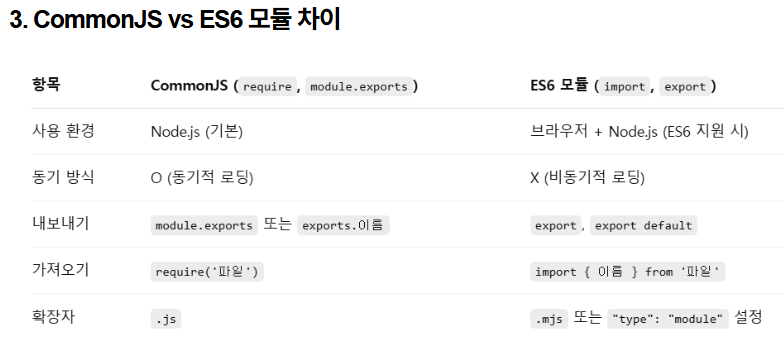
package.json에서 "type":"module"로 설정하면, ES6 모듈만 사용하게 된다.
하지만, 현재 CommonJS를 사용하는 사람들도 있고, ES6모듈을 사용하는 사람들도 있기 때문에 둘 다 알아두는 것이 좋다고 한다.
.gitignore
# node_modules 폴더 무시
node_modules/

# .txt 파일 무시
*.txt

# gitignore 파일 무시
.gitignore
git에 올릴 때 node_modules 폴더 안에 파일이 굉장히 많기 때문에 node_modules 폴더는 무시하고 올려야 한다.
gitignore 파일도 무시할 수 있지만, 어떤 폴더와 파일들을 무시했는지 아는 것이 중요하다고 하므로 gitignore 파일은 무시하지 않는 것이 좋다고 한다.
