웹소켓
웹소켓(WebSocket) : 웹 브라우저와 서버 간의 양방향 통신을 가능하게 하는 통신 프로토콜이다.
기존의 HTTP 통신은 요청(Request) → 응답(Response) 방식으로 단방향이지만,
웹소켓은 한 번 연결을 맺으면 서버와 클라이언트가 지속적으로 데이터를 주고받을 수 있는 상태를 유지한다.
웹소켓 특징
-
양방향 통신 (Full-Duplex)
클라이언트와 서버가 자유롭게 데이터를 주고받을 수 있어 실시간 기능에 적합하다. -
지속적인 연결 (Persistent Connection)
연결을 끊지 않고 유지하기 때문에 반복적인 연결/해제 오버헤드가 줄어든다. -
적은 오버헤드
HTTP 요청/응답보다 헤더가 작아 통신 비용이 적다.
실행 결과 & 흐름
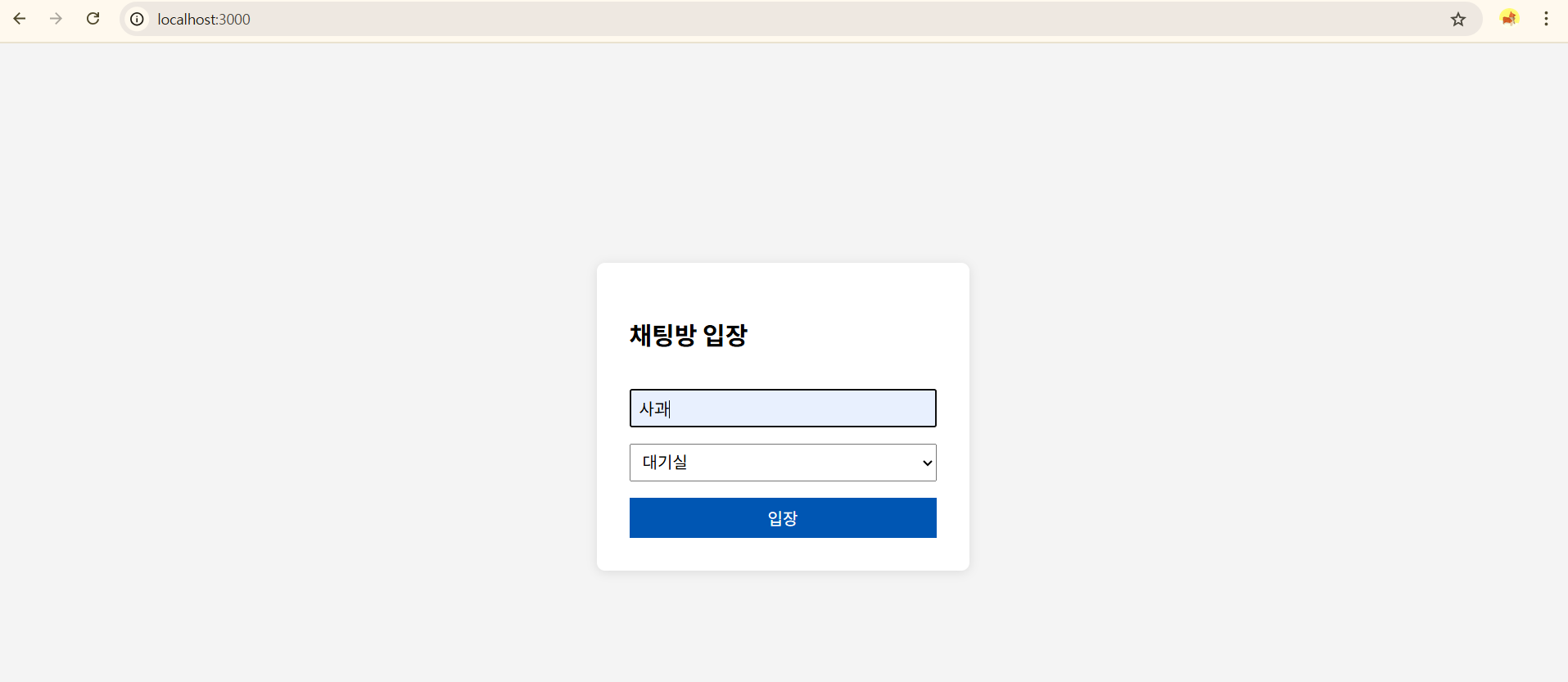
socket.emit("join", { nickname, channel: currentChannel });{닉네임, 현재 채널}
io.on("connection", (socket) => {
  socket.on("join", ({ nickname, channel }) => {
    socket.nickname = nickname; // 각자 만들어짐.
    socket.channel = channel;
    users[socket.id] = { nickname, channel };
    socket.join(channel); // 이름이 같은 것끼리 그룹으로 묶어짐.

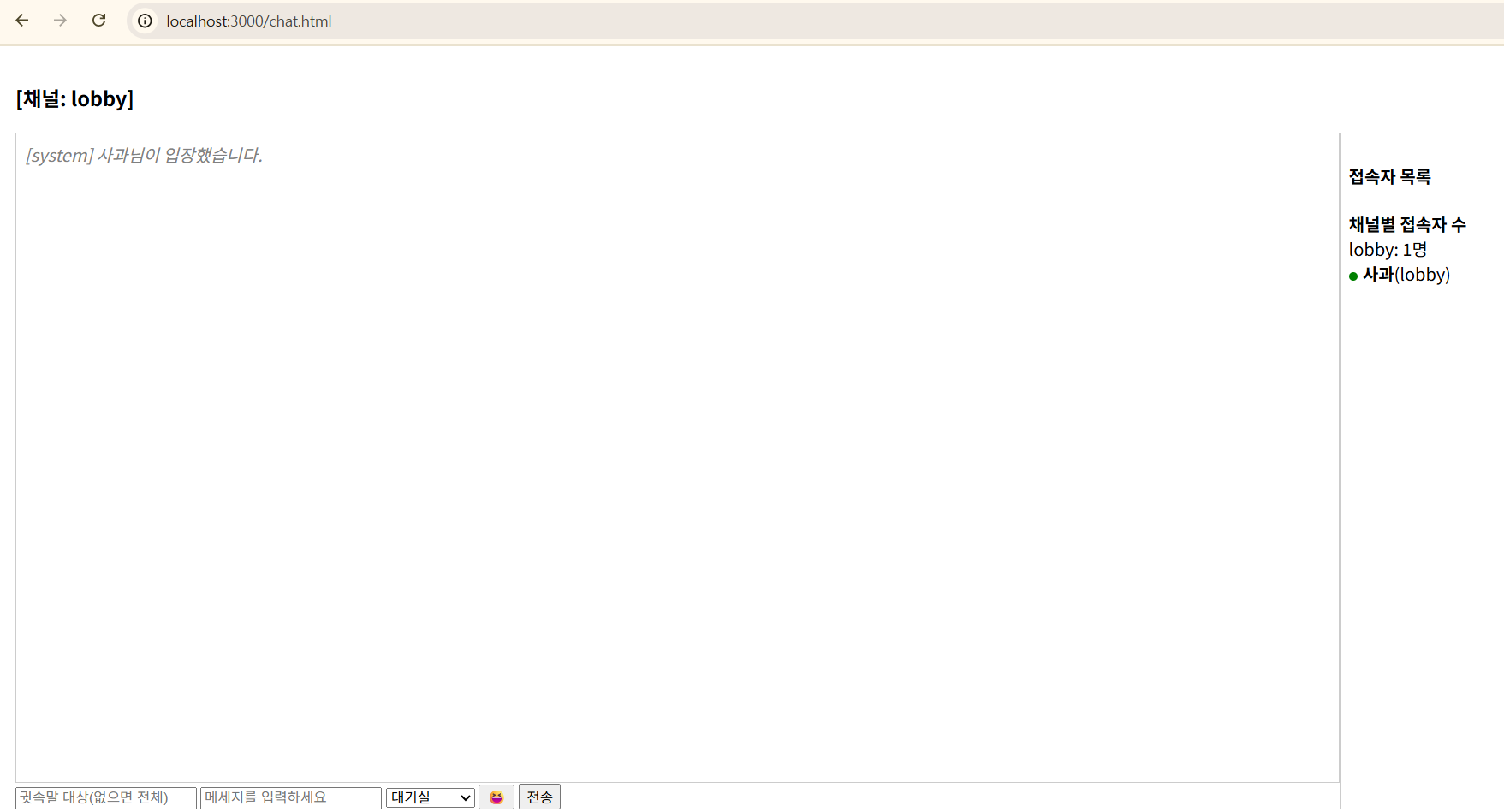
    const msg = { user: "system", text: `${nickname}님이 입장했습니다.` };
    io.to(channel).emit("message", msg);
    console.log("nickname: ", nickname, "channel: ", channel);

    updateUserList();
  });
function updateUserList() {
    const userList = Object.values(users); // [{nickname, channel}, .. ]
    io.emit("userList", userList);
  }
socket.on("userList", (list) => {
users.innerHTML = "";
const channelMap = {};
list.forEach(({ nickname, channel }) => {
const div = document.createElement("div");
div.innerHTML = `<span class="online-dot"></span><strong>${nickname}</strong>(${channel})`;
users.appendChild(div);
div.onclick = () => (toInput.value = nickname);
if (!channelMap[channel]) channelMap[channel] = 0;
channelMap[channel]++;
});
userCounts.innerHTML =
"<strong>채널별 접속자 수</strong><br>" +
Object.entries(channelMap)
.map(([ch, count]) => `${ch}: ${count}명`)
.join("<br>");
});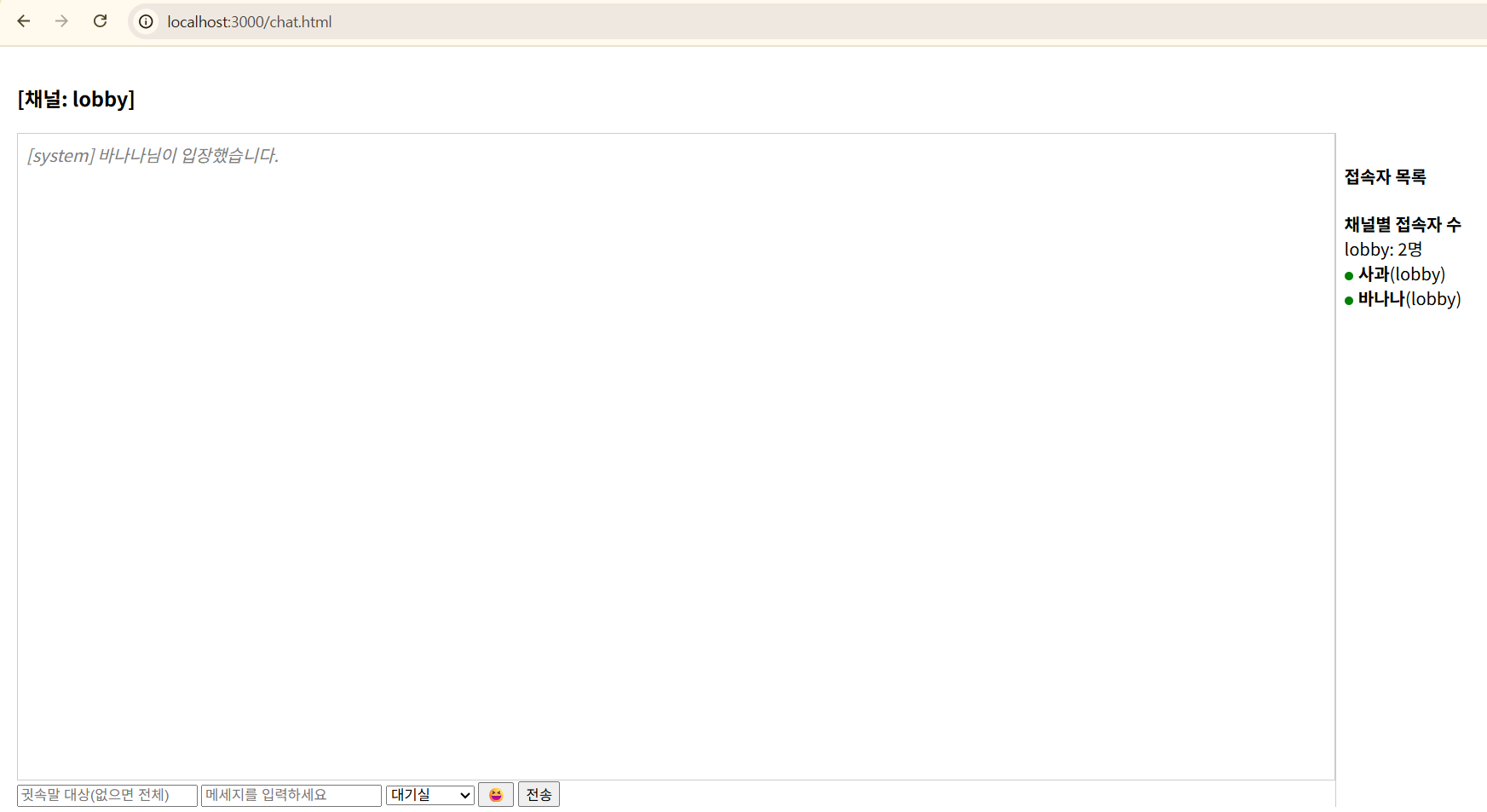
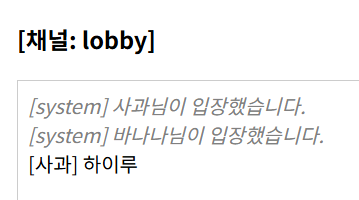
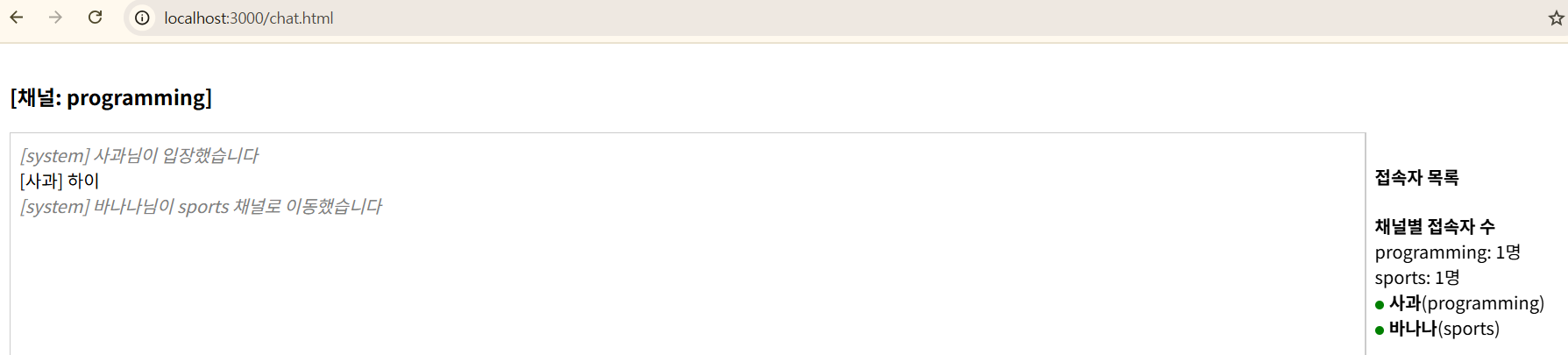
사과에 이어 바나나까지 채팅방->대기실에 입장했다!
오른쪽에 접속자 목록 -> 채널별 접속자 수를 확인할 수 있다.
document.getElementById("send").onclick = sendMessage;
function sendMessage() {
const text = messageInput.value.trim();
const to = toInput.value.trim();
if (text) {
socket.emit("chat", { text, to: to || null });
messageInput.value = "";
}
}
messageInput.addEventListener("keydown", (e) => {
if (e.key === "Enter") sendMessage();
});
socket.emit("chat", { text, to: to || null });
("chat")과 함께 데이터를 서버로 전송
socket.on("chat", ({ text, to }) => {
const sender = users[socket.id];
if (!sender) return;
const payload = { user: sender.nickname, text };
if (to) {
const receiverSocket = Object.entries(users).find(
([id, u]) => u.nickname === to
)?.[0]; // [0] 소켓id, ?.(옵셔널 체이닝): 값이 undefined일 경우 에러 없이 넘어가게 함(사용자가 없을 수도 있으니 안전하게 접근)
if (receiverSocket) {
io.to(receiverSocket).emit("whisper", payload);
socket.emit("whisper", payload);
}
} else {
io.to(sender.channel).emit("message", payload);
}
});채팅 데이터를 받는다.
receiverSocket은 값이 undefined일수도 있고, 값이 있을 수도 있는데,
값이 있는 경우(nickname 이 적혀 있는 경우), 귓속말이므로 ("whisper")라는 이벤트를 발생시킨다.
payload는 전달할 데이터 객체
값이 없는 경우는 특정 채널(또는 "룸")에 속한 클라이언트들에게 메시지를 보낸다.
socket.on("whisper", ({ user, text }) => {
const div = document.createElement("div");
div.textContent = `(귓속말) [${user}] ${text}`;
div.style.color = "deeppink";
messages.appendChild(div);
});
햄스터가 사과에게 귓속말 대상을 적어서 귓속말을 적어 보내면...
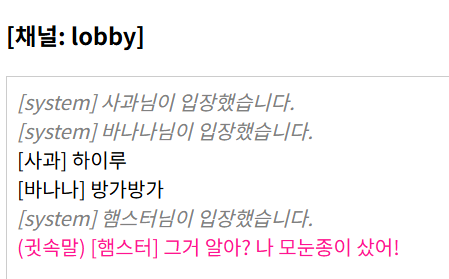
이렇게 사과에게만 귓속말이 보이고,
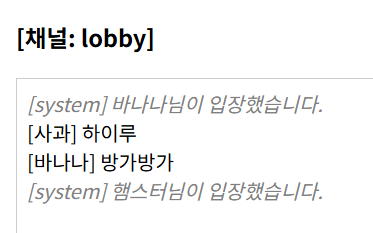
바나나에게는 귓속말이 보이지 않는다.
socket.on("message", ({ user, text }) => {
console.log("user: ", user, "text: ", text);
const div = document.createElement("div");
div.textContent = `[${user}] ${text}`;
if (user === "system") div.className = "system-msg";
messages.appendChild(div);
});
channelSelector.onchange = () => {
const newChannel = channelSelector.value;
if (newChannel !== currentChannel) {
socket.emit("changeChannel", { newChannel });
currentChannel = newChannel;
channelName.textContent = `[채널: ${currentChannel}]`;
messages.innerHTML = "";
}
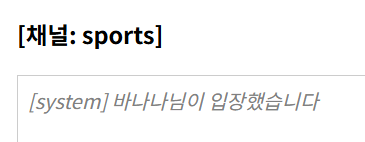
};새채널로 이동하게 되면(이동한 채널이 현재 채널과 다르면)
현재 채널=새 채널
socket.on("changeChannel", ({ newChannel }) => {
const oldChannel = socket.channel;
const nickname = socket.nickname;
socket.leave(oldChannel);
io.to(oldChannel).emit("message", {
user: "system",
text: `${nickname}님이 ${newChannel} 채널로 이동했습니다`,
});
socket.channel = newChannel;
users[socket.id].channel = newChannel;
socket.join(newChannel);
const joinMsg = { user: "system", text: `${nickname}님이 입장했습니다` };
io.to(newChannel).emit("message", joinMsg);
const previousLog = getLog(newChannel);
socket.emit("chatLog", previousLog);
updateUserList();
});채널 이동
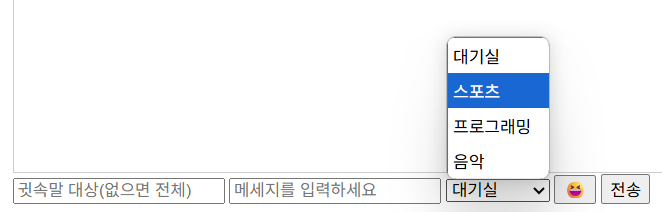
emojiBtn.onclick = () => {
emojiBox.style.display =
emojiBox.style.display === "block" ? "none" : "block";
emojiBox.style.top = emojiBtn.offsetTop - 50 + "px";
emojiBox.style.left = emojiBtn.offsetLeft + 0 + "px";
};
emojiBox.querySelectorAll("span").forEach((span) => {
span.onclick = () => {
messageInput.value += span.textContent;
emojiBox.style.display = "none";
};
});
이모지를 선택하면... textContent에 추가되고
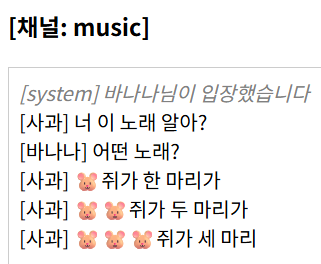
이렇게 이모지를 보낼 수 있다.
socket.on("disconnect", () => {
const user = users[socket.id];
if (user) {
const msg = {
user: "system",
text: `${user.nickname}님이 퇴장했습니다.`,
};
io.to(user.channel).emit("message", msg);
delete users[socket.id];
updateUserList();
}
});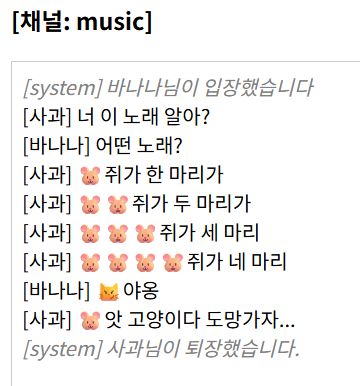
퇴장하면 이렇게 나온다.
이런 식으로 서로 대화를 주고 받으며 실시간 채팅을 할 수 있다...!!!
‼️전체 코드
public 폴더 안에 있는 index.html
<!DOCTYPE html>
<html lang="en">
<head>
<meta charset="UTF-8" />
<meta name="viewport" content="width=device-width, initial-scale=1.0" />
<title>환영합니다 :)</title>
<style>
body {
font-family: sans-serif;
margin: 0;
height: 100vh;
display: flex;
justify-content: center;
align-items: center;
background: #f4f4f4;
}
#loginForm {
background: white;
padding: 2rem;
border-radius: 8px;
box-shadow: 0 2px 10px rgba(0, 0, 0, 0.1);
display: flex;
flex-direction: column;
gap: 1rem;
width: 300px;
}
input,
select,
button {
padding: 0.5rem;
font-size: 1rem;
}
button {
background: #007bff;
color: white;
border: none;
cursor: pointer;
}
button:hover {
background: #0056b3;
}
</style>
</head>
<body>
<form id="loginForm">
<h2>채팅방 입장</h2>
<input
type="text"
id="nickname"
placeholder="닉네임을 입력하세요"
required
/>
<select id="channel">
<option value="lobby">대기실</option>
<option value="sports">스포츠</option>
<option value="programming">프로그래밍</option>
<option value="music">음악</option>
</select>
<button type="submit">입장</button>
</form>
<script>
document.getElementById("loginForm").onsubmit = (e) => {
e.preventDefault();
const nickname = document.getElementById("nickname").value.trim();
const channel = document.getElementById("channel").value;
if (!nickname) return alert("닉네임을 입력하세요");
localStorage.setItem("nickname", nickname);
localStorage.setItem("channel", channel);
location.href = "chat.html";
};
</script>
</body>
</html>
위에서 저장한 nickname과 channel 정보를 로컬스토리지에 넣고,
다음 페이지(chat.html)로 이동하는 구조
public 폴더 안에 있는 chat.html
<!DOCTYPE html>
<html lang="en">
<head>
<meta charset="UTF-8" />
<meta name="viewport" content="width=device-width, initial-scale=1.0" />
<title>채팅룸</title>
<style>
body {
font-family: sans-serif;
margin: 0;
display: flex;
height: 100vh;
}
#chat {
flex: 1;
display: flex;
flex-direction: column;
padding: 1rem;
}
#messages {
flex: 1;
overflow-y: auto;
border: 1px solid #ccc;
padding: 0.5rem;
}
#users {
width: 250px;
border-left: 1px solid #ccc;
padding: 0.5rem;
}
#emojiBox {
display: none;
border: 1px solid #ccc;
padding: 0.5rem;
position: absolute;
background: white;
}
#emojiBox span {
cursor: pointer;
padding: 0.3rem;
}
.system-msg {
color: gray;
font-style: italic;
}
.online-dot {
display: inline-block;
width: 8px;
height: 8px;
border-radius: 50%;
background: green;
margin-right: 5px;
}
.chat-container {
display: flex;
flex: 1;
}
.chat-main {
flex: 1;
display: flex;
flex-direction: column;
}
</style>
</head>
<body>
<div id="chat">
<h3 id="channelName"></h3>
<div class="chat-container">
<div class="chat-main">
<div id="messages"></div>
<div>
<input type="text" id="to" placeholder="귓속말 대상(없으면 전체)" />
<input type="text" id="message" placeholder="메세지를 입력하세요" />
<select id="channelSelector">
<option value="lobby">대기실</option>
<option value="sports">스포츠</option>
<option value="programming">프로그래밍</option>
<option value="music">음악</option>
</select>
<button id="emoji">😆</button>
<button id="send">전송</button>
</div>
</div>
<div id="users">
<h4>접속자 목록</h4>
<div id="userCounts"></div>
<div id="userList"></div>
</div>
</div>
<div id="emojiBox">
<span>🐹</span>
<span>😼</span>
<span>🥰</span>
<span>🐒</span>
<span>✨</span>
<span>🎃</span>
<span>🤔</span>
<span>🐶</span>
<span>❇️</span>
<span>🩵</span>
</div>
</div>
<script src="/socket.io/socket.io.js"></script>
<script>
const socket = io();
const nickname = localStorage.getItem("nickname");
let currentChannel = localStorage.getItem("channel");
if (!nickname || !currentChannel) {
alert("닉네임 또는 채널 정보가 없습니다.");
location.href = "index.html";
}
const channelName = document.getElementById("channelName");
const messageInput = document.getElementById("message");
const users = document.getElementById("userList");
const messages = document.getElementById("messages");
const userCounts = document.getElementById("userCounts");
const toInput = document.getElementById("to");
const emojiBtn = document.getElementById("emoji");
const emojiBox = document.getElementById("emojiBox");
const channelSelector = document.getElementById("channelSelector");
channelSelector.value = currentChannel;
channelName.textContent = `[채널: ${currentChannel}]`;
document.getElementById("send").onclick = sendMessage;
function sendMessage() {
const text = messageInput.value.trim();
const to = toInput.value.trim();
if (text) {
socket.emit("chat", { text, to: to || null });
messageInput.value = "";
}
}
messageInput.addEventListener("keydown", (e) => {
if (e.key === "Enter") sendMessage();
});
channelSelector.onchange = () => {
const newChannel = channelSelector.value;
if (newChannel !== currentChannel) {
socket.emit("changeChannel", { newChannel });
currentChannel = newChannel;
channelName.textContent = `[채널: ${currentChannel}]`;
messages.innerHTML = "";
}
};
emojiBtn.onclick = () => {
emojiBox.style.display =
emojiBox.style.display === "block" ? "none" : "block";
emojiBox.style.top = emojiBtn.offsetTop - 50 + "px";
emojiBox.style.left = emojiBtn.offsetLeft + 0 + "px";
};
emojiBox.querySelectorAll("span").forEach((span) => {
span.onclick = () => {
messageInput.value += span.textContent;
emojiBox.style.display = "none";
};
});
socket.emit("join", { nickname, channel: currentChannel });
socket.on("message", ({ user, text }) => {
console.log("user: ", user, "text: ", text);
const div = document.createElement("div");
div.textContent = `[${user}] ${text}`;
if (user === "system") div.className = "system-msg";
messages.appendChild(div);
});
socket.on("userList", (list) => {
        users.innerHTML = "";
        const channelMap = {};

        list.forEach(({ nickname, channel }) => {
          const div = document.createElement("div");
          div.innerHTML = `<span class="online-dot"></span><strong>${nickname}</strong>(${channel})`;
          users.appendChild(div);
          div.onclick = () => (toInput.value = nickname);

          if (!channelMap[channel]) channelMap[channel] = 0;
          channelMap[channel]++;
        });

        userCounts.innerHTML =
          "<strong>채널별 접속자 수</strong><br>" +
          Object.entries(channelMap)
            .map(([ch, count]) => `${ch}: ${count}명`)
            .join("<br>");
      });
socket.on("whisper", ({ user, text }) => {
const div = document.createElement("div");
div.textContent = `(귓속말) [${user}] ${text}`;
div.style.color = "deeppink";
messages.appendChild(div);
});
</script>22_websocket.mjs
import express from "express";
import { createServer } from "http";
import path from "path";
import { Server } from "socket.io";
import { fileURLToPath } from "url";
import fs from "fs";
const app = express();
const server = createServer(app);
const io = new Server(server);
// ES(.mjs)에서는 __dirname, _filename이 없음
// import.meta.url: 현재 파일의 경로
// fileURLToPath: 실제 경로를 문자열로 변환
// path.dirname: 디렉토리 이름만 추출
const __filename = fileURLToPath(import.meta.url);
const __dirname = path.dirname(__filename);
const logsDir = path.join(__dirname, "logs");
if (!fs.existsSync(logsDir)) fs.mkdirSync(logsDir);
app.use(express.static(path.join(__dirname, "public")));
const users = {};
io.on("connection", (socket) => {
socket.on("join", ({ nickname, channel }) => {
socket.nickname = nickname; // 각자 만들어짐.
socket.channel = channel;
users[socket.id] = { nickname, channel };
socket.join(channel); // 이름이 같은 것끼리 그룹으로 묶어짐.
const msg = { user: "system", text: `${nickname}님이 입장했습니다.` };
io.to(channel).emit("message", msg);
console.log("nickname: ", nickname, "channel: ", channel);
updateUserList();
});
socket.on("chat", ({ text, to }) => {
    const sender = users[socket.id];
    if (!sender) return;
    const payload = { user: sender.nickname, text };

    if (to) {
      const receiverSocket = Object.entries(users).find(
        ([id, u]) => u.nickname === to
      )?.[0]; // [0] 소켓id, ?.(옵셔널 체이닝): 값이 undefined일 경우 에러 없이 넘어가게 함(사용자가 없을 수도 있으니 안전하게 접근)
      if (receiverSocket) {
        io.to(receiverSocket).emit("whisper", payload);
        socket.emit("whisper", payload);
      }
    } else {
      io.to(sender.channel).emit("message", payload);
    }
  });
socket.on("changeChannel", ({ newChannel }) => {
    const oldChannel = socket.channel;
    const nickname = socket.nickname;
    socket.leave(oldChannel);
    io.to(oldChannel).emit("message", {
      user: "system",
      text: `${nickname}님이 ${newChannel} 채널로 이동했습니다`,
    });
    socket.channel = newChannel;
    users[socket.id].channel = newChannel;
    socket.join(newChannel);

    const joinMsg = { user: "system", text: `${nickname}님이 입장했습니다` };
    io.to(newChannel).emit("message", joinMsg);

    const previousLog = getLog(newChannel);
    socket.emit("chatLog", previousLog);

    updateUserList();
  });
socket.on("disconnect", () => {
    const user = users[socket.id];
    if (user) {
      const msg = {
        user: "system",
        text: `${user.nickname}님이 퇴장했습니다.`,
      };
      io.to(user.channel).emit("message", msg);
      delete users[socket.id];

      updateUserList();
    }
  });
function updateUserList() {
const userList = Object.values(users); // [{nickname, channel}, .. ]
io.emit("userList", userList);
}
});
server.listen(3000, () => {
console.log("서버 실행 중");
});
실행은 vscode 커맨드 창에서 npm run dev(nodemon 사용 시) 또는 node 파일명으로 실행한다.
실행 결과는 http://localhost:3000/ ← 이렇게 확인 가능
