ubuntu20.4에서 postgresql 13 설치하던 중 에러 해결
https://bumday.tistory.com/49 이거
https://gist.github.com/luizomf/1a7994cf4263e10dce416a75b9180f01 이거
https://www.howtodojo.com/install-postgresql-13-ubuntu-20-04/ 이거
https://computingforgeeks.com/how-to-install-postgresql-13-on-ubuntu/ 이거
https://catarchiveday.blogspot.com/2018/09/postgresql-5432-port-ubuntu.html 이거 참고함

psql: error: connection to server on socket "/var/run/postgresql/.s.PGSQL.5432" failed: No such file or directory
	Is the server running locally and accepting connections on that socket?
postgresql을 설치하던 중 이런 에러가 났다.
뭐가 문제지? 하고
$ netstat -ntlp | grep 5432확인해보니까

port가 5433으로 열려있다..?
->
vi /etc/postgresql/13/main/pg_hba.conf
여기서 0.0.0.0/0 으로 localhost 포트 다 열어줌
->
#------------------------------------------------------------------------------
# CONNECTIONS AND AUTHENTICATION
#------------------------------------------------------------------------------

# - Connection Settings -

#listen_addresses = 'localhost'         # what IP address(es) to listen on;
                                        # comma-separated list of addresses;
                                        # defaults to 'localhost'; use '*' for all
                                        # (change requires restart)
port = 5432                             # (change requires restart)

max_connections = 100                   # (change requires restart)
#superuser_reserved_connections = 3     # (change requires restart)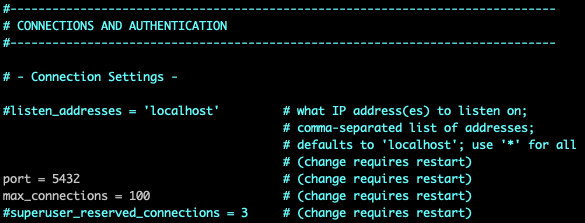
vi /etc/postgresql/13/main/postgresql.conf
port = 5432로 변경
postgresql 재시작 후,
sudo systemctl restart postgresqlsudo -u postgres psql다시 실행
정상작동 확인!
psql (13.7 (Ubuntu 13.7-1.pgdg20.04+1))
Type "help" for help.

postgres=#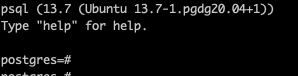

backend developer