상위 저장소에서 git add 를 실행할 때 아래와 같은 경고가 뜨는 경우가 있다.
warning: 내장 깃 저장소 추가: subrepo
힌트: You've added another git repository inside your current repository.
힌트: Clones of the outer repository will not contain the contents of
힌트: the embedded repository and will not know how to obtain it.
힌트: If you meant to add a submodule, use:
힌트:
힌트: git submodule add subrepo
힌트:
힌트: If you added this path by mistake, you can remove it from the
힌트: index with:
힌트:
힌트: git rm --cached subrepo
힌트:
힌트: See "git help submodule" for more information.
문제 원인
이 경고는 상위 저장소 안에 또 다른 Git 저장소(.git 폴더)가 들어있기 때문이다.
예를 들어, repo라는 상위 프로젝트 폴더 안에 subrepo라는 하위 프로젝트를 clone 한 경우, subrepo/.git 때문에 Git이 이를 서브모듈(submodule) 로 인식한다.
이 상태로 commit → push 를 하면 상위 저장소에는 하위 디렉토리 내용이 올라가지 않고, submodule 포인터 정보만 push 된다.
결과적으로 GitHub에서 확인했을 때 하위 디렉토리는 비어 있는 폴더처럼 보이게 된다.
<아래 turtlebot3_autorace 패키지>
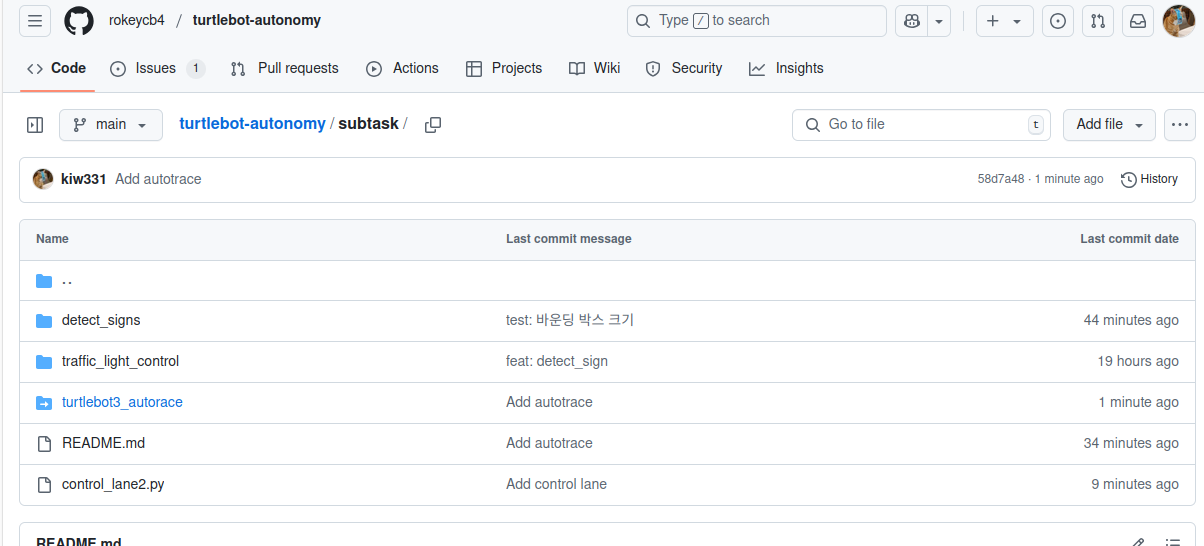
따라서 하위 폴더를 서브 모듈로 사용할 게 아니라면 .git 폴더를 삭제하고 다시 git add 하면 해결된다.
해결 방법
하위 폴더의 .git 폴더를 삭제해서 단순한 일반 디렉토리로 만들어야 한다.
(.git 파일은 보통 탐색기에서 보이지 않으므로, 명령어로 제거한다.)
현재 위치와 모든 하위 .git 제거
(⚠ 최상위 저장소의 .git까지 지워질 수 있으니 주의)
find . -type d -name ".git" -exec rm -rf {} +상위 디렉토리에서 실행
(현재 위치의 .git은 제외하고 제거)
find . -type d -name ".git" ! -path "./.git" -exec rm -rf {} +삭제 확인
제대로 삭제되었는지 확인하려면:
find . -type d -name ".git"출력이 비어 있으면 하위 .git 폴더가 전부 제거된 상태

🥝