프롬프트 AI&OpenAPI&공공데이터를 활용한 웹앱개발자 양성 과정 76일차 (nodeJs 세팅)
프롬프트 AI&OpenAPI&공공데이터를 활용한 웹앱개발자 양성 과정
1. checkbox, radiobax, selectbox등
셀렉터: input[type="checkbox"][name="fruit"][value="바나나"]
disabled로 비활성화 처리 가능
const selectedFruits = selecteds.map((el,index) => (el ? fruits[index] : el)).filter((el) => el);el은 true 아니면 false
el이 true라면 과일 배열에서 이름을 가져오고, 그렇지 않다면 el은 false기 때문에
filter에서 제외된다.
<select className="select select-bordered w-full max-w-xs" onChange={(e) => setSelectedAgeBand(e.target.value)}>select의 경우 option이 아니라 select쪽에 onChange를 넣음에 주의하자.
2. node Js 설치
브라우저: js실행기 -> 클라이언트 사이드 랜더링 방식(CSR)
브라우저 밖에서 사용 : node.js
LTS(long term serport version) 안정화된 버전
nvm다운로드
https://github.com/coreybutler/nvm-windows/releases
nvm 노드 버전 매니저
npm 노드 패키지 매니저
cmd에서 nvm실행 했을때 나오면 ok
리엑트는 csr로도 ssr로도 사용 가능.
node를 사용하는 방식은 ssr
nvm을 통한 node 특정버전 설치
nvm install 20.12.0
nvm use 20.12.0
next.js : 풀스택 프레임 워크 -> 웹 앱 가능
https://nextjs.org/docs/app/api-reference/file-conventions/loading
3. vs코드
생성된 프로젝트의 cmd창에서 code . 커멘드를 입력하여 vs코드를 실행할 수 있다.
vscode 단축키: Ctrl+` 터미널 열기
기본프로필 선택에서 cmd 열기 가능
커멘트 창에서 npm run dev커멘드 입력으로 서버를 실행할 수 있다.
마테리얼ui:
https://mui.com/
f1 후 json 검색
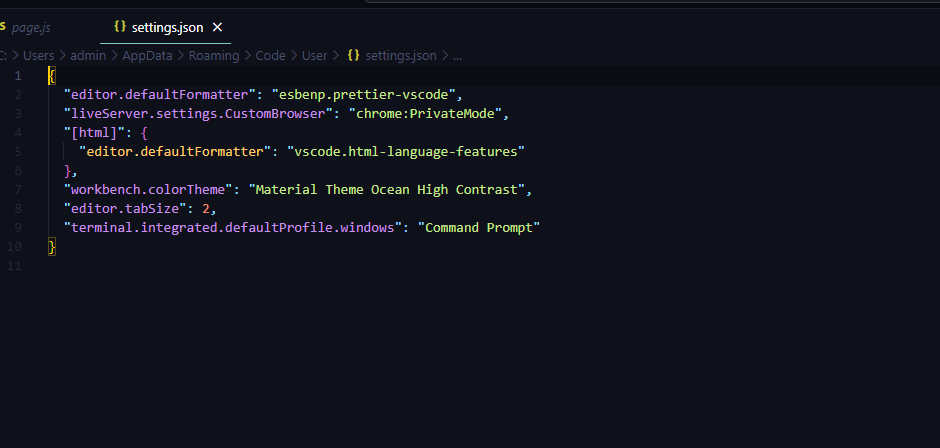
아래 설정 추가 할 것.
"emmet.includeLanguages": { "javascript": "javascriptreact" },
"emmet.syntaxProfiles": {
"javascript": "jsx"
},
npm add --dev --exact prettier
echo {}> .prettierrc.json
{
"printWidth": 100,
"tabWidth": 2,
"singleQuote": true,
"trailingComma": "all",
"jsxBracketSameLine": true
}
포맷 적용 위해 설정 필요

4. 플러그인 두개이상 섞어쓸 때 충돌 막는 방법
corePlugins: {
preflight: false,
},
important: true,
prefix: 'tw-',
