[배포] Django+React+Docker를 서버 환경설정
기존에 가상환경에서 docker로 작업을 해보고자 합니다.
WSL과 docker 데스크 톱이 설정 되어있다는 것을 전제로 진행합니다.
OS : Window(WSL utbuntu 20.04)
Dajngo : 4.1.7
gunicorn : 20.1.0
node : 18.12.1
nginx : 1.15.8
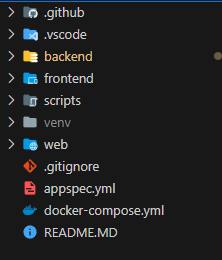
전체적인 폴더 구조입니다.(다른분들은 가독성 좋아보이던데...)
backend
ㄴ django
ㄴdocker file
frontend
ㄴ build
ㄴ docker file
web
ㄴ gunicorn
ㄴ nginx.conf
ㄴ project.conf
docker-compose.yml
아래 이미지와 비슷하다.
Backend
#backend/docker file
FROM python:3.9.0

ENV PYTHONUNBUFFERED 1

RUN apt-get update && apt-get install -y

ADD . /app

WORKDIR /app

RUN pip install --upgrade pip
RUN pip install -r requirements.txt
RUN python manage.py collectstatic --noinput


EXPOSE 8000
이미지화
docker build -t myapp:latest .접속
docker run -i -p80:8000 myapp:latest중요한건 아무것도 안뜨는 것이 정상동작이다. 구니콘으로 띄울 것이기 때문에 runserver를 하지 않았다.

Frontend
Docker file
# pull official base image
FROM node:15.8.0-alpine

# set work directory
WORKDIR /app

# install app dependencies
COPY package.json ./
COPY package-lock.json ./
RUN npm ci --silent

# add app
COPY . ./

# start app
CMD ["npm", "start"]
이미지 명령어
docker build -t myreact:latest .
접속
docker run -i -p 80:3000 myreact:latest
아마 본인이 만든 사이트가 뜰것이다.

WEB
Docker file
FROM nginx:1.15.8

RUN rm /etc/nginx/nginx.conf
COPY nginx.conf /etc/nginx/
RUN rm /etc/nginx/conf.d/default.conf
COPY project.conf /etc/nginx/conf.d/
web 같은 경우 nginx와 project 설정을 옮겨주기 위함이다.
nginx.conf
#ngnix.conf

#Define the user that will own and run the Nginx server
user  nginx;

# Define the number of worker processes; recommended value is the number of
# cores that are being used by your server
worker_processes  1;

# Define the location on the file system of the error log, plus the minimum
# severity to log messages for
error_log  /var/log/nginx/error.log warn;

# Define the file that will store the process ID of the main NGINX process
pid        /var/run/nginx.pid;


# events block defines the parameters that affect connection processing.
events {
    # Define the maximum number of simultaneous connections that can be opened by a worker process
    worker_connections  1024;
}


# http block defines the parameters for how NGINX should handle HTTP web traffic
http {
    # Include the file defining the list of file types that are supported by NGINX
    include       /etc/nginx/mime.types;

    # Define the default file type that is returned to the user
    default_type  text/html;

    # Define the format of log messages.
    log_format  main  '$remote_addr - $remote_user [$time_local] "$request" '
                      '$status $body_bytes_sent "$http_referer" '
                      '"$http_user_agent" "$http_x_forwarded_for"';

    # Define the location of the log of access attempts to NGINX
    access_log  /var/log/nginx/access.log  main;

    # Define the parameters to optimize the delivery of static content
    sendfile        on;
    tcp_nopush     on;
    tcp_nodelay    on;

    # Define the timeout value for keep-alive connections with the client
    keepalive_timeout  65;

    # Define the usage of the gzip compression algorithm to reduce the amount of data to transmit
    #gzip  on;

    # Include additional parameters for virtual host(s)/server(s)
    include /etc/nginx/conf.d/*.conf;
}
project.conf
server {

    listen 8000;
    server_name localhost;

    location / {
        proxy_pass http://django_app:8000;

        # Change this to the host and port you want Django to see
        proxy_set_header Host $host:8000;
        proxy_set_header X-Real-IP $remote_addr;
        proxy_set_header X-Forwarded-For $proxy_add_x_forwarded_for;
    }

    location /static/ {
        alias /app/backend/static/;
    }
}
server {
    listen 80;
    server_name localhost;

    location / {
        root /app/frontend/build;
        index index.html index.htm;
        try_files $uri /index.html;

        # Do not change this
        proxy_set_header Host $host;
        proxy_set_header X-Real-IP $remote_addr;
        proxy_set_header X-Forwarded-For $proxy_add_x_forwarded_for;
    }

}
gunicorn.conf
[program:gunicorn]
directory=/home/ubuntu/Simple-Diet-Manager/backend
command=/usr/local/bin/gunicorn --preload --workers 3 --bind unix:/home/ubuntu/Simple-Diet-Manager/backend/app.sock Simple_Diet_Manager.wsgi:application
autostart=true
autorestart=true
stderr_logfile=/logs/gunicorn.err.log
stdout_logfile=/logs/gunicorn.out.log
이렇게 준비하고 한번에 동작 하도록 docker compose 작업을 진행합니다.
Docker-compose.yml
version: '3'

services:
  nginx:
    container_name: nginx
    build:
      context: ./web
      dockerfile: Dockerfile
    volumes:
      - .:/app
    ports:
      - "80:80"
      - "8000:8000"
    depends_on:
      - django_app
      - react_app

  django_app:
    build:
      context: backend
      dockerfile: Dockerfile
    command: bash -c "cd backend && gunicorn --bind 0.0.0.0:8000 Simple_Diet_Manager.wsgi:application"
    expose:
      - "8000"
    volumes:
      - .:/app


  react_app:
    build:
      context: frontend
      dockerfile: Dockerfile
    volumes:
      - ./frontend:/app
    expose:
      - "3000"
동작방법
docker-compose up지금까지 로컬에서 docker 환경구성하는 방법을 알아보았습니다.


다른 포스트 들은 2개로 띄워서 진행하지만 공부하기위해서 전부다 띄워 보았습니다. 2개로 줄이는 건 다음기회에 해보겠습니다.

작게 하나씩