React / Typescript / vite 프로젝트 생성
초기 설정
Ant Design과 Toast UI를 사용하는 프론트엔드 프로젝트 초기 설정을 정리했습니다.
개발 환경은 다음과 같습니다:
- React
- TypeScript
- Vite
- Ant Design
- Toast UI
- ESLint + Airbnb 스타일
1. 프로젝트 생성 (Vite)
npm create vite@latest my-project-name -- --template react-ts
cd my-project-name
npm install
2. 주요 라이브러리 설치
UI 라이브러리 설치(ant)
npm install antd
npm install dayjs
Toast UI 컴포넌트 설치
npm install @toast-ui/react-grid --legacy-peer-deps
npm install @toast-ui/react-calendar --legacy-peer-deps
npm install @toast-ui/react-chart --legacy-peer-deps
npm install @toast-ui/react-editor --legacy-peer-deps
기타 유틸 설치
npm install path npm install @types/node`3. Vite 설정 (alias 적용)
vite.config.ts
import { defineConfig } from 'vite'
import react from '@vitejs/plugin-react'
import svgrPlugin from "vite-plugin-svgr";
import * as path from "path";

// https://vite.dev/config/
export default defineConfig({
  plugins: [react(), svgrPlugin()],
  server: {
    port: 3000,
  },
  resolve:{ //추가
    alias:[{
      find : "@src",
      replacement : path.resolve(__dirname, "src")
    },
      {
        find:"@components",
        replacement: path.resolve(__dirname,"src/components")
      }
    ]
  },
})
tsconfig.json
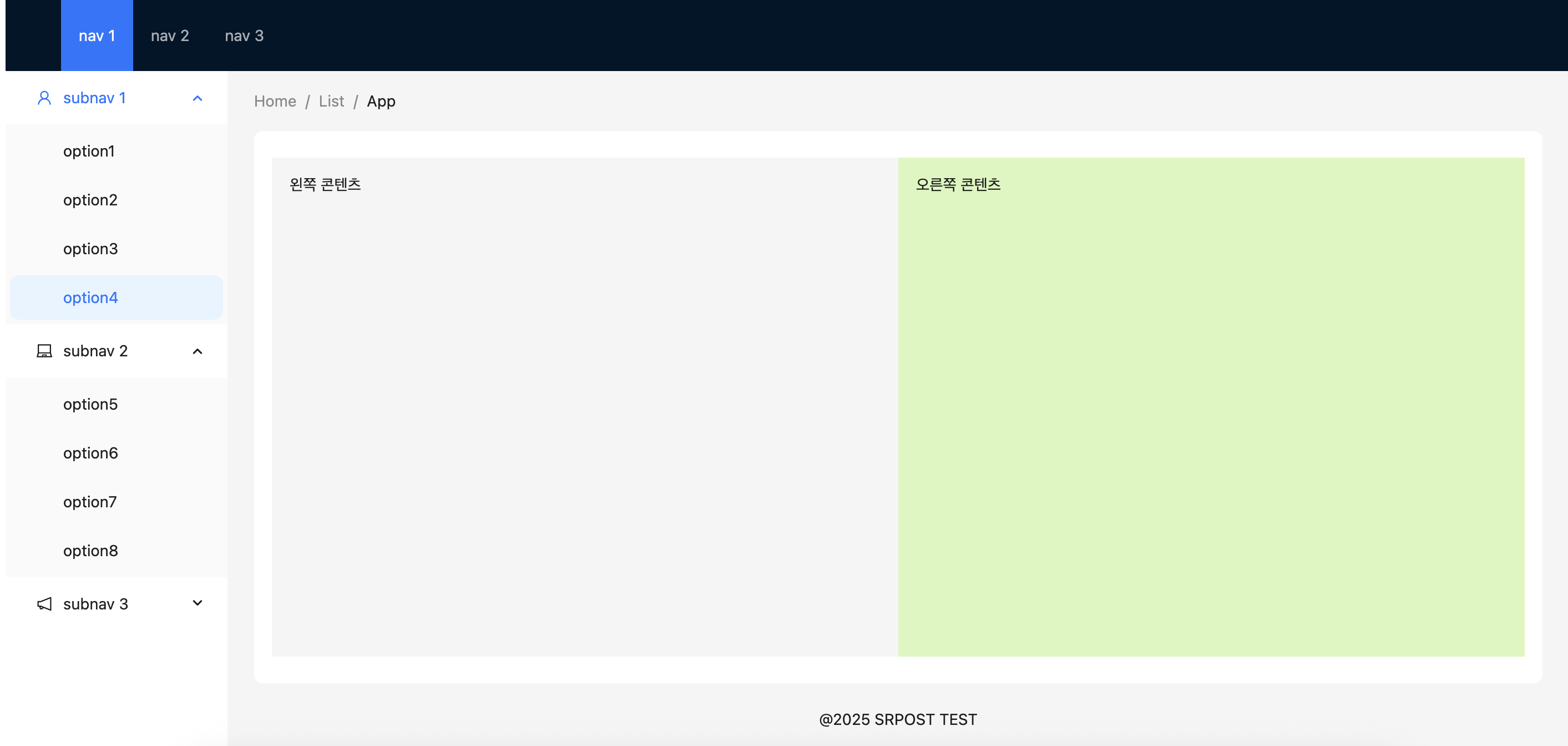
4. 기본 레이아웃 구성 (with Ant Design)
App.tsx

import React from 'react';
import { LaptopOutlined, NotificationOutlined, UserOutlined } from '@ant-design/icons';
import type { MenuProps } from 'antd';
import { Breadcrumb, Layout, Menu, theme, Row, Col } from 'antd';

const { Header, Content, Sider, Footer } = Layout;

const items1: MenuProps['items'] = ['1', '2', '3'].map((key) => ({
    key,
    label: `nav ${key}`,
}));

const items2: MenuProps['items'] = [UserOutlined, LaptopOutlined, NotificationOutlined].map(
    (icon, index) => {
        const key = String(index + 1);

        return {
            key: `sub${key}`,
            icon: React.createElement(icon),
            label: `subnav ${key}`,
            children: Array.from({ length: 4 }).map((_, j) => {
                const subKey = index * 4 + j + 1;
                return {
                    key: subKey,
                    label: `option${subKey}`,
                };
            }),
        };
    },
);

const App: React.FC = () => {
    const {
        token: { colorBgContainer, borderRadiusLG },
    } = theme.useToken();

    return (
        <Layout style={{ minHeight: '100vh' }}>
            <Header style={{ display: 'flex', alignItems: 'center' }}>
                <div className="demo-logo" />
                <Menu
                    theme="dark"
                    mode="horizontal"
                    defaultSelectedKeys={['2']}
                    items={items1}
                    style={{ flex: 1, minWidth: 0 }}
                />            </Header>

            <Layout style={{ flex: 1 }}>
                <Sider width={200} style={{ background: colorBgContainer }}>
                    <Menu
                        mode="inline"
                        defaultSelectedKeys={['1']}
                        defaultOpenKeys={['sub1']}
                        style={{ height: '100%', borderRight: 0 }}
                        items={items2}
                    />
                </Sider>

                <Layout style={{ padding: '0 24px 24px', flex: 1 }}>
                    <Breadcrumb
                        items={[{ title: 'Home' }, { title: 'List' }, { title: 'App' }]}
                        style={{ margin: '16px 0' }}
                    />

                    <Content
                        style={{
                            flex: 1,
                            display: 'flex',
                            flexDirection: 'column',
                            justifyContent: 'center',
                            background: colorBgContainer,
                            borderRadius: borderRadiusLG,
                            padding: '24px',
                        }}
                    >
                        <Row gutter={16} style={{ flex: 1 }}>
                            <Col
                                span={12}
                                style={{ background: '#f5f5f5', padding: '16px', height: '100%' }}
                            >
                                왼쪽 콘텐츠
                            </Col>
                            <Col
                                span={12}
                                style={{ background: '#d9f7be', padding: '16px', height: '100%' }}
                            >
                                오른쪽 콘텐츠
                            </Col>
                        </Row>
                    </Content>

                    <Footer style={{ textAlign: 'center' }}>@2025 SRPOST TEST</Footer>
                </Layout>
            </Layout>
        </Layout>
    );
};

export default App;
5. 프로젝트 실행
npm run dev