
📖 학습주제
데이터 파이프라인, Airflow (3)
Hello World 예제 프로그램 살펴보기
PythonOperator 이용
PythonOperator
from airflow.operators.python import PythonOperator

load_nps = PythonOperator(
 dag=dag,
 task_id='task_id',
 python_callable=python_func,
 params={
 'table': 'delighted_nps',
 'schema': 'raw_data'
 },
)
python_callable : 태크스가 실행 될 때 불러올 파이썬 함수
params : 함수의 인자
def python_func(**cxt):
table = cxt["params"]["table"]
schema = cxt["params"]["schema"]
ex_date = cxt["execution_date"]
# do what you need to do
...
소스코드
from airflow import DAG
from airflow.operators.python import PythonOperator
from datetime import datetime

dag = DAG(
    dag_id = 'HelloWorld',
    start_date = datetime(2022,5,5),
    catchup=False,
    tags=['example'],
    schedule = '0 2 * * *')

def print_hello():
    print("hello!")
    return "hello!"

def print_goodbye():
    print("goodbye!")
    return "goodbye!"

print_hello = PythonOperator(
    task_id = 'print_hello',
    #python_callable param points to the function you want to run
    python_callable = print_hello,
    #dag param points to the DAG that this task is a part of
    dag = dag)

print_goodbye = PythonOperator(
    task_id = 'print_goodbye',
    python_callable = print_goodbye,
    dag = dag)

#Assign the order of the tasks in our DAG
print_hello >> print_goodbye
2개의 태스크로 구성된 데이터 파이프라인 (DAG)
print_hello: PythonOperator로 구성되어 있으며 먼저 실행print_goodbye: PythonOperator로 구성되어 있으며 두번째로 실행
Airflow Decorators
프로그래밍이 단순해진다.
from airflow.decorators import task
@task
def print_hello():
 print("hello!")
 return "hello!"
@task
def print_goodbye():
 print("goodbye!")
 return "goodbye!"

with DAG(
 dag_id = 'HelloWorld_v2',
 start_date = datetime(2022,5,5),
 catchup=False,
 tags=['example'],
 schedule = '0 2 * * *'
) as dag:
 # Assign the tasks to the DAG in order
print_hello() >> print_goodbye()python_callable로 지정했던 함수들을 @task로 Decorate
-> 각각이 python_operator가 되며 정의된 함수가 task_id가 됨
소스 코드
from airflow import DAG
from airflow.decorators import task
from datetime import datetime

@task
def print_hello():
    print("hello!")
    return "hello!"

@task
def print_goodbye():
    print("goodbye!")
    return "goodbye!"

with DAG(
    dag_id = 'HelloWorld_v2',
    start_date = datetime(2022,5,5),
    catchup=False,
    tags=['example'],
    schedule = '0 2 * * *'
) as dag:

    # Assign the tasks to the DAG in order
    print_hello() >> print_goodbye()
중요한 DAG 파라마터 (not task parameters)
with DAG(
 dag_id = 'HelloWorld_v2',
 start_date = datetime(2022,5,5),
 catchup=False,
 tags=['example'],
 schedule = '0 2 * * *'
) as dag:max_active_runs: 한번에 동시에 실행될 수 있는 DAG의 수max_active_tasks: 한번에 동시에 실행될 수 있는 task의 수catchup: start_date부터 활성화 시점까지 실행 안된 날짜에 대해서 실행DAG parametersvs.Task parameters의 차이점 이해가 중요
위의 파라미터들은 모두 DAG 파라미터로 DAG 객체를 만들 때 지정해주어야함
Connections and Variables
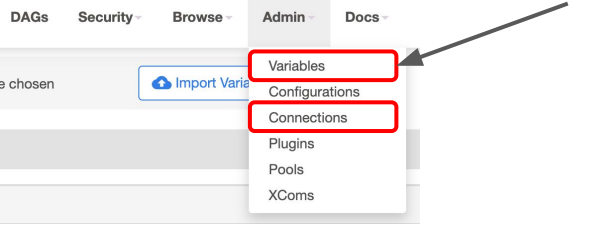
Connections
hostname, port number, access credential과 같이 외부 시스템과 연결하는 방식에 대한 정보를 저장해놓는 곳
Postgres connection, Redshift connection info 등이 이곳에 저장 될 수 있음
Variables
API keys, configuration info 또는 공통적으로 사용 가능한 변수들을 저장하는데 사용
key-value의 형식으로 저장되어 있으며 보안을 위해 password, secret, passwd, authorization, api_key, apikey, access_token 등의 키워드가 포함된 key를 가지는 경우 Web UI에서는 value가 보이지 않는 암호화된 key를 생성할 수 있다.
Xcom
- 태스크(Operator)들간에 데이터를 주고 받기 위한 방식
- 보통 한 Operator의 리턴값을 다른 Operator에서 읽어가는 형태가 됨
- 이 값들은 Airflow 메타 데이터 DB에 저장이 되기에 큰 데이터를 주고받는데는 사용불가
- 보통 큰 데이터는 S3등에 로드하고 그 위치를 넘기는 것이 일반적

.