
📖 학습주제
Airflow의 다양한 고급 기능과 CI/CD 환경 설정에 대해 학습 (2)
구글 시트 연동하기
구글 시트 => Redshift table
구글 시트를 테이블로 복사
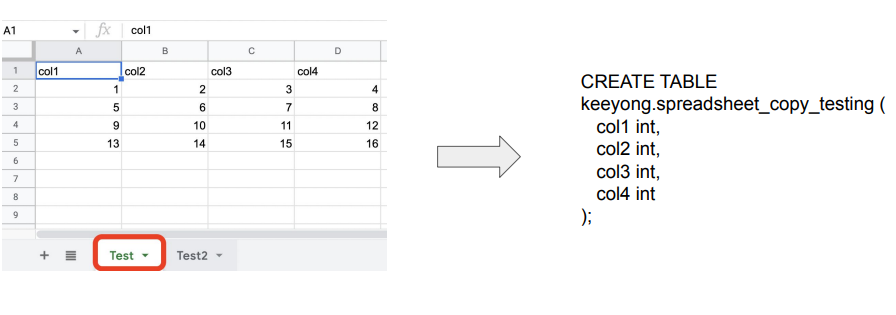
구현 절차
- 구글 클라우드에 로그인해 시트 API 활성화하고 구글 서비스 어카운트 생성하고 그 내용을 JSON 파일로 다운로드
- 어카운트에서 생성해준 이메일을 조작하고 싶은 시트에 공유
- Airflow DAG쪽에서 해당 JSON 파일로 인증하고 앞서 시트를 조작
구글 서비스 어카운트 생성
- 구글 클라우드 로그인
https://console.cloud.google.com/ - 구글 스프레드시트 API 활성화 필요 https://console.cloud.google.com/apis/library/sheets.googleapis.com
- 구글 서비스 어카운트 생성 (JSON), 아래 두 문서 중 하나를 참고
https://robocorp.com/docs/development-guide/google-sheets/interacting-with-google-sheets
https://denisluiz.medium.com/python-with-google-sheets-service-account-step-by-step-8f74c26ed28e - 이 JSON 파일의 내용을 google_sheet_access_token이란 이름의 Variable로 등록
- 이 JSON 파일을 보면 이메일 주소가 하나 존재 (이를 읽고 싶은 구글스프레드시트 파일에 공유, 이 이메일은 iam.gserviceaccount.com로 끝남)
구글 시트를 테이블로 복사
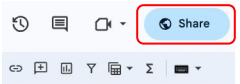
먼저 스프레드 시트 우측 상단 공유버튼 누름
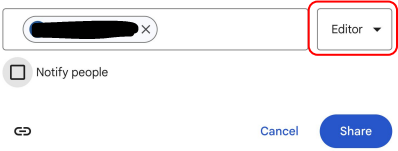
앞서 구글 서비스 어카운트에서 찾은 이메일을 공유 (+ 권한 설정)
API & Airflow 모니터링
Airflow API 활성화
airflow.cfg의 api 섹션에서 auth_backend의 값을 변경
[api]
auth_backend = airflow.api.auth.backend.basic_authdocker-compose.yaml에는 이미 설정이 되어 있음 (environments)
AIRFLOW__API__AUTH_BACKENDS: 'airflow.api.auth.backend.basic_auth,airflow.api.auth.backend.session'
- 아래 명령으로 확인해보기
airflow config get-value api auth_backend
- Airflow Web UI에서 새로운 사용자 추가 (API 사용자)
- Security -> List Users -> +, 이후 화면에서 새 사용자 정보 추가 (monitor:MonitorUser1)
Health API 호출 : Airflow 상태 확인
curl -X GET --user "monitor:MonitorUser1" http://localhost:8080/health정상 경우 응답:
{
 "metadatabase": {
 "status": "healthy"
 },
 "scheduler": {
 "status": "healthy",
 "latest_scheduler_heartbeat": "2022-03-12T06:02:38.067178+00:00"
 }
}
API 사용 예
특정 DAG를 API로 Trigger하기
curl -X POST --user "airflow:airflow" -H 'Content-Type: application/json' -d
'{"execution_date":"2023-05-24T00:00:00Z"}'
"http://localhost:8080/api/v1/dags/HelloWorld/dagRuns"
응답
{
 "detail": "DAGRun with DAG ID: 'HelloWorld' and DAGRun logical date: '2023-05-24 00:00:00+00:00'
already exists",
 "status": 409,
 "title": "Conflict",
 "type":
"https://airflow.apache.org/docs/apache-airflow/2.5.1/stable-rest-api-ref.html#section/Errors/AlreadyExists"
}
모든 DAG 리스트하기
curl -X GET --user "airflow:airflow" http://localhost:8080/api/v1/dags응답
 {
 "dag_id": "SQL_to_Sheet",
 "default_view": "grid",
 "description": null,
 "file_token": "...",
 "fileloc": "/opt/airflow/dags/SQL_to_Sheet.py",
 "has_import_errors": false,
 "has_task_concurrency_limits": false,
 "is_active": true,
 "is_paused": true,
 "is_subdag": false,
 "last_expired": null,
 "last_parsed_time": "2023-06-18T05:21:34.266335+00:00",
 "last_pickled": null,
 "max_active_runs": 16,
 "max_active_tasks": 16,
 "next_dagrun": "2022-06-18T00:00:00+00:00",
 "next_dagrun_create_after": "2022-06-18T00:00:00+00:00",
 "next_dagrun_data_interval_end": "2022-06-18T00:00:00",
 "next_dagrun_data_interval_start": "2022-06-18T00:00:00",
 "owners": [ "airflow" ],
 "pickle_id": null,
 "root_dag_id": null,
 "schedule_interval": {
 "__type": "CronExpression",
 "value": "@once"
 },
 "scheduler_lock": null,
 "tags": [ { "name": "example" }],
 "timetable_description": "Once, as soon as possible"
}
모든 Variable 리스트하기
curl -X GET --user "airflow:airflow" http://localhost:8080/api/v1/variables응답
{
 "total_entries": 7,
 "variables": [
 {
 "description": null,
 "key": "api_token",
 "value": "12345667"
 },
 {
 "description": null,
 "key": "csv_url",
 "value": "https://s3-geospatial.s3-us-west-2.amazonaws.com/name_gender.csv"
 }
모든 Config 리스트하기
curl -X GET --user "airflow:airflow" http://localhost:8080/api/v1/config응답
{
 "detail": "Your Airflow administrator chose not to expose the configuration, most likely for security
reasons.",
 "status": 403,
 "title": "Forbidden",
 "type":
"https://airflow.apache.org/docs/apache-airflow/2.5.1/stable-rest-api-ref.html#section/Errors/PermissionDe
nied"
}

.