
📖 학습주제
머신러닝, Scikit-learn, 실전 머신러닝 문제 실습 (1)
머신러닝 E2E(End-to-End)
주요 단계는 다음과 같다.
- 큰 그림을 본다. (look at the big picture)
- 데이터를 구한다. (get the data)
- 데이터로부터 통찰을 얻기 위해 탐색하고 시각화한다. (discover and visualize the data to gain insights)
- 머신러닝 알고리즘을 위해 데이터를 준비한다. (prepare the data for Machine Learning algorithms)
- 모델을 선택하고 훈련시킨다. (select a model and train it)
- 모델을 상세하게 조정한다. (fine-tune your model)
- 솔루션을 제시한다. (present your solution)
- 시스템을 론칭하고 모니터링하고 유지 보수한다. (launch, monitor, and maintain your system)
아래의 내용은 1990년 캘리포니아 인구조사 데이터를 기반으로 한 데이터 셋을 이용해 강의 실습에서 진행한 내용
큰 그림 보기 (Look at the Big Picture)
문제 정의
- 지도학습(supervised learning), 비지도학습(unsupervised learning), 강화학습(reinforcement learning) 중에 어떤 경우에 해당하는가?
- 분류문제(classification)인가 아니면 회귀문제(regresssion)인가?
- 배치학습(batch learning), 온라인학습(online learning) 중 어떤 것을 사용해야 하는가?
성능측정지표(performance measure) 선택
데이터 가져오기 (Get the Data)
작업환경 설정
$ export ML_PATH="$HOME/ml" # You can change the path if you prefer
$ mkdir -p $ML_PATH

$ python3 -m pip --version
pip 19.3.1 from [...]/lib/python3.7/site-packages/pip (python 3.7)

$ python3 -m pip install --user -U pip
Collecting pip
[...]
Successfully installed pip-19.3.1
독립적인 환경(isolated environment) 만들기
$ python3 -m pip install --user -U virtualenv
Collecting virtualenv
[...]
Successfully installed virtualenv-16.7.6

$ cd $ML_PATH
$ python3 -m virtualenv my_env
Using base prefix '[...]'
New python executable in [...]/ml/my_env/bin/python3
Also creating executable in [...]/ml/my_env/

$ cd $ML_PATH
$ source my_env/bin/activate # on Linux or macOS
$ .\my_env\Scripts\activate # on Windows
필요한 패키지들 설치하기
$ python3 -m pip install -U jupyter matplotlib numpy pandas scipy scikit-learn
Collecting jupyter
Downloading https://[...]/jupyter-1.0.0-py2.py3-none-any.whl
Collecting matplotlib
[...]
커널을 Jupyter에 등록하고 이름 정하기
$ python3 -m ipykernel install --user --name=python3Jupyter 실행
$ jupyter notebook
[...] Serving notebooks from local directory: [...]/ml
[...] The Jupyter Notebook is running at:
[...] http://localhost:8888/?token=60995e108e44ac8d8865a[...]
[...] or http://127.0.0.1:8889/?token=60995e108e44ac8d8865a[...]
[...] Use Control-C to stop this server and shut down all kernels [...]
데이터 다운로드
# Python ≥3.5 is required
import sys
assert sys.version_info >= (3, 5)

# Scikit-Learn ≥0.20 is required
import sklearn
assert sklearn.__version__ >= "0.20"

# Common imports
import numpy as np
import os

# To plot pretty figures
%matplotlib inline
import matplotlib as mpl
import matplotlib.pyplot as plt
mpl.rc('axes', labelsize=14)
mpl.rc('xtick', labelsize=12)
mpl.rc('ytick', labelsize=12)

# Where to save the figures
PROJECT_ROOT_DIR = "."
CHAPTER_ID = "end_to_end_project"
IMAGES_PATH = os.path.join(PROJECT_ROOT_DIR, "images", CHAPTER_ID)
os.makedirs(IMAGES_PATH, exist_ok=True)

def save_fig(fig_id, tight_layout=True, fig_extension="png", resolution=300):
    path = os.path.join(IMAGES_PATH, fig_id + "." + fig_extension)
    print("Saving figure", fig_id)
    if tight_layout:
        plt.tight_layout()
    plt.savefig(path, format=fig_extension, dpi=resolution)

# Ignore useless warnings (see SciPy issue #5998)
import warnings
warnings.filterwarnings(action="ignore", message="^internal gelsd")
import os
import tarfile
import urllib
DOWNLOAD_ROOT = "https://raw.githubusercontent.com/ageron/handson-ml2/master/"
HOUSING_PATH = os.path.join("datasets", "housing")
HOUSING_URL = DOWNLOAD_ROOT + "datasets/housing/housing.tgz"
def fetch_housing_data(housing_url=HOUSING_URL, housing_path=HOUSING_PATH):
if not os.path.isdir(housing_path):
os.makedirs(housing_path)
tgz_path = os.path.join(housing_path, "housing.tgz")
urllib.request.urlretrieve(housing_url, tgz_path)
housing_tgz = tarfile.open(tgz_path)
housing_tgz.extractall(path=housing_path)
housing_tgz.close()fetch_housing_data를 호출하면 현재 작업공간에 datasets/housing 디렉토리를 만들고 housing.tgz 파일을 내려받고 압축을 풀어 housing.csv 파일을 만든다.
import pandas as pd

def load_housing_data(housing_path=HOUSING_PATH):
    csv_path = os.path.join(housing_path, "housing.csv")
    return pd.read_csv(csv_path)
테스트 데이터셋 만들기
- 좋은 모델을 만들기 위해선 훈련에 사용되지 않고 모델평가만을 위해서 사용될 "테스트 데이터셋"을 따로 구분하는 것이 필요
- 테스트 데이터셋을 별도로 생성할 수도 있지만 프로젝트 초기의 경우 하나의 데이터셋을 훈련, 테스트용으로 분리하는 것이 일반적
# to make this notebook's output identical at every run
np.random.seed(42)
import numpy as np
# For illustration only. Sklearn has train_test_split()
def split_train_test(data, test_ratio):
shuffled_indices = np.random.permutation(len(data))
test_set_size = int(len(data) * test_ratio)
test_indices = shuffled_indices[:test_set_size]
train_indices = shuffled_indices[test_set_size:]
return data.iloc[train_indices], data.iloc[test_indices]train_set, test_set = split_train_test(housing, 0.2)- 문제점 : 새로운 데이터 추가 후 실행시, 기존의 training data가 test data로 옮겨가거나 그 반대의 일이 발생할 수 있음
- 해결방안 : 각 샘플의 식별자(identifier)를 사용해서 분할
from zlib import crc32

def test_set_check(identifier, test_ratio):
    return crc32(np.int64(identifier)) & 0xffffffff < test_ratio * 2**32

def split_train_test_by_id(data, test_ratio, id_column):
    ids = data[id_column]
    in_test_set = ids.apply(lambda id_: test_set_check(id_, test_ratio))
    return data.loc[~in_test_set], data.loc[in_test_set]
인덱스를 id로 추가
housing_with_id = housing.reset_index()   # adds an `index` column
train_set, test_set = split_train_test_by_id(housing_with_id, 0.2, "index")- 주의사항 : Id를 만드는 데 안전한 feature들을 사용해야 함 (각 sample에 유일하게 나타나는 것들)
housing_with_id["id"] = housing["longitude"] * 1000 + housing["latitude"]
train_set, test_set = split_train_test_by_id(housing_with_id, 0.2, "id")- Scikit-Learn에서 기본적으로 제공되는 데이터분할 함수
from sklearn.model_selection import train_test_split

train_set, test_set = train_test_split(housing, test_size=0.2, random_state=42)
계층적 샘플링(stratified sampling)
- 전체 데이터를 계층(strata)라는 동질의 그룹으로 나누고, 테스트 데이터가 전체 데이터를 잘 대표하도록 각 계층에서 올바른 수의 샘플을 추출
데이터 이해를 위한 탐색과 시각화
# 데이터 복사본 만들기 (훈련데이터를 손상시키지 않기 위해)
housing = strat_train_set.copy()
지리적 데이터 시각화
housing.plot(kind="scatter", x="longitude", y="latitude")
save_fig("bad_visualization_plot")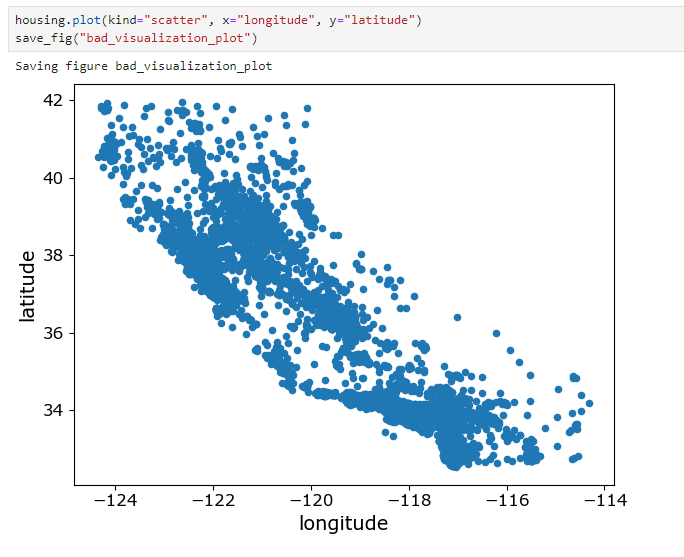
밀집된 영역 표시 : alpha옵션
housing.plot(kind="scatter", x="longitude", y="latitude", alpha=0.1)
save_fig("better_visualization_plot")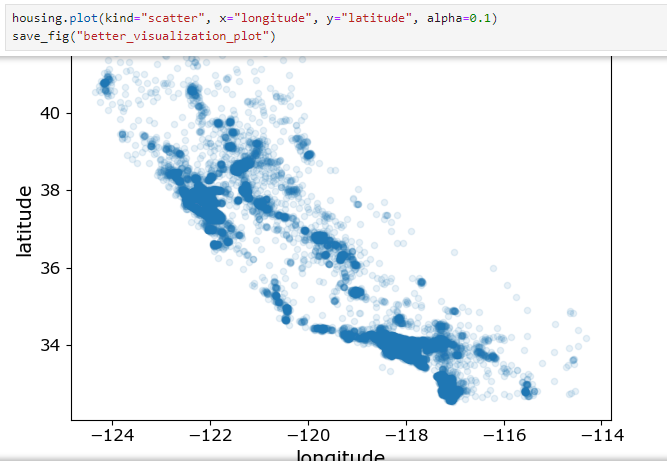
s : 원의 반지름 => 인구
c : 색상 => 가격
housing.plot(kind="scatter", x="longitude", y="latitude", alpha=0.4,
    s=housing["population"]/100, label="population", figsize=(10,7),
    c="median_house_value", cmap=plt.get_cmap("jet"), colorbar=True,
    sharex=False)
plt.legend()
save_fig("housing_prices_scatterplot")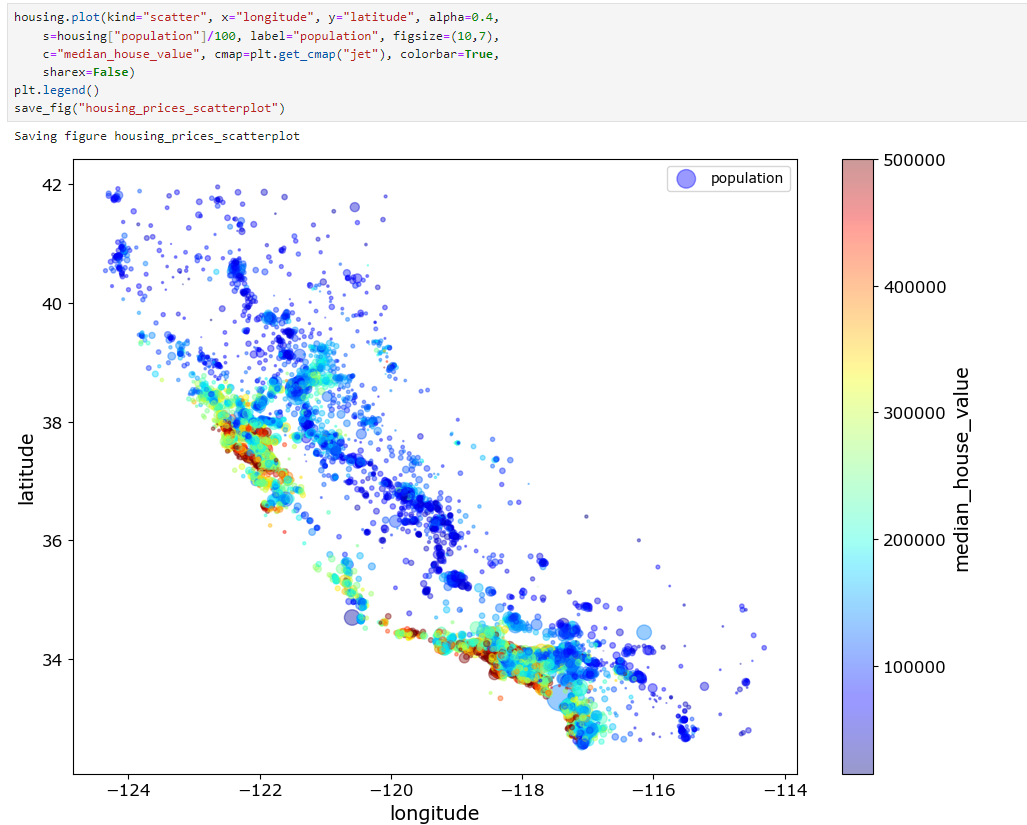
상관관계(Correlations) 관찰하기
corr_matrix = housing.corr()
corr_matrix["median_house_value"].sort_values(ascending=False)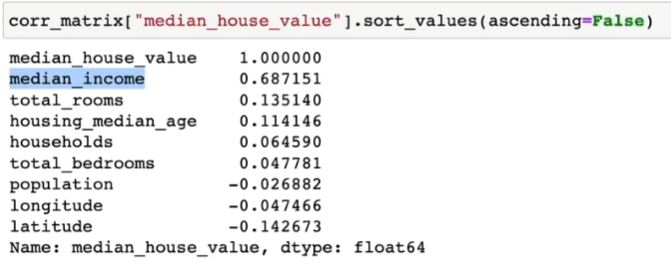
특성 조합들 실험
- 여러 특성(feature, attribute)들의 조합으로 새로운 특성을 정의해볼 수 있음
- 예를 들자면, 가구당 방 개수, 침대방(bedroom)의 비율, 가구당 인원
housing["rooms_per_household"] = housing["total_rooms"]/housing["households"]
housing["bedrooms_per_room"] = housing["total_bedrooms"]/housing["total_rooms"]
housing["population_per_household"]=housing["population"]/housing["households"]

corr_matrix = housing.corr()
corr_matrix["median_house_value"].sort_values(ascending=False)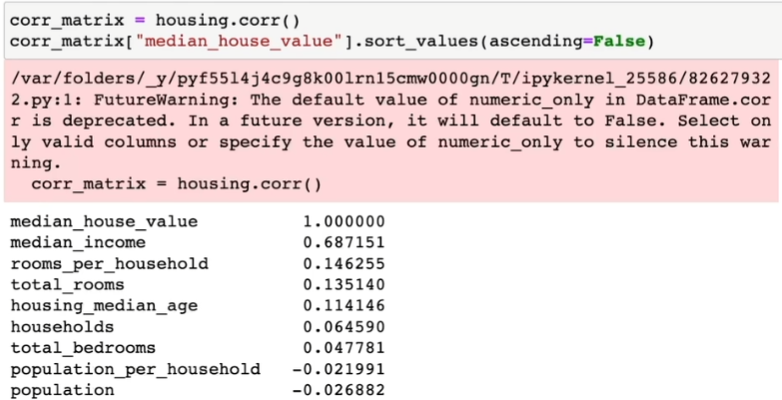
머신러닝 알고리즘을 위한 데이터 준비
데이터 준비는 데이터 변환(data transformation)과정으로 볼 수 있다.
데이터 수동변환 vs. 자동변환(함수만들기)
데이터 자동변환의 장점들
- 새로운 데이터에 대한 변환을 손쉽게 재생산(reproduce)할 수 있다.
- 향후에 재사용(reuse)할 수 있는 라이브러리를 구축하게 된다.
- 실제 시스템에서 가공되지 않은 데이터(raw data)를 알고리즘에 쉽게 입력으로 사용할 수 있도록 해준다.
- 여러 데이터 변환 방법을 쉽게 시도해 볼 수 있다.
데이터 정제(Data Cleaning)
누락된 특성(missing features) 다루는 방법들
- 해당 구역을 제거(행을 제거)
- 해당 특성을 제거(열을 제거)
- 어떤 값으로 채움(0, 평균, 중간값 등)
Estimator, Transformer, Predictor
-
추정기(estimator) : 데이터셋을 기반으로 모델 파라미터들을 추정하는 객체(e.g.) imputer). 추정자체는 fit() method에 의해서 수행되고 하나의 데이터셋을 매개변수로 전달받음(지도학습의 경우 label을 담고 있는 데이터셋을 추가적인 매개변수로 전달)
-
변환기(transformer) : (imputer같이) 데이터셋을 변환하는 추정기. 변환은 transform() method가 수행하고 변환된 데이터셋을 반환
-
예측기(predictor) : 일부 추정기는 주어진 새로운 데이터셋에 대해 예측값을 생성.(e.g.) LinearRegression) 예측기의 predict() method는 새로운 데이터셋을 받아 예측값을 반환하고고 score() method는 예측값에 대한 평가지표를 반환
Custom Transformers
- Scikit-Learn이 유용한 변환기를 많이 제공하지만 프로젝트를 위해 특별한 데이터 처리 작업을 해야 할 경우가 많은데 이 때 나만의 변환기를 만들 수 있음
반드시 구현해야 할 method들
- fit()
- transform()
특성 스케일링(Feature Scaling)
- Min-max scaling : 0과 1사이의 값이 되도록 조정
- 표준화(standardization) : 평균이 0, 분산이 1이 되도록 만들어 줌(사이킷런의 StandardScaler 사용)
변환 파이프라인(Transformation Pipelines)
- 여러 개의 변환이 순차적으로 이루어져야 할 경우 Pipeline class를 사용하면 편함
- 파이프라인의 fit() method를 호출하면 모든 변환기의 fit_transform() method를 순서대로 호출하면서 한 단계의 출력을 다음 단계의 입력으로 전달
- 마지막 단계에서는 fit() method만 호출
모델 훈련(Train a Model)
훈련 데이터셋의 RMSE가 이 경우처럼 큰 경우 => 과소적합(under-fitting)
과소적합이 일어나는 이유
- 특성들(features)이 충분한 정보를 제공하지 못함
- 모델이 충분히 강력하지 못함
모델 평가
- 테스트 데이터셋을 이용한 검증
- 훈련 데이터셋의 일부를 검증데이터(validation data)셋으로 분리해서 검증
- k-겹 교차 검증(k-fold cross-validation)
모델 세부 튜닝(Fine-Tune Your Model)
- 모델의 종류를 선택한 후에 모델을 세부 튜닝하는 것이 필요
- 모델 학습을 위한 최적의 하이퍼파라미터를 찾는 과정
그리드 탐색(Grid Search)
- 수동으로 하이퍼파라미터 조합을 시도하는 대신 GridSearchCV를 사용하는 것이 좋음
랜덤 탐색(Randomized Search)
- 하이퍼파라미터 조합의 수가 큰 경우에 유리
- 지정한 횟수만큼만 평가
특성 중요도, 에러 분석
론칭, 모니터링, 시스템 유지 보수
론칭후 시스템 모니터링
- 시간이 지나면 모델이 낙후되면서 성능이 저하
- 자동모니터링: 추천시스템의 경우, 추천된 상품의 판매량이 줄어드는지?
- 수동모니터링: 이미지 분류의 경우, 분류된 이미지들 중 일부를 전문가에게 검토시킴
-결과가 나빠진 경우
- 데이터 입력의 품질이 나빠졌는지? 센서고장?
- 트렌드의 변화? 계절적 요인?
유지보수
- 정기적으로 새로운 데이터 수집(레이블)
- 새로운 데이터를 테스트 데이터로, 현재의 테스트 데이터는 학습데이터로 편입
- 다시 학습후, 새로운 테스트 데이터에 기반해 현재 모델과 새 모델을 평가, 비교
머신러닝 기초 개념들
Machine Learning (기계학습)
- 경험을 통해 자동으로 개선하는 컴퓨터 알고리즘 연구
- 학습데이터
- 입력벡터 : 1, … ,
- 목표값 : 1, … , - 머신러닝 알고리즘의 결과는 목표값을 예측하는 함수 ()
- (1) ~
- (2) ~ 2
- …
(는 번째 행에 해당)
핵심개념
- 학습단계 (training/learning phase) : 함수 ()를 학습데이터에 기반해 결정하는 단계
- 테스트 데이터셋 : 모델을 평가하기 위해서 사용하는 별도의 데이터
- 일반화 (generalization) : 모델에서 학습에 사용된 데이터가 아닌 이전에 접하지 못한 새로운 데이터에 대해 올바른 예측을 수행하는 역량
- 지도학습 (supervised learning) : 목표값(타겟, 레이블)이 주어진 경우
- 분류 (classification) : 목표값이 이산적인 경우
- 회귀 (regression) : 목표값이 연속적인 경우
- 비지도학습 (unsupervised learning) : 목표값(타겟, 레이블)이 없는 경우
- 군집 (clustering)
다항식 곡선 근사 (Polynomial Curve Fitting)
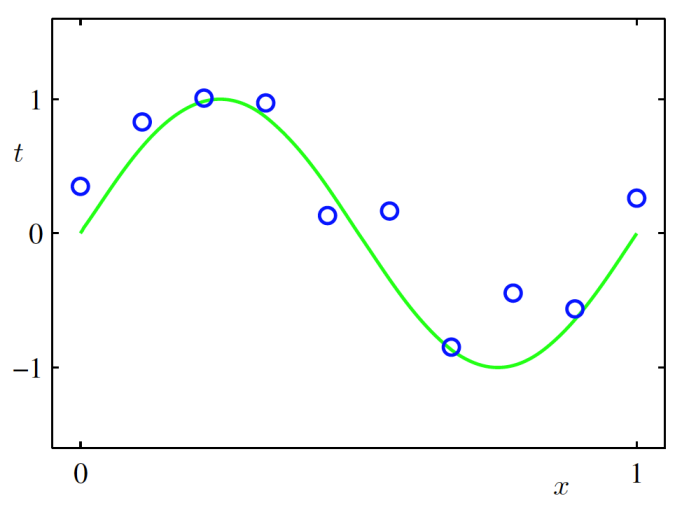
- 함수가 데이터 생성
- 학습시 데이터 생성방법은 모른다고 가정
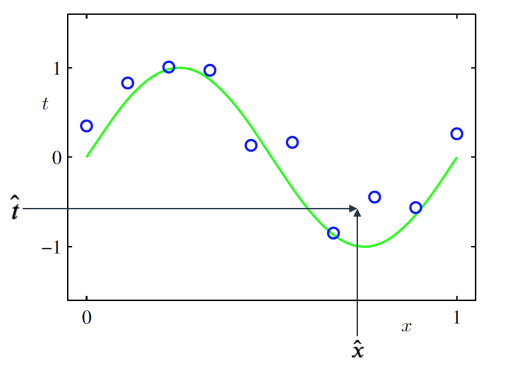
- 학습데이터 : = (1, … ,), = (1, … ,)
- 목표 : 새로운 입력벡터가 주어졌을 때 목표값 를 예측하는 것
머신러닝에 확률이 필요한 이유
- 확률이론(probability theory) : 예측값의 불확실성을 정량화시켜 표현할 수 있는 수학적인
프레임워크를 제공 - 결정이론(decision theory) : 확률적 표현을 바탕으로 최적의 예측을 수행할 수 있는 방법론을 제공
w 대해 선형인 다항함수
w = 0 + 1 + 22 + ... =
오차함수 (Error Function)
주어진 w에 대한 함수값 와 데이터 사이의 차이
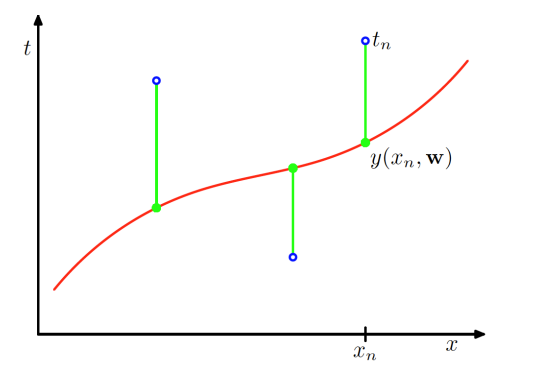
w = w를 최소화시키는 w를 구하는 것이 목표
과소적합 (Under-fitting), 과대적합 (Over-fitting)
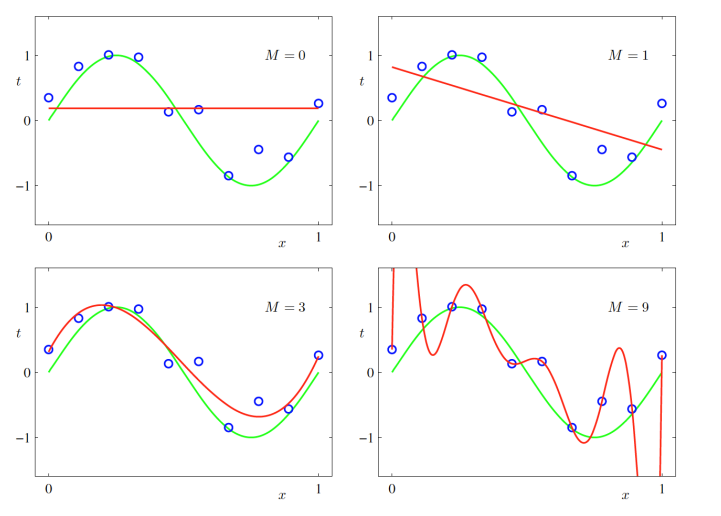
- 과소적합 : 모델이 너무 단순해서 데이터를 충분히 표현하지 못하는 경우
- 과대적합 : 모델이 너무 복잡해서 데이터의 노이즈까지 근사하려고 하는 경우
= 0, 1일 경우, 과소적합한 오차함수를 만들어 내었고, = 9일 경우, 과대적합되었다고 말할 수 있음
과소/과대적합은 모델의 일반화, 새로운 데이터에 관한 문제
-> 새로운 데이터가 들어왔을 때 오차가 클 것
이를 확인하기 위해서는 Test 데이터에 대해 오차를 구해보면 됨
=
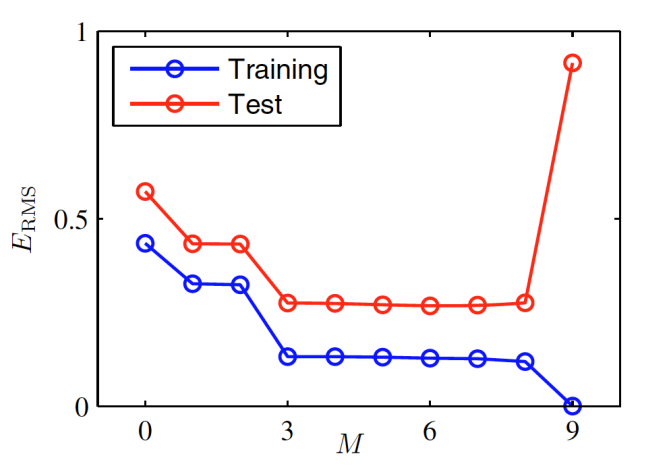
이 증가함에 따라 에러가 줄어들다가 9가 되었을 때 Training 데이터에 대해서는 오차가 0이 된 반면, Test 데이터에 대해서는 오차가 갑자기 커짐을 볼 수 있음
-> 과대적합 : Training 데이터와 Test 데이터간의 오차가 크다.
아래는 이 9일 때 값(샘플 수)을 변경 했을 때의 결과이다.
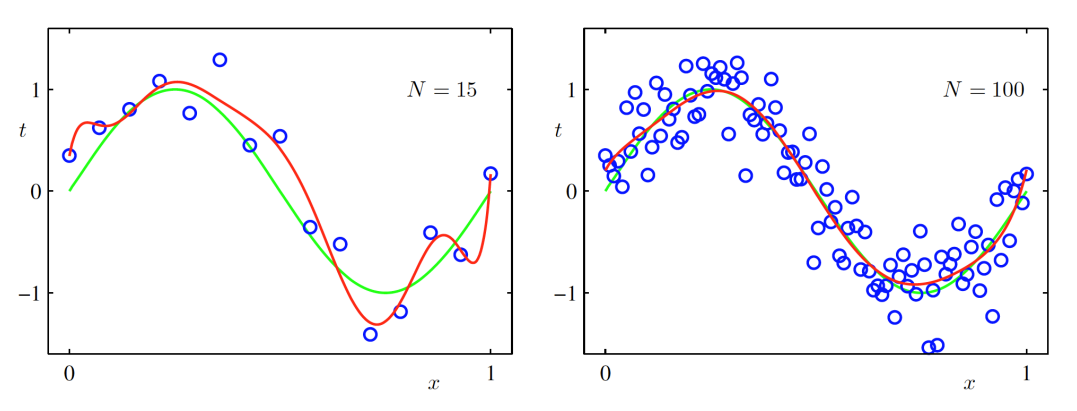
값이 커지면(샘플 수가 많아지면) 점점 근사하게 됨
규제화 (Regularization)
많은 샘플 수를 확보하지 못했을 때 사용
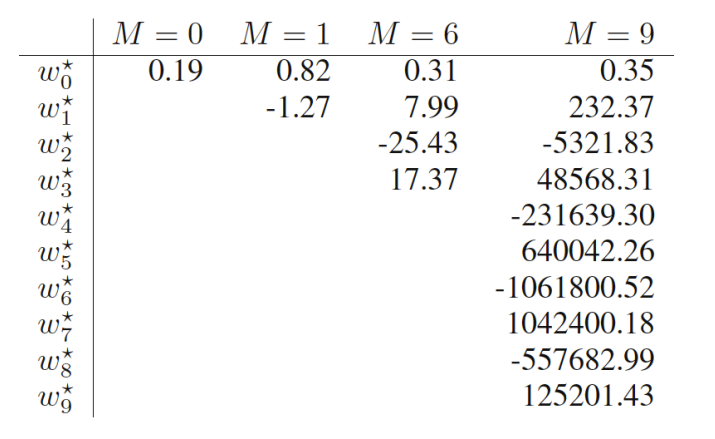
위의 그림은 값마다의 최적의 파라미터 값이다.
이 커져감에 따라 의 값의 절대값이 커져감
이를 해결하기 위해 규제화를 이용하는데 가장 간단한 규제화의 방법 중 하나는 오차함수에 대입하는 것
새로운 오차함수를 정의한다.
w = w ww
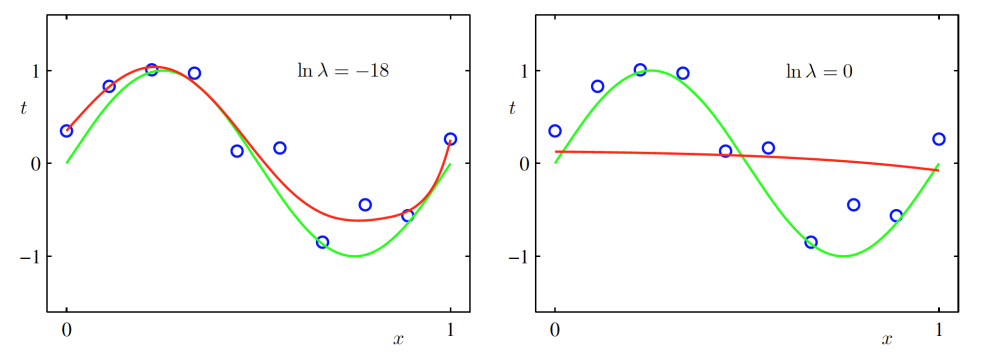
왼쪽은 어느 정도 규제화를 적용한 결과이고, 오른쪽은 기존의 문제와 동일한 경우이다.
= 9일 때
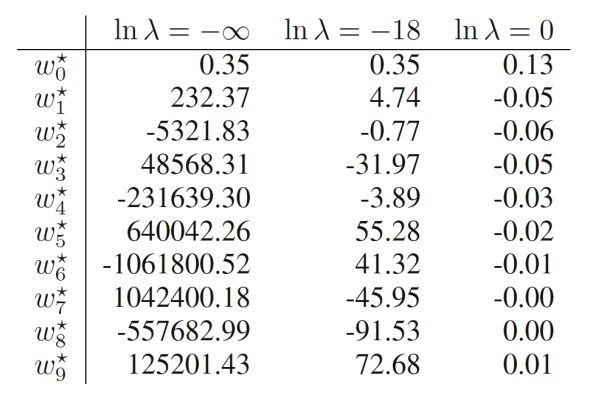
값을 너무 과하게 설정하면 역효과가 난다.