6. cron
On ServerB, schedule a cron job that prints "Break Time!" every two hours on weekdays on your current screen. Use the root user as the user performing the cron job.
answere)
crontab -e
00 */2 * * 1-5 echo "Break Time!"*/2: 매 2시간마다
1-5: weekdays
validation
crontab -l
8. shell
On ServerB, change the user sam's login shell to Bash.
answere)
vi /etc/passwd
sam:x:1001:1001::/home/sam:/bin/bashvalidation
su - samecho $SHELL
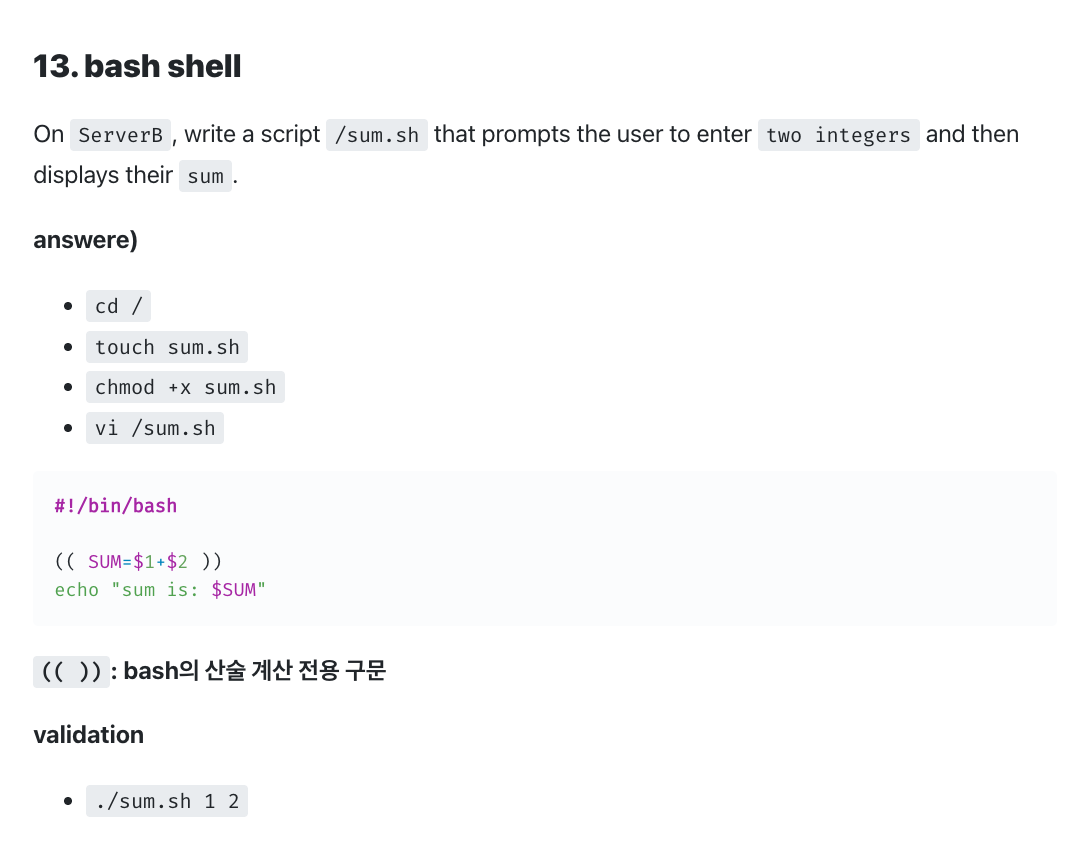
13. bash shell
On ServerB, write a script /sum.sh that prompts the user to enter two integers and then displays their sum.
answere)
cd /touch sum.shchmod +x sum.shvi /sum.sh
#!/bin/bash

(( SUM=$1+$2 ))
echo "sum is: $SUM"
(( )): bash의 산술 계산 전용 구문
validation
./sum.sh 1 2
23. sed
Which of the following commands replaces each occurrence of 'sam' in the file letter with 'Sam' and writes the result to the file newletter?
answere)
sed s/sam/Sam/g letter > newletter
man sed
s/regexp/replacement: regex에 해당하면, replacement로 교체
g: global
validation
vi letter
sam juwon test samsed 's/sam/Sam/g' ltter > newlettercat newletter
30. hardware clock
Which command is used to sync the hardware clock to the system clock? (Specify ONLY the command without any path or parameters.)
answere)
hwclock
validation
hwclocktimedatectl
35. thin pool, thin provisioned volume
On ServerB, using disk /dev/sdb, complete the following tasks:
- Create a
5T thin provisioned volumenamedmythinvolunder a2Gthin poolcalledmythinpoolwithin a4Gvolume groupnamedmyvg. - Extend the size of
mythinpoolby1G. Renamethethin poolfrommythinpooltothinpool1.Renamethethin provisioned volumefrommythinvoltothinvol1.
answere)
lsblkfdisk /dev/sdbn
newEnter
select partition(primary / secondary)Enter
partiton numberEnter
first sector+4G
sizet
type change8e
Linux LVMw
writelsblk
create thinpool
pvcreate /dev/sdb1vgcreate myvg /dev/sdb1lvcreate -L 2G --thinpool mythinpool /dev/myvglvs
Attr 행에서, 맨앞에 t로 시작하는 것 확인 가능
create thin provisioned volume
lvcreate -V 5T --name mythinvol /dev/myvg/mythinpool
-V: Virtual sizelvs
Attr 행에서, 맨앞에 V로 시작하는 것 확인 가능
extend thinpool
lvextend -L +1G /dev/myvg/mythinpoollvs
rename thin pool
lvrename /dev/myvg/mythinpool /dev/myvg/mythinpool1lvs
rename thin provisioned volume
lvrename /dev/myvg/mythinvol /dev/myvg/mythinvol1lvs
36. nfs, autofs
On ServerB, configure autofs to automatically mount user directories from the remote NFS ServerA. The server exports the /nfs/home directory, which contains individual user directories (e.g., /nfs/home/tom).
Mount these user directories on demand under the local /nfs/users directory. Ensure the mount is accessible and persists across reboots.
answere)
ServerA - nfs server
dnf install -y nfs-utilssystemctl enable --now nfs-server rpcbind
firewall-cmd --list-allfirewall-cmd --add-service=nfs --permanentfirewall-cmd --add-service=rpc-bind --permanentfirewall-cmd --add-service=mountd --permanentfirewall-cmd --reloadfirewall-cmd --list-all
mkdir -p /nfs/home/tomvi /etc/exports
/nfs/home serverb(no_root_squash,rw,sync)exportfs -arvshowmount -esystemctl restart nfs-server
ServerB - nfs client, autofs
dnf install -y nfs-utils
showmount -e serveramkdir -p /nfs/usersvi /etc/auto.master
/nfs/users /etc/auto.nfsvi /etc/auto.nfs
* -fstype=nfs,rw,sync servera:/nfs/home/&*: /nfs/users/*를 의미함.
&: 매칭되는 값을 그대로 대체한다는 것을 의미
systemctl restart autofs
validation
cd /nfs/users/tomdf -Th
37. mbr dd
Which of the following commands overwrites the bootloader located on /dev/sda without overwriting the partition table or any data following it?
answere)
dd if=/dev/zero of=/dev/sda bs=440 count=1
man dd
MBR(첫 512바이트) 구조: 0–439(=440바이트): 부트스트랩 코드(bootloader code)
38. find
On ServerB, write a script named /find_rf.sh that prints out a list of files owned by root and with the SUID bit set in /usr.
answere)
cd /touch find_rf.shchmod +x find_rf.sh
#!/bin/bash
find /usr -uid 0 -perm -4000
man find
-perm 4000: SetUID
-perm 2000: SetGID
-perm 1000: Sticky
./find_rf.sh
validation
cd /usrls -al
0. umask
Configure the system so that when user sam creates files and directories, the following default permissions are applied:
- Files: rw- --- ---
- Directories: rwx --- ---
answere)
vi /home/sam/.bash_profile
umask=077file은 원래 기본적으로 x권한이 빠진다.
validation
touch test1mkdir test2