왜 하는가
리액트 패키지와 모듈 등록을 통해 네이티브 모듈을 리액트 네이티브에서 사용했었다. [링크]
자바로 작성된 네이티브 모듈을 쓰다보니 메서드를 조금씩 수정해가며 공부하다가 네이티브에서 변경된 메서드 이름, 매개변수, 리턴값 등을 리액트에서 미처 바꾸지 못하기도 하고 안드로이드와 리액트 네이티브를 번갈아가며 비교해서 보는것이 번거로웠다.
하면 뭐가 좋은가
수정 전
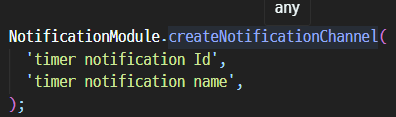
기존 any 타입으로 추론되는 메서드. 당연히 어떤 메서드들이 있는지, 매개변수에 어떤게 들어가는지도 알 수 없다.
수정 후

자동완성은 물론 매개변수의 이름(을 통한 쓰임새 추측 가능), 타입, 메서드에 관한 설명으로 더욱 편하고 정확하게 메서드를 사용할 수 있다.
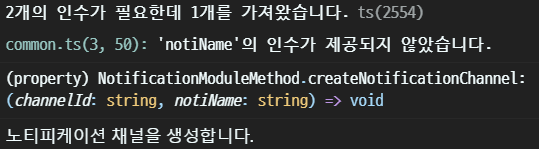
이렇게 1차로 오류를 거를 수도 있다!
커스텀 타입 정의
NotificationModule.java
...

@ReactMethod
    public void showNotification(String contentTitle, String contentText) {
        Intent serviceIntent = new Intent(reactApplicationContext, NotificationService.class);
        serviceIntent.putExtra("contentTitle", contentTitle);
        serviceIntent.putExtra("contentText", contentText);
        if (Build.VERSION.SDK_INT >= Build.VERSION_CODES.O) {
            reactApplicationContext.startForegroundService(serviceIntent);
        }
//        Log.d("ReactNativeJs", "logMsg: " + msg);
    }

    @ReactMethod
    public void cancelNotification() {
        NotificationManager notificationManager = (NotificationManager) reactApplicationContext.getSystemService(Context.NOTIFICATION_SERVICE);
        notificationManager.cancelAll();
    }

    @ReactMethod
    @SuppressLint("ObsoleteSdkInt")
    private void createNotificationChannel(String channelId, String notiName) {
        if(Build.VERSION_CODES.O <= Build.VERSION.SDK_INT) {
            NotificationChannel notiChannel = new NotificationChannel(
                    channelId,
                    notiName,
                    NotificationManager.IMPORTANCE_DEFAULT
            );

            NotificationManager notificationManager = reactApplicationContext.getSystemService(NotificationManager.class);
            notificationManager.createNotificationChannel(notiChannel);
        }
    }

    @ReactMethod
    public List<NotificationChannel> getAllNotifications() {
        NotificationManager notificationManager = (NotificationManager) reactApplicationContext.getSystemService(Context.NOTIFICATION_SERVICE);
        if (Build.VERSION.SDK_INT >= Build.VERSION_CODES.O) {
            return notificationManager.getNotificationChannels();
        }
        return null;
    }

 ...
customType.ts
interface NotificationModuleMethod {
  /** 노티피케이션 채널을 생성합니다. */
  createNotificationChannel: (channelId: string, notiName: string) => void;

  /** 노티피케이션을 띄웁니다. */
  showNotification: (contentTitle: string, contentText: string) => void;

  /** 노티피케이션을 지웁니다. */
  cancelNotification: () => void;
}
interface로 타입을 정의한다.
@ReactMethod 어노테이션을 붙여 관리해주는 모듈의 메서드들과 일치시켜주면 된다.
각 메서드 위에 /** */를 통해 설명을 붙여주면 미리보기 시에 설명까지 덧붙일 수 있다.
여담
타입스크립트를 처음 사용할때는 편리함이 크게 와닿지 않았는데, 아 이런 맛으로 쓰는구나 느낄 수 있었다...
프로젝트의 규모가 커질수록 초기에 타입 관리를 빡세게 잘 해놓는다면 편리함은 제곱이 될 것이다.
번거롭더라도 멀리 보는 습관을 들이자!

🍅 준비된 안드로이드 개발자 📱