서론
👀RN에서 백그라운드/포그라운드 상태 감지하기
👀안드로이드 포그라운드 노티피케이션 만들기
👀네이티브 메서드 RN에서 사용하기
앞선 이 글들은, 모두 이 기능을 구현하기 위한 공부였다!
바로 [백그라운드 상태일때만 노티피케이션 나오게 만들기]!
- 먼저 백그라운드 상태임을 감지하고
-RN에서 감지하는 방법과 안드로이드에서 감지하는 방법이 있는데(두 글 다 포스트 해두었음) RN에서 감지하는 방법을 사용했다. 이후 백그라운드 상태에 진입할때 RN의 변수를 전달받아 노티피케이션에 전달할 예정이기 때문이다. - 네이티브 기능(포그라운드 노티피케이션)을 만들고
- 리액트 네이티브 프로젝트에서 그 기능을 가져다 쓴다
이제 이 모든 공부를 응용해서 목표 기능을 만들면 된다.
네이티브를 제대로 모르는 상태에서 시작했지만, 그래서 배워가는 즐거움이 또 컸다.
(사실 중간에 너무 막막해서 눈물도 조금 훔쳤지만🥲)
본론
최대한 보면서 따라가기 좋을 순서로 적어두었습니다😆
다만, 저번 글들과는 약간 다른 부분들이 있으니(실제 프로젝트에 녹이는 과정에서 살짝 다르게 수정된 부분들이 있음) 참고해서 봐 주세요!
Android
NotificationService.java
노티피케이션 서비스를 만들어준다.
public class NotificationService extends Service {

    private static final int NOTIFICATION_ID = 1;
    private static final String CHANNEL_ID = "foreground_service_channel";
    private static final String CHANNEL_NAME = "Foreground Service Channel";

    @Override
    public void onCreate() {
        super.onCreate();
    }

    @SuppressLint("ObsoleteSdkInt")
    private void createNotificationChannel() {
        // 오레오 이상에서는 노티피케이션 채널 필요
        if(Build.VERSION_CODES.O <= Build.VERSION.SDK_INT) {
            NotificationChannel notiChannel = new NotificationChannel(
                    CHANNEL_ID,
                    CHANNEL_NAME,
                    NotificationManager.IMPORTANCE_DEFAULT
            );

            NotificationManager notificationManager = getSystemService(NotificationManager.class);
            notificationManager.createNotificationChannel(notiChannel);
        }
    }

    @SuppressLint("ObsoleteSdkInt")
    @Override
    public int onStartCommand(Intent intent, int flag, int startId) {

        createNotificationChannel();

        Notification noti = new NotificationCompat.Builder(this, CHANNEL_ID)
                .setContentTitle(intent.getStringExtra("contentTitle"))
                .setContentText(intent.getStringExtra("contentText"))
                .setSmallIcon(R.mipmap.ic_launcher)
                .build();

        if(Build.VERSION_CODES.O <= Build.VERSION.SDK_INT) {
            startForeground(NOTIFICATION_ID, noti);
        } else {
            if (Build.VERSION.SDK_INT >= Build.VERSION_CODES.Q) {
                startForeground(NOTIFICATION_ID, noti, ServiceInfo.FOREGROUND_SERVICE_TYPE_SPECIAL_USE);
            }
        }

        return START_STICKY;
    }

    @Nullable
    @Override
    public IBinder onBind(Intent intent) {
        return null;
    }
}
NotificationModule.java
모듈을 만들어 NotificationService를 리액트 네이티브에서 쓸 수 있도록 메서드로 만들어준다.
public class NotificationModule extends ReactContextBaseJavaModule {

    private final ReactApplicationContext reactApplicationContext;

    public NotificationModule(ReactApplicationContext reactApplicationContext, ReactApplicationContext reactApplicationContext1) {
        super(reactApplicationContext);
        this.reactApplicationContext = reactApplicationContext1;
    }

    @NonNull
    @Override
    public String getName() {
        return "NotificationModule";
    }

    @ReactMethod
    public void showNotification(String contentTitle, String contentText) {
        Intent serviceIntent = new Intent(reactApplicationContext, NotificationService.class);
        serviceIntent.putExtra("contentTitle", contentTitle);
        serviceIntent.putExtra("contentText", contentText);
        if (Build.VERSION.SDK_INT >= Build.VERSION_CODES.O) {
            reactApplicationContext.startForegroundService(serviceIntent);
        }
//        Log.d("ReactNativeJs", "logMsg: " + msg);
    }

    @ReactMethod
    public void cancelNotification(int notificationId) {
        NotificationManager notificationManager = (NotificationManager) reactApplicationContext.getSystemService(Context.NOTIFICATION_SERVICE);
        notificationManager.cancel(notificationId);
    }
}
NotificationPackage.java
패키지를 만들어 리액트 네이티브에 모듈을 등록시켜준다.
public class NotificationPackage implements ReactPackage {
    @NonNull
    @Override
    public List<NativeModule> createNativeModules(@NonNull ReactApplicationContext reactApplicationContext) {
        List<NativeModule> modules = new ArrayList<>();
        modules.add(new NotificationModule(reactApplicationContext, reactApplicationContext));
        return modules;
    }

    @NonNull
    @Override
    public List<ViewManager> createViewManagers(@NonNull ReactApplicationContext reactApplicationContext) {
        return Collections.emptyList();
    }
}
MainApplication.kt
class MainApplication : Application(), ReactApplication {

  override val reactNativeHost: ReactNativeHost =
      object : DefaultReactNativeHost(this) {
        override fun getPackages(): List<ReactPackage> =
            PackageList(this).packages.apply {
              // Packages that cannot be autolinked yet can be added manually here, for example:
              // add(MyReactNativePackage())

              // 이 부분을 추가
                add(NotificationPackage())
            }

          override fun getJSMainModuleName(): String = "index"

        override fun getUseDeveloperSupport(): Boolean = BuildConfig.DEBUG

        override val isNewArchEnabled: Boolean = BuildConfig.IS_NEW_ARCHITECTURE_ENABLED
        override val isHermesEnabled: Boolean = BuildConfig.IS_HERMES_ENABLED
      }

  override val reactHost: ReactHost
    get() = getDefaultReactHost(this.applicationContext, reactNativeHost)

  @RequiresApi(Build.VERSION_CODES.O)
  override fun onCreate() {
    super.onCreate()
    SoLoader.init(this, false)
    if (BuildConfig.IS_NEW_ARCHITECTURE_ENABLED) {
      // If you opted-in for the New Architecture, we load the native entry point for this app.
      load()
    }
    ReactNativeFlipper.initializeFlipper(this, reactNativeHost.reactInstanceManager)
getPackages()에 add(NotificationPackage())를 통해 패키지를 등록해주는 부분만 다르다.
React Native
App.tsx
  const {NotificationModule} = NativeModules;

  const contentTitle = '노티피케이션 타이틀';
  const contentText = '노티피케이션 텍스트';

  const appState = useRef(AppState.currentState);

  AppState.addEventListener('change', nextAppState => {
    if (appState.current === 'background' && nextAppState === 'active') {
      console.log('active');
      NotificationModule.cancelNotification(1);
    } else if (appState.current === 'active' && nextAppState === 'background') {
      console.log('background');
      NotificationModule.showNotification(contentTitle, contentText);
    }

    appState.current = nextAppState;
  });
결론
완성샷
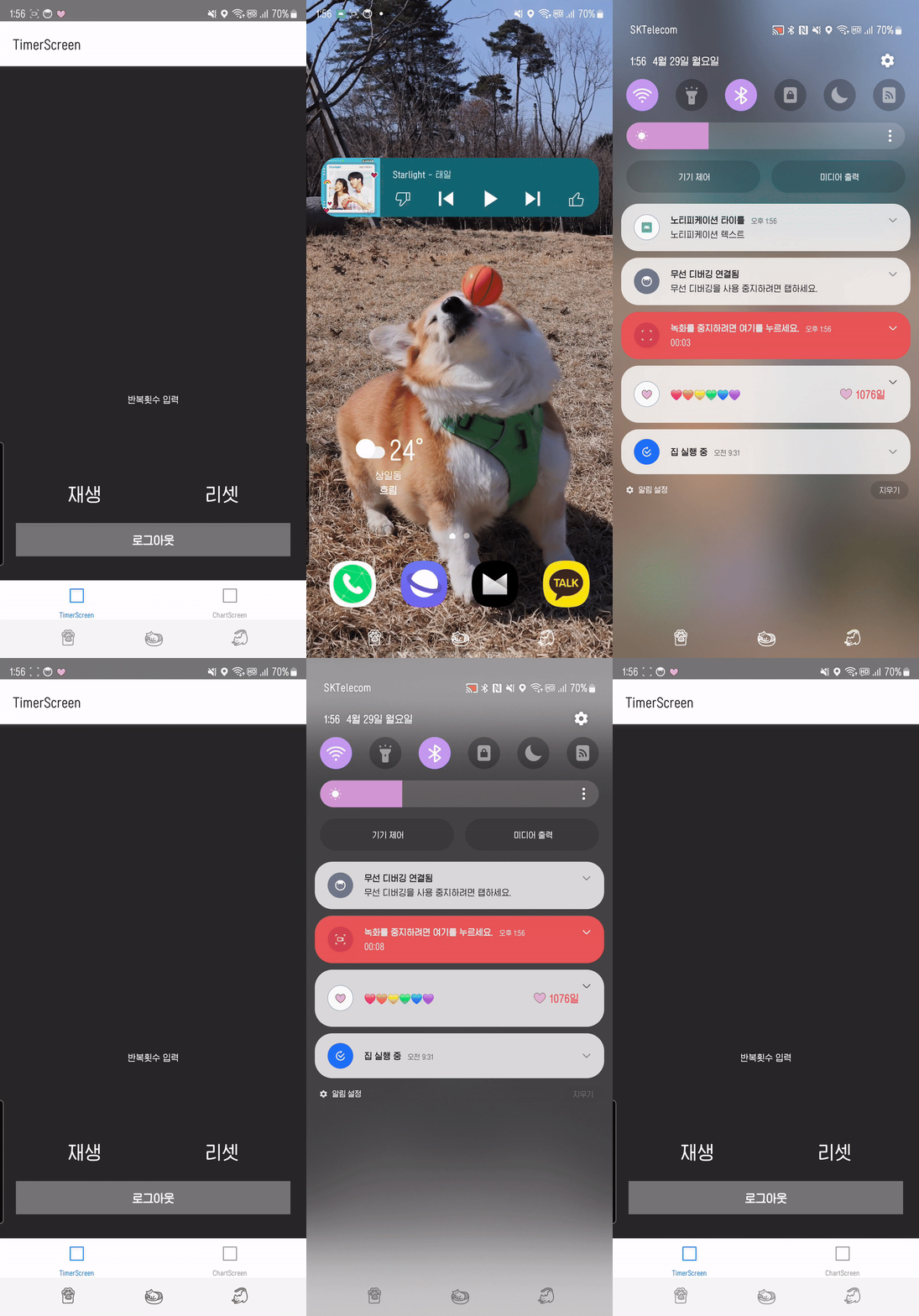
앱이 올라와있는 상태에서는 노티피케이션이 사라지고, 백그라운드로 전환되었을때 노티피케이션이 올라오는것을 확인할 수 있다!

🍅 준비된 안드로이드 개발자 📱