들어가기 앞서...
지출 관리 애플리케이션을 만들던 도중에 로그인 기능 구현중 새로고침시 로그인이 초기화 되는 트러블 슈팅이 발생했다. 트러블 슈팅을 수정했던 과정을 간추려서 작성했다.
문제 상황 😶🌫️
- 로그인 상태가 브라우저를 새로고침하면 초기화되기 때문에 발생했다.
원인 분석 🔍
- 로그아웃 코드 검색: 어디서 로그아웃이 발생하는지 확인하기 위해 VS Code에서
logout을 전체 검색 - 로그아웃 발생 위치 확인: 여러 곳에서 로그아웃이 발생하고 있음을 확인 하였고, 특히, 인증 실패 시 로그아웃 처리되는 코드를 확인했다.
- 토큰 유효성 검사 실패 시 로그아웃 처리: 각 로그아웃 조건을 디버깅하여 문제가 발생하는 원인을 파악했다.
- 추가 사항 : API 명세를 재확인 하여 응답 형식이 일치하는지 확인했다.
찾아 봤던 로그아웃이 발생하는 코드들 🚧
- 로그아웃 발생 코드 1
const isAuthenticated = useSelector((state) => state.auth.isAuthenticated); // 인증 상태를 가져옴
const dispatch = useDispatch();

useEffect(() => {
    // 컴포넌트가 마운트될 때 인증 상태를 확인
    dispatch(checkAuth())
        .unwrap()
        .catch(() => {
            // 인증 실패 시 로그아웃 처리
            dispatch(logout());
        });
}, [dispatch]);
- 로그아웃 발생 코드 2
const authSlice = createSlice({
    name: 'auth',
    initialState,
    reducers: {
        login: (state) => {
            state.isAuthenticated = true;
        },
        logout: (state) => {
            state.isAuthenticated = false;
            localStorage.removeItem('accessToken');
            localStorage.removeItem('user');
        },
    },
    extraReducers: (builder) => {
        builder
            .addCase(checkAuth.fulfilled, (state) => {
                state.isAuthenticated = true;
            })
            .addCase(checkAuth.rejected, (state) => {
                state.isAuthenticated = false;
            });
    },
});
-
이 코드에서
checkAuth를 호출하여 인증 상태를 확인하고 실패하면checkAuth가 로그아웃 처리를 한다. -
즉,
useEffect훅에서checkAuth비동기 액션을 호출하는 과정에서 상태 관리가 제대로 이루어지지 않아서 문제가 발생한거 같아서checkAuth를 작성한 파일로 가서 확인했다.
문제가 됬던 코드 🧰
문제 1
const initialState = {
    isAuthenticated: !!localStorage.getItem('accessToken'),
};
-
문제 :
initialState에서 단순히localStorage에accessToken이 있는지 여부만 확인하여 상태를 설정함. -
이유:
isAuthenticated값이 단순히localStorage에 토큰이 있는지 없는지로만 결정되기 때문에, 이 방식은 초기 로드 시에만 유효하며, 이후 상태 관리는checkAuth액션에 의해 관리되도록 수정해야 했다.
문제 2
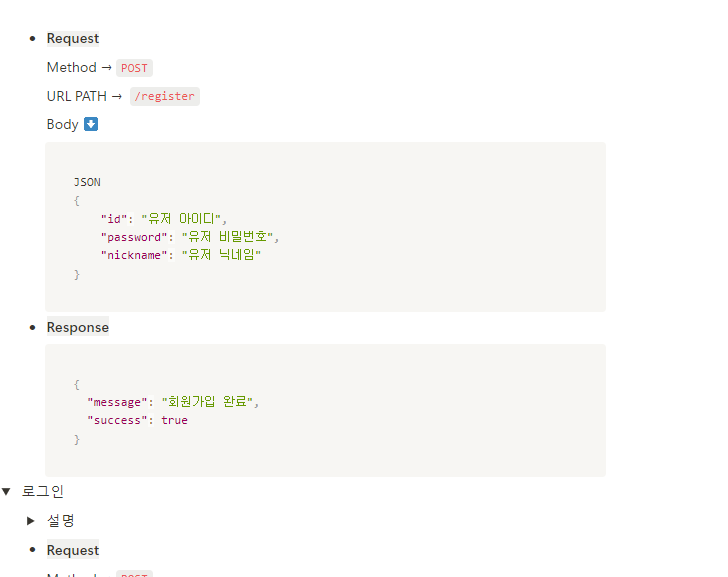
    if (response.data.valid) {
        return response.data;
    } else {
        localStorage.removeItem('accessToken');
        localStorage.removeItem('user');
        return rejectWithValue('Invalid token');
}- 문제 :
checkAuth내부 처리 과정 중 API 문서대로response.data.valid가 아닌response.data.success로 처리해야 했다. - 이유 :
response.data.valid를response.data.success로 변경하지 않으면, 서버가 보내는 응답을 올바르게 처리하지 못해 토큰이 유효하지 않다고 판단한다.
문제 3
useEffect(() => {
    // 컴포넌트가 마운트될 때 인증 상태를 확인
    dispatch(checkAuth())
        .unwrap()
        .catch(() => {
            // 인증 실패 시 로그아웃 처리
            dispatch(logout());
        });
}, [dispatch]);
-
문제:
useEffect에서checkAuth를 호출하여 인증 상태를 확인한다. 여기서checkAuth가 실패하면 로그아웃 처리를 하게 됨 -
이유:
checkAuth가 실패할 경우logout액션이 호출되어localStorage에서accessToken이 제거되기 때문에 새로고침 후 로그아웃이됨
수정된 코드 🧑🔧
src/redux/modules/authSlice
import { createSlice, createAsyncThunk } from '@reduxjs/toolkit';
import { loginApi } from '../../axios/api';

// 초기 상태: 처음에 토큰이 있으면 로그인된 상태로 설정
const initialState = {
    isAuthenticated: !!localStorage.getItem('accessToken'),
};

// 토큰이 유효한지 확인하는 비동기 액션 (상태 관리는 checkAuth 액션에 의해 관리)
export const checkAuth = createAsyncThunk('auth/checkAuth', async (_, { rejectWithValue }) => {
    // localStorage에서 accessToken을 가져옴
    const accessToken = localStorage.getItem('accessToken');

    // accessToken이 없으면 에러 반환
    if (!accessToken) {
        return rejectWithValue('No token found');
    }

    try {
        // 서버에 토큰이 유효한지 확인하는 요청을 보냄
        const response = await loginApi.get('/user', {
            headers: {
                // 헤더에 토큰을 포함하여 요청
                Authorization: `Bearer ${accessToken}`,
                'Content-Type': 'application/json',
            },
        });

        // 서버 응답에서 success가 true이면 토큰이 유효함 (success 변경)
        if (response.data.success) {
            return response.data;
        } else {
            // 토큰이 유효하지 않으면 토큰과 사용자 정보를 삭제하고 에러 반환
            localStorage.removeItem('accessToken');
            localStorage.removeItem('user');
            return rejectWithValue('Invalid token');
        }
    } catch (error) {
        // 요청 중 에러가 발생하면 토큰과 사용자 정보를 삭제하고 에러 반환
        localStorage.removeItem('accessToken');
        localStorage.removeItem('user');
        return rejectWithValue('Invalid token');
    }
});

const authSlice = createSlice({
    name: 'auth',
    initialState,
    reducers: {
        // 로그인 액션: isAuthenticated를 true로 설정
        login: (state) => {
            state.isAuthenticated = true;
        },
        // 로그아웃 액션: isAuthenticated를 false로 설정하고 토큰과 사용자 정보를 삭제
        logout: (state) => {
            state.isAuthenticated = false;
            localStorage.removeItem('accessToken');
            localStorage.removeItem('user');
        },
    },
    extraReducers: (builder) => {
        // checkAuth 액션이 성공하면 isAuthenticated를 true로 설정
        builder
            .addCase(checkAuth.fulfilled, (state) => {
                state.isAuthenticated = true;
            })
            // checkAuth 액션이 실패하면 isAuthenticated를 false로 설정하고 토큰과 사용자 정보를 삭제
            .addCase(checkAuth.rejected, (state) => {
                state.isAuthenticated = false;
                localStorage.removeItem('accessToken');
                localStorage.removeItem('user');
            });
    },
});

export const { login, logout } = authSlice.actions;
export default authSlice.reducer;
- checkAuth 액션에 의해 관리되는 방향으로 수정하였고, API 명세대로 변경하였다.
src/shard/Router
import { useEffect } from 'react';
import { useDispatch } from 'react-redux';
import { checkAuth, logout } from '../redux/authSlice';

const YourComponent = () => {
    const dispatch = useDispatch();

   useEffect(() => {
        // 컴포넌트가 마운트될 때 인증 상태를 확인
        dispatch(checkAuth())
            .unwrap()
            .catch((error) => {
                console.error('인증 확인 실패:', error);
            });
    }, [dispatch]);

    return (
        <div>
            {/*component content */}
        </div>
    );
};

export default YourComponent;
- 인증 실패 시 로그아웃 처리를 하지 않고 콘솔에 에러를 출력하는 방식으로 변경했다. 이로 인해 인증 실패로 인해 불필요하게 로그아웃되는 문제를 방지하였다.
마무리
API 명세를 세세하게 잘 읽어보자... 🥹 인증 실패 시 바로 로그아웃을 처리하는 것은 올바른 방법이 아니였다. 인증 상태 확인 후 문제가 발생할 경우 확인 후 로그아웃 처리가 되도록 코드를 작성해야한다고 느꼈다.