어제 useReducer를 배우면서 아주 많이 당황과 어려움을 느꼈다
(왜 이렇게 써야하며, 왜 이렇게 많은걸 분리해서 써야 하며 이해를 못했다)
하지만... 그럴만도 하다
써보니까 간편하다는 것을 알았다
집중도 안되고 차라리 useReducer와 리액트를 이용해 간단한 것들을 혼자 만들어보면 어떨까? 라는 마음으로 시작했따
리액트를 배우기 전에는 굳이 굳이 리액트를 배워야 할까?
부터 시작해서 생각보다 너무 생소했지만, 막상 해보니까 왜 하는지 이해가 되긴 하는 듯한 느낌이다..! 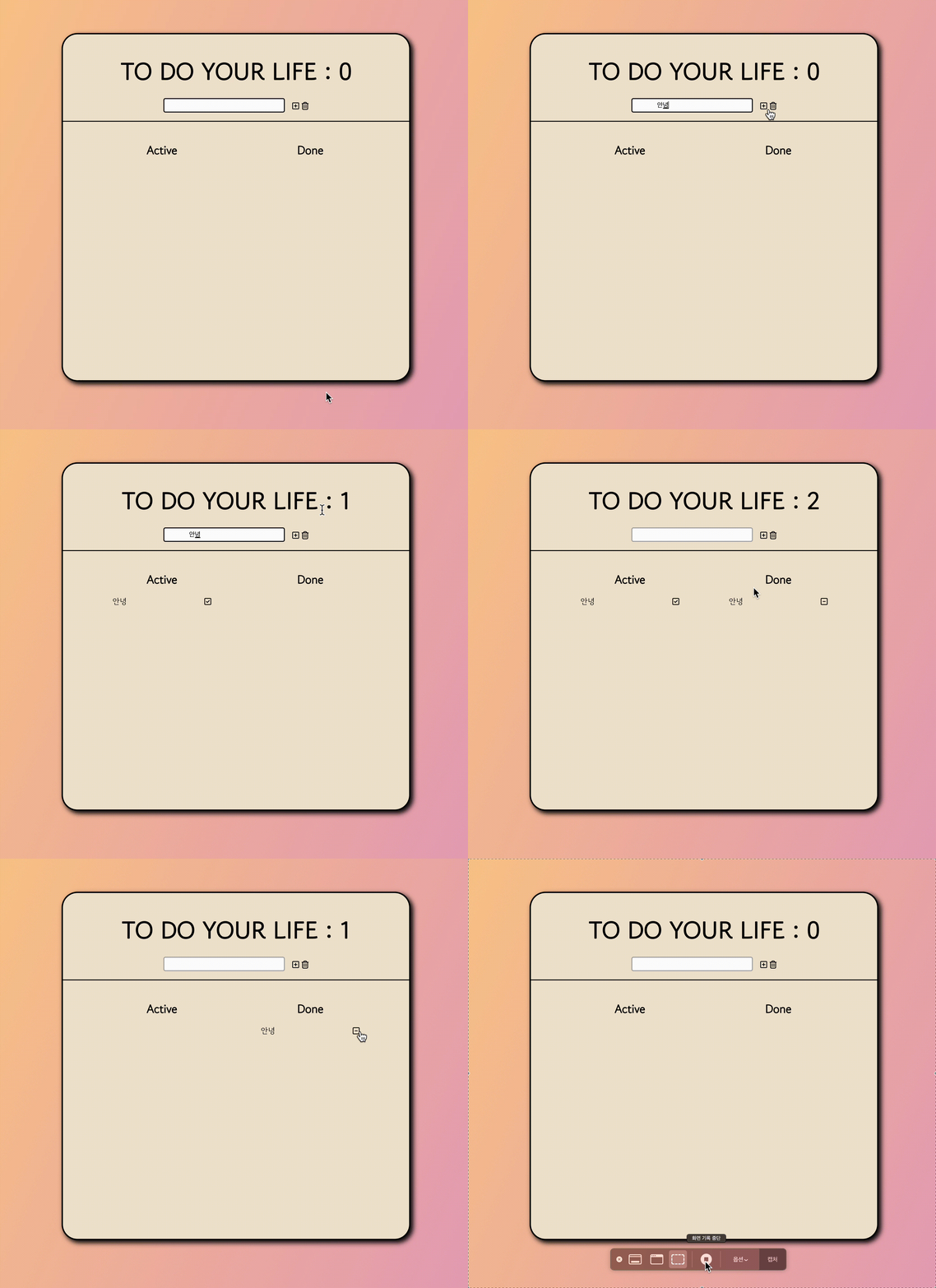
간단하게 기능을 설명하자면
1 . 투두 추가
2. 투두 추가시 Active 쪽으로 추가가 이루어짐
3. 내가 할 일을 했으면, 체크 표시를 둘러서 Done으로 이동
4. Done에서 - 버튼 누르고 삭제
요렇게 이루어진다고 간단하게 생각하면 될 것 같다!
코드 작성
: React (useReducer 사용)
 import React, { useReducer, useRef } from 'react';
import styles from './TodoList.module.css';
import { FontAwesomeIcon } from '@fortawesome/react-fontawesome';

import {
  faSquarePlus,
  faTrashCan,
  faSquareCheck,
  faSquareMinus,
} from '@fortawesome/free-regular-svg-icons';

const initialState = {
  count: '',
  inputValue: '',
  todos: [],
  deleteBTN: false,
  doneTodos: [],
};

const CHANGE_INPUT = 'CHANGE_INPUT';
const CREATE_TODO = 'CREATE_TODO';
const DELETE_BTN_ALL = 'DELETE_BTN_ALL';
const DELETE_BTN = 'DELETE_BTN';
const MOVE_BTN = 'MOVE_BTN';

const reducer = (state, action) => {
  switch (action.type) {
    case CHANGE_INPUT:
      return {
        ...state,
        inputValue: action.payload,
      };

    case CREATE_TODO:
      return {
        ...state,
        todos: [
          ...state.todos,
          { id: state.todos.length + 1, text: action.payload },
        ],
        inputValue: '',
        deleteBTN: true,
        count: state.count + 1,
      };

    case DELETE_BTN_ALL:
      return {
        ...state,
        todos: [],
        doneTodos: [],
        count: 0,
        inputValue: '',
      };

    case DELETE_BTN:
      return {
        ...state,
        doneTodos: state.doneTodos.filter((todo) => todo.id !== action.payload),
        count: state.count - 1,
      };

    case MOVE_BTN:
      const moveTodo = state.todos.find((todo) => todo.id === action.payload);
      if (moveTodo) {
        return {
          ...state,
          todos: state.todos.filter((todo) => todo.id !== action.payload),
          doneTodos: [...state.doneTodos, moveTodo],
        };
      }
      return state;

    default:
      return state;
  }
};

const TodoList = () => {
  const [state, dispatch] = useReducer(reducer, initialState);
  const inputRef = useRef(null);

  const onClickSub = () => {
    if (!state.inputValue) {
      return;
    }
    dispatch({ type: CREATE_TODO, payload: state.inputValue });
    inputRef.current.focus();
  };

  const onChangeInput = (e) => {
    dispatch({ type: CHANGE_INPUT, payload: e.target.value });
  };

  const onDeleteBtnAll = () => {
    dispatch({ type: DELETE_BTN_ALL });
    inputRef.current.focus();
  };

  const onDeleteBtn = (id) => {
    dispatch({ type: DELETE_BTN, payload: id });
  };

  const moveDone = (id) => {
    dispatch({ type: MOVE_BTN, payload: id });
  };

  return (
    <>
      <div className={styles.content}>
        <div className={styles.header}>
          <h1 className={styles.title}>TO DO YOUR LIFE : {state.count}</h1>

          <div className={styles.container}>
            <input
              ref={inputRef}
              onChange={onChangeInput}
              value={state.inputValue}
              type="text"
              className={styles.inputField}
            />
            <button
              onClick={onClickSub}
              type="button"
              className={styles.plusBtn}
            >
              <FontAwesomeIcon icon={faSquarePlus} />
            </button>
            <button
              onClick={onDeleteBtnAll}
              type="button"
              className={styles.deleteBtnAll}
            >
              <FontAwesomeIcon icon={faTrashCan} />
            </button>
          </div>
        </div>

        <section className={styles.todoList}>
          <div className={styles.section}>
            <h1>Active</h1>
            <ul className={styles.activeList}>
              {state.todos.map((todo) => (
                <li key={todo.id}>
                  {todo.text}
                  <button
                    onClick={() => moveDone(todo.id)}
                    type="button"
                    className={styles.doneBtn}
                  >
                    <FontAwesomeIcon icon={faSquareCheck} />
                  </button>
                </li>
              ))}
            </ul>
          </div>

          <div className={styles.section}>
            <h1>Done</h1>
            <ul className={styles.doneList}>
              {state.doneTodos.map((todo) => (
                <li key={todo.id}>
                  {todo.text}
                  <button
                    onClick={() => onDeleteBtn(todo.id)}
                    type="button"
                    className={styles.deleteBtn}
                  >
                    <FontAwesomeIcon icon={faSquareMinus} />
                  </button>
                </li>
              ))}
            </ul>
          </div>
        </section>
      </div>
    </>
  );
};

export default TodoList;
이렇게 해보는 건 어떨까 ?
하면서 useReducer를 사용해서 코드를 쭉 작성하기 시작했다.
React To-Do 리스트 애플리케이션: useReducer 훅 사용
React 컴포넌트 --> useReducer 훅을 사용하여 상태 관리를 하는 할일 목록 애플리케이션
컴포넌트: TodoList
상태와 참조: useReducer 훅으로 상태를 초기화하고 reducer로 상태 변화를 처리한다.
라고 간단하게 설명하고 넘어가겠다
나는 앞으로 갈 일이 많기 때문이다!

2024. 01. 02 ~ 백앤드 공부 시작, 2024. 04.01 ~ 프론트 공부 시작