1. 좋은 도커파일을 만드는 방법
Dockerfile에는 일반적으로 서버에서 애플리케이션을 실행하는 데 사용하는 단계와 유사한 단계가 있다.
- 운영 체제로 시작
- 언어 런타임 설치
- 모든 애플리케이션 종속성 설치
- 실행 환경 설정
- 애플리케이션 실행
참고: OS 및 언어 런타임이 사전 설치된 기본 이미지를 선택하면 3번으로 바로 이동할 수 있는 경우가 많다.
유용한 기술
- 특정 기본 이미지 고정
- By specifying an image tag, you can avoid nasty surprises where the base image
- 작은 기본이미지 선택
- 우리는 다양한 기본 이미지를 선택 할 수 있는데 더 작은 기본 이미지를 선택하는 것이 최종적으로 나오는 이미지 사이즈를 줄이는데에 좋다.
- 더 안전한 기본 이미지 선택
- 이미지 크기와 마찬가지로 기본 이미지의 취약점 수와 공격 노출 영역도 같이 고려해야한다. Chainaurd는 다수의 강화된 이미지를 게시한다.
(https://www.chainguard.dev/chainguard-images).
- 작업 공간 지정
- 많은 언어에는 응용 프로그램을 설치하는 방법/위치에 대한 규칙이 있다. 해당 규칙을 준수하면 개발자가 컨테이너 작업을 더 쉽게 할 수 있다.
- 빌드 속도를 개선하기위한 레이어 캐시
- 컨테이너 파일 시스템의 계층적 특성을 이해하고 특정 파일을 복사할 시기를 선택함으로써 Docker 캐싱 시스템을 더 잘 활용할 수 있다.
- COPY —link 적절하게 사용
- --link 옵션은 2022년 3월 COPY 명령에 추가되었다. 이 옵션을 사용하면 이전 항목에 종속되지 않는 독립적인 이미지 레이어에 파일을 복사하여 특정 상황에서 캐시 동작을 개선할 수 있다.
- 컨테이너 내에서 루트가 아닌 사용자 사용
- 컨테이너는 사용자 네임스페이스를 활용하여 컨테이너 내부의 루트와 호스트의 루트를 구별할 수 있지만 이 기능이 항상 활용되는 것은 아니며 루트가 아닌 사용자를 사용하면 컨테이너의 기본 안전성이 향상된다. Docker Desktop을 사용할 때 실행되는 가상 머신은 컨테이너와 호스트 사이에 격리 경계를 제공하지만 Docker 엔진을 실행하는 경우 사용자 네임스페이스를 사용하여 컨테이너 격리를 보장하는 것이 좋다.
- 프로덕션 이미지에 대한 프로덕션 종속성만 설치하고 그에 따라 언어 런타임을 구성하는 데 필요한 환경 변수를 지정.
이러한 기술 적용의 영향
일반적으로 이러한 기술은 (1) 빌드 속도, (2) 이미지 보안 및 (3) 개발자 명확성의 일부 조합에 영향을 미친다. 다음은 이러한 영향을 요약한 것.
Legend:
🔒 Security
🏎️ Build Speed
👁️ Clarity
Pin specific versions [🔒 👁️]
- base images (either major+minor OR SHA256 hash) [🔒 👁️]
- stem Dependencies [🔒 👁️]
- plication Dependencies [🔒 👁️]
Use small + secure base images [🔒 🏎️]
Protect the layer cache [🏎️ 👁️]
- Order commands by frequency of change [🏎️]
- COPY dependency requirements file → install deps → copy remaining source code [🏎️]
- Use cache mounts [🏎️]
- Use COPY --link [🏎️]
- Combine steps that are always linked (use heredocs to improve tidiness) [🏎️ 👁️]
Be explicit [🔒 👁️]
- Set working directory with WORKDIR [👁️]
- Indicate standard port with EXPOSE [👁️]
- Set default environment variables with ENV [🔒 👁️]
Avoid unnecessary files [🔒 🏎️ 👁️]
- Use .dockerignore [🔒 🏎️ 👁️]
- COPY specific files [🔒 🏎️ 👁️]
Use non-root USER [🔒]
Install only production dependencies [🔒 🏎️ 👁️]
Avoid leaking sensitive information [🔒]
Leverage multi-stage builds [🔒 🏎️]
2. 베이스 이미지 고르기
컨테이너의 기본 이미지를 선택할 때 크기, 언어 지원, 인체공학, 보안과 같은 요소를 고려하는 것이 중요하다. 이러한 고려 사항에 대해 논의하고 Node.js 애플리케이션에 대한 몇 가지 샘플 이미지를 확인해보자.
고려해야 할 요소들
크기: 기본이미지 사이즈는 최종 이미지 사이즈의 처음 값
언어지원: 기본이지미가 해당 언어를 지원하고 있는지 확인
인체공학:이미지 작업이 얼마나 쉬운지, 디버깅이나 패키지 설치를 위한 유틸리티가 내장되어 있는지.
보안: CVE(취약점과 노출성) 수와 이미지의 공격 노출 영역을 고려
node.js 어플리케이션의 기본이미지 예시
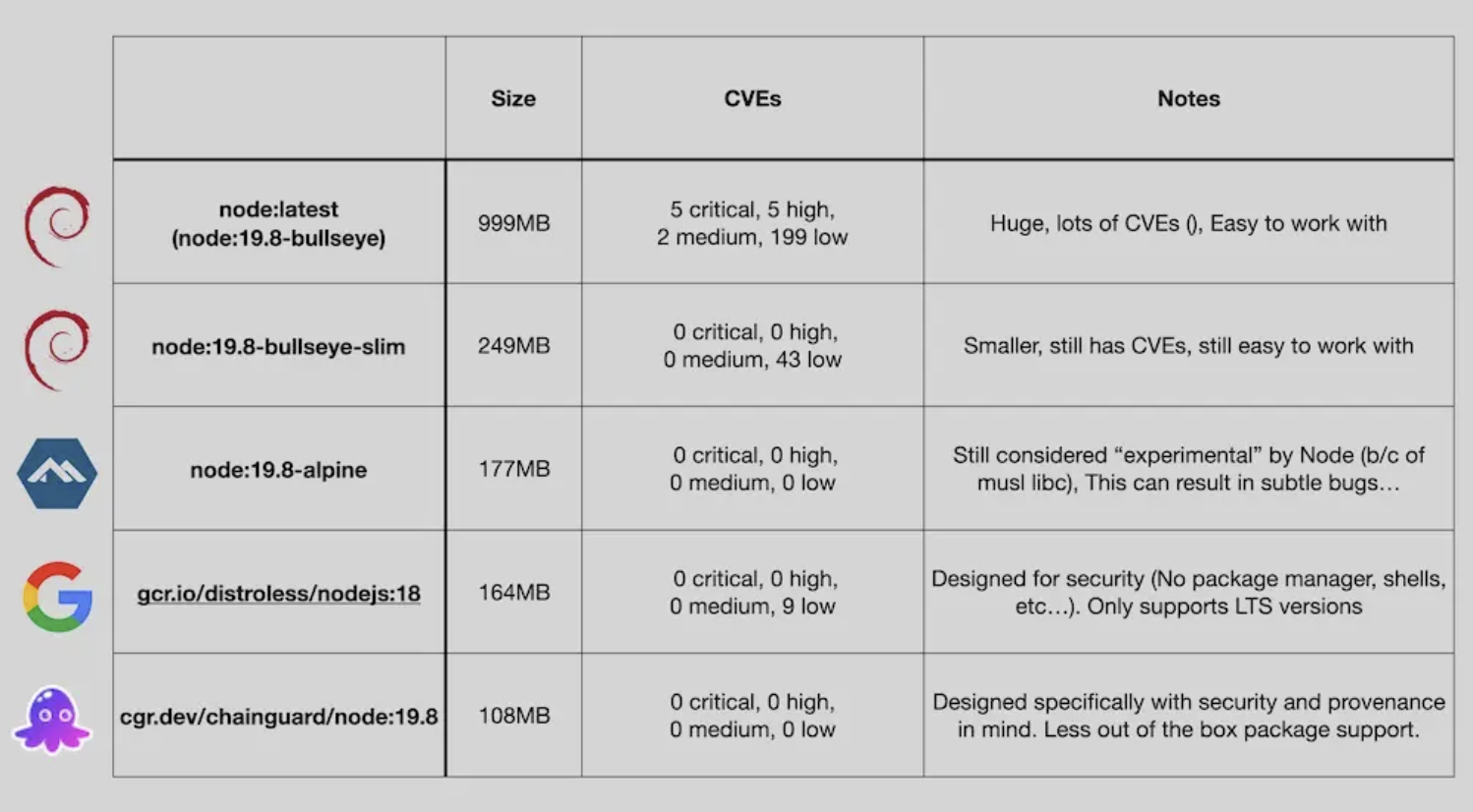
위 사진은 node.js 어플리케이션 기본이미지와 각각의 취약점과 사이즈에 대한 예시이다.
-
node:latest (Bullseye) - Almost 1 GB in size, with 5 critical vulnerabilities, but easy to work with.
-
node:slim (Bullseye) - 4 times smaller than the full size image and eliminates critical vulnerabilities, but with fewer built-in utilities.
-
node:alpine - Small and free of CVEs, but considered experimental by Node.js due to its different C library variant.
-
gcr.io/distroless/nodejs - Security-focused image created by Google, with LTS Node.js support only and limited utilities.
-
cgr.dev/chainguard/node - Smallest and most secure image, but may be more difficult to work with due to its software provenance and limited package support.