Check if string is null or empty in Bash
External file or output of command in Terminal
Code command lines in Bash Script to order what computer should do in Terminal
Intro
- 반복되는 명령어나 명령어묶음이 있을 때, 이 것을 쉘스크립트파일에 저장하면 터미널에서 사용자가 이 파일을 열때마다 저장된 라인들이 output된다. 명령어를 수기로 일일히 작성하는 것보다 시간을 절약할 수 있음
- 터미널에서 사용되는 모든 명령어는 bash script안에서도 사용 가능
- bash script은 여러 shell script 중에 하나 ( 파일명이 .sh로 끝난다)
- bash script은 기존과 다른 특수한 comparision operator를 사용한다. 만약의 기존의 comparision을 사용하려면 이중 brackets으로 가능하다 [[ ... ]]
- bash script을 작성할 때는 정확한 syntax으로 써야한다. 특히,(쉼표)와 space(공백)의 사용에 유의하자
- shell script를 사용하면 프로그래머로서 deploy할 때나 프로그램이 맞게 잘 동작하고 있는지 permission문제는 없는지 등등을 체크할 때 유용하다
.png)
맨 윗 줄엔 항상 #!/bin/bash 를 적어 준다. 빠트리거나 스펠링을 틀리게 적으면 명령어를 이용해 작업할 때 원할하지 않음
Special Operator
- arithmetic operator의 경우는 < bash arthmetic operator >을 참조
- 추가적으로 만약 기존의 comparision operation을 사용하고 싶다면 이중 brackets으로 가능하다
- equal: -eq
- not equal : -ne
- less than or equal : -le
- less than : -lt
- greater than or equal : -ge
- greater than : -gt
- is null : -z
- equal: ==
- noteual: !=
- &&
- ||
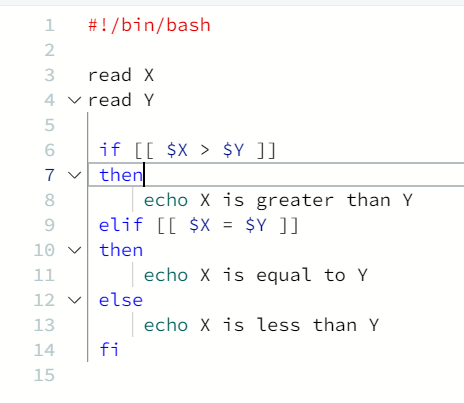
non-string comparision
string comparison
add/or operator
.png)
위와 같이 $filename으로 얻을 value와 비교할 대상 (source/secretinfo.md)가 모두 string이면 quotation mark가 필요함

if condition 두개가 or operator로 연결되어 있다.
Bash Arithmetic Operation
- Bash Script는 다른 프로그래밍 언어와는 달리 연산을 다룰 때 아래의 방법으로만 가능하다. 그리고 다른 언어와 달리 floating point나 double numbers를 다룰 수 없다.
-
Using 'expr' command
- 가장 오래된 방법. 오직 integer values만 출력가능하다 ( read를 통해 terminal에서 input를 받는 경우 read A와 같이 약속하는데 이 'A'는 value이지만 integer가 아니기 때문에 'expr' command와 같이 사용될 수 없다 )

-
Using 'let' command
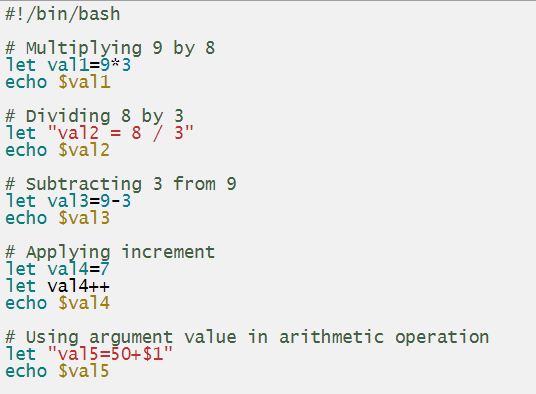
-
Using double brackets
- more flexible than commands like 'expr' or 'let'
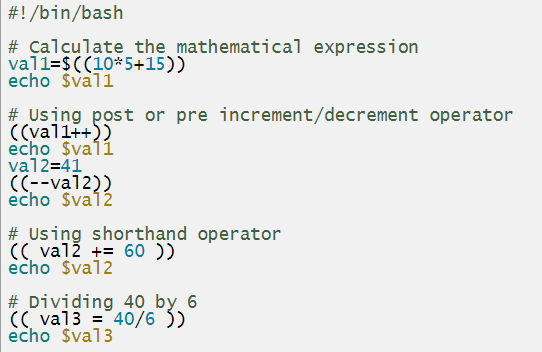
-
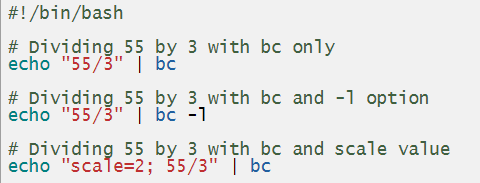
Using 'bc' command for float or double numbers
- float나 double numbers는 다룰 수 없다는 bash sh를 보완해줄 수 있는 유일한 방법. but integer만 가능 ( read를 통해 terminal에서 input를 받는 경우 read A와 같이 약속하는데 이 'A'는 value이지만 integer가 아니기 때문에 'expr' command와 같이 사용될 수 없다)
Check if string is null or empty in Bash
- 다른 컴퓨터언어와는 달리 Bash는 string 값이 null이거나 비어있는지 확인하는 방법이 있다.

-z옵션을 이용하면 length of the variable이 zero인지 아닌지 확인 가능. zero면 true.
How to - bash script 작성 방법
rules
- 관습적으로 script 작성 시 맨 윗 줄에
#!/bin/bash를 적어 준다. ( 컴퓨터에서 해당 file이 bash script임을 알리는 역할) - script file을 저장할 때는 자주 사용하는 scripts라면 ~/bin/ directory에 저장
- nano editor 등을 이용하여 shell script file을 생성할 때는 filename.sh ( sh는 이 file이 shell script 임을 나타냄 )
- editor를 이용해서 script생성 - bash script도 computer language이기 때문에 당연히 if문이나 variable같은 것들도 사용가능.
- 저장하기 ( 혼자쓰는 파일인지 공유하는 파일인지에 따라 저장위치 다름 )
- 해당 directory를 PATH에 넣기 - https://linuxize.com/post/how-to-add-directory-to-path-in-linux/ 참조
- run the script ?? - 이때 ./파일명.sh 형식을 취해야 가능?
방법
Permission
- bash file을 실행할 때 denied된다면 terminal에
chmod +x script.sh를 작성하고 permission을 획득할 수 있다.

터미널에서 ./myscript.sh로 bash file을 실행하였으나 permission denied 됨. 이후, chmod +x [파일명]으로 permission 획득.
Variables
- bash script 안에서도 variable은 variable name=value의 형식을 가진다 ( 각 요소들사이 no space )
- bash script 안에서 variable에 access하려면 dollar sign ( $ )이 필요 $variable name
- variable끼리의 비교도 가능하다 ( 예를 들어, if [ "$string1" == "$string2" ]와 같이 )

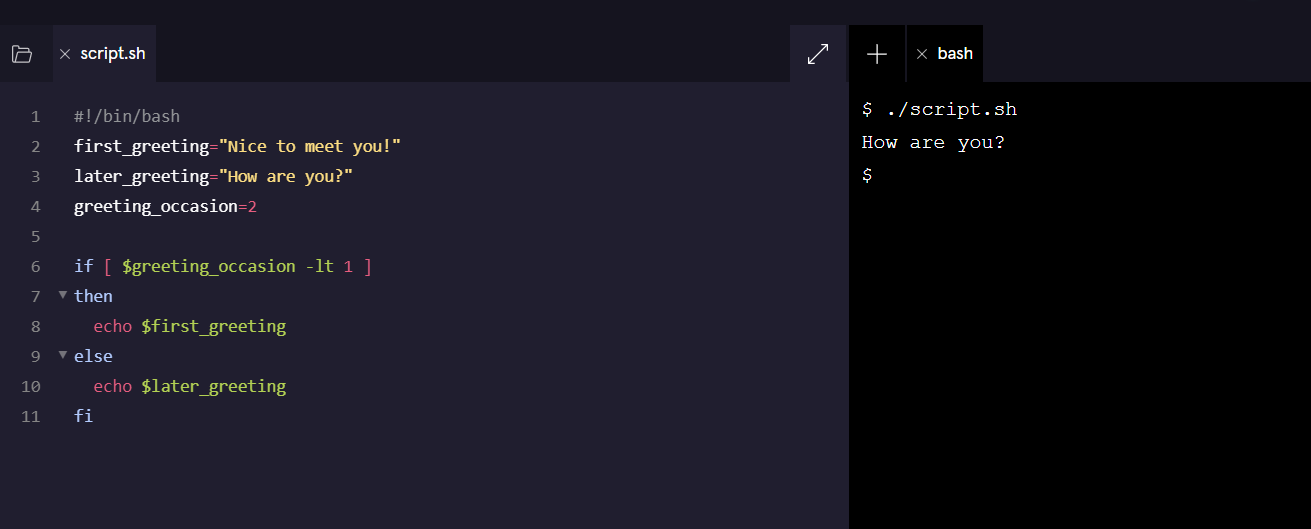
왼쪽이 bash script / 오른쪽이 terminal
Conditionals
- bash scripts는 기존의 operator가 아니고 specific list of operators가 존재. non-string comparison의 경우와 string comparison의 경우로 나뉜다.

lt는 less than이라는 의미
snippet에서는 나와 있지 않지만 if문 밖에 "index" variable을 assign하였음

greeting_occasion의 value값에 따라 다르게 if절이 적용.
greeting_occasion의 value가 0이므로 if절의 조건과 만난다. 따라서, terminal에 value of first_greeting variable 가 print

if와 else 이외의 다른 conditional이 존재하는 경우
Loops
- bash script에서 사용되는 iterator는 for, while 그리고 until이다.
- iterator에서는 stopping point 가 중요! 무한의 loop은 시스템의 손상을 가져올 수 있다.

dollor sign ( $ )는 value를 access할 때만 필요함
for loop은 list 안의 data를 iterator할 때 유용 ( ex) array)

bash script에선 arithmetic은 $((...)) syntax 안에서만 가능함
하이라이트 표시 부분이 stopping point


위의 식에서는 if 조건문이 do 와 done 사이에 위치함
Inputs in Bash
- script작성 중 bash script file 밖에 있는 data에 접근할 때 필요
( ex ) 쇼핑몰에서 고객이 입력하는 ID나 password같은 external input data 등을 의미 ) - read command가 필요하고 syntax은
read variable - in bash script
.png)

in terminal
Aliases
- .bashrc 나 .bash_profile 파일에 alias command를 이용하여 원하는 script의 가명(alias)를 지정하면, terminal 안에서 해당 파일의 이름을 전부 쓰지 않고 alias만으로도 부를 수 있다

.bashrc나 .bash_profile 안에 지정

standard input arguments 중에 하나인 green을 saycolors bash파일의 첫 input으로 지정하고 싶다면 위와 같은 방법 사용??
External file or output of command in Terminal
- 외부파일에 있는 data value를 bash script안에 variable로 지정하고 저장할 수 있다.
syntax은 variable=$(command option external-file-path) - 또한 terminal에서 command를 통해 나온 output을 bash script로 부를 때도 위와 같은 syntax이 사용된다.

왼쪽이 input in a bash script / 오른쪽이 output in terminal
-n 1 의 의미 : changelog.md에 있는 line 중 첫번째 한 줄만 return

왼쪽이 input in a bash script / 오른쪽이 output in terminal
Calling data from an array
- 예를 들어 index를 이용해서 array foo의 value에 접근하는 syntax은 다음과 같다


왼쪽은 input in a bash script / 오른쪽은 output in terminal
마크 된 line의 의미는 variable_firstline의 value값은 splitfirstline이라는 read -a를 통해 생성된 array에 나누어 redirect한다는 내용.
variable_firstline의 value는 ## 11.2.3이였고 ##과 11.2.3가 나뉘어 array에 저장되었었음.
따라서, splitfirstline[1]를 print하면 output으론 11.2.3만 print
Code command lines in Bash Script to order what computer should do in Terminal
- bash script 안에 terminal에 사용하고 싶은 command를 code로 작성한 후 터미널에서 해당 bash script를 실행하면 컴퓨터가 이를 수행한다.

왼쪽이 bash script / 오른쪽이 terminal
흰색으로 mark된 부분이 ㅠash script 안의 명령 command lines. 오른쪽 파란색 mark에 해당 code output을 확인할 수 있다
More

Input arguments can be passed to a bash script after the script name, separated by spaces ( myScript.sh "hello" "how are you") 안됨 ㅡㅡ bash script에 먼가 argument의 쌍인 parameter가 들어가야 할 것 같은데 ㅡㅡ ?