어제 받았던 사용자 정보를 jsonschema2pojo에 가져가서
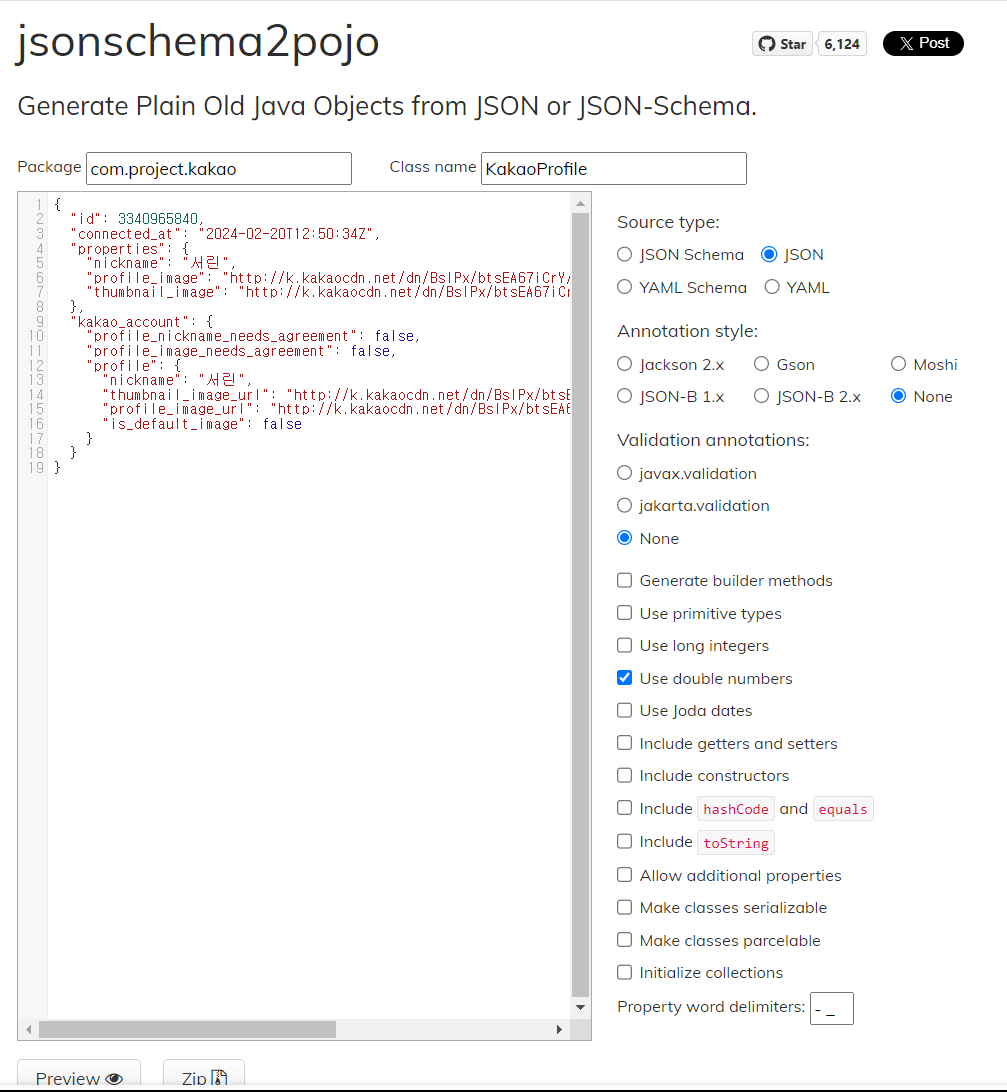
미리보기를 하고
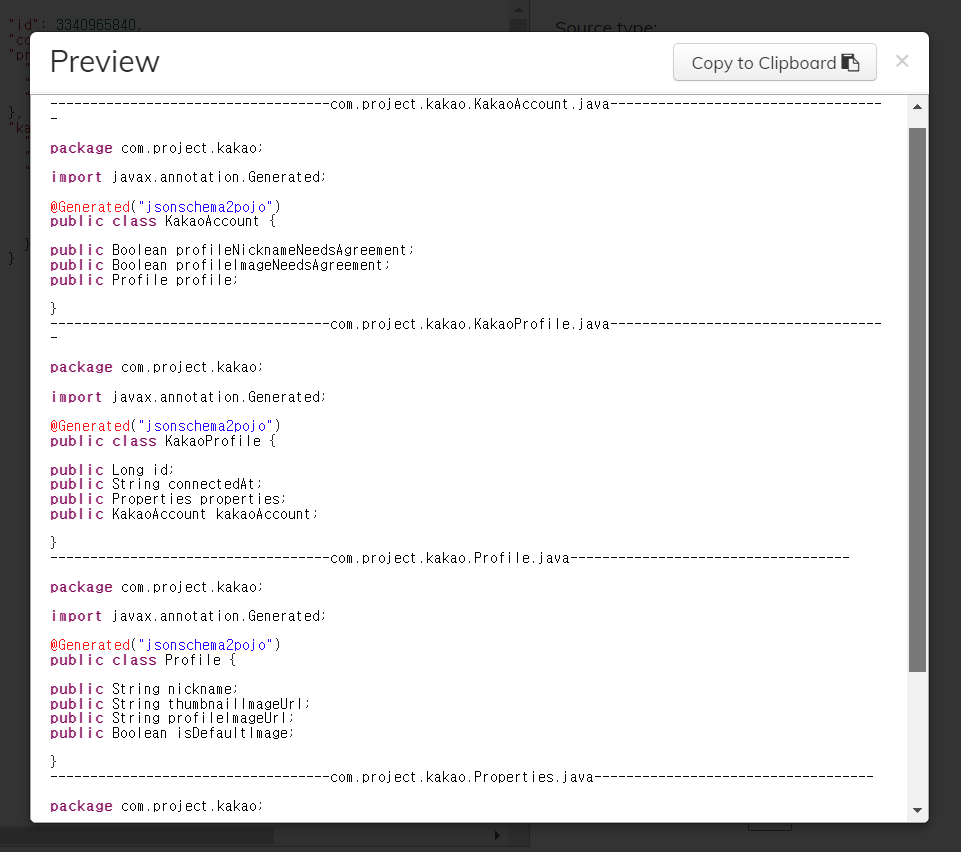
복사해서 새 클래스를 생성한다
KakaoProfile.java
@Data
@Generated("jsonschema2pojo")
public class KakaoProfile {

	public Long id;
	public String connectedAt;
	public Properties properties;
	public KakaoAccount kakaoAccount;

	@Data
	class Properties {

		public String nickname;
		public String profileImage;
		public String thumbnailImage;

	}

	@Data
	class KakaoAccount {

		public Boolean profileNicknameNeedsAgreement;
		public Boolean profileImageNeedsAgreement;
		public Profile profile;

		@Data
		class Profile {

			public String nickname;
			public String thumbnailImageUrl;
			public String profileImageUrl;
			public Boolean isDefaultImage;

		}
	}
}
KakaoController.java
@Controller
@RequestMapping("/kakao")
public class KakaoController {

	@ResponseBody
	@GetMapping("/callback")
	public String kakaoCallback(String code) { //data를 리턴해주는 컨트롤러 함수

		//생략----------

		//Gson, Json Simple, ObjectMapper 라이브러리
				ObjectMapper objectMapper2 = new ObjectMapper();
				KakaoProfile kakaoProfile = null;

				try {
					kakaoProfile = objectMapper2.readValue(response2.getBody(), KakaoProfile.class);
				} catch (JsonMappingException e) {
					e.printStackTrace();
				} catch (JsonProcessingException e) {
					e.printStackTrace();
				}

				System.out.println("카카오 id : " + kakaoProfile.getId());
				System.out.println("카카오 nickname : " + kakaoProfile.getProperties().getNickname());

		return response2.getBody();

	}
실행하니 에러가 발생했다
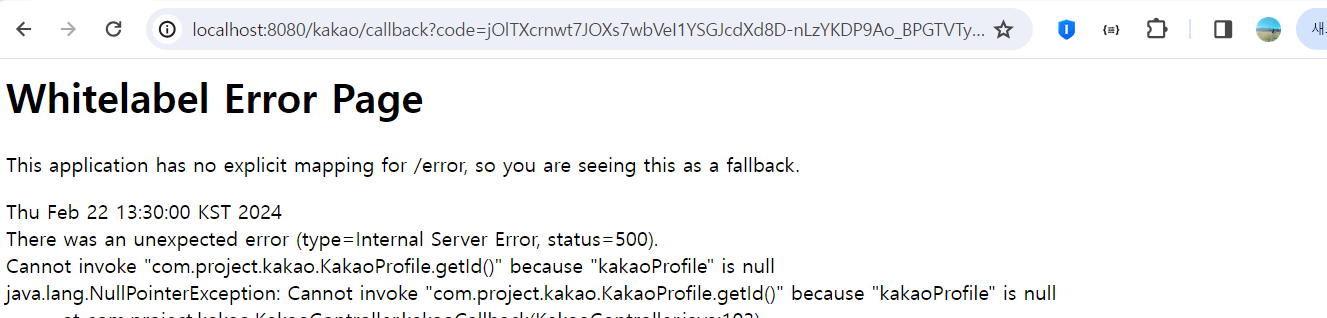
console에 찍힌 에러
com.fasterxml.jackson.databind.exc.UnrecognizedPropertyException: Unrecognized field "connected_at" (class com.project.kakao.KakaoProfile), not marked as ignorable (4 known properties: "kakaoAccount", "id", "connectedAt", "properties"])
 at [Source: (String)"{"id":3340965840,"connected_at":"2024-02-20T12:50:34Z","properties":{"nickname":"서린","profile_image":"http://k.kakaocdn.net/dn/BsIPx/btsEA67iCrY/5ATUQ4Xy5zWM59CwQYCw71/img_640x640.jpg","thumbnail_image":"http://k.kakaocdn.net/dn/BsIPx/btsEA67iCrY/5ATUQ4Xy5zWM59CwQYCw71/img_110x110.jpg"},"kakao_account":{"profile_nickname_needs_agreement":false,"profile_image_needs_agreement":false,"profile":{"nickname":"서린","thumbnail_image_url":"http://k.kakaocdn.net/dn/BsIPx/btsEA67iCrY/5ATUQ4Xy5zWM59CwQYCw71/"[truncated 148 chars]; line: 1, column: 34] (through reference chain: com.project.kakao.KakaoProfile["connected_at"])

 2024-02-22 13:43:33,396 ERROR [org.apache.catalina.core.ContainerBase.[Tomcat].[localhost].[/].[dispatcherServlet]] Servlet.service() for servlet [dispatcherServlet] in context with path [] threw exception [Request processing failed; nested exception is java.lang.NullPointerException: Cannot invoke "com.project.kakao.KakaoProfile.getId()" because "kakaoProfile" is null] with root cause
java.lang.NullPointerException: Cannot invoke "com.project.kakao.KakaoProfile.getId()" because "kakaoProfile" is null
카카오에서는 snake_case형식으로 넘겨주는데
jsonschema2pojo에서 자동으로 CamelCase로 변경해서 생성해줘서 생긴 에러였다
카카오에서 넘겨주는 형식으로 수정해 실행했더니
@Data
@Generated("jsonschema2pojo")
public class KakaoProfile {

	public Long id;
	public String connected_at;
	public Properties properties;
	public KakaoAccount kakao_account;

	@Data
	class Properties {

		public String nickname;
		public String profile_image;
		public String thumbnail_image;

	}

	@Data
	class KakaoAccount {

		public Boolean profile_nickname_needs_agreement;
		public Boolean profile_image_needs_agreement;
		public Profile profile;

		@Data
		class Profile {

			public String nickname;
			public String thumbnail_image_url;
			public String profile_image_url;
			public Boolean is_default_image;

		}
	}
}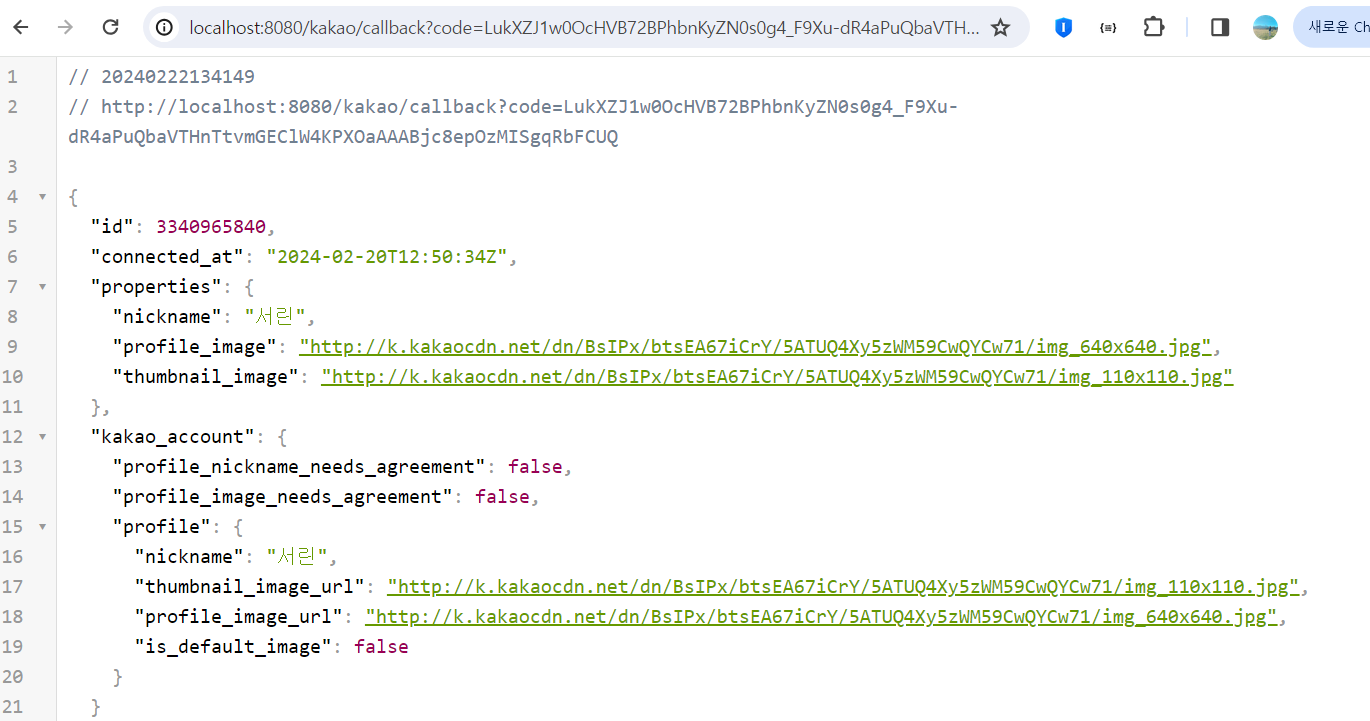
잘 나타나는 것을 볼 수 있었다
console에서도 
잘 찍히는것을 확인했다
그 다음 이제 카카오유저 정보를 MOUNT 서버에서 사용할 정보로 만드는 과정을 진행한다
KakaoController.java
@Controller
@RequestMapping("/kakao")
public class KakaoController {

	@ResponseBody
	@GetMapping("/callback")
	public String kakaoCallback(String code) { //data를 리턴해주는 컨트롤러 함수

		//생략---------

				//user오브젝트 : username, password,
				System.out.println("카카오 id : " + kakaoProfile.getId());
				System.out.println("카카오 nickname : " + kakaoProfile.getProperties().getNickname());

				System.out.println("mount서버 유저네임 : " + kakaoProfile.getProperties().getNickname() + "_" + kakaoProfile.getId());
				UUID tempPassword = UUID.randomUUID(); //임시 패스워드 만들기
				System.out.println("mount서버 패스워드 : " + tempPassword);


		return response2.getBody();

	}
이때 userEntity에 카카오 사용자 정보를 build하기 위해서
코드를 추가해줬다
KakaoController.java
UserEntity userEntity = UserEntity.builder()
						.loginId(kakaoProfile.getProperties().getNickname())
						.password(tempPassword)
						.name(kakaoProfile.getProperties().getNickname() + "_" + kakaoProfile.getId())
                        .email(email)
						.build();

				userBO.addKakaoUser(userEntity);
그런데 여기서 보였던 문제점들이 있다
1. password가 인코딩 되지 않아서 인코딩을 해줘야하며
2. 기존 user테이블에서는 email이 not null로 설정되어있는데
카카오에서는 카카오로그인 사용자의 email을 받아올 수 있는 권한이 없어서 카카오로그인 사용자는 email을 null로 받아야 한다는 점이었다
먼저 password를 인코딩 해주기 위해
클래스를 생성했다
PasswordEncoder.java
package com.project.user;

import java.security.MessageDigest;
import java.security.NoSuchAlgorithmException;

public class PasswordEncoder {

	/**
     * 비밀번호를 MD5 알고리즘으로 해싱
     * @param password 해싱할 비밀번호
     * @return 해싱된 비밀번호
     */
    public static String encode(String password) {
        try {
            // MD5 해시 함수를 사용하여 비밀번호를 해싱합니다.
            MessageDigest md = MessageDigest.getInstance("MD5");
            md.update(password.getBytes());
            byte[] byteData = md.digest();

            // 바이트 데이터를 16진수 문자열로 변환합니다.
            StringBuilder sb = new StringBuilder();
            for (byte b : byteData) {
                sb.append(Integer.toString((b & 0xff) + 0x100, 16).substring(1));
            }
            return sb.toString();
        } catch (NoSuchAlgorithmException e) {
            // 해당 알고리즘이 없는 경우에 대한 예외 처리
            e.printStackTrace();
            return null;
        }
    }
}
그다음 기존 일반 로그인 사용자의 회원가입, 로그인 시 패스워드 해싱 코드 수정
//password 해싱 - md5알고리즘
String hashedPassword = PasswordEncoder.encode(password);
그 다음 UserBO.java에 카카오 로그인(회원가입) 메소드를 추가했다
// 일반 회원가입
	//input:loginId, password, name, email
	//output: id(pk)
	public Integer addUser(String loginId, String password, String name, String email) {
		UserEntity userEntity = userRepository.save(
				UserEntity.builder()
				.loginId(loginId)
				.password(password)
				.name(name)
				.email(email)
				.build());

		return userEntity == null ? null : userEntity.getId();
	}

	/**
     * 카카오 회원가입
     * @param userEntity 사용자 엔터티
     * @return 등록된 사용자의 ID
     */
   public Integer addKakaoUser(UserEntity userEntity) {
        UserEntity UserEntity = userRepository.save(userEntity);
        return userEntity == null ? null : userEntity.getId();
    }
그 다음 user테이블의 email을 수정
create table `user`(
    `id` int not null auto_increment primary key,
    `loginId` varchar(15) not null,
    `password` varchar(256) not null,
    `name` varchar(20) not null,
    `email` varchar(80) not null,
    `createdAt` timestamp default current_timestamp,
    `updatedAt` timestamp default current_timestamp
)ENGINE=InnoDB DEFAULT CHARSET=utf8mb4;

ALTER TABLE user MODIFY COLUMN email varchar(80) DEFAULT NULL;
인코딩 완료 한 후 user에 사용자 정보 추가 코드!
+
그 아래에 가입자인지 비가입자인지 체크하는 코드 추가
KakaoController.java
@Controller
@RequestMapping("/kakao")
public class KakaoController {

	@Autowired
	private UserBO userBO;

	@Autowired
	private PasswordEncoder passwordEncoder;

	@ResponseBody
	@GetMapping("/callback")
	public String kakaoCallback(String code, HttpSession session) { //data를 리턴해주는 컨트롤러 함수

		//생략---------------

				//user오브젝트 : username, password
				System.out.println("카카오 id : " + kakaoProfile.getId());
				System.out.println("카카오 nickname : " + kakaoProfile.getProperties().getNickname());

				System.out.println("mount서버 유저네임 : " + kakaoProfile.getProperties().getNickname() + "_" + kakaoProfile.getId());
				String rawPassword = UUID.randomUUID().toString(); //임시 패스워드 만들기
				String encodedPassword = PasswordEncoder.encode(rawPassword);;

				System.out.println("mount서버 패스워드 : " + encodedPassword);

				UserEntity kakaoUser = UserEntity.builder()
						.loginId(kakaoProfile.getProperties().getNickname())
						.password(encodedPassword)
						.name(kakaoProfile.getProperties().getNickname() + "_" + kakaoProfile.getId())
						.build();

				//가입자 혹은 비가입자 체크 해서 처리
				Optional<UserEntity> originUserEntity = userBO.getUserEntityByName(kakaoUser.getName());

				if (originUserEntity.isPresent()) { // 이미 가입된 회원인 경우
			        // 해당 회원으로 로그인 처리
					System.out.println("기존 회원입니다-----------------");
			        UserEntity loggedInUser = originUserEntity.get();
			        session.setAttribute("userId", loggedInUser.getId());
			        session.setAttribute("userName", loggedInUser.getName());
			        session.setAttribute("userLoginId", loggedInUser.getLoginId());

			        // 로그인 성공 메시지 반환
			        return "로그인 성공";
			    } else { // 비가입자인 경우
			        // 회원가입 처리
			        userBO.addKakaoUser(kakaoUser);

			        // 회원가입 완료 메시지 반환
			        return "회원가입 완료";
			    }
	}

}
UserBO.java에도 코드 추가
@Service
public class UserBO {

	@Autowired
	private UserRepository userRepository;

	//생략 ----------------------

    //카카오 로그인 가입 비가입 체크
    @Transactional(readOnly=true)
    public Optional<UserEntity> getUserEntityByName(String name) {
    	Optional<UserEntity> userEntity = userRepository.findByName(name);
		return userEntity;
	}
}
처음엔 메소드를 getUserEntityByKakaoName()/findByKakaoName()으로 작성했는데,
console에 이런 에러가 찍혔었다
Caused by: org.springframework.beans.factory.UnsatisfiedDependencyException: Error creating bean with name 'commentBO': Unsatisfied dependency expressed through field 'userBO';

Caused by: org.springframework.beans.factory.UnsatisfiedDependencyException: Error creating bean with name 'userBO': Unsatisfied dependency expressed through field 'userRepository';

Caused by: org.springframework.beans.factory.BeanCreationException: Error creating bean with name 'userRepository' defined in com.project.user.repository.UserRepository defined in @EnableJpaRepositories declared on JpaRepositoriesRegistrar.

Caused by: org.springframework.data.repository.query.QueryCreationException: Could not create query for public abstract java.util.

Caused by: java.lang.IllegalArgumentException: Failed to create query for method public abstract java.util.Optional com.project.user.repository.UserRepository.findbyKakaoName(java.lang.String)! No property 'findbyKakaoName' found for type 'UserEntity'

Caused by: org.springframework.data.mapping.PropertyReferenceException: No property 'findbyKakaoName' found for type 'UserEntity'
UserRepository 인터페이스에서 findbyKakaoName 메소드를 찾을 수 없고,
userEntity에 findbyKakaoName과 일치하는 속성이 없으므로
이 메소드를 사용자를 찾는 데 사용할 수 없기 때문에 발생한거였다
이 에러를 통해서 ~~By메소드를 생성할 때 domain, entity에 존재하는 속성으로 작성해야된다는 것을 알았다
여태까지는 메소드 이름 짓기가 쉬운? 당연한? 것들만 만들었던지라 이것도 처음 안 내용이다
getUserEntityByName()/findByName()으로 메소드를 수정했더니 에러가 해결되었다
이 에러를 해결하고 나니 바로 다음 에러가 발생했는데,,
Error starting ApplicationContext. To display the conditions report re-run your application with 'debug' enabled.
2024-02-22 16:50:18,096 ERROR [org.springframework.boot.diagnostics.LoggingFailureAnalysisReporter]

***************************
APPLICATION FAILED TO START
***************************

Description:

Field passwordEncoder in com.project.kakao.KakaoController required a bean of type 'com.project.user.PasswordEncoder' that could not be found.

The injection point has the following annotations:
	- @org.springframework.beans.factory.annotation.Autowired(required=true)


Action:

Consider defining a bean of type 'com.project.user.PasswordEncoder' in your configuration.
이 에러는 com.project.kakao.KakaoController에서 passwordEncoder 필드를 사용하려고 하는데, 해당 타입의 빈을 찾을 수 없다 라는 의미이다
확인해보니 class가 아니라 interface로 생성해야 하는 거였다
왜 class는 안되고 에러가 발생한건지 궁금해서 찾아봤는데
interface가 코드에서 둘 이상의 위치, 특히 둘 이상의 파일 또는 함수에서 사용될 객체의 속성 및 함수를 생성해야하는 경우에 사용되기 때문이라고 한다
이 에러는 PasswordEncoder클래스를 interface로 수정하니 해결되었다
여기 까지 완료 하고 실행해보니 "회원가입 완료"가 응답왔고

user테이블에도 사용자의 정보가 저장된것을 확인했다

이제 로그인은 완료 되었으니
카카오 로그인이 완료되면 /home/home-list-view 화면으로 이동하도록 구현하고 싶은데
음,, return을 어디로 해야하는지 헷갈린다
