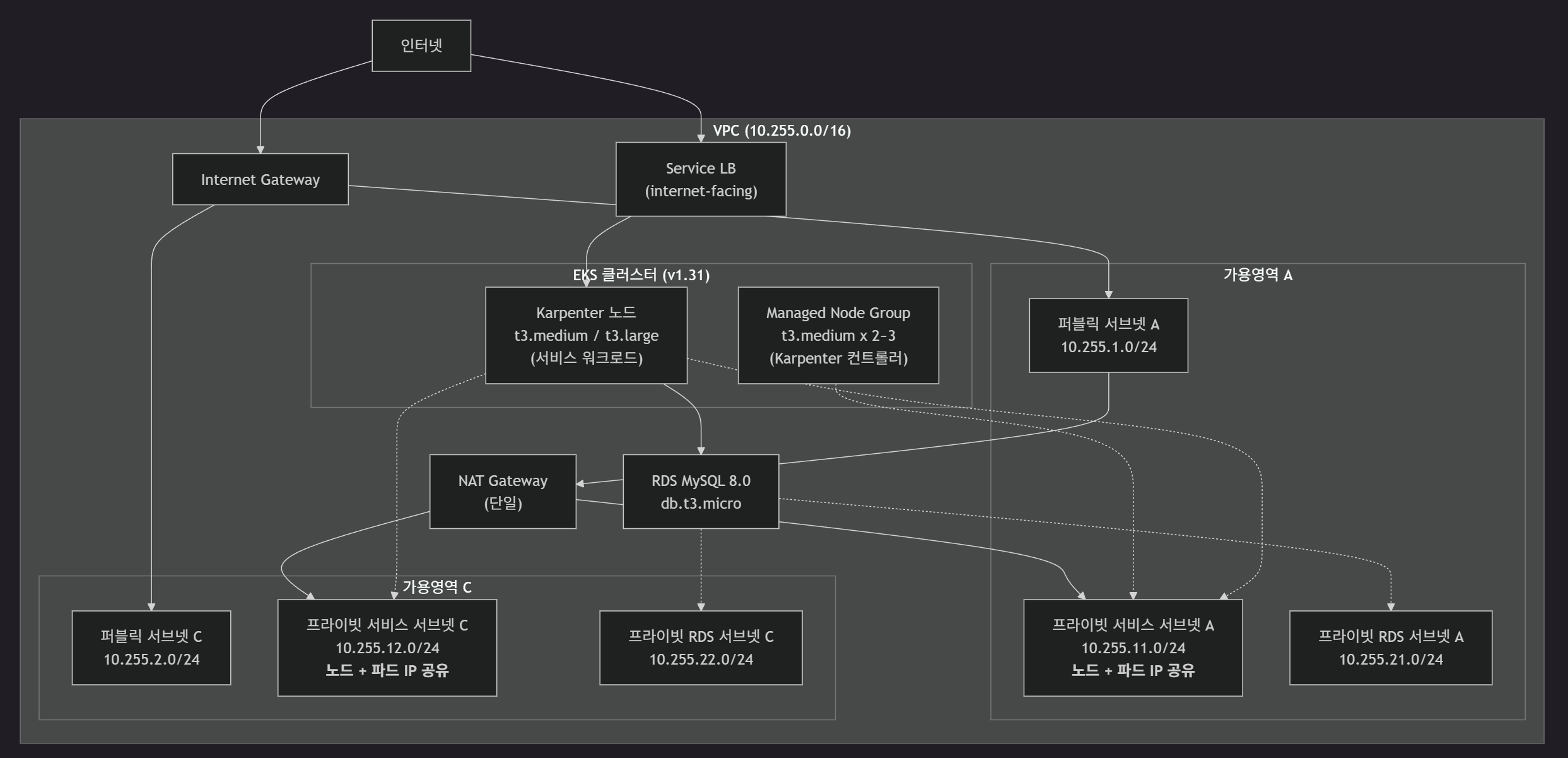
사내 EKS 환경의 파드 IP 고갈 문제를 VPC CNI Custom Networking으로 해결하는 전체 과정을 각색하여 재구현
1. 배경
문제
- 서브넷 IP 주소는 유한 — 노드와 파드가 나누어 사용
- 워크로드 증가 시 IP 부족 → 새 파드 스케줄링 불가
→ VPC CNI Custom Networking으로 해결
VPC CNI
- Amazon EKS의 기본 네트워크 플러그인 — VPC CNI(Container Network Interface)
- 파드에 VPC 내 실제 IP 주소를 할당하는 방식
- 파드가 VPC 내 다른 리소스(RDS, ElastiCache 등)와 오버레이 네트워크 없이 직접 통신 가능
기본 동작 방식
- 노드의 프라이머리 ENI(Elastic Network Interface) 서브넷에서 파드 IP 할당
- 노드와 파드가 동일한 서브넷 IP 풀을 공유
노드 IP: 10.255.11.10 (프라이빗 서비스 서브넷)
파드 IP: 10.255.11.15 (동일한 프라이빗 서비스 서브넷)
파드 IP: 10.255.11.23 (동일한 프라이빗 서비스 서브넷)
2. AS-IS 아키텍처
- Custom Networking 미적용 상태의 기본 VPC CNI 구성
- Terraform 기반 전체 인프라 코드 관리
2.1 네트워크 구성
VPC: 10.255.0.0/16
│
├── 퍼블릭 서브넷 (Service LB 배치)
│   ├── ap-northeast-2a: 10.255.1.0/24
│   └── ap-northeast-2c: 10.255.2.0/24
│
├── 프라이빗 서비스 서브넷 (EKS 노드 + 파드)
│   ├── ap-northeast-2a: 10.255.11.0/24
│   └── ap-northeast-2c: 10.255.12.0/24
│
├── 프라이빗 RDS 서브넷 (데이터베이스)
│   ├── ap-northeast-2a: 10.255.21.0/24
│   └── ap-northeast-2c: 10.255.22.0/24
│
└── VPC Endpoints (프라이빗 서브넷 → AWS API)
    ├── S3 (Gateway) — ECR 이미지 레이어
    ├── ECR API / ECR DKR (Interface) — 컨테이너 이미지
    ├── EC2 (Interface) — Karpenter 인스턴스 프로비저닝
    ├── STS (Interface) — IRSA 토큰
    ├── SQS (Interface) — Karpenter 인터럽션 큐
    ├── SSM (Interface) — SSM Agent
    ├── CloudWatch Logs (Interface) — 로깅
    └── EKS (Interface) — EKS API
2.2 전체 아키텍처 다이어그램
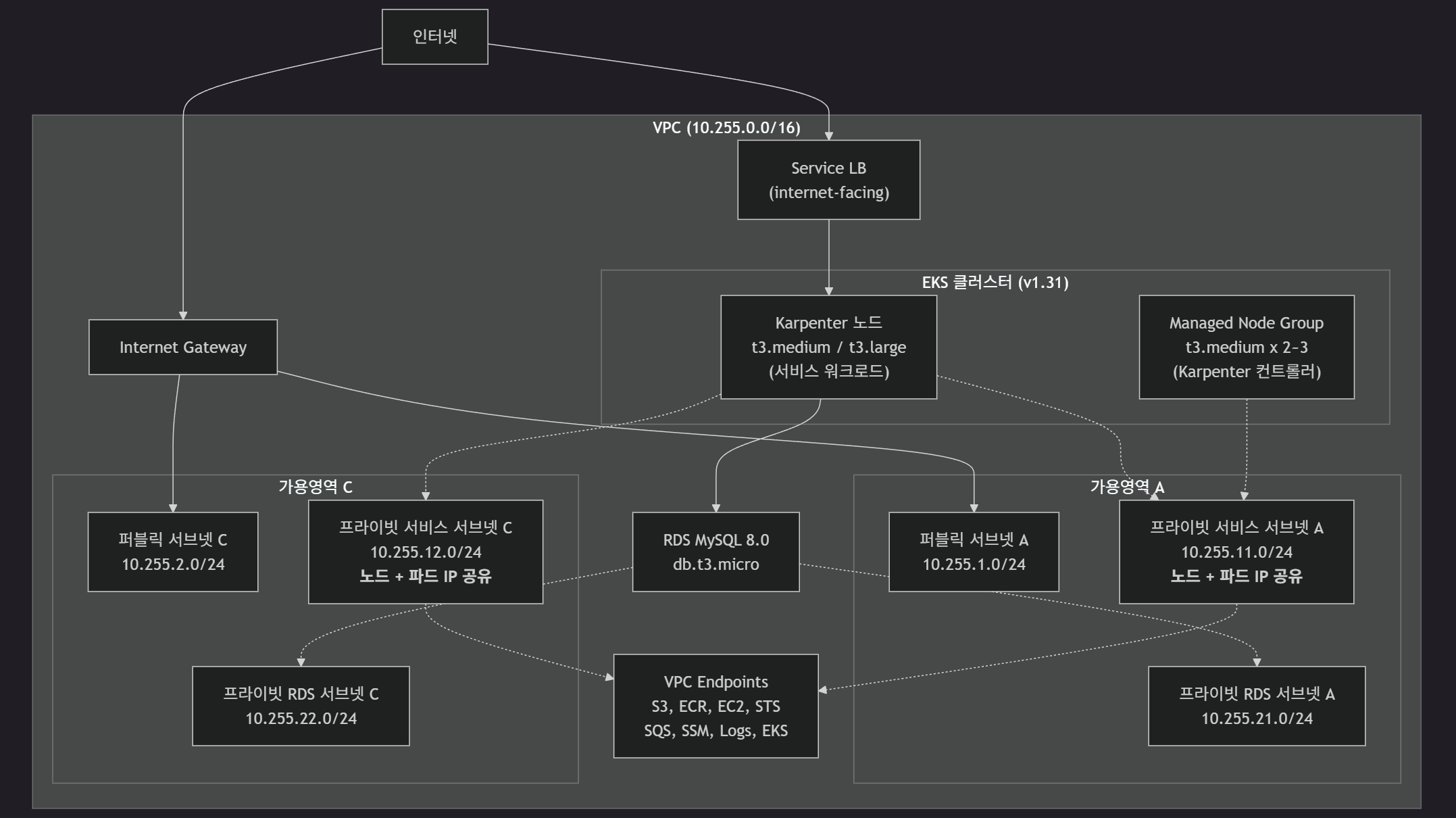
2.3 트래픽 흐름
외부 사용자
    │ HTTP (80)
    ▼
Service LB (퍼블릭 서브넷)
    │ internet-facing LoadBalancer
    ▼
Example Service Pod (프라이빗 서비스 서브넷)
    │ Karpenter 노드에서 실행
    │ MySQL (3306)
    ▼
RDS Instance (프라이빗 RDS 서브넷)
    │ MySQL 8.0, db.t3.micro
    ▼
응답 반환 (역순)
2.4 EKS 구성 상세
| 구성 요소 | 상세 |
|---|---|
| EKS 버전 | 1.31 |
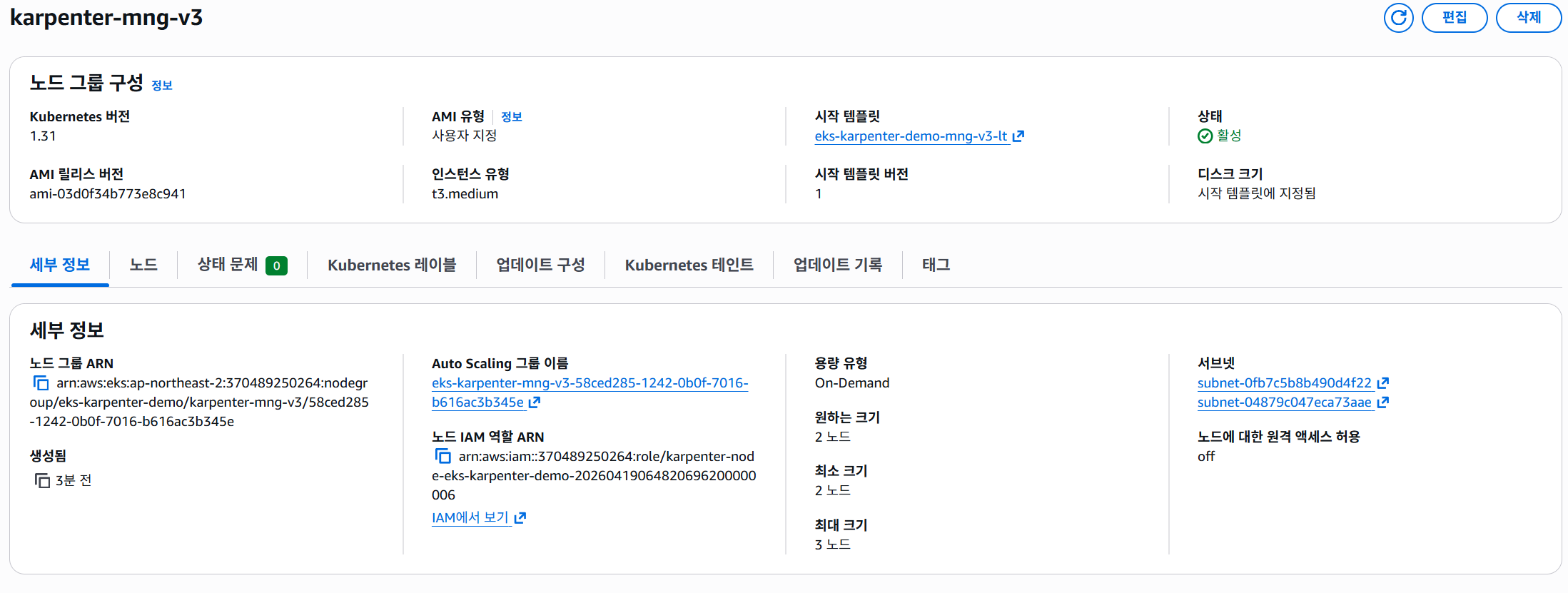
| Managed Node Group | t3.medium, 2~3대 (Karpenter 컨트롤러 전용) |
| Karpenter NodePool | on-demand, t3.medium/t3.large, CPU 10코어/Memory 40Gi 제한 |
| EC2NodeClass | AL2023 AMI, 프라이빗 서비스 서브넷 배치 |
| EKS 애드온 | VPC CNI, CoreDNS, kube-proxy |
| 클러스터 엔드포인트 | 퍼블릭 + 프라이빗 액세스 |
2.5 보안 그룹 구성
| 보안 그룹 | 인바운드 | 아웃바운드 |
|---|---|---|
| LB SG | 0.0.0.0/0 → 80, 443 | EKS 노드 SG → NodePort |
| EKS 노드 SG | LB SG → NodePort, CP SG → 443/10250 | RDS SG → 3306, 0.0.0.0/0 → 443 |
| RDS SG | 프라이빗 서비스 서브넷 CIDR → 3306 | - |
| EKS CP SG | 노드 SG → 443 | 노드 SG → 443/10250 |
2.6 라우팅 테이블
| 서브넷 | 대상 | 게이트웨이 |
|---|---|---|
| 퍼블릭 | 0.0.0.0/0 | Internet Gateway |
| 프라이빗 서비스 | S3 prefix list | S3 Gateway Endpoint |
| 프라이빗 서비스 | AWS API | VPC Interface Endpoints (프라이빗 DNS) |
| 프라이빗 RDS | - | 외부 경로 없음 (VPC 내부만) |
2.7 VPC Endpoints 구성
| Endpoint | 타입 | 용도 |
|---|---|---|
| S3 | Gateway (무료) | ECR 이미지 레이어 저장소 |
| ECR API | Interface | 컨테이너 이미지 메타데이터 |
| ECR DKR | Interface | 컨테이너 이미지 풀 |
| EC2 | Interface | Karpenter 인스턴스 프로비저닝 |
| STS | Interface | IRSA 토큰 발급 |
| SQS | Interface | Karpenter 인터럽션 큐 |
| SSM | Interface | SSM Agent 통신 |
| CloudWatch Logs | Interface | EKS/Karpenter 로깅 |
| EKS | Interface | EKS API 프라이빗 접근 |
2.8 Karpenter Helm 차트 — 프라이빗 ECR 미러링
- NAT Gateway 미사용 → 퍼블릭 ECR(
public.ecr.aws) 직접 접근 불가 - Karpenter Helm 차트 + 컨트롤러 이미지를 프라이빗 ECR에 미러링하여 사용
# 1. 퍼블릭 ECR에서 Helm 차트 다운로드 (인터넷 접근 가능한 환경에서)
helm pull oci://public.ecr.aws/karpenter/karpenter --version 1.1.1

# 2. 프라이빗 ECR 로그인
aws ecr get-login-password --region ap-northeast-2 | \
  helm registry login --username AWS --password-stdin \
  <ACCOUNT_ID>.dkr.ecr.ap-northeast-2.amazonaws.com

# 3. 프라이빗 ECR에 Helm 차트 푸시
helm push karpenter-1.1.1.tgz \
  oci://<ACCOUNT_ID>.dkr.ecr.ap-northeast-2.amazonaws.com/karpenter

# 4. 컨트롤러 이미지 미러링
docker pull public.ecr.aws/karpenter/controller:1.1.1
docker tag public.ecr.aws/karpenter/controller:1.1.1 \
  <ACCOUNT_ID>.dkr.ecr.ap-northeast-2.amazonaws.com/karpenter/controller:1.1.1
docker push <ACCOUNT_ID>.dkr.ecr.ap-northeast-2.amazonaws.com/karpenter/controller:1.1.1
2.9 파드 네트워킹 (핵심)
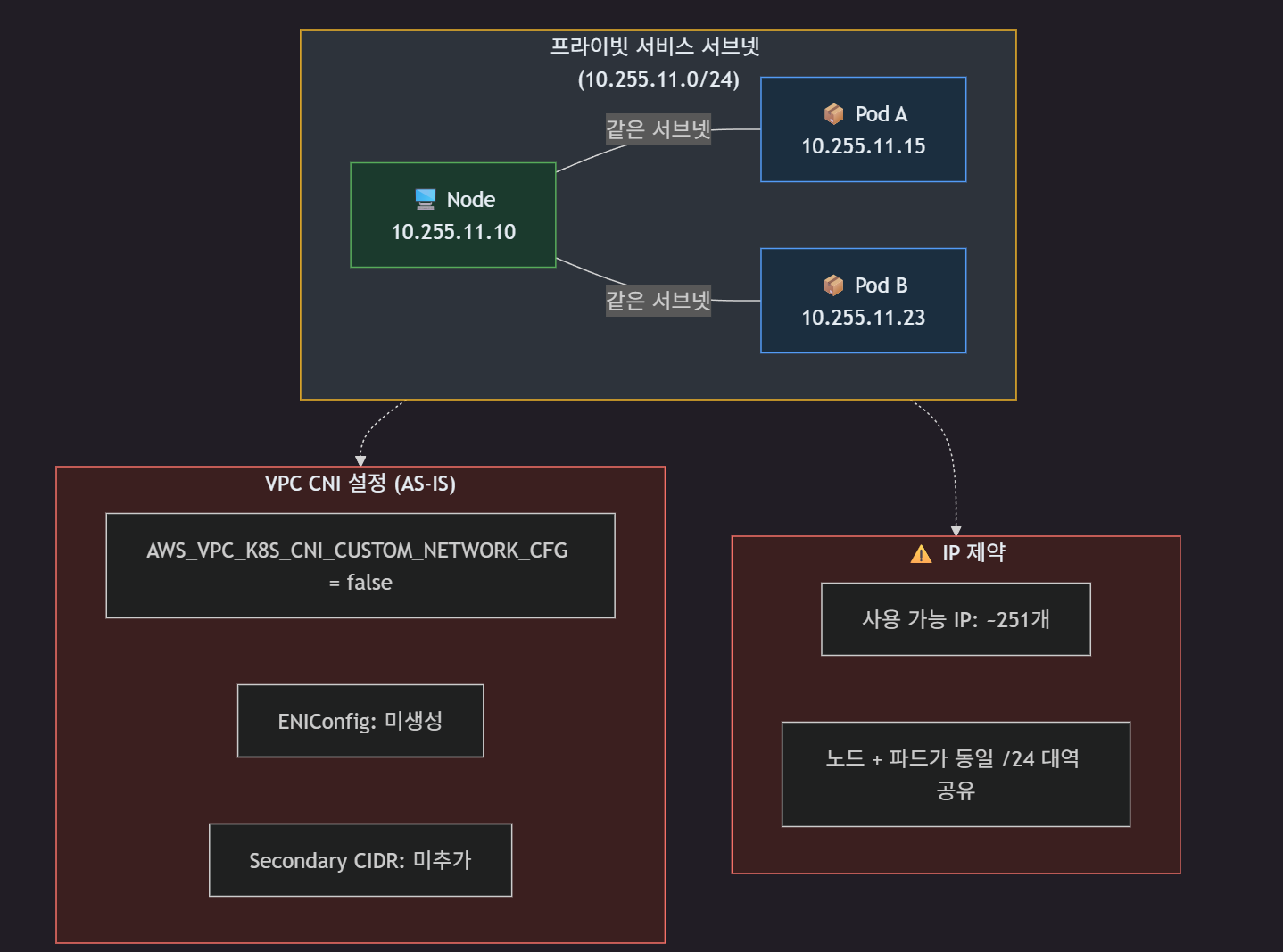
- 노드(10.255.11.x)와 파드(10.255.11.x)가 동일한 /24 서브넷 IP 대역 공유
- Custom Networking 미적용 → VPC CNI가 노드의 프라이머리 ENI 서브넷에서 파드 IP 할당
3. AS-IS 상태
3.1 문제점
- IP 주소 고갈
- Primary CIDR 내 서브넷 추가 시 기존 할당 범위와의 충돌 가능성
- 노드/파드 동일 서브넷 사용 → 네트워크 레벨 트래픽 분리 불가
- 보안 정책 적용, 트래픽 모니터링 시 불리
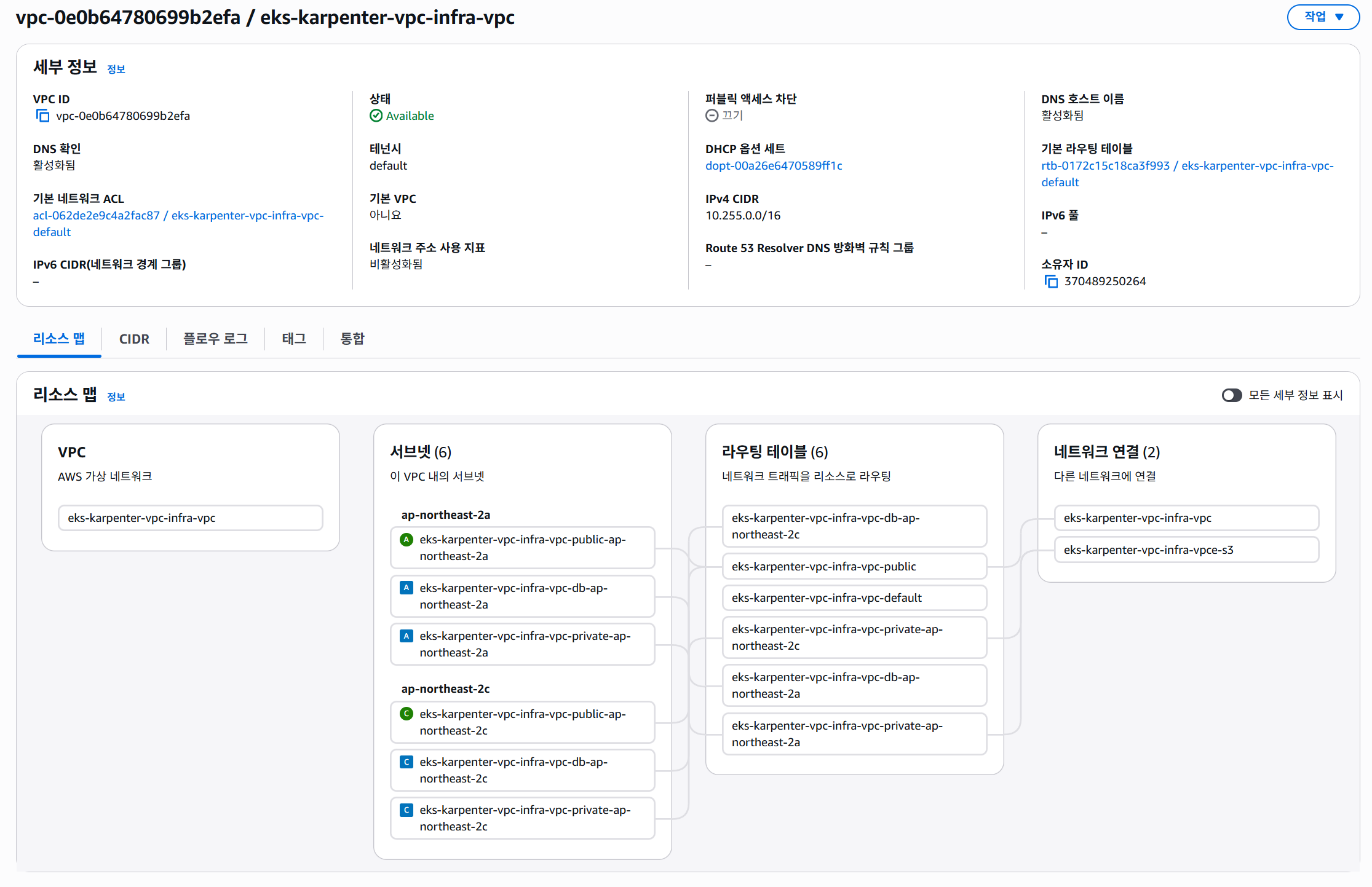
3.2 VPC/서브넷
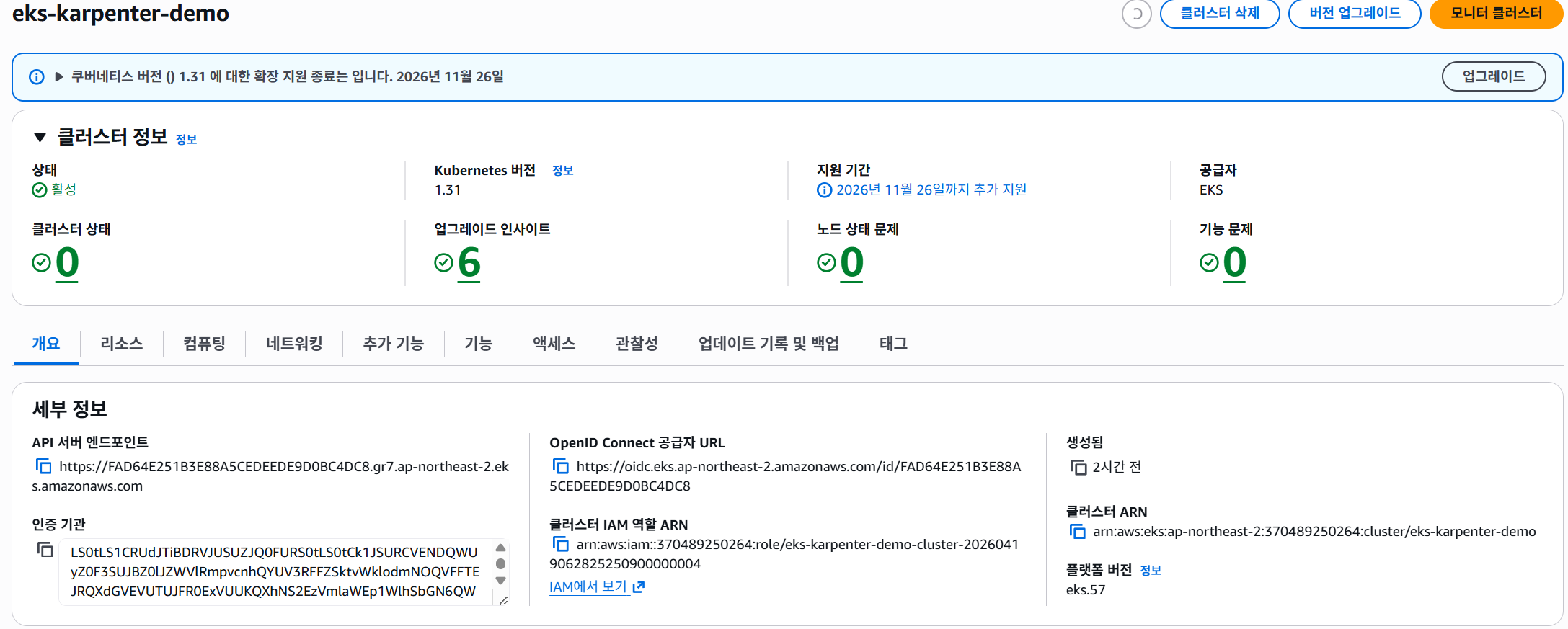
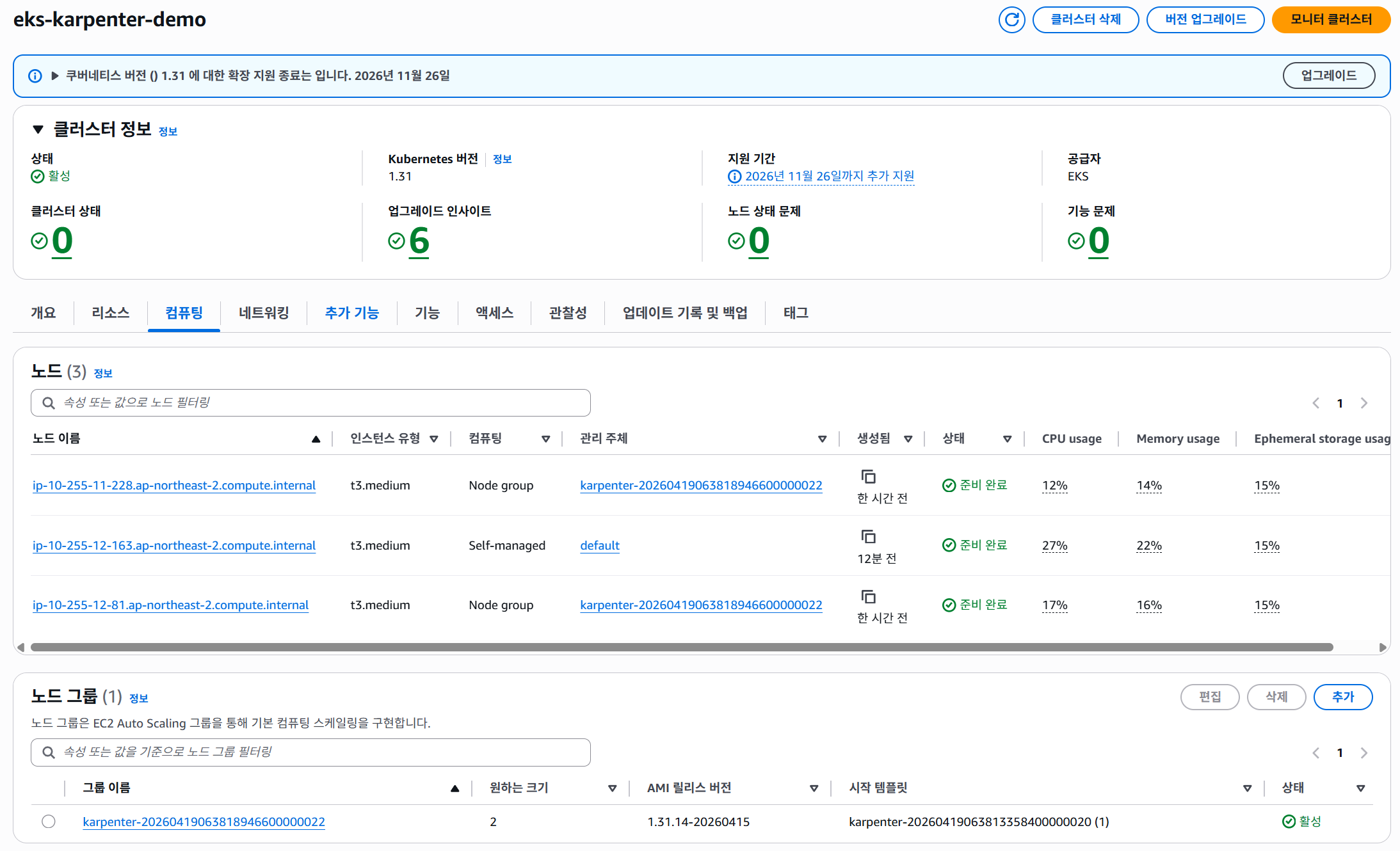
3.3 EKS
클러스터
노드
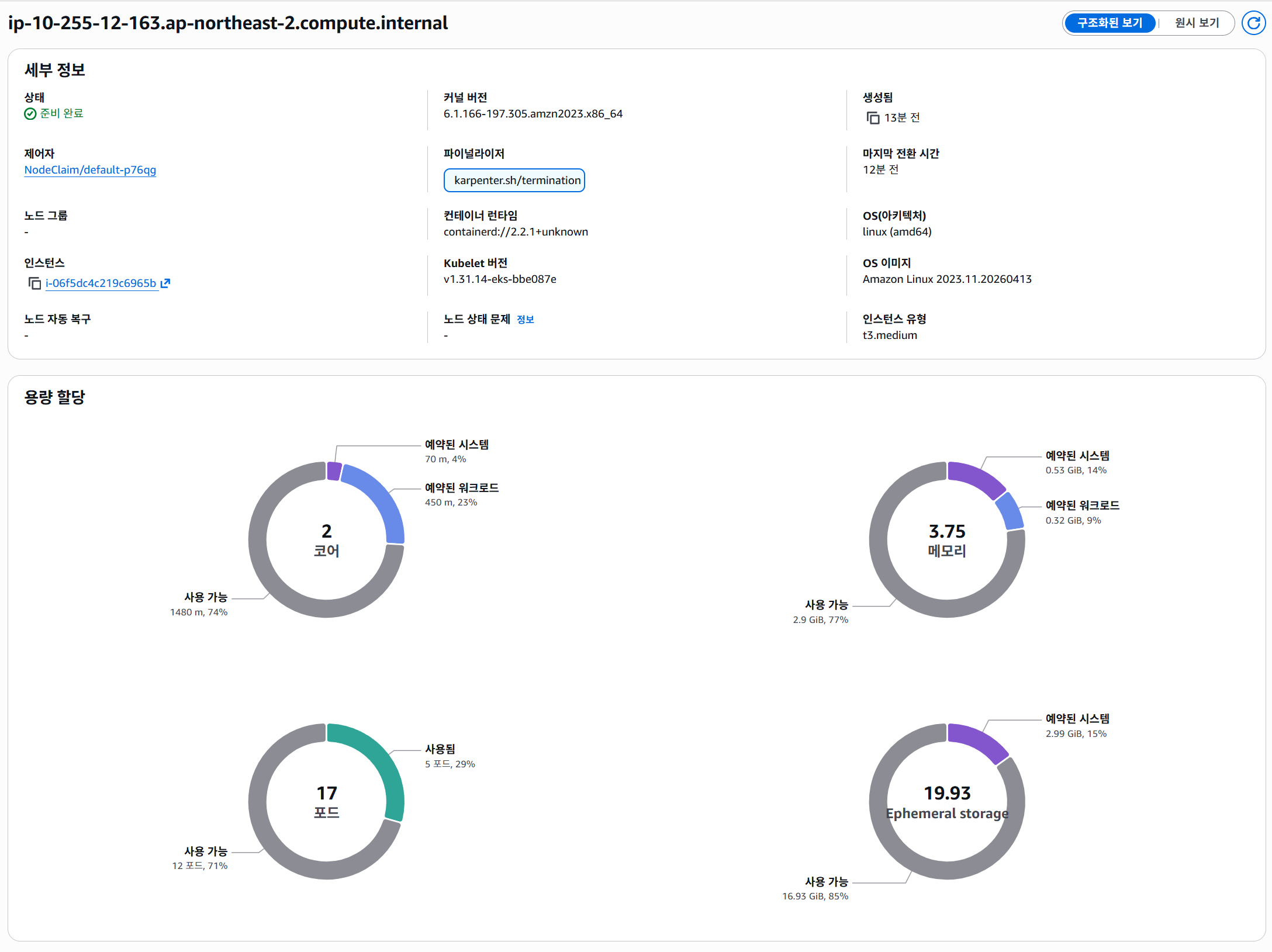
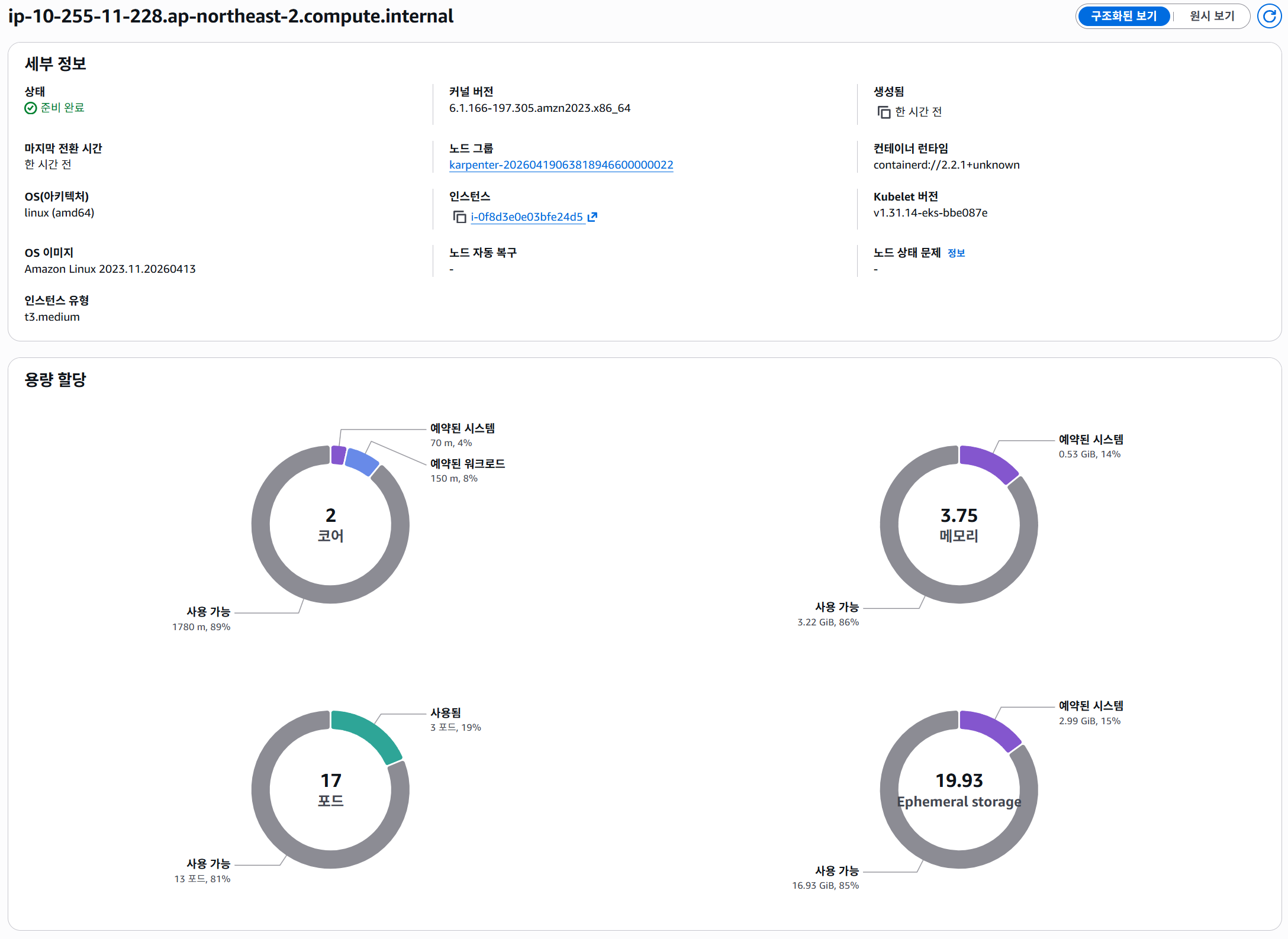
노드별 할당 가능한 pod수
파드
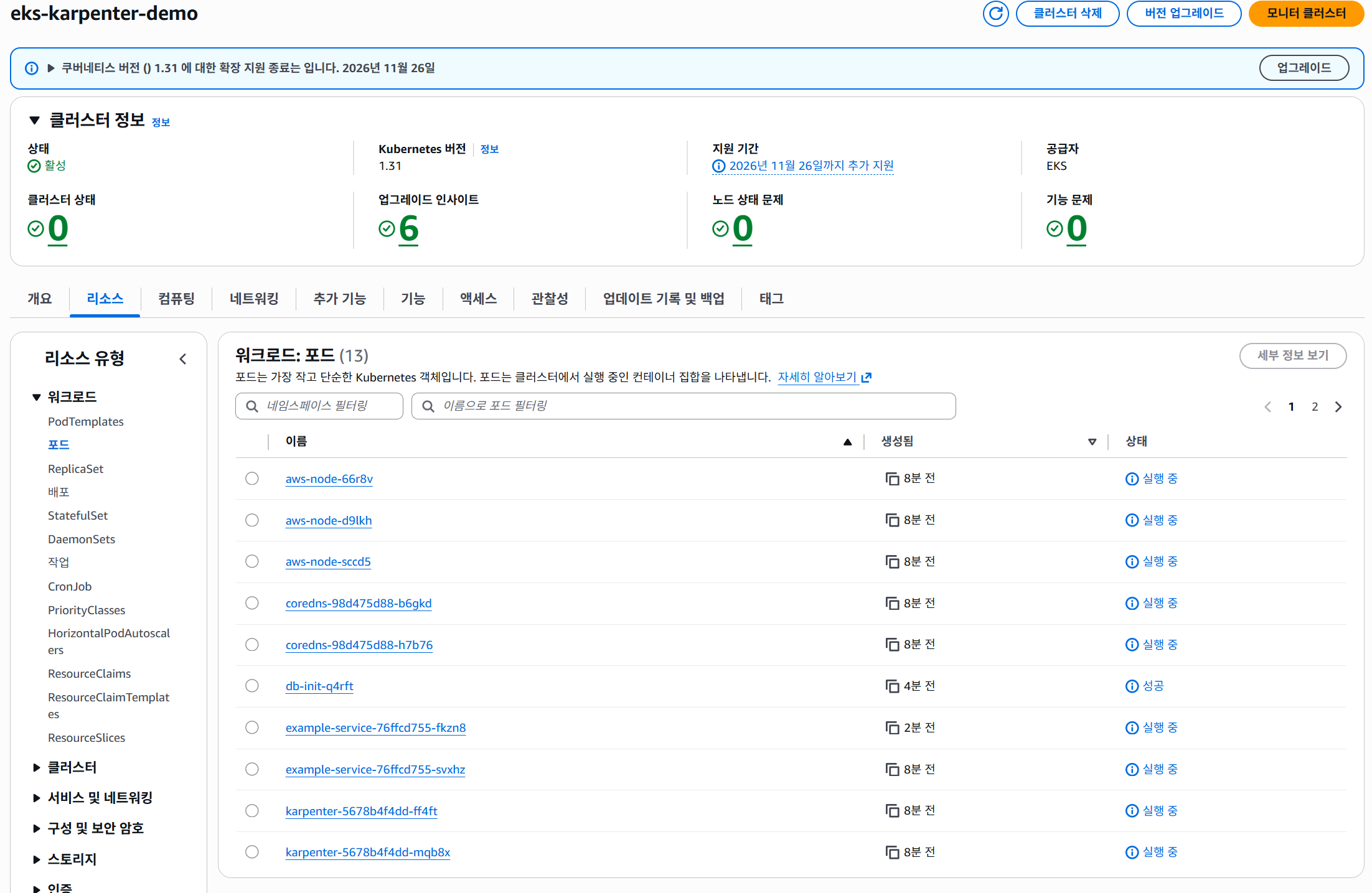
파드 IP 할당 정보

3.4 서비스 접속 테스트

4. TO-BE 아키텍처
4.1 핵심 변경 사항
- Secondary CIDR VPC 추가
- VPC CNI Custom Networking 활성화
- 파드 전용 서브넷 분리
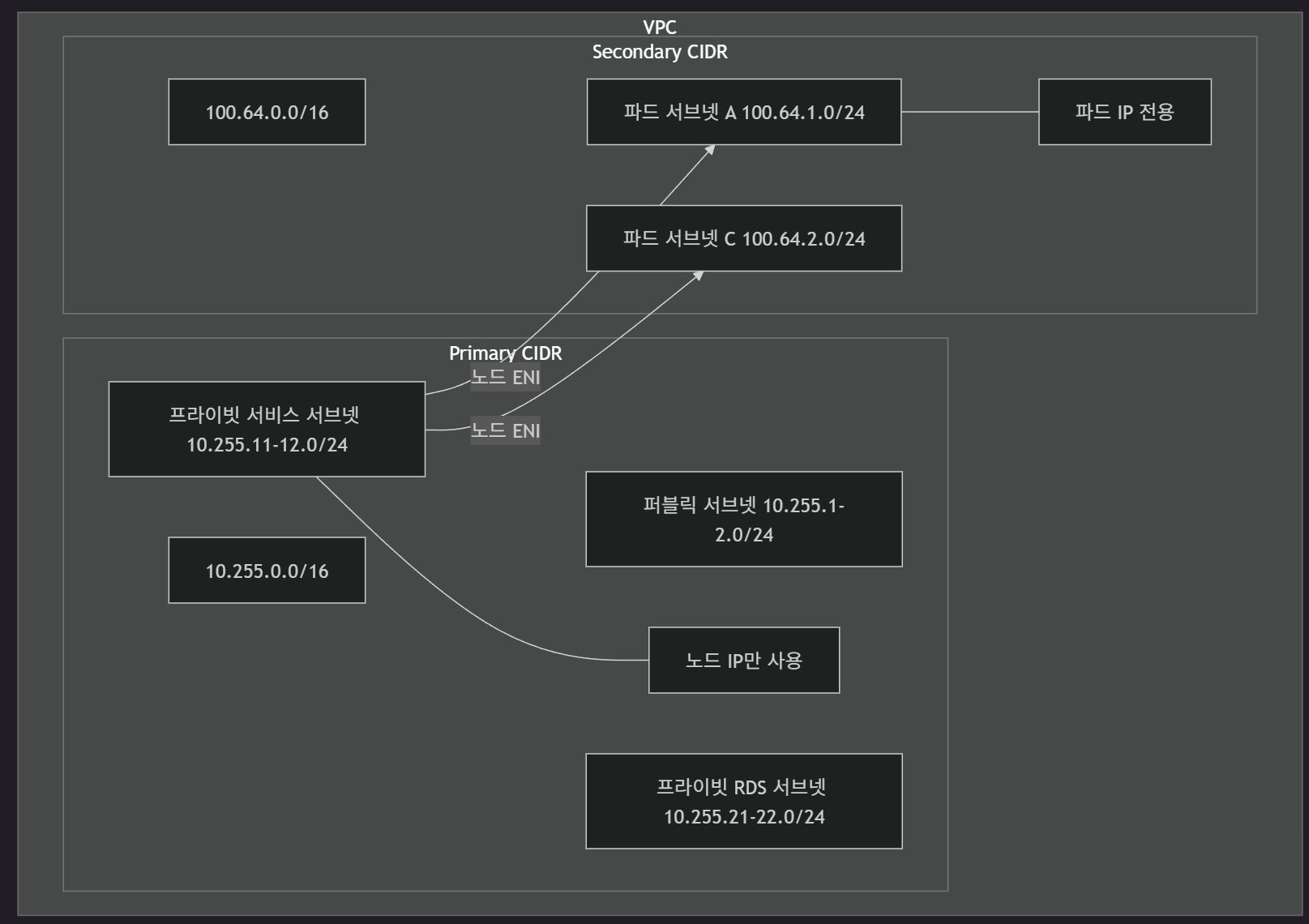
4.2 AS-IS vs TO-BE 비교
| 항목 | AS-IS (현재) | TO-BE (목표) |
|---|---|---|
| VPC CIDR | 10.255.0.0/16 (단일) | 10.255.0.0/16 + 100.64.0.0/16 |
| 파드 IP 대역 | 노드와 동일 (10.255.11-12.0/24) | 파드 전용 (100.64.1-2.0/24) |
| Custom Networking | 미적용 (false) | 적용 (true) |
| ENIConfig | 미생성 | AZ별 생성 |
| IP 용량 (파드) | ~251개 (노드와 공유) | ~502개 (파드 전용, 2개 서브넷) |
| 노드-파드 분리 | 불가 | 가능 |
4.3 TO-BE 파드 네트워킹
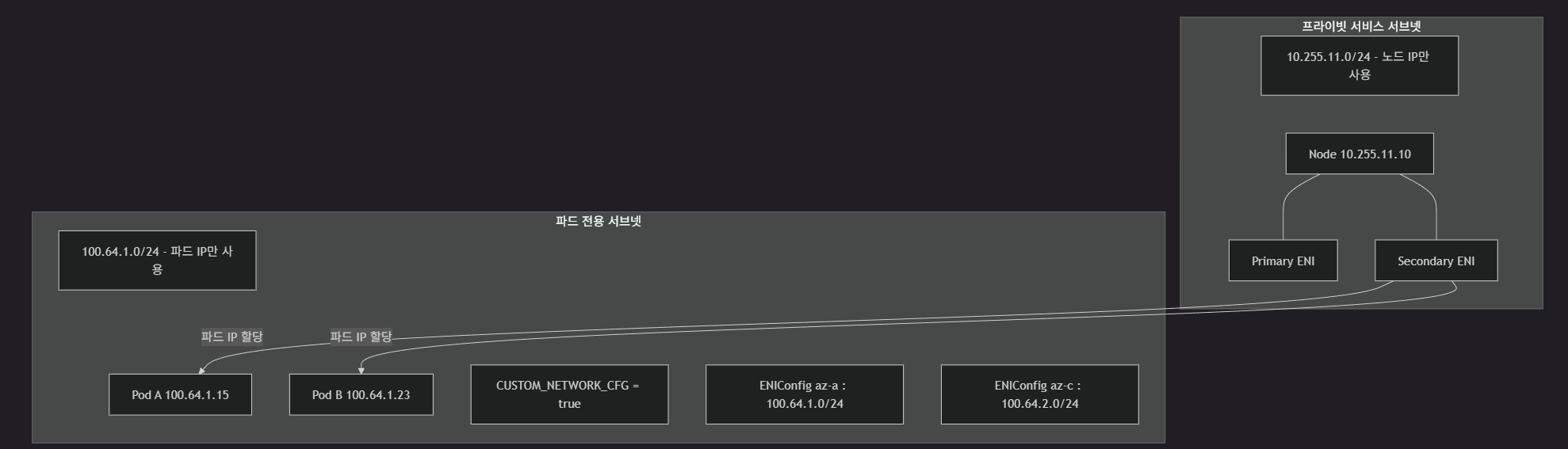
5. 마이그레이션 계획
5.1 마이그레이션 단계 개요

5.2 단계별 상세
1단계: Secondary CIDR 추가
- VPC에 Secondary CIDR 블록(100.64.0.0/16) 추가
- 100.64.0.0/16 — RFC 6598 Shared Address Space
- 기존 프라이빗 IP 대역과 충돌 없음
# vpc.tf에 추가
resource "aws_vpc_ipv4_cidr_block_association" "secondary" {
  vpc_id     = module.vpc.vpc_id
  cidr_block = "100.64.0.0/16"
}
2단계: 파드 전용 서브넷 생성
- Secondary CIDR 대역에 AZ별 파드 전용 서브넷 생성
resource "aws_subnet" "pod_az_a" {
  vpc_id            = module.vpc.vpc_id
  cidr_block        = "100.64.1.0/24"
  availability_zone = "ap-northeast-2a"

  tags = {
    Name                          = "pod-subnet-az-a"
    "kubernetes.io/role/cni"      = 1
    "karpenter.sh/discovery"      = var.cluster_name
  }

  depends_on = [aws_vpc_ipv4_cidr_block_association.secondary]
}

resource "aws_subnet" "pod_az_c" {
  vpc_id            = module.vpc.vpc_id
  cidr_block        = "100.64.2.0/24"
  availability_zone = "ap-northeast-2c"

  tags = {
    Name                          = "pod-subnet-az-c"
    "kubernetes.io/role/cni"      = 1
    "karpenter.sh/discovery"      = var.cluster_name
  }

  depends_on = [aws_vpc_ipv4_cidr_block_association.secondary]
}
파드 전용 서브넷 생성후, 파드 대역을 호출할 VPC 내부의 서비스 SG에 해당 대역을 추가 해주어야 함
3단계: ENIConfig CRD 생성
- 각 AZ별 ENIConfig 생성
- 파드가 사용할 서브넷 + 보안 그룹 지정
apiVersion: crd.k8s.amazonaws.com/v1alpha1
kind: ENIConfig
metadata:
  name: ap-northeast-2a
spec:
  subnet: <pod-subnet-az-a-id>
  securityGroups:
    - <eks-node-security-group-id>
---
apiVersion: crd.k8s.amazonaws.com/v1alpha1
kind: ENIConfig
metadata:
  name: ap-northeast-2c
spec:
  subnet: <pod-subnet-az-c-id>
  securityGroups:
    - <eks-node-security-group-id>
4단계: VPC CNI Custom Networking 활성화
- VPC CNI 애드온 환경변수 설정으로 Custom Networking 활성화
# eks.tf의 cluster_addons 수정
cluster_addons = {
  vpc-cni = {
    most_recent = true
    configuration_values = jsonencode({
      env = {
        AWS_VPC_K8S_CNI_CUSTOM_NETWORK_CFG = "true"
        ENI_CONFIG_LABEL_DEF               = "topology.kubernetes.io/zone"
      }
    })
  }
}
5단계: Karpenter NodeClass 업데이트
- EC2NodeClass의 서브넷 선택 태그 업데이트
- 새 노드 프로비저닝 시 올바른 서브넷 사용
6단계: 노드 롤링 업데이트
- 기존 노드를 새 설정 적용 노드로 교체
- Karpenter disruption 정책 활용 시 자동 교체
# Karpenter 노드 드레인 및 교체
kubectl delete nodes -l karpenter.sh/nodepool=default

# Managed Node Group 롤링 업데이트
# Terraform에서 launch template 변경 후 apply
7단계: 검증 및 정리
# 파드 IP가 Secondary CIDR 대역인지 확인
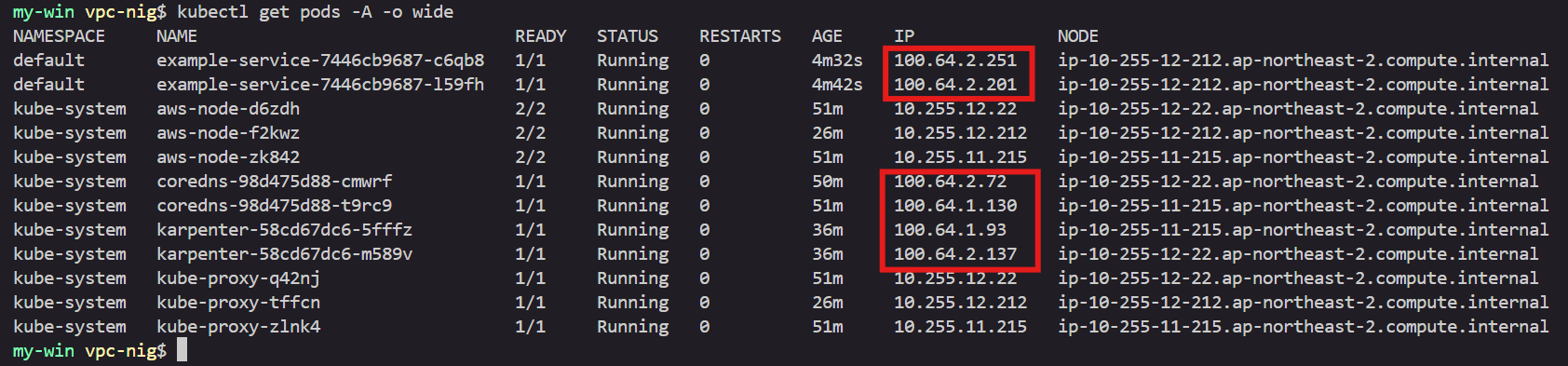
kubectl get pods -o wide
# 예상: Pod IP가 100.64.x.x 대역

# ENIConfig 확인
kubectl get eniconfigs

# VPC CNI 설정 확인
kubectl get daemonset aws-node -n kube-system -o yaml | grep CUSTOM_NETWORK

# 트래픽 흐름 검증
curl http://<service-lb-hostname>
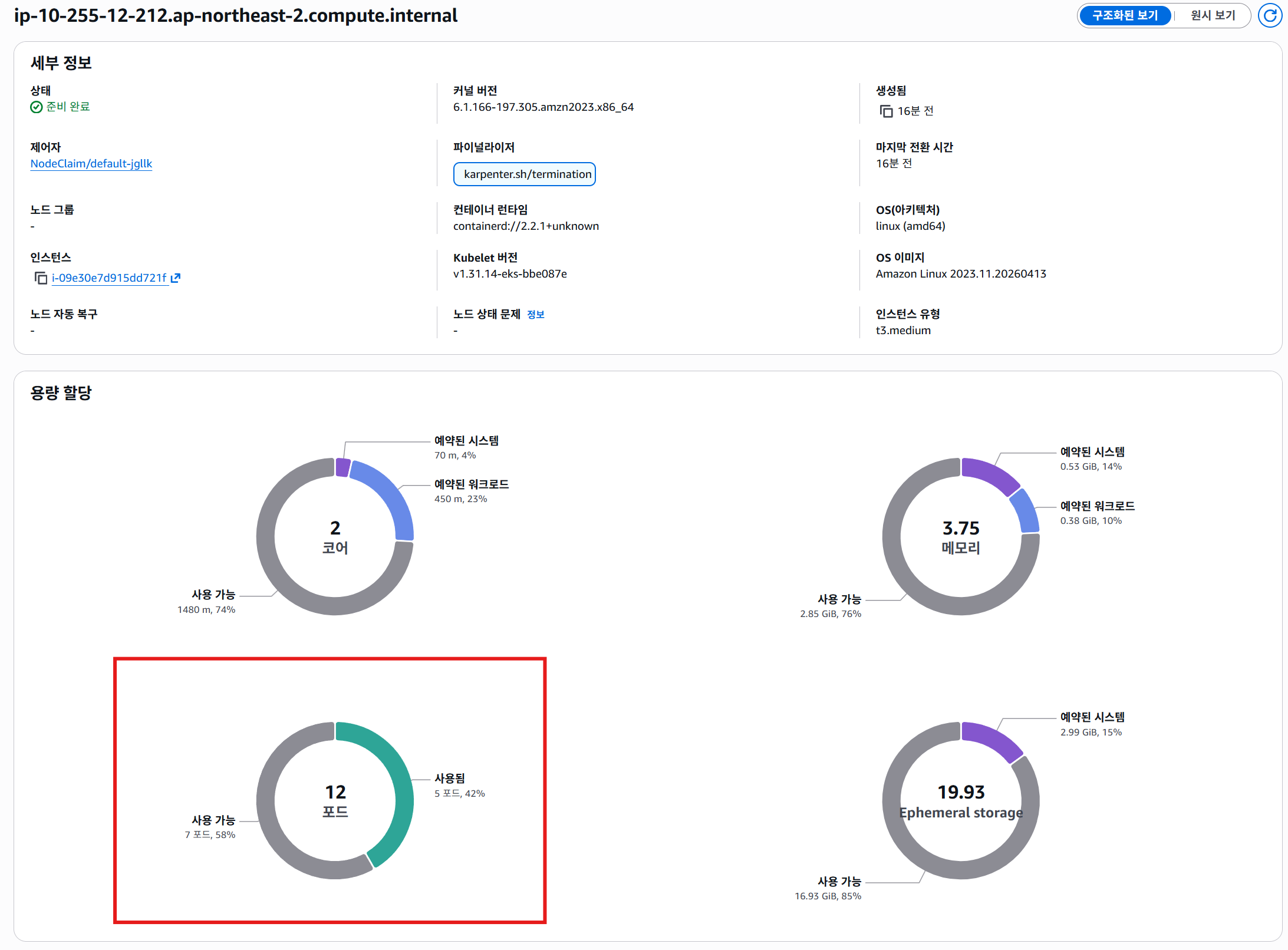
6. Custom Networking 적용 후 maxPods 설정
- Custom Networking 활성화 시 프라이머리 ENI가 파드 IP 할당에서 제외
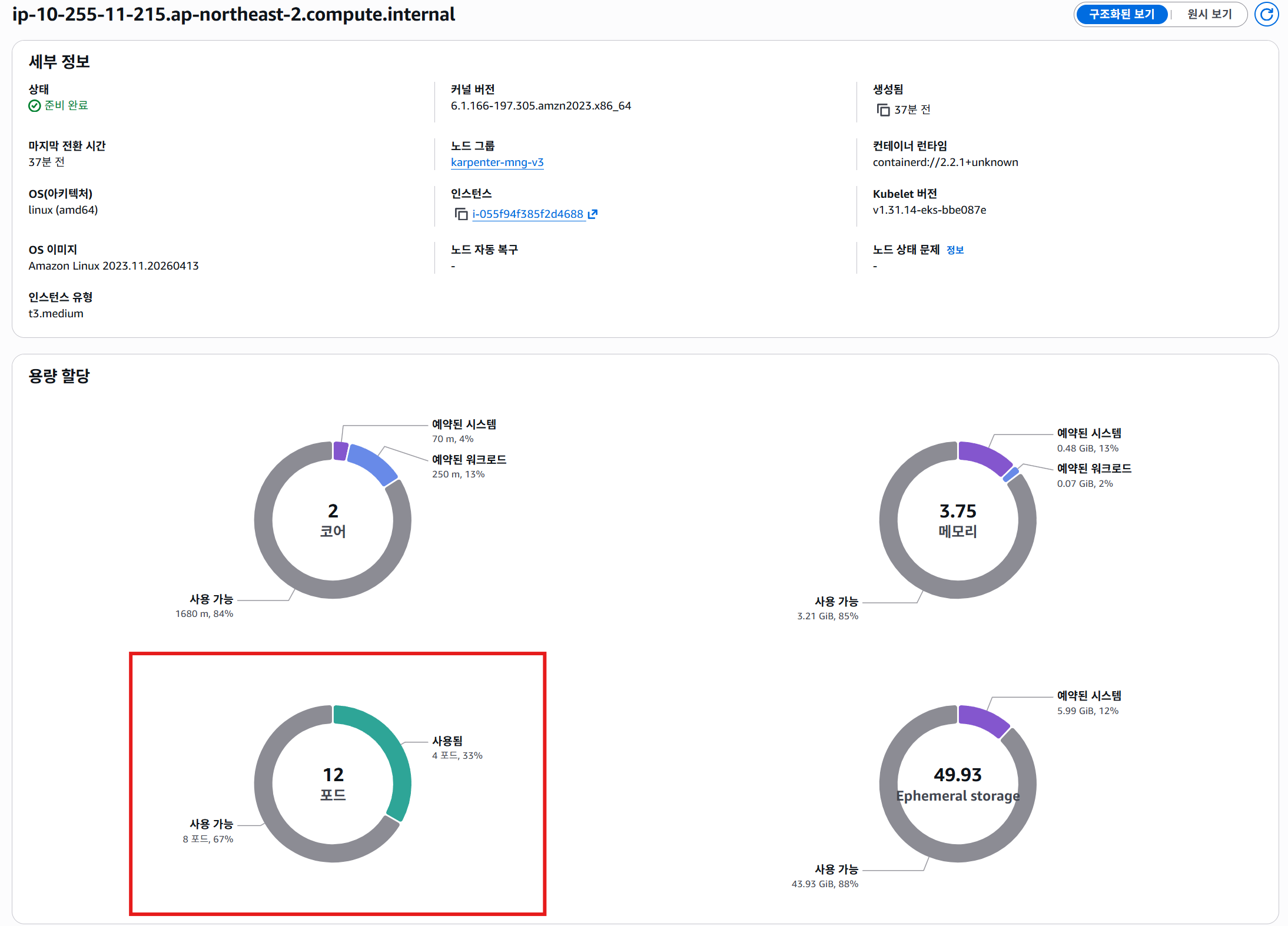
- 동일 인스턴스 타입이라도 기본 모드 대비 파드 수용량 감소
- kubelet에 미반영 시 → 스케줄러가 IP 할당 불가한 파드를 노드에 배치 시도 → Pending 에러 발생
6.1 maxPods 계산 공식 — 기본 모드 vs Custom Networking
# 기본 모드 (Custom Networking OFF)
maxPods = (ENI 수 × (ENI당 IP 수 - 1)) + 2

# Custom Networking (프라이머리 ENI 제외)
maxPods = ((ENI 수 - 1) × (ENI당 IP 수 - 1)) + 2
+ 2— 호스트 네트워크 사용하는aws-node(VPC CNI)와kube-proxy파드용- 이들은 파드 IP 미소비
t3.medium 예시
| 항목 | 값 |
|---|---|
| 최대 ENI 수 | 3 |
| ENI당 최대 IP 수 | 6 |
# 기본 모드
maxPods = (3 × (6 - 1)) + 2 = 17

# Custom Networking
maxPods = ((3 - 1) × (6 - 1)) + 2 = 12
t3.large 예시
| 항목 | 값 |
|---|---|
| 최대 ENI 수 | 3 |
| ENI당 최대 IP 수 | 12 |
# 기본 모드
maxPods = (3 × (12 - 1)) + 2 = 35

# Custom Networking
maxPods = ((3 - 1) × (12 - 1)) + 2 = 24
6.2 maxPods 결정 우선순위
- EKS 노드의 최종
maxPods값 결정 우선순위:
1. Managed Node Group 강제 적용 (최우선)
   └─ Custom AMI 미사용 시 EKS가 user data에 maxPods 주입
   └─ vCPU < 30: 110 / vCPU ≥ 30: 250

2. kubelet maxPods 직접 설정
   └─ Launch Template + Custom AMI에서 직접 지정

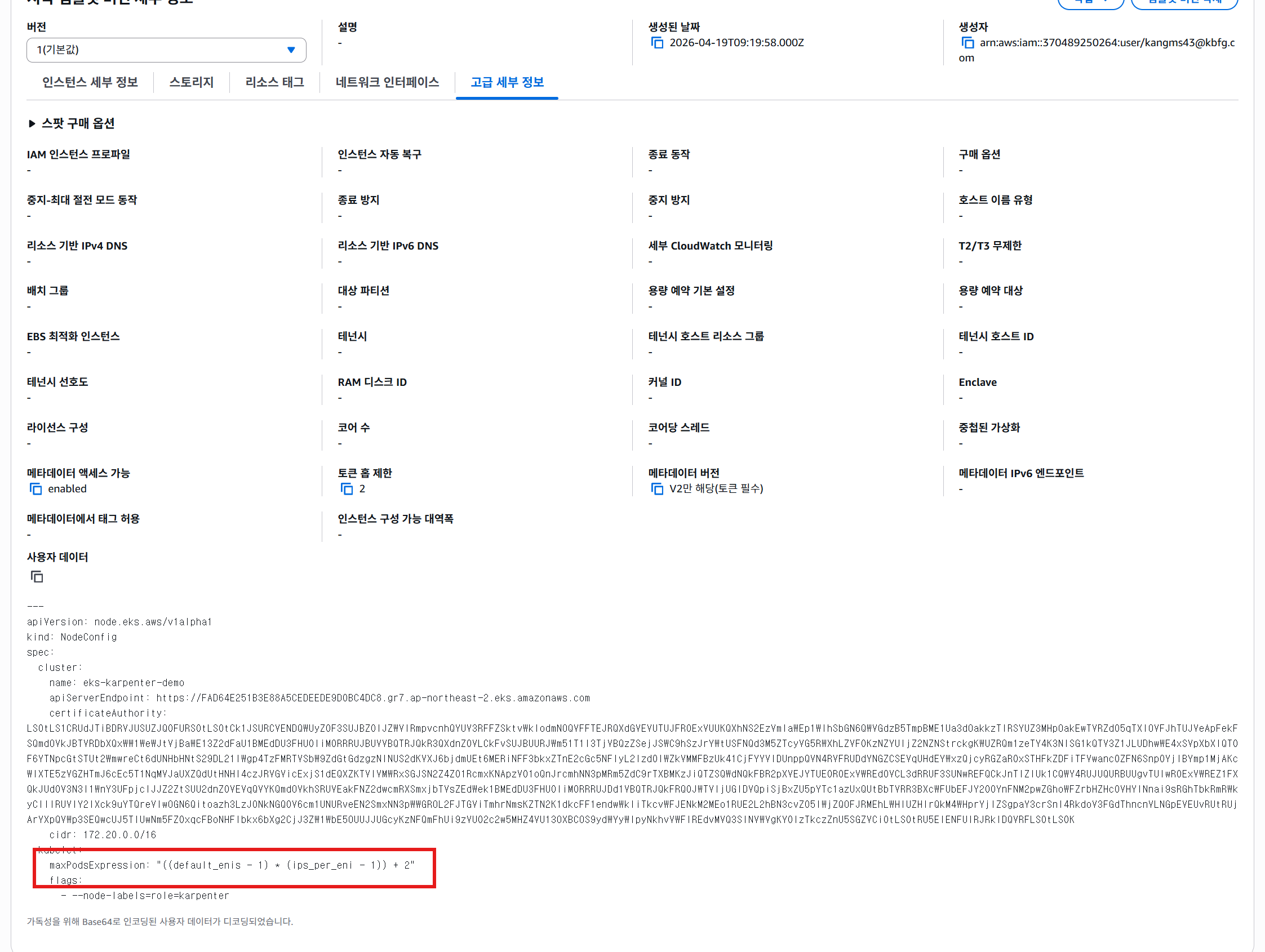
3. nodeadm maxPodsExpression (AL2023)
   └─ NodeConfig에서 수식으로 계산
6.3 AL2023 AMI의 maxPodsExpression
- AL2023 AMI —
nodeadm기반 노드 부트스트랩 NodeConfig의maxPodsExpression으로 인스턴스 타입별 동적 maxPods 계산
Managed Node Group에서 설정 (Custom AMI 필요)
- Managed Node Group — Custom AMI 미사용 시 EKS가 maxPods 강제 주입
- Custom Networking 맞춤 maxPods 적용 → Custom AMI + Launch Template 조합 필요
# eks.tf - Managed Node Group Launch Template
resource "aws_launch_template" "karpenter_mng" {
  name_prefix = "karpenter-mng-"

  user_data = base64encode(<<-USERDATA
    MIME-Version: 1.0
    Content-Type: multipart/mixed; boundary="BOUNDARY"

    --BOUNDARY
    Content-Type: application/node.eks.aws

    ---
    apiVersion: node.eks.aws/v1alpha1
    kind: NodeConfig
    spec:
      cluster:
        name: ${var.cluster_name}
        apiServerEndpoint: ${module.eks.cluster_endpoint}
        certificateAuthority: ${module.eks.cluster_certificate_authority_data}
        cidr: ${module.eks.cluster_service_cidr}
      kubelet:
        config:
          maxPods: 12
        flags:
          - --use-max-pods=false

    --BOUNDARY--
  USERDATA
  )
}bootstrap.sh사용 시:
#!/bin/bash
/etc/eks/bootstrap.sh ${cluster_name} \
  --use-max-pods false \
  --kubelet-extra-args '--max-pods=12'
maxPodsExpression 수식 예시
nodeadm의maxPodsExpression— 인스턴스 ENI/IP 정보를 변수로 수식 평가- Custom Networking 환경 → 프라이머리 ENI 제외 필요
apiVersion: node.eks.aws/v1alpha1
kind: NodeConfig
spec:
  kubelet:
    config:
      maxPodsExpression: "((NUM_ENIS - 1) * (IPS_PER_ENI - 1)) + 2"
- Custom Networking 공식 계산 방식과 동일한 수식
NUM_ENIS— 인스턴스 타입의 최대 ENI 수IPS_PER_ENI— ENI당 최대 IP 수
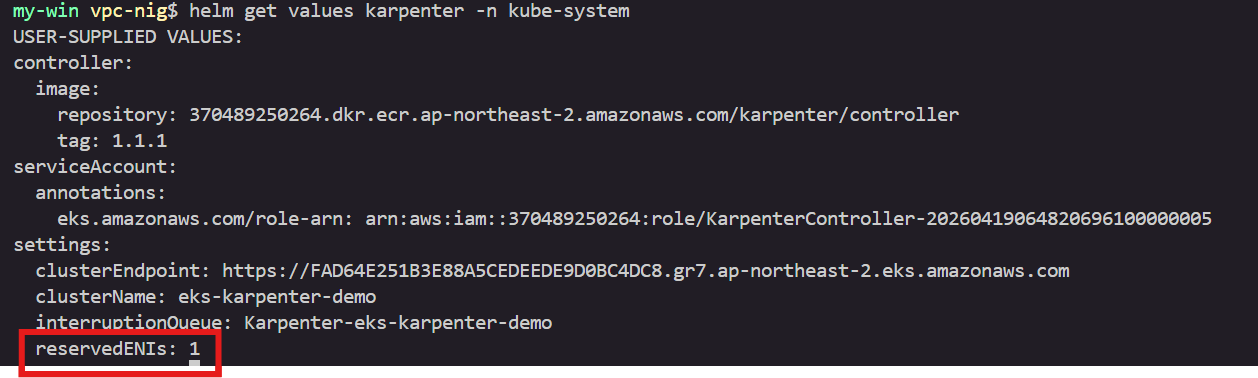
6.4 Karpenter 노드의 maxPods — RESERVED_ENIS 설정
- Karpenter 프로비저닝 노드 — Managed Node Group과 다른 maxPods 결정 방식
- Karpenter 자체적으로 인스턴스 타입 ENI/IP 정보 기반 maxPods 계산
- Custom Networking 환경의 핵심 —
RESERVED_ENIS설정
RESERVED_ENIS
- maxPods 계산 시 지정 수만큼 ENI 제외
- Custom Networking → 프라이머리 ENI가 파드 IP 할당에 미사용
RESERVED_ENIS=1설정으로 프라이머리 ENI 1개를 계산에서 제외
# Karpenter 기본 계산 (RESERVED_ENIS=0)
maxPods = (ENI 수 × (ENI당 IP - 1)) + 2

# Custom Networking (RESERVED_ENIS=1)
maxPods = ((ENI 수 - 1) × (ENI당 IP - 1)) + 2
Karpenter Helm 차트에 RESERVED_ENIS 설정
# karpenter.tf - Helm Release 수정
resource "helm_release" "karpenter" {
  namespace  = "kube-system"
  name       = "karpenter"
  repository = "oci://${data.aws_caller_identity.current.account_id}.dkr.ecr.${var.aws_region}.amazonaws.com/karpenter"
  chart      = "karpenter"
  version    = "1.1.1"

  wait    = true
  timeout = 600

  values = [
    <<-EOT
    serviceAccount:
      annotations:
        eks.amazonaws.com/role-arn: ${module.karpenter.iam_role_arn}
    settings:
      clusterName: ${module.eks.cluster_name}
      clusterEndpoint: ${module.eks.cluster_endpoint}
      interruptionQueue: ${module.karpenter.queue_name}
      reservedENIs: "1"    # ← Custom Networking: 프라이머리 ENI 제외
    controller:
      image:
        repository: ${data.aws_caller_identity.current.account_id}.dkr.ecr.${var.aws_region}.amazonaws.com/karpenter/controller
        tag: "1.1.1"
    EOT
  ]

  depends_on = [
    module.karpenter,
    module.eks.eks_managed_node_groups,
  ]
}
settings.reservedENIs: "1"한 줄이 핵심- 미설정 시 → Karpenter가 프라이머리 ENI 포함하여 maxPods 계산
- 실제 수용 불가한 파드 수 산정 → IP 할당 실패 발생
EC2NodeClass에서 kubelet maxPods 직접 지정
RESERVED_ENIS대신 EC2NodeClass의kubelet.maxPods직접 지정 가능- 인스턴스 타입별 값이 다름 → 여러 인스턴스 타입 사용 시
RESERVED_ENIS가 더 유연 - EC2NodeClass에서 설정한 nodeadm의 maxPodsExpression은 미반영
apiVersion: karpenter.k8s.aws/v1
kind: EC2NodeClass
metadata:
  name: default
spec:
  kubelet:
    maxPods: 12    # t3.medium Custom Networking 기준
    systemReserved:
      cpu: 100m
      memory: 100Mi
    kubeReserved:
      cpu: 200m
      memory: 100Mi
  amiSelectorTerms:
    - alias: al2023@latest
  subnetSelectorTerms:
    - tags:
        karpenter.sh/discovery: ${cluster_name}
  securityGroupSelectorTerms:
    - tags:
        karpenter.sh/discovery: ${cluster_name}
  role: ${node_iam_role_name}
max-pods-calculator.sh로 직접 계산 가능:# EKS AMI 리포지토리에서 스크립트 다운로드 curl -O https://raw.githubusercontent.com/awslabs/amazon-eks-ami/master/templates/al2/runtime/max-pods-calculator.sh chmod +x max-pods-calculator.sh # Custom Networking 모드로 계산 ./max-pods-calculator.sh --instance-type t3.medium --cni-version 1.18.6-eksbuild.1 --cni-custom-networking-enabled # 출력: 12 ./max-pods-calculator.sh --instance-type t3.large --cni-version 1.18.6-eksbuild.1 --cni-custom-networking-enabled # 출력: 24
7. TO-BE 상태
7.2 VPC/서브넷
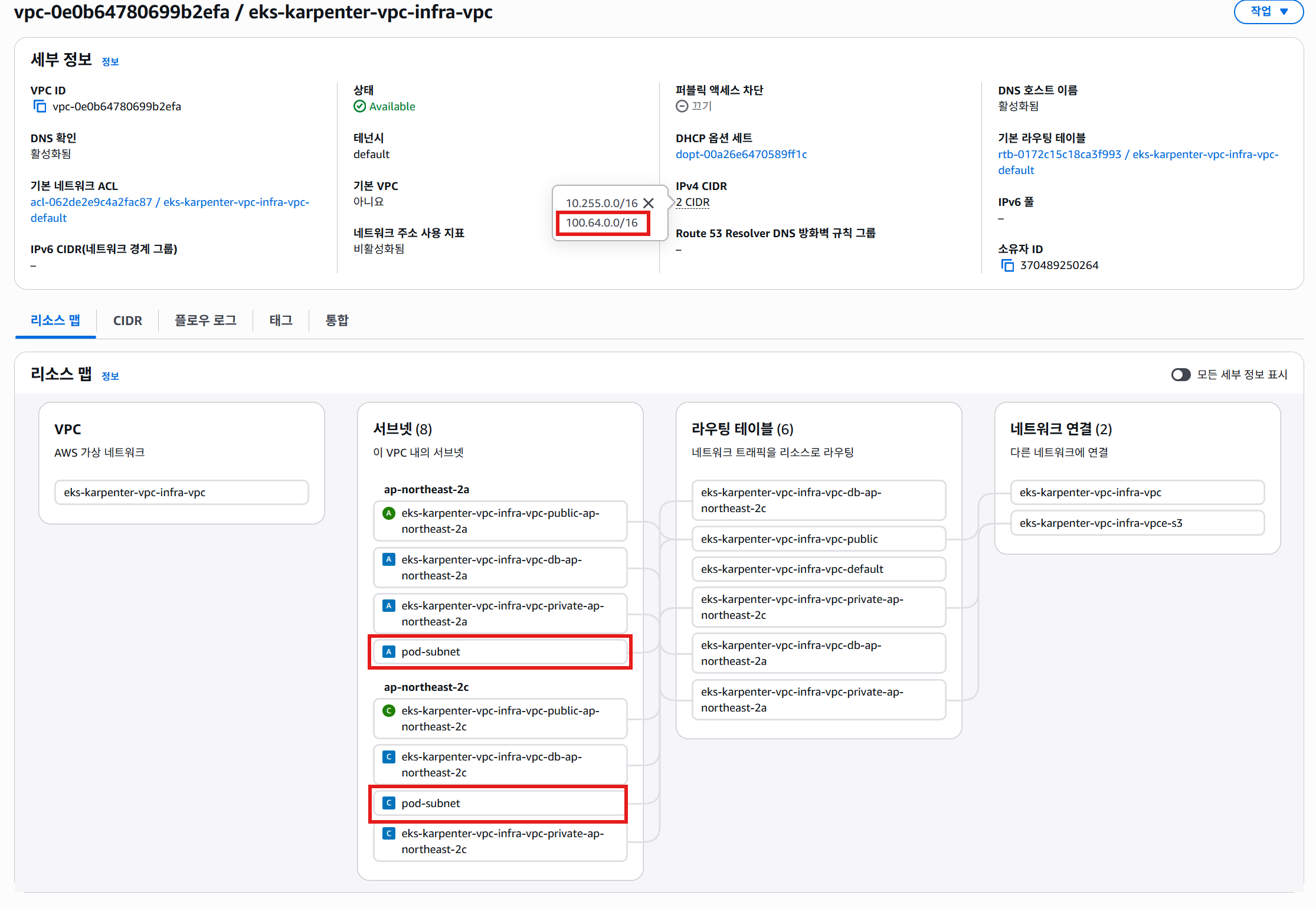
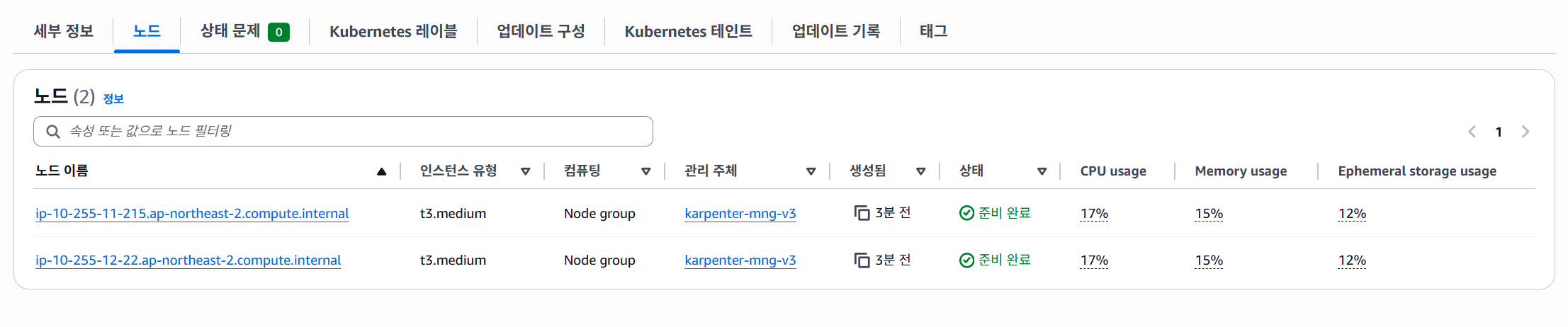
7.3 EKS
클러스터
노드
노드별 할당 가능한 pod수
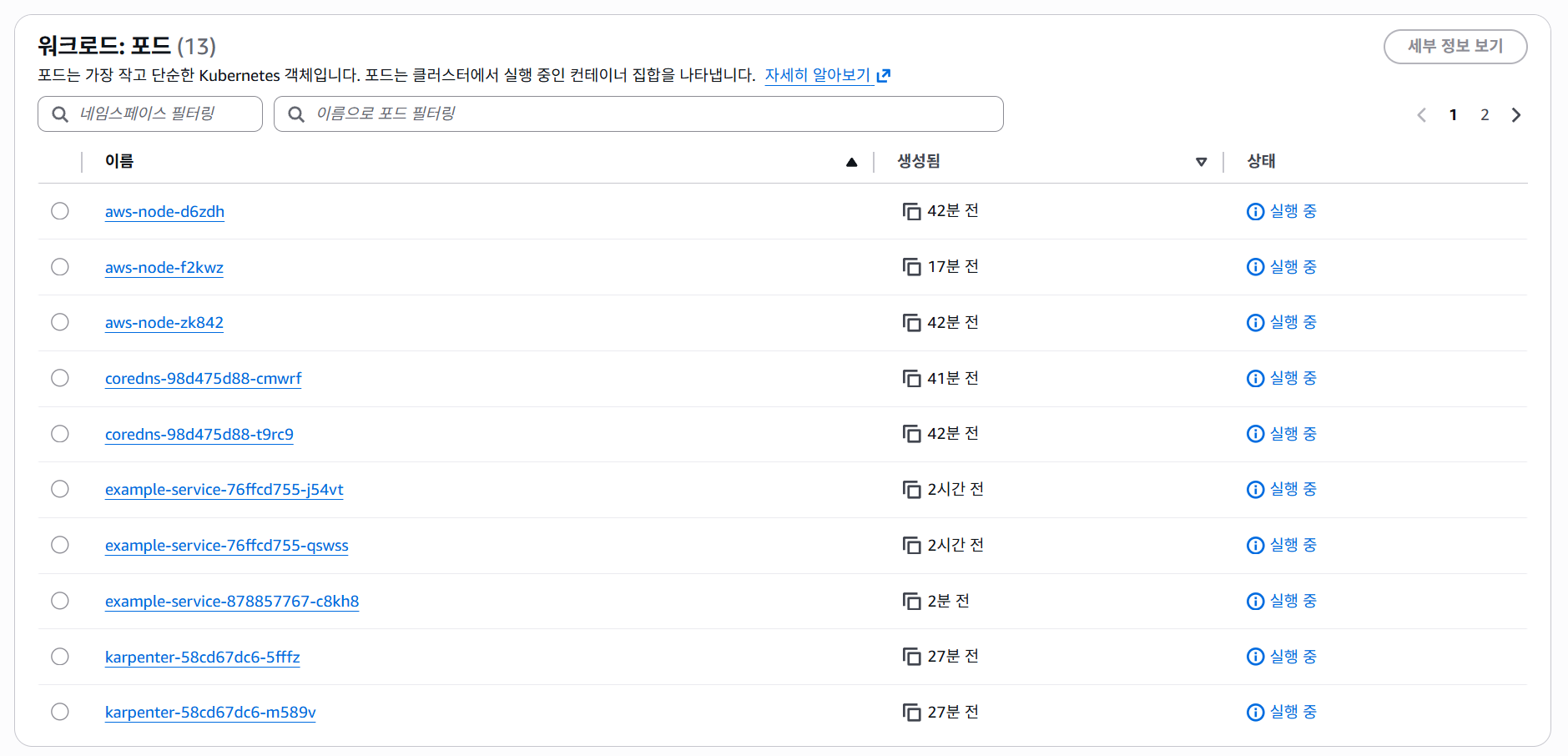
파드
파드 IP 할당 정보
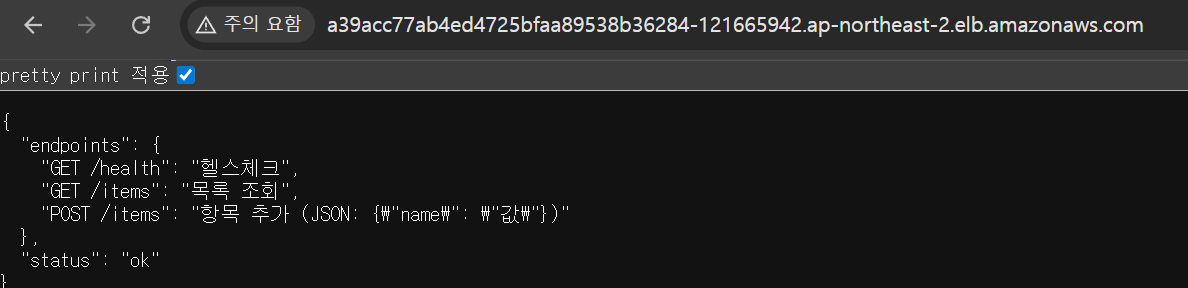
7.4 서비스 접속 테스트
8. 정리
현재 상태 (AS-IS)
- VPC 10.255.0.0/16 — 퍼블릭/프라이빗 서비스/프라이빗 RDS 서브넷 구성
- EKS 1.31 + Karpenter v1 + Managed Node Group
- 파드와 노드가 동일 서브넷 IP 공유 (Custom Networking 미적용)
- 서비스 흐름: LB → Pod → RDS 정상 동작
- Terraform 기반 전체 인프라 코드 관리
마이그레이션 목표 (TO-BE)
- Secondary CIDR (100.64.0.0/16) 추가
- 파드 전용 서브넷 분리
- VPC CNI Custom Networking 활성화
- 파드 IP 용량 대폭 확장 + 노드-파드 네트워크 분리

클라우드 왕초보