프론트엔드프로그래밍 - Chapter 02 ~ 03. HTML/CSS 내용 정리
HTML5 핵심 정리
1. HTML5 기본 구조
<!DOCTYPE html>
<html>
  <head>
    <title>페이지 제목</title>
  </head>
  <body>
    <!-- 내용 -->
  </body>
</html>
<!DOCTYPE html>: HTML5 문서 선언- 태그는 대소문자 구분 없음
- 요소 = 시작태그 + 콘텐츠 + 종료태그
2. 주요 태그
글자 태그
<h1>~<h6>: 제목 (숫자 작을수록 큰 글씨)<p>: 문단 (자동 줄바꿈)<br>: 줄바꿈<strong>,<b>: 굵게<em>,<i>: 기울임<hr>: 수평선
리스트
<ol>: 순서있는 리스트<ul>: 순서없는 리스트<li>: 리스트 항목<dl>,<dt>,<dd>: 정의 리스트
테이블
<table border="1">
  <tr>
    <th>헤더</th>
  </tr>
  <tr>
    <td>데이터</td>
  </tr>
</table>colspan: 열 병합rowspan: 행 병합
이미지 & 링크
<img src="파일명" width="300" height="250" alt="설명">
<a href="URL" target="_blank">링크텍스트</a>- target:
_self(현재창),_blank(새창)
3. 시맨틱 태그
시맨틱 태그는 문서의 구조와 의미를 명확히 표현
주요 시맨틱 태그
<header>: 페이지/섹션 제목, 소개<nav>: 내비게이션 메뉴, 목차<section>: 문서의 섹션/절<article>: 독립적인 콘텐츠<aside>: 본문 관련 부가 정보<footer>: 저자, 저작권 정보
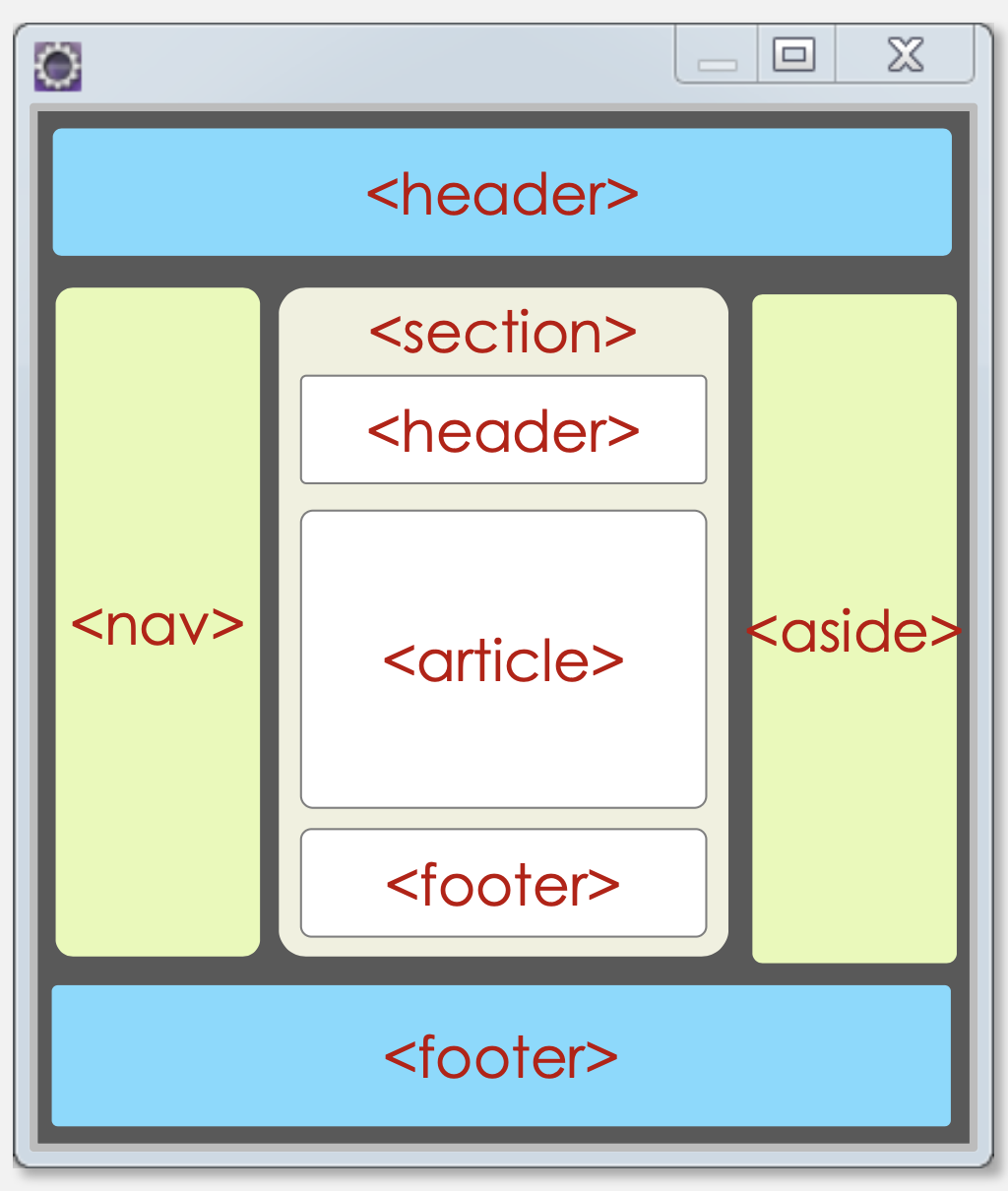
기타 시맨틱 태그
<figure>: 이미지, 차트 등 독립 컨텐츠<figcaption>: figure의 설명<details>: 상세 정보<summary>: details의 제목<mark>: 중요 텍스트 표시<time>: 시간 정보
4. 블록 요소 vs 인라인 요소
블록 요소
- 한 줄을 다 차지
- 예:
<h1>,<p>,<ul>,<ol>,<li>,<table>,<div> <div>: 블록 요소 그룹화용 컨테이너
인라인 요소
- 줄바꿈 없이 나란히 배치
- 예:
<a>,<img>,<strong>,<em>,<input>,<span>,<i>,<b> <span>: 인라인 요소 그룹화용 컨테이너
5. 멀티미디어
오디오
<audio controls autoplay>
  <source src="file.mp3" type="audio/mp3">
</audio>
비디오
<video width="640" height="480" controls>
  <source src="file.mp4" type="video/mp4">
</video>
iframe
<iframe src="URL" width="500" height="250"></iframe>- 현재 페이지에 다른 HTML 페이지 삽입
- 유튜브 등 외부 콘텐츠 임베드에 사용
6. 입력 양식 (Form)
기본 구조
<form action="서버URL" method="get/post">
  <input type="text" name="필드명">
  <input type="submit" value="제출">
</form>
GET vs POST
GET 방식
- URL 주소 뒤에 파라미터를 붙여 전송
?뒤에 데이터 표시 (예:url?name=value)- 최대 2048자 제한
- 보안에 취약 (URL에 데이터 노출)
- 검색, 조회 등에 사용
POST 방식
- HTTP Request 헤더에 데이터 포함
- 길이 제한 없음
- 보안 유지 (데이터 숨김)
- 로그인, 회원가입 등에 사용
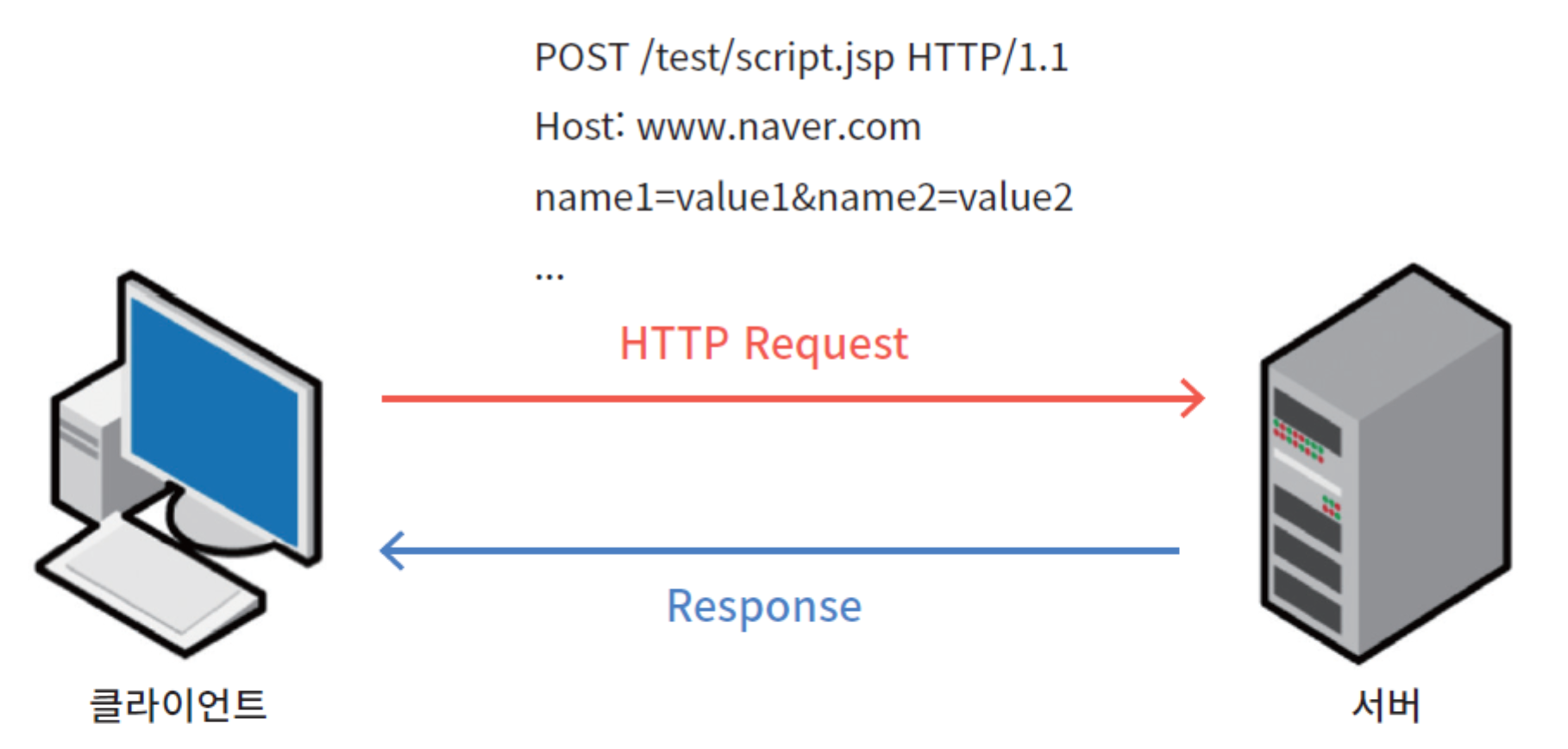
주요 input 타입
<input type="text">       <!-- 텍스트 -->
<input type="password">   <!-- 비밀번호 -->
<input type="email">      <!-- 이메일 -->
<input type="number">     <!-- 숫자 -->
<input type="date">       <!-- 날짜 -->
<input type="radio" name="group">  <!-- 라디오버튼 -->
<input type="checkbox">   <!-- 체크박스 -->
<input type="submit">     <!-- 제출버튼 -->
<input type="reset">      <!-- 초기화버튼 -->
주요 속성
placeholder: 입력 힌트required: 필수 입력readonly: 읽기 전용autofocus: 자동 포커스checked: 체크박스/라디오 기본 선택
기타 양식 태그
<textarea></textarea>        <!-- 여러 줄 입력 -->
<select>
  <option value="값">항목</option>
</select>
<label>레이블</label>
<fieldset>
  <legend>그룹 제목</legend>
</fieldset>
7. 특수문자
: 공백<:>: >": "&: &
CSS3 스타일시트 정리
1. CSS 기본 개념
CSS란?
- Cascading Style Sheets: HTML 문서의 스타일(디자인) 지정
- 문서 구조(HTML)와 문서 표현(CSS) 분리
CSS 문법
선택자 { 속성: 값; }
/* 예: p { background-color: yellow; } */
2. 선택자 (Selectors)
2.1 기본 선택자
| 선택자 | 문법 | 설명 |
|---|---|---|
| 타입 선택자 | p { } | 모든 p 요소 선택 |
| 전체 선택자 | * { } | 모든 요소 선택 |
| 아이디 선택자 | #target { } | id="target"인 요소 선택 |
| 클래스 선택자 | .target { } | class="target"인 요소 선택 |
/* 타입 선택자 */
p { color: green; }

/* 아이디 선택자 - 하나만 선택 */
#target { background-color: yellow; }

/* 클래스 선택자 - 여러 개 선택 가능 */
.target { color: red; }
2.2 결합 선택자
/* 선택자 그룹 */
h1, h3, p { font-family: sans-serif; }

/* 자손 선택자 (후손 관계) */
body em { color: red; }

/* 자식 선택자 (직계 자식) */
body > h1 { color: blue; }
2.3 의사 클래스 (pseudo-class)
a:link { }        /* 방문 안한 링크 */
a:visited { }     /* 방문한 링크 */
a:hover { }       /* 마우스 오버 */
a:active { }      /* 클릭 중 */
3. CSS 선언 방법
우선순위: 인라인 > 내부 > 외부
외부 스타일시트
<link type="text/css" rel="stylesheet" href="mystyle.css">내부 스타일시트
<style>
  h1 { color: red; }
</style>
인라인 스타일
<h1 style="color: red">제목</h1>4. 박스 모델 (Box Model)
박스 구성 요소
[margin] ← 경계 바깥 (투명)
  [border] ← 경계선
    [padding] ← 경계와 내용 사이 (투명)
      [content] ← 실제 내용
박스 크기 계산
#target {
  width: 200px;
  padding: 10px;
  border: 5px solid red;
  margin: 20px;
}
/* 전체 너비 = 20 + 5 + 10 + 200 + 10 + 5 + 20 = 270px */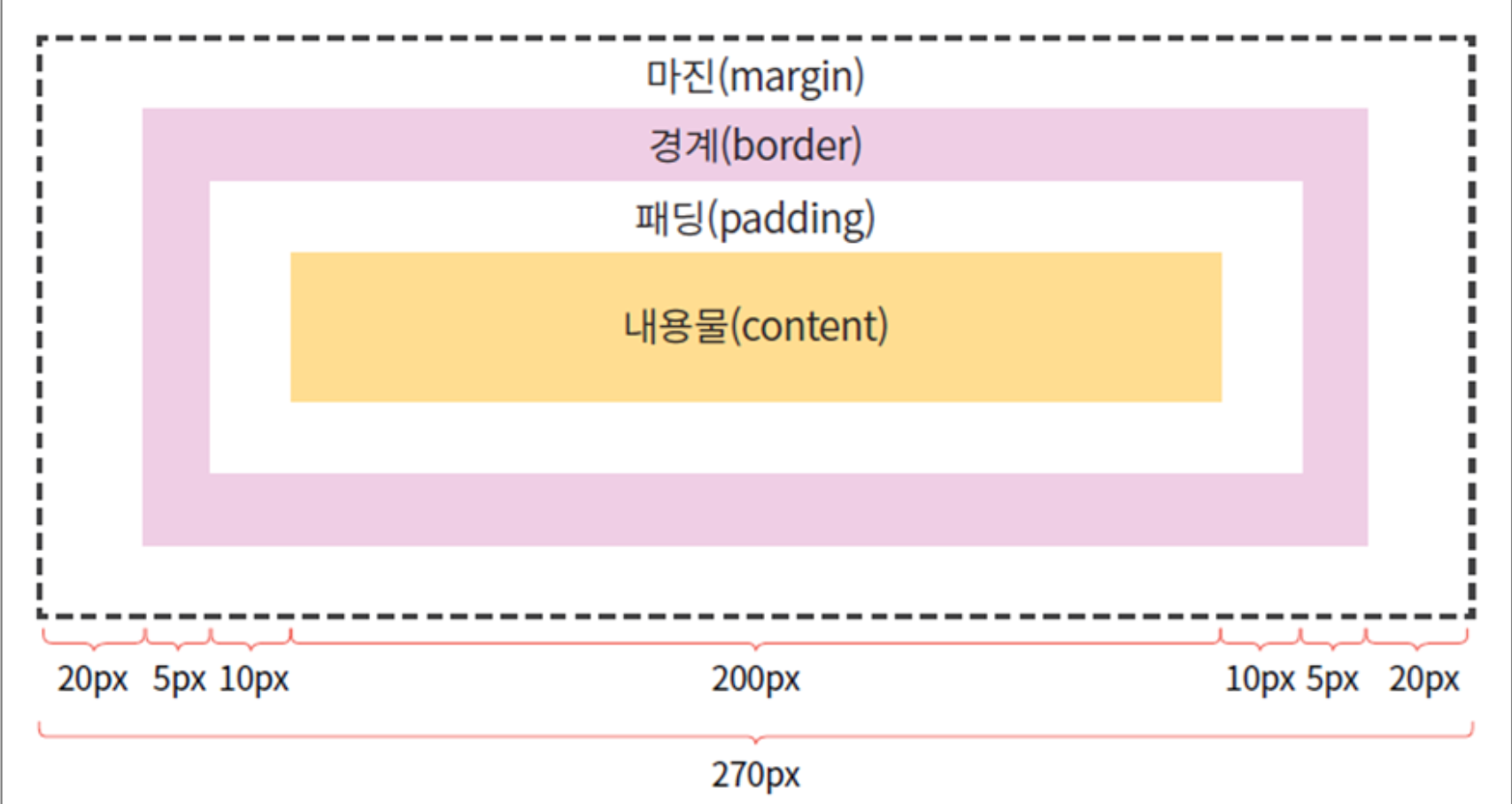
주요 속성
/* 마진 설정 */
margin: 10px 20px 30px 40px;  /* 상 우 하 좌 */
margin: 10px;  /* 모든 방향 */

/* 패딩 설정 */
padding: 10px 20px 30px 40px;  /* 상 우 하 좌 */
padding: 10px;  /* 모든 방향 */

/* 크기 설정 */
width: 200px;
height: 100px;
5. 레이아웃
5.1 display 속성
display: block;         /* 블록 요소처럼 */
display: inline;        /* 인라인 요소처럼 */
display: inline-block;  /* 인라인 + 크기 조절 가능 */
display: none;          /* 숨김 (요소 제거) */
5.2 Flexbox (1차원 레이아웃)
.flex-container {
  display: flex;
  flex-direction: row;      /* row(가로) | column(세로) */
  justify-content: center;  /* 주축 정렬 */
  align-items: center;      /* 교차축 정렬 */
}
justify-content 값: flex-start, flex-end, center, space-between, space-around
5.3 Grid (2차원 레이아웃)
.grid-container {
  display: grid;
  grid-template-columns: auto auto auto;  /* 3열 */
  gap: 10px;
}

.item1 {
  grid-column-start: 1;
  grid-column-end: 3;  /* 1~2열 차지 */
}
5.4 position 속성
| 값 | 설명 |
|---|---|
| static | 기본값, 순서대로 배치 |
| relative | 원래 위치 기준 상대 위치 |
| absolute | 부모 요소 기준 절대 위치 |
| fixed | 브라우저 창 기준 고정 |
.box {
  position: absolute;
  top: 30px;
  left: 30px;
}
6. 주요 속성 정리
색상 표현
color: red;              /* 이름 */
color: #FF0000;          /* 16진수 */
color: rgb(255, 0, 0);   /* RGB */
폰트
font-size: 16px;         /* px, pt, em, % */
font-weight: bold;       /* 굵기 */
font-style: italic;      /* 스타일 */
font-family: sans-serif; /* 폰트 */
텍스트
text-align: center;      /* 정렬: left, center, right */
text-decoration: none;   /* 밑줄 제거 */
7. 정렬 방법
인라인 요소 중앙 정렬
p { text-align: center; }블록 요소 중앙 정렬
div {
  width: 50%;
  margin-left: auto;
  margin-right: auto;
}
Flexbox 중앙 정렬
.container {
  display: flex;
  justify-content: center;
  align-items: center;
}
컴공학생