해당 포스트는 The Ultimate React Course 2024: React, Redux & More 의 Redux 부분 필기 위주로 작성되었습니다. 해당 강의는 강의 내용 기반으로 블로그 글 작성이 허용된 강의입니다.

말로만 듣던 Redux에 대해 알아보자. Context API 잘 있는데 이친구 왜 다들 쓰는지도 분석해본다.
Redux?
전역 상태, Global state를 관리하기 위한 써드파티 라이브러리다.
리덕스에서의 전역 상태는 하나의 전역적 엑세스 가능한 store에 저장되어, 이미 Context API의 일부로 사용해본 useReducer처럼 action을 사용하여 업데이트 할 수 있다.
크게 클래식한 리덕스 작성 방법과, Modern Redux Toolkit을 사용하여 작성하는 방법이 있다.
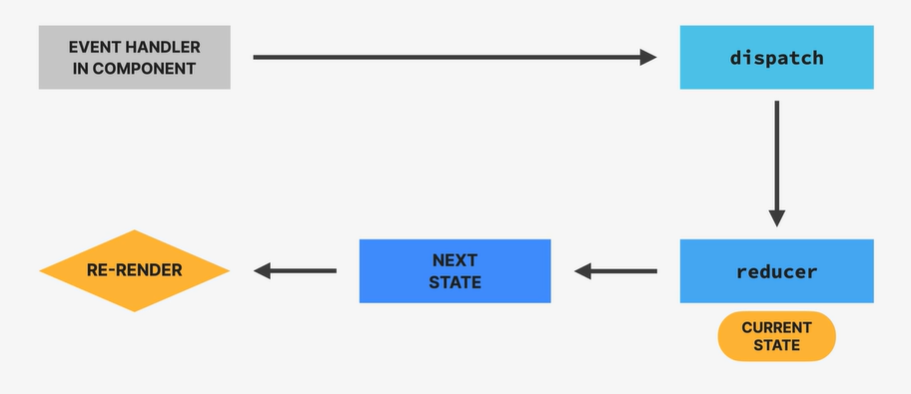
useReducer를 복습해보면 위와 같다. 큰 틀에서는 action이 dispatch되어 reducer 함수가 action에 기반해 새로운 상태를 계산하고, 재렌더링 하는 방식이다.
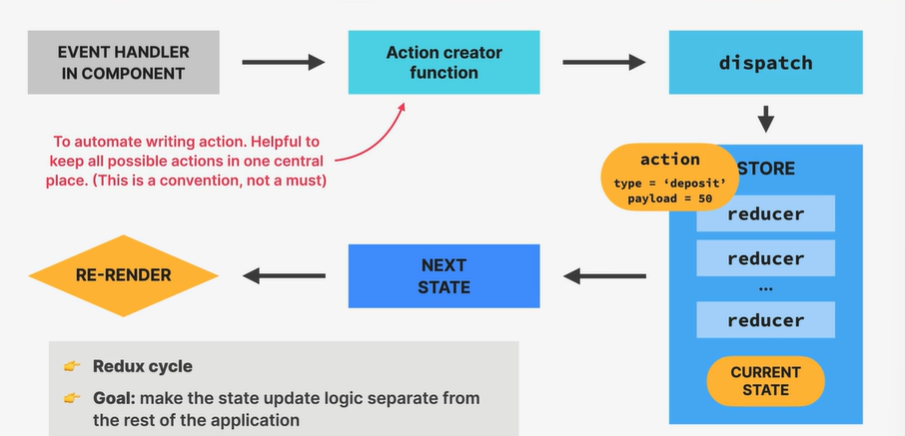
Redux는 비슷하지만 크게 두가지 차이가 있다. 우선 Action creator function이 불러져서 결과로 나온 action을 dispatch한다. action은 store에 도착해 해당 reducer가 action의 안내에 따라 상태를 업데이트하고 재렌더링이 실행된다. 리덕스 사이클의 큰 목적은 상태 업데이트 로직을 앱의 다른 부분과 분리하는데에 있다.
역사적으로 볼때, 거의 모든 리액트 앱들이 리덕스를 사용하여 전역 상태를 관리했다고 한다. 하지만 세상이 바뀌면서 다른 대체 선택지들이 많이 생겨서, 전역 UI 상태가 매우 많은게 아니면 굳이 리덕스를 사용하진 않아도 된다.
사용법
Reducer 만들기
const initialStateCustomer = {
  fullName: "",
  nationalID: "",
  createdAt: "",
};

function accountReducer(state = initialStateAccount, action) {
  switch (action.type) {
    case "account/deposit":
      return { ...state, balance: state.balance + action.payload };
}
    case "account/withdraw":
      return { ...state, balance: state.balance - action.payload };
  ...
    default:
      return state;
Redux 팀이 state domain/event name 식으로 action type을 쓰길 advice하고 있다고 한다.
useReducer와 기본적으로 같아보인다.
Store 만들기
import { combineReducers, createStore } from "redux";

const store = createStore(Reducer);

store.dispatch({ type: "account/deposit", payload: 500 });
위처럼 클래식한 방법으로 store를 만들고 action을 dispatch 할 수 있다.
Action Creator 함수 사용
function deposit(amount) {
  return { type: "account/deposit", payload: amount };
}

function withdraw(amount) {
  return { type: "account/withdraw", payload: amount };
}

store.dispatch(deposit(500));
store.dispatch(withdraw(200));
위 섹션에서 쓸때보다 dispatch 코드가 많이 짧아졌다.
State slicing
const rootReducer = combineReducers({
  account: accountReducer,
  customer: customerReducer,
});

const store = createStore(rootReducer);
store.js 한 파일에 모든 reducer들을 나눌 수 없으니, 각 파일에 작성하고 위처럼 합칠 수 있다.
리액트 컴포넌트에서의 사용
import { Provider } from "react-redux";
...
import store from "./store";

const root = ReactDOM.createRoot(document.getElementById("root"));
root.render(
  <React.StrictMode>
    <Provider store={store}>
      <App />
    </Provider>
  </React.StrictMode>
);
Context API로 provider를 씌워주듯 위처럼 씌워주면 리액트에서의 사용이 가능하다.
import { useSelector } from "react-redux";

function Customer() {
  const customer = useSelector((store) => store.customer.fullName);

  return <h2>👋 Welcome, {customer}</h2>;
}

export default Customer;
위처럼 useSelector hook을 사용하여 store에 있는 전역 변수를 받아올 수 있다.
import { useDispatch } from "react-redux";
import { createCustomer } from "./customerSlice"; // Action creator function

const dispatch = useDispatch();

function handleClick() {
    if (!fullName || !nationalId) return;
    dispatch(createCustomer(fullName, nationalId));
}
리액트 내부에선 useDispatch를 사용하여 action을 dispatch한다.
Middleware, Thunk
Redux store에는 reducer들이 pure function이어야 하고, 비동기 작업이 없어야 한다는 제약이 있다. 물론 컴포넌트가 async 작업을 하고 store에 dispatch 할 수도 있겠지만, 이는 이상적이지 않다.
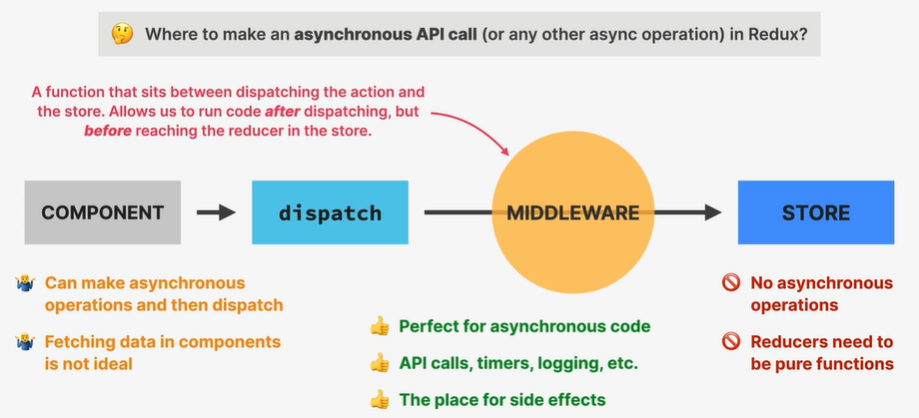
그럼 어디에서 async 작업을 해야할까? 여기서 Middleware가 등장한다. Middleware는 action dispatch와 store 사이에 있는 함수로, dispatch 이후, reducer 도착 전에 코드 실행이 가능하다.
리덕스에서 가장 많이 쓰이는 미들웨어는 Redux Thunk다.
import thunk from "redux-thunk";

const store = createStore(
  rootReducer,
  composeWithDevTools(applyMiddleware(thunk))
);
...

// accountSlice.js
export function deposit(amount, currency) {
  if (currency === "USD") return { type: "account/deposit", payload: amount };

  return async function (dispatch, getState) {
    dispatch({ type: "account/convertingCurrency" });

    const res = await fetch(
      `https://api.frankfurter.app/latest?amount=${amount}&from=${currency}&to=USD`
    );
    const data = await res.json();
    const converted = data.rates.USD;

    dispatch({ type: "account/deposit", payload: converted });
  };
}
위처럼 thunk를 store에 적용 후, 비동기 작업이 들어가는 함수를 반환하면 앞에 말했던것처럼 작동한다.
RTK (Redux Toolkit)
위의 사용 방식보다 더욱 "modern"한 Redux 코드를 작성하는 방법이다. 클래식한 방식과도 같이 사용 가능하다.
원래 방법에 비해 코드양이 많이 줄어들고, 크게 3가지 장점이 있다.
- Reducer 내부에 상태를 바꾸는 코드를 작성 가능하다. 그동안 state가 객체면 필요한 부분만 바꿔서 아예 새 객체를 만들어 반환했는데, 이젠 직접 변경이 가능해지는 것이다.
- Action creator를 자동으로 만들어준다.
- 자동적으로 thunk 미들웨어와 devtools를 셋업해준다.
사용법
Store 만들기
import { configureStore } from "@reduxjs/toolkit";

import accountReducer from "./features/accounts/accountSlice";
import customerReducer from "./features/customers/customerSlice";

const store = configureStore({
  reducer: {
    account: accountReducer,
    customer: customerReducer,
  },
});
자동으로 reducer들을 합쳐주고, devtools와 thunk도 셋업해준다.
Slice 만들기
export default function accountReducer(state = initialState, action) {
  switch (action.type) {
    case "account/deposit":
      return {
        ...state,
        balance: state.balance + action.payload,
        isLoading: false,
      };
      ...
     default:
      return state;
  }
}
원래 코드가 위와 같다고 하자.
import { createSlice } from "@reduxjs/toolkit";

const accountSlice = createSlice({
  name: "account",
  initialState,
  reducers: {
    deposit(state, action) {
      state.balance += action.payload;
    },
  }
});

export const { deposit } = accountSlice.actions;
보이듯 새 방법으로는 새로운 객체를 반환할 필요 없이, 바로 객체에서 변경해야 할 부분들만 바꿔서 반환이 가능하다! default 케이스의 처리 로직도 생략 가능하다.
Redux vs Context API
그래서 context api 있는데 왜 리덕스 씀? 이라고 할 수 있다. (사실 막 배운 내 입장에선 의문이 든다) 그래서 둘을 비교해보자.
Redux
장점
- 셋업되면 여러 state slices를 만들기 쉽다.
- 비동기 처리를 위한 미들웨어를 제공한다.
- 최적화를 내부에서 해준다.
- 훌륭한 DevTools가 제공된다.
단점
- 써드파티 라이브러리라 설치해야 하고, 번들 사이즈가 커진다.
- 초기 설정에 할게 많다.
Context API
장점
- 리액트에 내장되어 있다.
- Single Context를 셋업하기 쉽다.
단점
- 새로운 slice를 만드려면 새로운 context를 처음부터 만들어야 하고, App.js에 provider hell이 일어날 수 있다.
- 비동기 처리 메커니즘이 없다.
- 최적화가 헬이다.
- React DevTools만 사용 가능하다.
언제 뭘 쓸까?
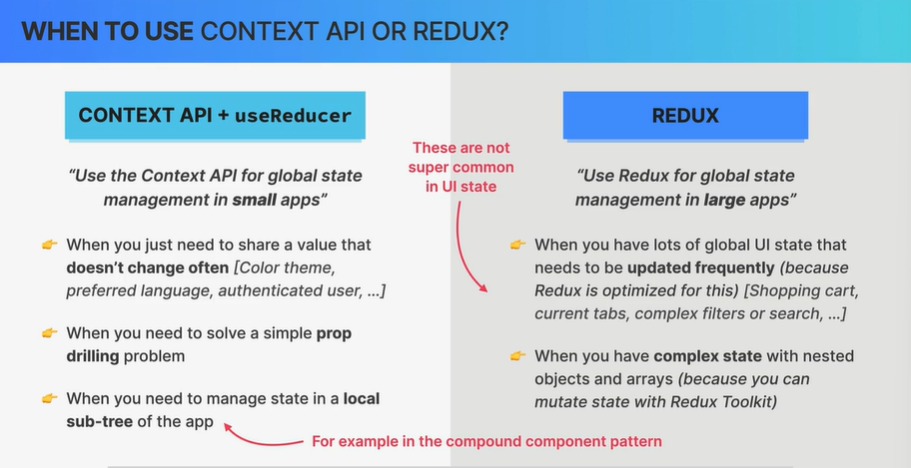
Context API는 자주 바뀌지는 않는, 예를 들어 다크모드 여부, 선호 언어, 인증된 사용자 정보같은 전역 변수를 관리할때 쓰기 좋다.
리덕스는 자주 업데이트되는, 많은 전역 변수 (쇼핑카트, 현재 탭, 복잡한 필터 등)이 사용될 때 쓰기 좋다. 상태가 객체 형태로 복잡하게 되어있어도 RTK를 쓰면 변경하기 편하니 좋다.