- 전체적인 과정 요약
✅ 전체 흐름 요약 (알라딘 API 기반 도서 DB 구축)
1. 알라딘 API 회원가입 및 키 발급
-
알라딘 API 공식 사이트: http://www.aladin.co.kr/ttb/apiintro.aspx
-
회원가입 후 TTB Key 발급
- 이 키가 있어야 API 요청이 가능함.
2. 원하는 카테고리 정보 파악
-
알라딘은 카테고리를 숫자로 구분합니다.
- 예시:
- 한국소설:CategoryId=50973
- 과학소설(SF):CategoryId=50992
- 로맨스:CategoryId=50976
- 자기계발:CategoryId=336
- 에세이:CategoryId=2551카테고리 전체 목록은 여기에서 조회해볼 수 있어요 (API 응답 참고).
3. 도서 정보 요청 (API 호출)
-
기본 API URL 예시:
http://www.aladin.co.kr/ttb/api/ItemList.aspx?ttbkey={TTBKey}&QueryType=ItemNewSpecial&MaxResults=20&start=1&SearchTarget=Book&output=js&CategoryId=50973 -
주요 파라미터 설명:
-ttbkey: 발급받은 키
-QueryType: 조회 방식 (예:ItemNewSpecial= 분야별 신간)
-MaxResults: 한 번에 가져올 최대 개수 (최대 100)
-start: 페이지 번호
-CategoryId: 카테고리 ID
-output: 응답 포맷 (js또는xml)
4. 데이터 파싱 (JSON 응답 처리)
-
JSON으로 응답을 받아서 다음과 같은 정보 추출:
- title (책 제목)
- author (저자)
- publisher (출판사)
- publishedDate (출간일)
- isbn13 (ISBN)
- cover (이미지 URL)
- description (책 소개)
5. MySQL 등 DB에 저장
-
예:
book테이블 구성CREATE TABLE book ( id BIGINT AUTO_INCREMENT PRIMARY KEY, title VARCHAR(255), author VARCHAR(255), publisher VARCHAR(255), pub_date DATE, isbn13 VARCHAR(20), cover_url VARCHAR(255), category VARCHAR(50), description TEXT );
-
- ML 추천 알고리즘 코드 https://docs.google.com/document/d/1mX-WxuoGs8Hy-QalhHcvuV17n50uGI2Sg_GHofgiePE/edit?pli=1&tab=t.0
알라딘 오픈 API 선택 이유
- 국중 API는 카테고리별로 받아오는게 안됐음
- 다른 API들은 일반 도서 검색 (키워드 주고 검색값 반환되는 식)
- 알라딘은 목록도 반환해주고 저희가 필요로 하는 책 소개 같은 정보도 다 갖고있어서 선택하게 됨!
1. 알라딘 API 키 발급
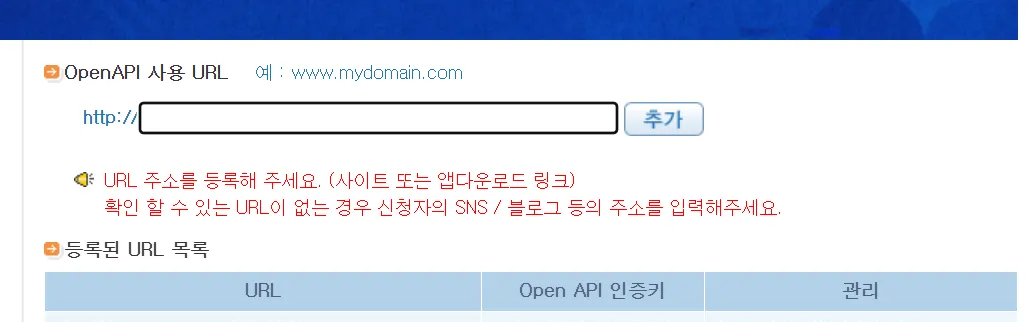
- 따로 사이트가 없기 때문에 그냥 내 개인 블로그 사이트를 가져왔음
- 인증키 :
2. 알라딘 API 가져오기
https://docs.google.com/document/d/1mX-WxuoGs8Hy-QalhHcvuV17n50uGI2Sg_GHofgiePE/edit?pli=1&tab=t.0
- 여러 알라딘 API 중에 itemList API를 가져오기로 했다.
- 분야별 도서 리스트.
CategoryId를 바꾸면 다양한 장르 도서 데이터를 가져올 수 있음.- 알라딘 API는 카테고리별로
categorId를 반환해주기 때문에bookId를 integer 배열값으로 받음!- 전체 카테고리 Id 엑셀 파일 aladin_Category_CID_20210927.xls
- 전체 카테고리 Id 엑셀 파일 aladin_Category_CID_20210927.xls
- 알라딘 API는 카테고리별로
- 원하는 카테고리별로 신간/베스트셀러/추천 도서를 일정 개수씩 가져올 수 있음.
- JSON 응답으로 받기 쉽고, 제목/저자/출판사/ISBN/커버이미지 등 DB에 저장할 주요 정보 포함.
- 예시 URL
http://www.aladin.co.kr/ttb/api/ItemList.aspx
?ttbkey=발급받은키
&QueryType=ItemNewSpecial
&MaxResults=50
&start=1
&SearchTarget=Book
&output=js
&CategoryId=50973
🔹 QueryType별 추천 용도
| QueryType | 설명 | 추천 여부 |
|---|---|---|
ItemNewSpecial | 분야별 신간 목록 | ✅ |
Bestseller | 분야별 베스트셀러 목록 | ✅ |
ItemEditorChoice | 분야별 추천 도서 목록 | ❌ (데이터 적음) |
BlogBest | 블로거 추천 도서 | ❌ (카테고리별 제한) |
ItemSearch | 키워드 기반 검색 | ❌ (너는 카테고리 위주이므로 비추천) |
3. Spring Boot 의존성 확인 (Web + Jackson + MySQL + JPA)
#1 ) 의존성 확인
dependencies {
    implementation 'org.springframework.boot:spring-boot-starter-web'
    implementation 'org.springframework.boot:spring-boot-starter-data-jpa'
    implementation 'com.fasterxml.jackson.core:jackson-databind'
    runtimeOnly 'com.mysql:mysql-connector-j'
}
4. book 엔티티 생성
mysql book table 코드
CREATE TABLE book (
  book_id INT PRIMARY KEY,
  title VARCHAR(255),
  author VARCHAR(255),
  genre VARCHAR(255),
  published_year INT,
  image_url VARCHAR(255),
  publisher VARCHAR(255),
  description TEXT
);
5. repository 생성
package com.example.qnb.book.repository;

import org.springframework.data.jpa.repository.JpaRepository;
import org.springframework.stereotype.Repository;
import com.example.qnb.book.entity.Book;

@Repository
public interface BookRepository extends JpaRepository<Book, Long> {
}
5. 알라딘 API 호출 서비스 (AladinApiService.java)
import com.example.qnb.book.entity.Book;
import com.example.qnb.book.repository.BookRepository;
import org.springframework.beans.factory.annotation.Value;
import org.springframework.http.ResponseEntity;
import org.springframework.stereotype.Service;
import org.springframework.web.client.RestTemplate;

import java.util.List;
import java.util.Map;

@Service
public class AladinApiService {

    private final BookRepository bookRepository;
    private final RestTemplate restTemplate = new RestTemplate();

    @Value("${aladin.ttbkey}")
    private String ttbKey;

    public AladinApiService(BookRepository bookRepository) {
        this.bookRepository = bookRepository;
    }

    public void fetchBooksByCategory(String genre, int categoryId) {
        String url = String.format(
                "http://www.aladin.co.kr/ttb/api/ItemList.aspx?ttbkey=%s&QueryType=ItemNewSpecial&MaxResults=20&start=1&SearchTarget=Book&output=js&CategoryId=%d",
                ttbKey, categoryId
        );

        try {
            ResponseEntity<Map> response = restTemplate.getForEntity(url, Map.class);
            List<Map<String, Object>> items = (List<Map<String, Object>>) response.getBody().get("item");

            for (Map<String, Object> item : items) {
                Book book = new Book();

                // API에는 book_id가 없으므로 ISBN13을 대체 ID로 사용하거나 랜덤 생성 필요
                String isbn13 = (String) item.get("isbn13");
                int bookId = isbn13.hashCode(); // 간단히 해시로 book_id 생성 (충돌 가능성 있음)

                book.setBookId(bookId);
                book.setTitle((String) item.get("title"));
                book.setAuthor((String) item.get("author"));
                book.setGenre(genre);
                book.setPublisher((String) item.get("publisher"));
                book.setImageUrl((String) item.get("cover"));
                book.setDescription((String) item.get("description"));

                // 출간일을 "2024-05-01" 형태에서 연도만 추출
                String pubDate = (String) item.get("pubDate");
                if (pubDate != null && pubDate.length() >= 4) {
                    try {
                        int year = Integer.parseInt(pubDate.substring(0, 4));
                        book.setPublishedYear(year);
                    } catch (NumberFormatException ignored) {}
                }

                bookRepository.save(book);
            }

        } catch (Exception e) {
            e.printStackTrace();
        }
    }
}
이 코드의 문제점#1: isbn13.hashCode()를 book_id로 쓰는 것
1. 해시 충돌 위험
- Java의
String.hashCode()는 32비트 정수로 변환되며, 서로 다른 ISBN 문자열도 동일한 해시값이 나올 수 있어요. - 즉, 서로 다른 책인데
book_id가 겹쳐서 DB 삽입 시 오류나 데이터 덮어쓰기가 발생할 수 있습니다.
2. 고유 ID로서의 안정성 부족
book_id는 테이블의 기본키(PK)이므로 절대로 중복되면 안 되며, 예측 가능한 방식으로 생성되어야 함.hashCode()는 예측이 어렵고 중복 방지 보장이 없기 때문에 위험합니다.
3. 해결방안
이 코드의 문제점 #2 : 알라딘 API는 최대 100개씩만 가져올 수 있어서 전체 책 수만큼 반복해야한다!
해결방안
수정된 코드
import com.example.qnb.book.entity.Book;
import com.example.qnb.book.repository.BookRepository;
import org.springframework.beans.factory.annotation.Value;
import org.springframework.http.ResponseEntity;
import org.springframework.stereotype.Service;
import org.springframework.web.client.RestTemplate;

import java.util.List;
import java.util.Map;

@Service
public class AladinApiService {

    private final BookRepository bookRepository;
    private final RestTemplate restTemplate = new RestTemplate();

    @Value("${aladin.ttbkey}")
    private String ttbKey;

    public AladinApiService(BookRepository bookRepository) {
        this.bookRepository = bookRepository;
    }

    public void fetchBooksByCategory(String genre, int categoryId) {
        int page = 1;
        int totalSaved = 0;

        while (true) {
            String url = String.format(
                "http://www.aladin.co.kr/ttb/api/ItemList.aspx?ttbkey=%s&QueryType=Bestseller&MaxResults=100&start=%d&SearchTarget=Book&output=js&CategoryId=%d",
                ttbKey, page, categoryId
            );

            try {
                ResponseEntity<Map> response = restTemplate.getForEntity(url, Map.class);
                List<Map<String, Object>> items = (List<Map<String, Object>>) response.getBody().get("item");

                if (items == null || items.isEmpty()) {
                    System.out.printf("📚 [%s] 카테고리 수집 완료 (총 %d권 저장됨)\n", genre, totalSaved);
                    break;
                }

                for (Map<String, Object> item : items) {
                    String isbn13 = (String) item.get("isbn13");

                    // 중복 체크
                    if (isbn13 == null || bookRepository.existsByIsbn13(isbn13)) continue;

                    Book book = new Book();
                    book.setTitle((String) item.get("title"));
                    book.setAuthor((String) item.get("author"));
                    book.setGenre(genre);
                    book.setPublisher((String) item.get("publisher"));
                    book.setImageUrl((String) item.get("cover"));
                    book.setIsbn13(isbn13);
                    book.setDescription((String) item.get("description"));

                    // 출판 연도 추출
                    String pubDate = (String) item.get("pubDate");
                    if (pubDate != null && pubDate.length() >= 4) {
                        try {
                            int year = Integer.parseInt(pubDate.substring(0, 4));
                            book.setPublishedYear(year);
                        } catch (NumberFormatException ignored) {}
                    }

                    bookRepository.save(book);
                    totalSaved++;
                }

                page++; // 다음 페이지로

            } catch (Exception e) {
                System.err.println("❌ API 요청 실패 (page " + page + "): " + e.getMessage());
                break;
            }
        }
    }
}
6. 컨트롤러에서 실행 트리거
package com.example.qnb.book.controller;
//AladinApiService를 실행시키기 위한 컨트롤러 코드

import com.example.qnb.book.service.AladinApiService;
import org.springframework.http.ResponseEntity;
import org.springframework.web.bind.annotation.*;

@RestController
@RequestMapping("/api/books")
public class BookController {

    private final AladinApiService aladinApiService;

    public BookController(AladinApiService aladinApiService) {
        this.aladinApiService = aladinApiService;
    }

    // 도서 데이터 수집 API
    @PostMapping("/import")
    public ResponseEntity<String> importBooks() {
        // [카테고리명, 알라딘 CategoryId] 순서로 수집
        aladinApiService.fetchBooksByCategory("한국소설", 50973);
        aladinApiService.fetchBooksByCategory("과학소설", 50992);
        aladinApiService.fetchBooksByCategory("로맨스", 50976);
        aladinApiService.fetchBooksByCategory("자기계발", 336);
        aladinApiService.fetchBooksByCategory("에세이", 2551);

        return ResponseEntity.ok("도서 수집 완료");
    }
}
7. application.yml 또는 .properties 설정
server:
  port: 8080  # 기본 포트, 프론트나 Postman에서 요청 시 이 포트로 요청
  address: 0.0.0.0  # 외부에서도 접근 가능하도록 설정

spring:
  # 실제 사용하는 내 DB
  datasource:
    url: jdbc:mysql://localhost:3306/qnb_database
    username: root
    password: "Dang1216@@"
    driver-class-name: com.mysql.cj.jdbc.Driver

  jpa:
    hibernate:
      ddl-auto: update  # 개발 중에는 update, 배포 시에는 validate 또는 none 권장
    properties:
      hibernate:
        format_sql: true  # SQL 쿼리를 예쁘게 출력
        dialect: org.hibernate.dialect.MySQL8Dialect  # MySQL8 전용 방언
        globally_quoted_identifiers: true
        naming:
          physical-strategy: org.springframework.boot.orm.jpa.hibernate.SpringPhysicalNamingStrategy

  jackson:
    serialization:
      fail-on-empty-beans: false  # Bean에 필드가 없어도 직렬화 오류 발생하지 않도록 설정

# JWT 설정 (보안 키와 만료 시간)
jwt:
  secret: my-very-secret-jwt-key-that-should-be-long
  expiration: 3600000  # 만료 시간 (1시간 = 3600000ms)

# 알라딘 오픈 API 키 (외부 도서 데이터 수집용)
aladin:
  ttbkey: //해당 키

순두의 누나입니다