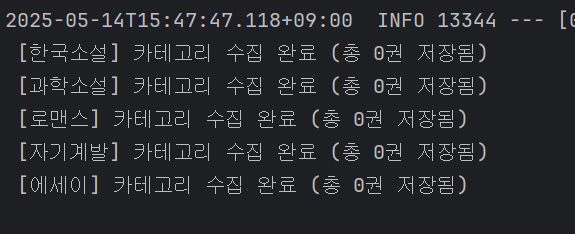
- 카테고리 수집 로직은 실행됨
- 그러나 저장된 책 수는 0권 → 즉, API 응답이 비어 있거나 데이터가 정상적으로 파싱되지 않음
의심되는 원인 3가지
1. API 응답이 비정상 (item이 null)
response.getBody().get("item")이 null이어서 저장 로직이 건너뛰었을 가능성
2. API 호출은 성공했지만 결과가 없음 (빈 배열)
item은 존재하나[]인 경우 (items.isEmpty())
3. 잘못된 ttbkey / QueryType / CategoryId 조합
- 특히
Bestseller는 모든 카테고리에 대해 응답을 주지 않을 수 있음 - 예:
에세이,SF는ItemNewSpecial은 가능해도Bestseller는 없음
경우의 수 확인
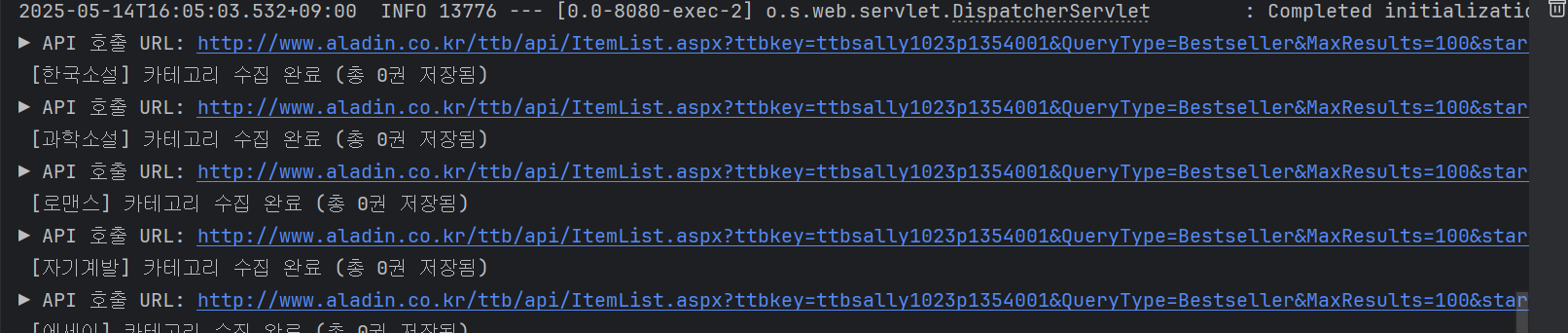
[1단계] API 호출 URL 확인
API 호출 URL이 정상적으로 구성되어 있는지 확인
- 디버깅용 코드 입력
🔧 방법
while (true) {
            String url = String.format(
                    "http://www.aladin.co.kr/ttb/api/ItemList.aspx?ttbkey=%s&QueryType=Bestseller&MaxResults=100&start=%d&SearchTarget=Book&output=js&CategoryId=%d",
                    ttbKey, page, categoryId
            );

            //디버깅용 코드
            System.out.println("▶ API 호출 URL: " + url);

            try {
                ResponseEntity<Map> response = restTemplate.getForEntity(url, Map.class);
                List<Map<String, Object>> items = (List<Map<String, Object>>) response.getBody().get("item");
정상 예시 출력:
▶ API 호출 URL: http://www.aladin.co.kr/ttb/api/ItemList.aspx?ttbkey=ttbsally...&QueryType=ItemNewSpecial&MaxResults=100&start=1&SearchTarget=Book&output=js&CategoryId=50917
이상한 경우
ttbkey=부분이 비어 있음 → 키 주입 안됨- QueryType 잘못됨 (예: 오타, 해당 카테고리에서 안 쓰는 타입)
→ 이건 잘됨!
[2단계] API 응답 전체 출력
API 호출 결과가 아예 비었는지, 오류 메시지가 있는지 확인
방법
try {
    ResponseEntity<Map> response = restTemplate.getForEntity(url, Map.class);

    // [2단계] API 응답 본문 로그 출력
    System.out.println("▶ API 응답 내용:");
    System.out.println(response.getBody());

    List<Map<String, Object>> items = (List<Map<String, Object>>) response.getBody().get("item");
정상 예시 출력:
{
  "item": [
    { "title": "책1", "author": "...", ... },
    ...
  ],
  ...
}
오류 예시 출력:
{ "errorCode": "InvalidTTBKey", "errorMessage": "잘못된 키입니다." }- 결과
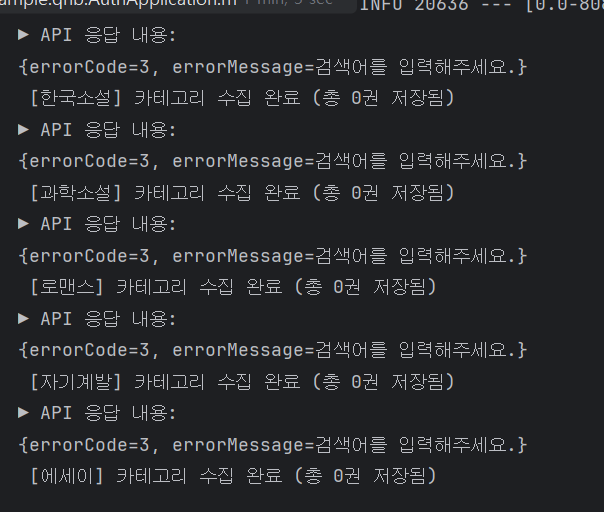
- 알라딘에서
QueryType=BestsellerorItemNewSpecial일 때 특정 카테고리에서 제대로 작동하지 않거나,
쿼리에 필요한 조건이 빠졌을 때 발생
URL을
http://www.aladin.co.kr/ttb/api/ItemList.aspx?ttbkey=%s&QueryType=Bestseller&MaxResults=100&start=%d&SearchTarget=Book&output=js&CategoryId=%d&Version=20131101이걸로 바꿔주니까 저장됨!
기존에는 Version 부분이 없었는데 알라딘 오픈 API 에 필수값이었다..그러니 안되지 어쨋든 해결!

순두의 누나입니다