회고
- sql수업 초반 건강이슈로 수업을 제대로 듣지 못하였다. 진도를 따라가기 위해서 얼른 개별적으로 공부를 더 해야겠다고 생각했다. 기초적인 sql사용법부터 문법, sakila 등의 db를 활용해보고있다. python만 해서 그런가 sql이 적응이 안되지만 점점 나아질것이라 믿는다.
Key_point
✅ MySQL 기초 사용법
- cmd 창에서 SQL파일 실행
-- ex) mysql -u root -p mydb < emp_dept_sample.sql
✅ 테이블 구조 확인
- Desc 테이블명; : 테이블 구조 보기
- Char(n) : 고정길이 문자열
- VARCHAR(n) : 가변길이 문자열
- TEXT/LONGTEXT : 대용량 텍스트 저장용
✅ SQL 기본문법
- DML : SELECT, INSERT, UPDATE, DELETE
- DDL : CREATE, ALTER, DROP, TRUNCATE
- DCL : GRANT, REVOKE
✅ 조건 검색과 정렬
- LIKE 'A%' : A로 시작하는
- LIKE '%A' : A로 끝나는
- LIKE '%A%' : A가 포함된
- IN (a,b,c) : 여러 조건 중 하나
- BETWEEN a AND b : 범위 조건, a와 b 사이 값
- ORDER BY Column ASC : 오름차순 정렬
- ORDER BY Column DESC : 내림차순 정렬
✅ PRIMARY KEY VS FOREIGN KEY
- PRIMARY KEY
-- 1. 고유함(Unique) : 같은 값이 두 번 이상 존재할 수 없음.
-- 2. NULL 허용 안됨 : 반드시 값이 존재해야함.
-- 3. 테이블당 1개만 정의 가능 : 기본키는 하나임 - FOREIGH KEY
-- 1. 중복 가능 : 같은 외래키 값이 여러행에서 반복될 수 있음.
-- 2. NULL 가능 : 특정행이 다른 테이블을 참조하지 않을 수 있어 NULL 허용
-- 3. 참조 무결성 제약 : 참조하는 값이 반드시 원본테이블(PK)에 존재해야함
필기
데이터베이스 삽입_cmd
- cd C:\Users\sjsj4\Desktop(파일경로)
mysql -u root -p mydb < emp_dept_sample.sql
Enter user pass word : 1234
새로운 계정 만들기
- 기본적으로 mysql은 로컬에서만 접근 가능하다.
- 로컬에서만 가능하다는 말은 디비서버(MySQL84)와 디비클라이언트 (mysql, workbench, dbeavor, sqlgate, heidsql..등)
동일 컴퓨터에 존재할 때 접근 가능함을 말한다. - 클라이언트가 다른 컴퓨터에 있을 때 접근가능한 계정을 별도로 만들어줘야한다.
- 실무에서는 보통 phpmyadmin이라는 웹사이트를 설치하여 이 사이트를 통해 접근한다.
로컬 접근 계정 만들기
- create user '계정명'@'localhost' identified by '패스워드';
ex) create user 'user01'@'localhost' identified by '1234'; - root 계정이 생성된 사용자계정에게 디비에 접근할 권한을 부여해야 특정 디비에 접근할 권한이 생긴다.
- grant all privileges on mydb.* to user01@localhost;
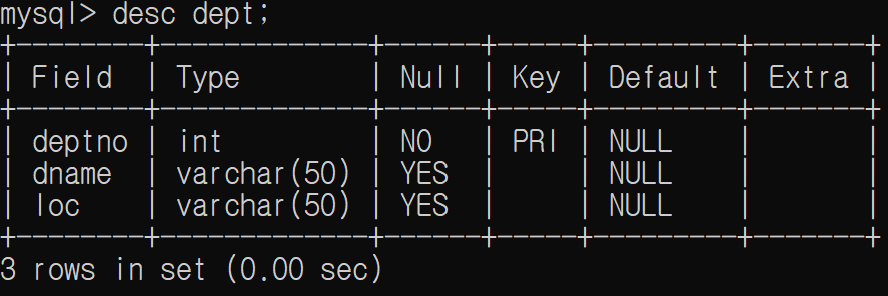
테이블 구조를 확인하는 명령어
-
desc dept; 를 치면 아래의 표가 나온다.
-
열을 필드라고 부른다
-
Type : 데이터타입이 존재한다. small int int bigint,,,,
-
chr : 고정길이 문자열(1000byte 이내)
gender char(10) gender = 'Y' y ㅡ ㅡ ㅡ ㅡ ㅡ ㅡ ㅡ ㅡ ㅡ ㅡ 10개의 메모리를 다 차지 where gender = 'Y' where gender = 'Y' 다른 dbms마다 다른데 대부분은 데이터에서 대소문자 구분을 하는데 mysql은 못한다. 오라클의 경우 where gender = 'y' 또는 where trip(gender) = 'y' 데이터의 길이가 정해져 있을 때 사번, 학번, 성별, 연도<br/> -
varcar(바차) variant char의 약자
가변길이 문자열, 용량을 지정해도 실제 데이터만큼만 사용을 한다. varchar(100) 'y'가 들어가면 실제 데이터길이 1만 차지한다. 2000byte까지 앞부분에 데이터 길이를 별도로 저장한다. 그래서 상황에 맞춰서, 사용자아이디, 게시글 타이틀 -
text, long text : 2G 게시판 게시글
-
Null - 널 허용여부
-
Key - pri -primary key : 중복불가, null불가 조건을 만족해야함.
-
Default : 특별한 값을 입력하지 않았을 때 기본값으로 저장된다.
-
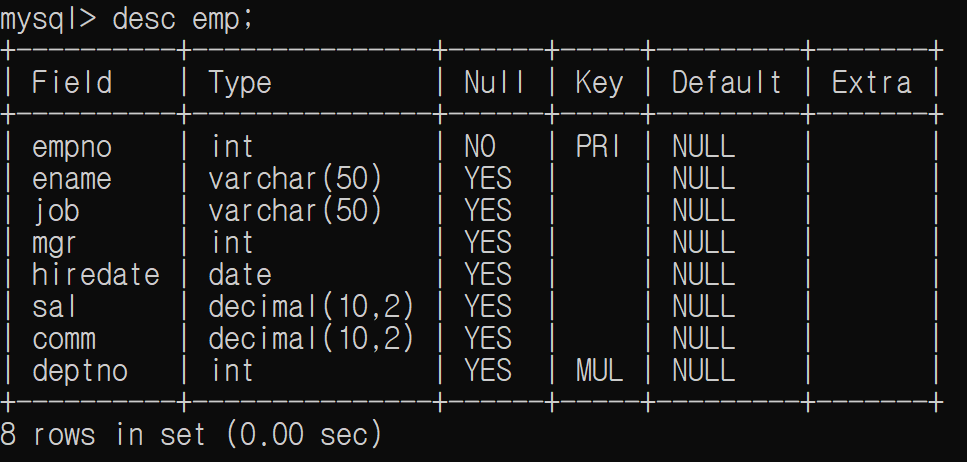
desc emp; 를 치면 아래의 표가 나온다.
-
DCL : Data Control Language
grant(권한 주는 명령어), revoke(권한 뺏는 명령어) -
DML : Data manipulation Language
insert, delete, update, select(조회) -
DDL : Data Definiton Language
create, drop, alter, truncate.... 등
SQL기초
-
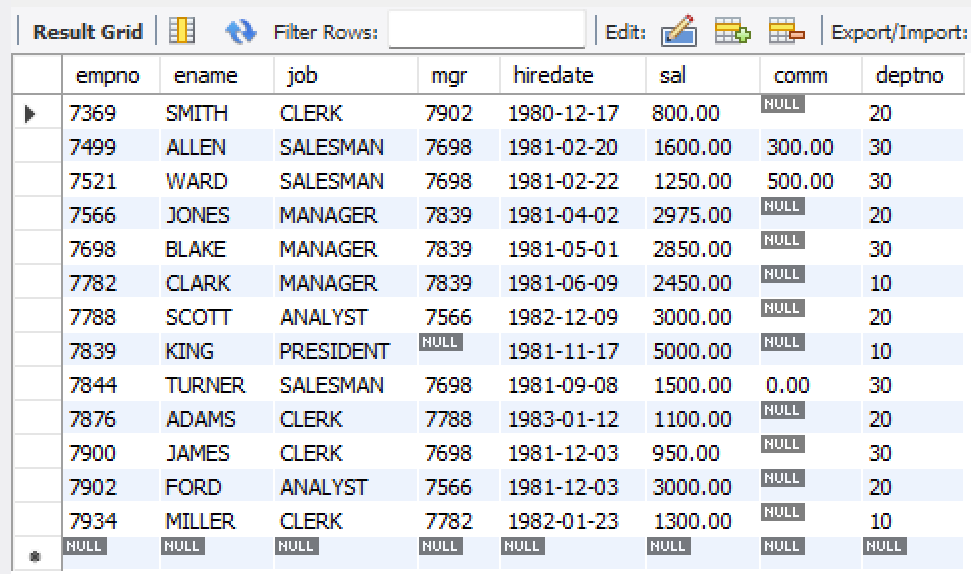
select * from emp : emp의 내용을 다 보여줌
-
select count(*) from emp; : emp의 개수를 세줌

myemp 활용 문제
select * from emp;
-- 이름이 smith인 사람만 보려고 한다.
select * from emp where ename = 'SMITH';
select * from emp where ename = 'smith';
select * from emp where ename = 'Smith';

-- Q.이름이 smith 이거나 ford인 사람
select * from emp where ename = 'SMITH' or ename = 'FORD';

-- Q.급여가 3000 이상인 사원의 이름과 급여를 조회하라
select ename, sal from emp where sal >= 3000;

-- Q.직무가 'MANAGER'인 사람의 정보를 조회하라
select * from emp where job = 'manager';

-- Q.급여가 2000 이상, 5000이하인 사원을 조회하시오.
select * from emp where 2000 >= sal and sal <= 5000;
-- 위 문제를 between을 써서 할 수 있다. * between a and b(oracle, mysql 지원) : a 이상 b 이하
select * from emp where sal between 2000 and 5000;

-- Q.커미션이 NULL이 아닌 사원을 조회하시오.
select * from emp where comm is null;
-- null의 경우는 관계연산자가 아니나 is, is not을 사용해야한다.
-- select * from emp where comm = null : 이거는 결과가 안나온다.

-- Q.'A'로 시작되는 이름을 가진 사원을 조회하시오.
select * from emp where ename like 'a%';

-- Q.부서번호가 10, 20, 30에 해당되는 사원을 조회하시오.
select * from emp where deptno = 10 or deptno = 20 or deptno =30;
select * from emp where deptno in(10,20,30);

-- Q.급여가 1000 미만이거나 커미션이 500초과인 사원을 조회하시오.
select * from emp where sal < 1000 or comm > 500;

-- Q.관리자가 없는 사원 (mgr이 null)을 조회하시오.
select * from emp where mgr is null;

-- Q.직무가 'CLERK'이면서 부서번호가 20인 사원을 조회하시오.
select * from emp where job = 'clerk' and deptno = 20;

-- Q.입사일이 1981년 이전인 사원을 조회하시오.
select * from emp where hiredate < '1981-01-01';

select *
from emp
-- where;
order by ename asc; -- 이름으로 오름차순 정렬

select *
from emp
-- where;
order by ename desc; -- 이름으로 내림차순 정렬
sakila 활용 문제
USE sakila;

desc actor;
select count(*) from actor;
--- 항상 데이터가 몇개인지 확인하고 조회해라, 무턱대고 데이터 전체를 보는것은 위험하다.
select * from actor limit 0, 10; --- limit 옵셋, 개수;

-- [기초 조회]
-- 1. 모든 배우(Actor)의 이름과 성을 조회하시오.
select first_name, last_name
from actor;

-- 2. 배우 테이블에서 성(last_name)이 ‘DAVIS’인 사람을 모두 찾으시오.
select *
from actor
where last_name = 'DAVIS';

-- 3. 고객(Customer)의 이메일 목록을 알파벳 순서로 조회하시오.
desc customer; -- 필드명 확인
select *
from customer
order by email asc;

-- 4. 영화(film)의 제목과 대여 요금(rental_rate)을 조회하시오.
desc film;
select title, rental_rate
from film;

-- 5. 고객(Customer)의 이름, 성, 이메일을 각각 출력하시오.
desc customer;
select first_name, last_name, email
from customer;

-- 6. 카테고리(category)별 이름과 ID를 출력하시오.
desc category;
select name, category_id
from category;

-- [조건과 정렬]
-- 7. 길이가 180분 이상인 영화 제목을 조회하시오.
desc film;
select title
from film
where length > 180;

-- 8. 대여 요금이 4.99 이상인 영화 중에서 제목(title)과 요금(rental_rate)을 내림차순 정렬하시오.
desc film;
select title, rental_rate
from film
where rental_rate >= 4.99
order by rental_rate desc;

-- 9. 대여(rental) 중 2005년에 이루어진 기록만 조회하시오.
select *
from rental
where rental_date
between '2005-01-01' and '2005-12-31';
-- where rental_date >= '2005-01-01' and rental_date <= '2025-12-31'로 써도 괜찮음.
-- 문자열을 자르는 함수 substring(시작위치, 개수)
-- DB는 인덱스가 1부터 시작함.
-- select rental_date, substring(rental_date, 1, 4) from rental;
select * from rental -- 이게 정석임.
where substring(rental_date, 1, 4) = '2005';

-- 10. 고객 중 이름이 'S'로 시작하는 고객의 이름을 조회하시오.'
select last_name
from customer
where last_name like 's%';

-- 11. 배우(actor) 테이블에서 이름이 5글자인 배우만 찾으시오.
desc actor;
select *
from actor
where length(last_name) = 5;

/*
무결성 - 결함이 없는 성격
중복성 배제 - 데이터의 중복 배제
일관성 - 데이터가 중복도 없고 일관성이 있다.

primary key 개념을 제공한다. - primary key는 특정 필드 또는 여러개의 필드를 묶어서 중복성을 배제하고
						   null 값도 갖지 못하도록 제약하는 특성을 갖는다.
                           사번, 학번 등은 사용가능, 주민번호(이미 중복된 사람 20000명)는 사용불가
                           필드의 성격에 auto_increment 자동증가, mssql에서는 일련번호, 오라클은 시퀀스라는 객체
                           mysql은 auto_increment 속성이 있는 필드가 primary key여야 한다.
*/
use mydb;
desc emp;
-- empno 필드가 primary key로 되어 있다.
insert into emp(empno,ename) values(8000,'홍길동');
insert into emp(empno,ename) values(8000,'임꺽정');
-- 8000번이 이미 있어서 에러발생
-- Error Code : 1062. Duplicate entry '8000' for key 'emp.
-- 테이블을 만들 때 primary key를 지정할 수도 있고, 테이블을 다만들고 지정할 수도 있다.

-- 일부 데이터를 먼저 테이블에 넣어놓고 primary key 지정할때의 경우
-- 이미 들어가 있는 데이터가 중복이거나 null값이 있으면 primary key를 지정못함

-- 필드 하나로 primary key를 지정할 수도 있고 필요하면 여러개의 필드를 묶어서 하나의 primary key를 지정할 수 있다.
-- 단, 하나의 테이블에 한개만 지정가능하다.

-- sql은 기본적으로 검색이 순차검색임, 한개씩 읽어서 검색한다.
-- 그러나 오라클은 병행처리가 가능해서 한번에 여러개 읽는다.
-- 따라서 sql 사용 시 색인순차검색, 색인표를 만들어서 검색한다. primary key를 지정하면 자동으로 색인(index)를 만들어준다.
use sakila;
-- 1. film 테이블에서 영화 제목과 대여 요금을 조회하시오.
desc film;
select title, rental_rate
from film;
-- select f.title, f.rental_rate
-- from film f; f라는 별칭을 부여해서 컬럼에 접근
-- 2. actor 테이블에서 이름이 'JOHN'인 배우를 조회하시오.
desc actor;
select last_name
from actorcitycitycountry
where last_name = 'JOHN';
-- select A.* from actor A where A.last_name ='JOHN';
-- 3. category 테이블의 모든 카테고리 이름을 조회하시오.
desc category;
select category_id, name, last_update
from category;
-- select C.* from category C; : 카테고리를 c라는 별칭으로 부여하고 c.*모든 컬럼을 조회
-- 4. film 테이블에서 rental_rate가 3.99보다 큰 영화의 제목과 요금을 조회하시오.
desc film;
select title, rental_rate
from film
where rental_rate > 3.99;
-- 5. customer 테이블에서 이메일 주소에 'gmail'이 포함된 고객을 조회하시오.
desc customer;
select *
from customer
where email like '%gmail%';
-- 6. film 테이블에서 길이가 120분 이하인 영화의 제목과 길이를 조회하시오.
desc film;
select title, length
from film
where length <= 120;
-- 7. language 테이블에서 언어 이름이 'English'인 행을 조회하시오.
desc language;
select *
from language
where name = 'English';
-- select * from language A where A.name = 'English';
-- 8. actor 테이블에서 성(last_name)이 'SMITH'인 배우의 이름과 성을 조회하시오.
desc actor;
select first_name, last_name
from actor
where last_name = 'SMITH';
-- 9. customer 테이블에서 first_name이 'A'로 시작하는 고객을 조회하시오.
desc customer;
select *
from customer
where first_name like 'A%';
-- 10. film 테이블에서 2006년에 개봉한 영화만 조회하시오.
desc film;
select *
from film
where release_year = 2006;
-- 11. actor 테이블에서 배우번호가 10, 21, 34, 56, 87, 89, 90 인
-- 사람들 정보만 출력
desc actor;
select *
from actor
where actor_id in (10,21,34,56,87,89,90);
-- 12. customer 테이블중에서
-- store_Id=1 이고 customer_id가
-- 562, 580, 470, 471,363, 364
desc customer;
select *
from customer
where store_Id = 1 and customer_id in (562,580,470,471,363,364);과제
gpt 활용 유사예제 10개
use world;
-- ✅ 문제 1
-- city 테이블에서 모든 도시의 이름(Name)을 조회하시오.
desc city;
select name
from city;

-- ✅ 문제 2
-- city 테이블에서 국가 코드(CountryCode)가 'KOR'인 도시의 이름과 인구를 조회하시오.
desc city;
select name, population
from city
where countrycode like "%kor%";

-- ✅ 문제 3
-- city 테이블에서 인구 기준 상위 10개의 도시 이름과 인구를 내림차순으로 조회하시오.
desc city;
select name, population
from city
order by population desc
limit 10;

-- ✅ 문제 4
-- country 테이블에서 면적(SurfaceArea)이 1,000,000 이상인 국가들의 이름과 면적을 조회하시오.
desc country;
select name, surfacearea
from country
where surfacearea >= 1000000;

-- ✅ 문제 5 : 도시(City) 중 인구가 가장 많은 5개 도시를 조회하세요.
desc city;
select *
from city
order by population desc
limit 5;

-- ✅ 문제 6
-- countrylanguage 테이블에서 공식 언어(IsOfficial = 'T')가 'Spanish'인 국가 코드를 조회하시오.
desc countrylanguage;
select countrycode
from countrylanguage
where isofficial = 'spanish' and isofficial = 'T';

-- ✅ 문제 7
-- country 테이블에서 인구가 1억 이상인 국가의 이름과 인구를 조회하시오.
desc country;
select name, population
from country
where population >= 100000000;

-- ✅ 문제 8 : 인구가 500만 이상 1천만 이하인 나라들의 이름과 인구를 출력하세요.
select c.name, c.Population
from country c
where c.Population >= 5000000 and c.population <= 10000000;

-- ✅ 문제 9 : 가장 많은 이라는 표시를 어떻게 해야할까?
-- city 테이블에서 인구가 가장 많은 도시의 이름과 인구를 조회하시오.
desc city;
select name, population
from city
order by population desc
limit 1;

-- ✅ 문제 10 : 나라 이름이 ‘land’로 끝나는 나라의 이름을 모두 출력하세요.
select c.name
from country c
where c.name like '%land';
복습
gpt 활용 유사예제
SQL 연습문제 1
-- 🧩 SQL 연습 문제 10선
use sakila;
-- 배우(actor) 테이블에서 이름이 'A'로 시작하는 배우의 이름과 성을 조회하시오.
select first_name, last_name
from actor
where first_name like 'A%';

-- 고객(customer) 테이블에서 성(last_name)이 'TAYLOR'인 고객 정보를 조회하시오.
select *
from customer
where last_name = 'TAYLOR';

-- 영화(film) 테이블에서 대여 요금(rental_rate)이 2.99 또는 4.99인 영화 제목을 조회하시오.
select title
from film
where rental_rate = 2.99 or rental_rate = 4.99;

-- 카테고리(category) 테이블에서 마지막 수정일(last_update)이 2006년인 카테고리 이름을 모두 조회하시오.
select name
from category
-- where last_update = 2006; -- 틀린풀이
where YEAR(last_update) = 2006; -- last_update는 날짜/시간 타입이기에 함수로 연도만 추출해야한다.

-- 고객(customer) 테이블에서 이메일에 'yahoo'가 포함된 고객의 이름과 이메일을 조회하시오.
select first_name, email
from customer
where email like '%yahoo%';

-- 영화(film) 테이블에서 길이(length)가 90분 이상이고, 대여 요금이 3.99 이하인 영화의 제목과 요금을 조회하시오.
select title, rental_rate
from film
where length >= 90 and rental_rate <= 3.99;

-- address 테이블에서 district가 'Texas'인 주소 목록을 조회하시오.
select address
from address
where district = 'Texas';

-- rental 테이블에서 2005년 6월에 이루어진 대여 기록만 조회하시오.
select rental_date
from rental
-- where rental_date between 2005-06-01 and 2005-06-30; -- 틀린 풀이
 where rental_date between '2005-06-01' and '2005-06-30'; -- 날짜는 따옴표로 감싸야한다.

-- actor 테이블에서 배우번호(actor_id)가 5의 배수인 배우 정보를 모두 조회하시오.
select *
from actor
where actor_id % 5 = 0;

-- customer 테이블에서 store_id가 2이고, 고객 성(last_name)이 'M'으로 시작하는 고객의 이름과 성을 조회하시오.
select first_name, last_name
from customer
where store_id = 2 and last_name like 'M%';
SQL 연습문제 2
use sakila;

-- 문제 1.
-- customer 테이블에서 이름(first_name)이 'A'로 시작하는 고객의 first_name, last_name을 조회하세요.
select first_name, last_name
from customer
where first_name like 'A%';
a
-- 문제 2.
-- film 테이블에서 rental_rate가 2.99보다 큰 영화의 title, rental_rate를 조회하세요.
select title, rental_rate
from film
where rental_rate >= 2.99;

-- 문제 3.
-- staff 테이블에서 각 직원의 first_name, last_name, 그리고 그들이 속한 store_id를 조회하고, store_id 기준으로 오름차순 정렬하세요.
select first_name, last_name, store_id
from staff
order by store_id asc;

-- 문제 4.
-- payment 테이블에서 amount가 5 이상인 결제만 조회하고, amount 기준으로 내림차순 정렬하세요.
select *
from payment
where amount >= 5
order by amount desc;

-- 문제 5.
-- film 테이블에서 rating이 'PG'인 영화들의 title과 length를 조회하세요. 결과는 length 기준으로 오름차순 정렬하세요.
select title, length
from film
where rating = 'PG'
order by length asc;

-- 문제 6.
-- rental 테이블에서 2005년 5월에 대여된 건수를 일자별로 집계하여, rental_date 기준으로 오름차순 정렬하세요.
select date(rental_date) as rental_day, count(*) as rental_count
from rental
where rental_date between '2005-05-01' and '2005-05-31'
group by rental_day
order by rental_day asc;

-- 문제 7.
-- customer 테이블에서 store_id별 고객 수를 집계하여 store_id와 고객 수를 출력하세요.
select store_id, count(*) as customernum
from customer
group by store_id

-- 문제 8.
-- film 테이블에서 replacement_cost가 20 이상 25 이하인 영화들의 수를 rating별로 집계하세요.
select count(*) as '영화들의 수'
from film
where replacement_cost >= 20 and replacement_cost <= 25
group by rating;

-- 문제 9.
-- inventory 테이블에서 film_id별 재고 개수를 구하고, 그 수가 5개 이상인 경우만 출력하세요.
-- 결과는 film_id 기준으로 정렬하세요.
select count(*) as '재고개수'
from inventory
group by film_id
having count(*) >= 5;


-- 문제 10.
-- payment 테이블에서 각 customer_id가 지불한 총 금액을 구하고, 그 총액이 100 이상인 고객만 출력하세요.
-- 결과는 총액 기준으로 내림차순 정렬하세요.
select sum(amount) as '총 금액'
from payment
group by customer_id
having sum(amount) >= 100
order by sum(amount) desc;