Terraform taint / untaint
taint는 특정 리소스를 마크하여 apply 시, 해당 리소스를 강제로 재생성하도록 하는 옵션이다.
리소스 구성은 그대로 유지하지만 리소스가 대체해야 할 경우에 사용할 수 있는데 가령 설정 스크립트가 꼬여 동작하지 않는 ec2를 교체해야 하는 경우가 그렇다.
taint, untaint 사용법은 아래와 같다.
terraform taint "aws_instance.example[0]"terraform untaint "aws_instance.my_vm[0]"하지만 v0.15.2 버전부터 이 명령어는 deprecated 되었다.
Terraform replace
taint 명령과 동일하지만 untaint 명령어를 수행할 필요가 없다.
--replace 옵션은 아래와 같이 사용된다.
$ terraform apply --replace="aws_instance.example[0]"

aws_key_pair.mykey: Refreshing state... [id=mykey]
aws_instance.example: Refreshing state... [id=i-031027b0f09eb52a7]

Terraform used the selected providers to generate the following execution plan. Resource actions are indicated with the following symbols:
-/+ destroy and then create replacement

Terraform will perform the following actions:

  # aws_instance.example is tainted, so must be replaced
-/+ resource "aws_instance" "example" {
      ~ arn                                  = "arn:aws:ec2:ap-northeast-2:118791715084:instance/i-031027b0f09eb52a7" -> (known after apply)
      ~ associate_public_ip_address          = true -> (known after apply)
      ~ availability_zone                    = "ap-northeast-2a" -> (known after apply)
      ~ cpu_core_count                       = 1 -> (known after apply)
      ~ cpu_threads_per_core                 = 1 -> (known after apply)
      ~ disable_api_stop                     = false -> (known after apply)
      ~ disable_api_termination              = false -> (known after apply)
      ~ ebs_optimized                        = false -> (known after apply)
      - hibernation                          = false -> null
      + host_id                              = (known after apply)
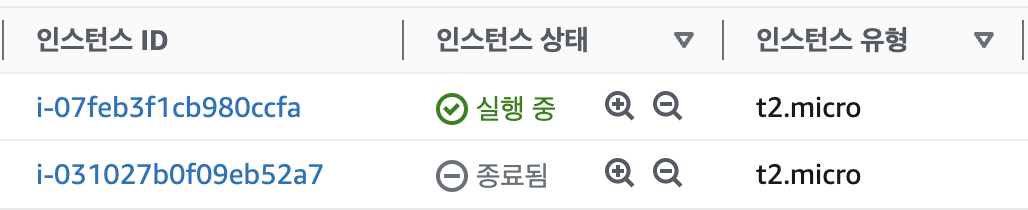
기존 인스턴스는 종료되고 새 인스턴스가 생성된 모습이다.
taint 대신 replace를 사용해야 하는 이유
taint는 deprecated 되었지만 여전히 사용할 수 있다.
다만, taint 명령어 실행 시 다른 팀원들에게 예기치 못한 영향을 줄 수 있는데 이에 대해 설명한 글은 아래를 참고할 수 있다.
https://nedinthecloud.com/2024/01/16/terraform-taint-is-bad-and-heres-why/
따라서, --replace 플래그를 사용해 자원을 교체하는 것이 더 안전하고 명령 실행 전 변화를 미리 검토할 수 있다.