React Quill을 이용해 커뮤니티 게시글을 구현했으나 heading 값에 게시글이 영향을 받지 않고 있다는 걸 알게 됐다. 생각해보니 HTML을 렌더링하고 있긴 했지만, tailwindCSS를 사용하다보니 h 태그의 style의 설정이 모두 reset 되지 않았을까란 생각이 들었다.
이에 대해 찾아보니 TailwindCSS 플러그인을 활용하면 이 문제를 해결할 수 있다는 걸 알게 됐다.
@tailwindcss/typography
공식 문서에 플러그인에 대한 설명으로는 아래와 같다.
@tailwindcss/typography 플러그인은 Markdown이나 CMS 데이터베이스 같은 소스에서 가져온 콘텐츠 블록에 적절한 타이포그래피 스타일을 빠르게 적용할 수 있도록 하는 prose 클래스를 추가해준다.
<article class="prose lg:prose-xl">
  <h1>Garlic bread with cheese: What the science tells us</h1>
  <p>
    For years parents have espoused the health benefits of eating garlic bread with cheese to their
    children, with the food earning such an iconic status in our culture that kids will often dress
    up as warm, cheesy loaf for Halloween.
  </p>
  <p>
    But a recent study shows that the celebrated appetizer may be linked to a series of rabies cases
    springing up around the country.
  </p>
  <!-- ... -->
</article>
단순하게 prose 속성만 추가해주면 해당 영역에 style을 적용할 수 있다는 것이다.
다음 명령어로 플러그인을 설치한다.
npm install -D @tailwindcss/typographytailwind.config.js 파일에 다음과 같이 플러그인을 추가해준 다음 prose 속성을 class에 추가해주면 된다.
/** @type {import('tailwindcss').Config} */
module.exports = {
  // ...
  plugins: [
    require('@tailwindcss/typography'),
    require('@tailwindcss/forms'),
    require('@tailwindcss/aspect-ratio'),
    require('@tailwindcss/container-queries'),
  ]
}
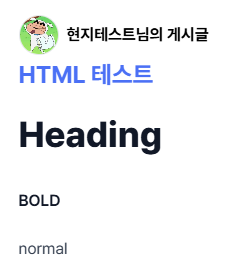
따로 설정없이도 HTML이 생각한 대로 렌더링되는 것을 확인할 수 있다.

Frontend🍓