개인, 업무 환경은 맥
IDE나 BTT, Karabiner 와 같은 생산성 앱 설정을 아이클라우드의 설정폴더를 만들어서 동기화 할 수있는 방법을 찾았다.
아래있는 앱들 외에도 다른 앱도 설정해서 사용하면 된다.
Karabiner Elements
- 설정 파일 이동:
mv ~/.config/karabiner/karabiner.json ~/Library/Mobile\ Documents/com~apple~CloudDocs/mac_config/karabiner.json- 심볼릭 링크 생성:
ln -s ~/Library/Mobile\ Documents/com~apple~CloudDocs/mac_config/karabiner.json ~/.config/karabiner/karabiner.jsonBetterTouchTool
- 설정 폴더 이동:
mv ~/Library/Application\ Support/BetterTouchTool ~/Library/Mobile\ Documents/com~apple~CloudDocs/mac_config/BetterTouchTool- 심볼릭 링크 생성:
ln -s ~/Library/Mobile\ Documents/com~apple~CloudDocs/mac_config/BetterTouchTool ~/Library/Application\ Support/BetterTouchToolAlfred
- 설정 폴더 이동:
mv ~/Library/Application\ Support/Alfred ~/Library/Mobile\ Documents/com~apple~CloudDocs/Alfred- 심볼릭 링크 생성:
ln -s ~/Library/Mobile\ Documents/com~apple~CloudDocs/Alfred ~/Library/Application\ Support/AlfredVisual Studio Code
- 설정 파일(
settings.json) 이동:
mv ~/Library/Application\ Support/Code/User/settings.json ~/Library/Mobile\ Documents/com~apple~CloudDocs/mac_config/VSCode/settings.json- 심볼릭 링크 생성:
ln -s ~/Library/Mobile\ Documents/com~apple~CloudDocs/mac_config/VSCode/settings.json ~/Library/Application\ Support/Code/User/settings.json- 추가:
keybindings.json파일 동기화:
mv ~/Library/Application\ Support/Code/User/keybindings.json ~/Library/Mobile\ Documents/com~apple~CloudDocs/mac_config/VSCode/keybindings.jsonln -s ~/Library/Mobile\ Documents/com~apple~CloudDocs/mac_config/VSCode/keybindings.json ~/Library/Application\ Support/Code/User/keybindings.jsonIntelliJ IDEA
- 설정 폴더 이동:
mv ~/Library/Application\ Support/JetBrains/IntelliJIdea2023.3 ~/Library/Mobile\ Documents/com~apple~CloudDocs/mac_config/IntelliJIdea2023.3- 심볼릭 링크 생성 (오타 수정 포함):
ln -s ~/Library/Mobile\ Documents/com~apple~CloudDocs/mac_config/IntelliJIdea2023.3 ~/Library/Application\ Support/JetBrains/IntelliJIdea2023.3**IntelliJIdea<설치한 버전>
다른 컴퓨터에서 심볼릭 링크 생성 방법
다른 컴퓨터에서 iCloud로 동기화된 설정 파일을 사용하려면, 위에서 제공된 ln -s 명령어를 그대로 사용하여 심볼릭 링크를 생성
단, iCloud Drive에 로그인되어 있어야 하며, 해당 파일 또는 폴더가 동기화가 완료된 상태여야 함
발생한 문제
각 PC마다 환경 변수와 같은 설정들이 조금씩 다를 수 있기 때문에 이러한 문제가 발생한다면, 맞춰주면 된다
- 자바 환경 변수
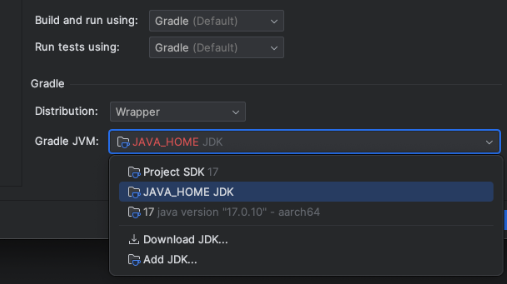
해결
export JAVA_HOME=/Library/Java/JavaVirtualMachines/<Your_Java_Path>/Contents/Home
Onward, Always Upward - 기록은 성장의 증거