[Node.js] 웹 크롤링으로 제품명 가져오기 / GET API
크롤링 코드
import axios from "axios";
import { load } from "cheerio";

const getHtml = async () => {
  try {
    const html = await axios.get(
      "https://www.adidas.co.kr/women-originals-shoes?start=48",
      {
        headers: {
          "User-Agent":
            "Mozilla/5.0 (Windows NT 10.0; Win64; x64) AppleWebKit/537.36 (KHTML, like Gecko) Chrome/90.0.4430.93 Safari/537.36",
        },
        timeout: 5000, // 5초 타임아웃 설정
      }
    );

    let ulList = [];
    const $ = load(html.data);

    // p[data-testid='product-card-title'] 요소 가져오기. 웹 사이트마다 구조가 다르기 때문에 변경 필요.
    $("p[data-testid='product-card-title']").each((i, element) => {
      ulList[i] = {
        rank: i + 1,
        title: $(element).text().trim(), // 불필요한 공백 제거
      };
    });

    console.log("Product Titles:", ulList);
  } catch (error) {
    console.error("Error fetching data:", error.message);
  }
};

getHtml();
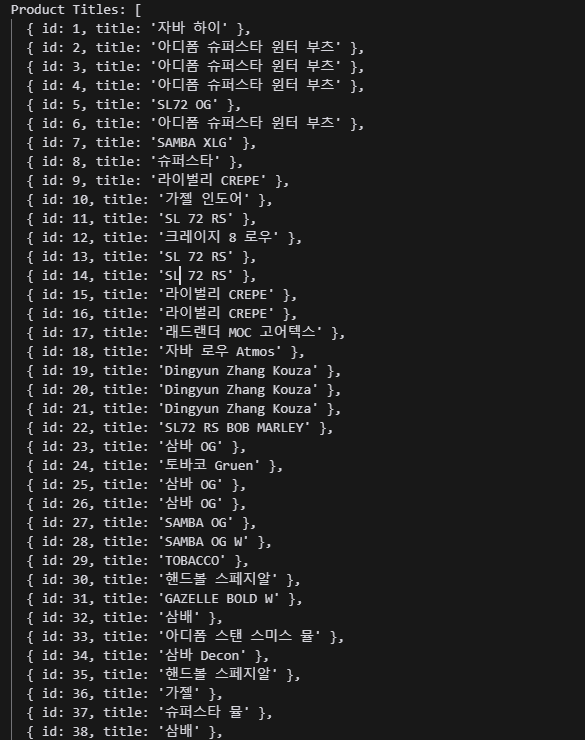
-
User-Agent 헤더를 설정하지 않으면 서버가 이 요청을 자동화된 스크립트나 봇에서 오는 것으로 인식하고, 응답을 차단하거나 빈 응답을 보낼 수 있다. 많은 웹사이트가 이런 식으로 봇을 감지하여 자동 스크래핑을 방지한다
-
cheerio는 Node.js 환경에서 html을 파싱하고 조작할 수 있게 도와주는 라이브러리이다. 브라우저 없이도 HTML문서의 요소를 쉽게 다룰 수 있다. cheerio는 서버에서 HTML을 처리하고, 특정 요소를 선택하거나 텍스트를 추출하고, 구조를 변형하는 작업에 주로 사용됨.
크롤링 GET API코드
만약 위 코드를 API로 만들고 싶으면 밑에 코드와 같이 작성하면 된다.
import axios from "axios";
import { load } from "cheerio";
import express from "express";
import cors from "cors";

const app = express();
const PORT = 3000;

app.use(cors());

app.get("/api/data", async (req, res) => {
  const { url } = req.query;
  const getHtml = async () => {
    try {
      const html = await axios.get(url, {
        headers: {
          "User-Agent":
            "Mozilla/5.0 (Windows NT 10.0; Win64; x64) AppleWebKit/537.36 (KHTML, like Gecko) Chrome/90.0.4430.93 Safari/537.36",
        },
        timeout: 10000, // 5초 타임아웃 설정
      });

      let ulList = [];
      const $ = load(html.data);

      // p[data-testid='product-card-title'] 요소 가져오기. 웹 사이트마다 구조가 다르기 때문에 변경 필요.
      $("p[data-testid='product-card-title']").each((i, element) => {
        ulList[i] = {
          id: i + 1,
          title: $(element).text().trim(), // 불필요한 공백 제거
        };
      });

      console.log("Product Titles:", ulList);
      // 데이터를 가공하여 JSON 형태로 클라이언트에 보냅니다.
      res.json(ulList);
    } catch (error) {
      console.error("Error fetching data:", error.message);
      res.status(500).json({ message: "Error fetching data" });
    }
  };

  getHtml();
});

app.listen(PORT, () => {
  console.log(`Server is running on http://localhost:${PORT}`);
});
개발에 몰두하며 성장하는 도중에 얻은 인사이트에 희열을 느낍니다.