1. TodoList
1) 배열 형태에 추가
setTodoList([{title : inputValue, isDone :false}]);- 기존의 list상태 가져오기
=> javascript spread 연산자 ( ... )
: 기존 배열이나, 객체의 전체 또는 일부를 다른 배열이나 객체로 복사함.
setTodoList([...TodoList, {title : inputValue, isDone :false}]);2) map으로 li 만들기
=> todo 안에

이 형태로 객체가 담겨있음.
그래서 title, isDone에 접근 가능
3) 정의하고 내보내기 위해서는 return 사용
                   todoList.map((todo, index) => {
                       return(
                           <li>
                               <span>{todo.title}</span>
                               <button>{todo.isDone ? '미완료' : '완료'}</button>
                               <button>삭제</button>
                           </li>
                       )
})- return 안쓰려면,, 중괄호를 소괄호로 바꾸면됨.
                    todoList.map((todo, index) => (
                            <li>
                                <span>{todo.title}</span>
                                <button>{todo.isDone ? '미완료' : '완료'}</button>
                                <button>삭제</button>
                            </li>
                        ))
4) 복사본 만들어서 삭제하기 => splice
    // todoList에 있는 값 삭제하기
    const handleDeleteTodo = (index) => {
        // splice 함수 : mutates 함수라서 원본이 변경되는 함수이므로
        //               state인 todoList에 직접적으로 사용 불가

        // todoList와 똑같은 배열 newTodoList를 만들어 splice 이용 후,
        // setState함수 이용하여 상태 업데이트

        const newTodoList = [...todoList]; // todoList와 똑같은 배열 만들기 (복사)
        newTodoList.splice(index, 1) // 복사한 배열에서 index번호로부터 1개 잘라내기
        setTodoList(newTodoList); // 잘라낸 새로운 todoList를 완료된 todoList로 보냄.
    }
 <button onClick={() => handleDeleteTodo(index)}>삭제</button>
5) 완료/미완료
    const handleToggleTodo = (index) => {

        const newTodoList = [...todoList];
        newTodoList[index].isDone = !newTodoList[index].isDone;
        setTodoList(newTodoList);


    }


    ...

    <span style={{textDecoration:todo.isDone ?'line-through' : 'none'}}>{todo.title}</span>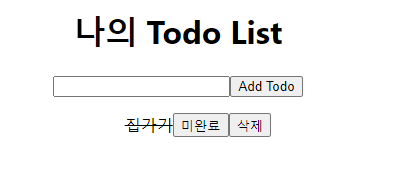
*) 배열은 복사해서 해야하는 이유


React는 얕은 복사함.
배열은 주소만 비교함!
원시 타입은 콜스택으로 바로 변경 가능
하지만, 배열 등의 참조 타입은 콜스택의 주소로 가면서 메모리 힙으로 가서 넣기 때문에,,?
2) 전체 코드
import { useState } from "react";

function TodoList(){
    // 작성한 todo를 기억할 상태 -> 배열
    const [todoList, setTodoList] = useState([]); // 배열 요소 하나에 객체 하나 넣음 {title : inputValue, isDone : false}
    const [inputValue, setInputValue] = useState("");

    // Add Todo 버튼 클릭 시 todoList 상태에 업데이트
    const handleAddTodo = ()=>{
        // javascript spread 연산자 (...) : 기존 배열이나, 객체의 전체 또는 일부를 다른 배열이나 객체로 복사함.
        setTodoList([...todoList, {title : inputValue, isDone :false}]);
        setInputValue(""); // 이전의 상태 값 비워두기
    }

    // todoList에 있는 값 삭제하기
    const handleDeleteTodo = (index) => {
        // splice 함수 : mutates 함수라서 원본이 변경되는 함수이므로
        //               state인 todoList에 직접적으로 사용 불가

        // todoList와 똑같은 배열 newTodoList를 만들어 splice 이용 후,
        // setState함수 이용하여 상태 업데이트

        const newTodoList = [...todoList]; // todoList와 똑같은 배열 만들기 (복사)
        newTodoList.splice(index, 1) // 복사한 배열에서 index번호로부터 1개 잘라내기
        setTodoList(newTodoList); // 잘라낸 새로운 todoList를 완료된 todoList로 보냄.
    }

    // 완료, 미완료
    const handleToggleTodo = (index) => {

        const newTodoList = [...todoList];
        newTodoList[index].isDone = !newTodoList[index].isDone;
        setTodoList(newTodoList);


    }

    return(
        <div>
            <h1>나의 Todo List </h1>

            <input value = {inputValue} onChange={(e)=>setInputValue(e.target.value)}/>

            <button onClick={handleAddTodo}>
                Add Todo
            </button>

            <ul>
                {
                        // index는 배열의 값을 조정할 때 사용하기 위해서 넣어둠.
                    todoList.map((todo, index) => (
                            <li key = {index}>
                                <span style={{textDecoration:todo.isDone ?'line-through' : 'none'}}>{todo.title}</span>
                                <button onClick={() => handleToggleTodo(index)}>{todo.isDone ? '미완료' : '완료'}</button>
                                <button onClick={() => handleDeleteTodo(index)}>삭제</button>
                            </li>
                        ))
                }
            </ul>

        </div>
    );
}

export default TodoList;