travel-expense-java# [4일차] 클라우드에 올리기 (Security + Deploy) — Java 버전
목표: 로컬 앱을 엔터프라이즈급 보안을 갖춘 프로덕션 앱으로 격상한다.
시나리오: XSUAA 인증 설정 → MTA 빌드 (Maven 포함) → Cloud Foundry 배포 → BTP Cockpit에서 실행.
런타임: CAP Java (Spring Boot 8080) + Cloud Foundry
소요 시간: 이론 1.5시간 + 실습 2.5시간
4일차 학습 목표
이론:
  클라우드 보안의 기초: 인증(Authentication) vs 인가(Authorization)를 이해한다
  XSUAA(XS User Account and Authentication)의 역할을 안다
  MTA(Multi-Target Application)의 개념과 필요성을 이해한다
  Cloud Foundry 배포 파이프라인을 안다 (Java 모듈 빌드 포함)

실습:
  xs-security.json 작성 (인증 정책) — Node.js와 동일
  pom.xml에 XSUAA 의존성 추가 ← Java 특화
  Java Handler에 권한 검증 코드 추가 ← Java 특화
  mta.yaml 생성 (배포 설정) — Java 모듈 포함
  로컬에서 권한 테스트
  Cloud Foundry에 배포 (mbt build-push)
  BTP Cockpit에서 배포된 앱 확인
  4일차 결과 Git 커밋
이론 세션 (1.5시간)
이론 1. 클라우드의 보안: 인증 vs 인가
온프레미스(로컬)의 보안
로컬 개발:
├─ 인증: 없음 (Java: SecurityContext.getAuthentication() = null)
└─ 인가: 없음 (@requires 무시)

→ 개발 편의를 위해 모든 API 접근 가능
클라우드의 보안
클라우드(BTP):
├─ 인증: SAP ID 로그인 필수 (XSUAA가 관리)
└─ 인가: 역할(Role) 기반 접근 제어
   ├─ 관리자 역할 = Approve 버튼 보임
   ├─ 신청자 역할 = Create, Submit 버튼만 보임
   └─ 뷰어 역할 = 읽기만 가능
구체적 예시:
로컬 (지금): 누구나 누를 수 있는 버튼
┌──────────────────────────────┐
│ [제출] [승인] [반려] [삭제]    │  ← 보안 없음
└──────────────────────────────┘

클라우드 (내일): 역할에 따라 다른 버튼
┌──────────────────────────────┐
│ 신청자 로그인                 │
│ [제출] [저장]                 │  ← 승인 버튼 없음
├──────────────────────────────┤
│ 매니저 로그인                 │
│ [제출] [저장] [승인] [반려]   │  ← 모든 버튼 보임
└──────────────────────────────┘
이론 2. XSUAA(SAP Authentication Service)란?
전통적 인증 (on-premise)
┌────────┐      Username/Password
│ UI     ├────────────────→ ┌──────────┐
│ (OSS   │                 │ ABAP AS  │
│ Portal)│ ←─────────────── │ (SAP)    │
└────────┘   Session ID    └──────────┘

단일 SAP 시스템 내부에서 인증
→ 외부 앱 연동 어려움
XSUAA (Cloud 인증)
┌────────┐  로그인 시도
│ UI     │────────────────┐
└────────┘                ↓
                   ┌──────────────┐
                   │   XSUAA      │
                   │   (SAP ID)   │
                   │   ↓          │
                   │ OAuth 2.0    │
                   │ JWT Token    │
                   └──────────────┘
                          ↑
        ┌──────────────────┤
        │                  │
    ┌───────────────┐  ┌────────────┐
    │ CAP Java App  │  │ Fiori UI   │
    │ (Spring Boot) │  │ (Frontend) │
    └───────────────┘  └────────────┘

→ 여러 앱이 동일 인증 서비스 공유
→ SSO(Single Sign-On) 가능
XSUAA의 역할:
1. 사용자 인증
   OAuth 2.0 표준 사용 → JWT Token 발급

2. 역할 관리
   "앱 관리자" "승인자" "신청자" 등 역할 정의

3. Token 검증 (Java: Spring Security가 자동 처리)
   API 호출 시 Token 확인 → 유효하면 요청 처리

4. 개인정보 보호
   SAP가 사용자 정보 중앙화 관리
이론 3. MTA (Multi-Target Application) with Java
단일 Buildpack 배포 (구형)
┌──────────────────────────────┐
│ Java App + Node.js UI        │ ← 한 덩어리
│ ├─ target/travel.jar         │
│ ├─ node_modules              │
│ └─ dist 폴더                 │
│ 전체: 800MB 이상              │
└──────────────────────────────┘
          ↓
     CF 배포
          ↓
  한 번에 전부 배포/업데이트
  → 비효율적, 느림 (Java 컴파일 포함)
MTA 배포 (신형, 권장)
┌─────────────────────────────────────┐
│   MTA (Multi-Target Application)    │
├────────────────────┬────────────────┤
│ Java Backend       │ Fiori Frontend │
│ (travel-api)       │ (travel-ui)    │
├────────────────────┼────────────────┤
│ 배포 시간: 8-10분  │ 배포 시간: 1분 │
│ (Maven build       │                │
│  + JAR 패킹)       │                │
└────────────────────┴────────────────┘
        ↓
각각 독립적으로 빌드/배포
→ Java 코드만 변경? 8분 재배포!
→ UI만 변경? 1분 재배포!
MTA가 필요한 이유:
| 항목 | 이전 | MTA |
|---|---|---|
| 빌드 시간 | 15분 (모두) | Java 8분 + UI 1분 |
| 배포 크기 | 800MB | Java 200MB + UI 50MB |
| 롤백 난이도 | 어려움 | 각 모듈별 독립 |
이론 4. Cloud Foundry 배포 흐름 (Java)
로컬 개발 (DAY1-3)
     ↓
[build] Java 부분만 컴파일
       ← mvn clean install (2-3분)
     ↓
[package] MTA 구조로 패키징
       ← mbt build (MTA Build Tool)
     ↓ (mtar 파일 생성)
[deploy] Cloud Foundry로 배포
       ← cf deploy 또는 mbt build-push
     ↓
BTP Cloud Foundry 환경
├─ Java 앱 실행 (OpenJDK on Tomcat)
├─ Fiori UI 실행 (Node.js)
├─ AppRouter (라우팅)
├─ XSUAA (인증)
└─ HANA Cloud (데이터베이스)

     ↓
[사용자 접근]
https://travel-xxx.cfapps.us10.hana.ondemand.com
     ↓
XSUAA 로그인
     ↓
Fiori UI 로드
     ↓
CAP Java Backend 호출 (:8080)
실습 세션 (2.5시간)
실습 1. XSUAA 보안 정책 정의
1-1. xs-security.json 작성
프로젝트 루트에 파일 생성:
xs-security.json:
{
    "xsappname": "travel-expense-java",
    "tenant-mode": "dedicated",
    "scopes": [
        {
            "name": "$ACCEPT_GRANTED_SCOPES",
            "description": "Accepted granted scopes"
        },
        {
            "name": "$XSAPPNAME.Approver",
            "description": "Can approve travel requests"
        },
        {
            "name": "$XSAPPNAME.Requester",
            "description": "Can create and submit travel requests"
        },
        {
            "name": "$XSAPPNAME.Viewer",
            "description": "Can view all travel requests (read-only)"
        }
    ],
    "role-templates": [
        {
            "name": "Approver",
            "description": "승인권자",
            "scope-references": [
                "$XSAPPNAME.Approver",
                "$XSAPPNAME.Viewer"
            ]
        },
        {
            "name": "Requester",
            "description": "출장 신청자",
            "scope-references": [
                "$XSAPPNAME.Requester",
                "$XSAPPNAME.Viewer"
            ]
        },
        {
            "name": "Viewer",
            "description": "뷰어 (읽기만)",
            "scope-references": [
                "$XSAPPNAME.Viewer"
            ]
        },
        {
            "name": "Admin",
            "description": "관리자 (모든 권한)",
            "scope-references": [
                "$XSAPPNAME.Approver",
                "$XSAPPNAME.Requester",
                "$XSAPPNAME.Viewer",
                "$ACCEPT_GRANTED_SCOPES"
            ]
        }
    ],
    "role-collections": [
        {
            "name": "TravelExpense-Approver",
            "description": "출장 승인권자 역할 컬렉션",
            "role-template-references": [
                "$XSAPPNAME.Approver"
            ]
        },
        {
            "name": "TravelExpense-Requester",
            "description": "출장 신청자 역할 컬렉션",
            "role-template-references": [
                "$XSAPPNAME.Requester"
            ]
        },
        {
            "name": "TravelExpense-Admin",
            "description": "출장 관리자 역할 컬렉션",
            "role-template-references": [
                "$XSAPPNAME.Admin"
            ]
        }
    ]
}
Node.js vs Java 비교
xs-security.json은 완전히 동일합니다!
차이는 Java는 Spring Security로 이를 처리한다는 점뿐입니다.
1-2. pom.xml에 XSUAA 의존성 추가 (Java 특화)
pom.xml의 <dependencies> 섹션에 추가:
<!-- XSUAA 인증 (Spring Security 연동) -->
<dependency>
  <groupId>com.sap.cloud.security</groupId>
  <artifactId>token-client-spring-boot-starter</artifactId>
</dependency>
<dependency>
  <groupId>com.sap.cloud.security.spring</groupId>
  <artifactId>spring-security-starter</artifactId>
</dependency>
<dependency>
  <groupId>com.sap.cloud.security.xsuaa</groupId>
  <artifactId>xsuaa-spring-boot-starter</artifactId>
</dependency>

<!-- Spring Security 기본 -->
<dependency>
  <groupId>org.springframework.boot</groupId>
  <artifactId>spring-boot-starter-security</artifactId>
</dependency>
설치 후:
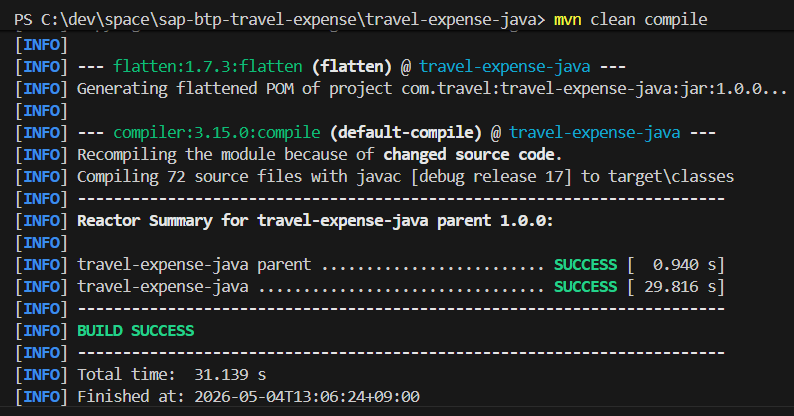
mvn clean compile으로 의존성 다운로드
- 참고 : 현시점 pom.xml
<?xml version="1.0" encoding="UTF-8"?>
<project xmlns="http://maven.apache.org/POM/4.0.0"
	xmlns:xsi="http://www.w3.org/2001/XMLSchema-instance"
	xsi:schemaLocation="http://maven.apache.org/POM/4.0.0 http://maven.apache.org/xsd/maven-4.0.0.xsd">
	<modelVersion>4.0.0</modelVersion>

	<groupId>com.travel</groupId>
	<artifactId>travel-expense-java-parent</artifactId>
	<version>${revision}</version>
	<packaging>pom</packaging>

	<name>travel-expense-java parent</name>

	<properties>
		<!-- OUR VERSION -->
		<revision>1.0.0</revision>

		<!-- DEPENDENCIES VERSION -->
		<jdk.version>17</jdk.version>
		<cds.services.version>4.9.0</cds.services.version>
		<spring.boot.version>3.5.13</spring.boot.version>

		<cds.install-node.downloadUrl>https://nodejs.org/dist/</cds.install-node.downloadUrl>
		<project.build.sourceEncoding>UTF-8</project.build.sourceEncoding>
	</properties>

	<modules>
		<module>srv</module>
	</modules>

	<dependencyManagement>
		<dependencies>
			<!-- CDS SERVICES -->
			<dependency>
				<groupId>com.sap.cds</groupId>
				<artifactId>cds-services-bom</artifactId>
				<version>${cds.services.version}</version>
				<type>pom</type>
				<scope>import</scope>
			</dependency>

			<!-- SPRING BOOT -->
			<dependency>
				<groupId>org.springframework.boot</groupId>
				<artifactId>spring-boot-dependencies</artifactId>
				<version>${spring.boot.version}</version>
				<type>pom</type>
				<scope>import</scope>
			</dependency>

			<!-- XSUAA 인증 (Spring Security 연동) -->
			<dependency>
				<groupId>com.sap.cloud.security</groupId>
				<artifactId>token-client-spring-boot-starter</artifactId>
			</dependency>
			<dependency>
				<groupId>com.sap.cloud.security.spring</groupId>
				<artifactId>spring-security-starter</artifactId>
			</dependency>
			<dependency>
				<groupId>com.sap.cloud.security.xsuaa</groupId>
				<artifactId>xsuaa-spring-boot-starter</artifactId>
			</dependency>

		</dependencies>
	</dependencyManagement>

	<build>
		<pluginManagement>
			<plugins>
				<!-- MAKE CDS PLUGIN RUNNABLE FROM ROOT -->
				<plugin>
					<groupId>com.sap.cds</groupId>
					<artifactId>cds-maven-plugin</artifactId>
					<version>${cds.services.version}</version>
				</plugin>
			</plugins>
		</pluginManagement>

		<plugins>
			<!-- JAVA VERSION -->
			<plugin>
				<artifactId>maven-compiler-plugin</artifactId>
				<version>3.15.0</version>
				<configuration>
					<release>${jdk.version}</release>
					<encoding>UTF-8</encoding>
				</configuration>
			</plugin>

			<!-- MAKE SPRING BOOT PLUGIN RUNNABLE FROM ROOT -->
			<plugin>
				<groupId>org.springframework.boot</groupId>
				<artifactId>spring-boot-maven-plugin</artifactId>
				<version>${spring.boot.version}</version>
				<configuration>
					<skip>true</skip>
				</configuration>
			</plugin>

			<!-- SUREFIRE VERSION -->
			<plugin>
				<artifactId>maven-surefire-plugin</artifactId>
				<version>3.5.5</version>
			</plugin>

			<!-- POM FLATTENING FOR CI FRIENDLY VERSIONS -->
			<plugin>
				<groupId>org.codehaus.mojo</groupId>
				<artifactId>flatten-maven-plugin</artifactId>
				<version>1.7.3</version>
				<configuration>
					<updatePomFile>true</updatePomFile>
					<flattenMode>resolveCiFriendliesOnly</flattenMode>
				</configuration>
				<executions>
					<execution>
						<id>flatten</id>
						<phase>process-resources</phase>
						<goals>
							<goal>flatten</goal>
						</goals>
					</execution>
					<execution>
						<id>flatten.clean</id>
						<phase>clean</phase>
						<goals>
							<goal>clean</goal>
						</goals>
					</execution>
				</executions>
			</plugin>

			<!-- PROJECT STRUCTURE CHECKS -->
			<plugin>
				<artifactId>maven-enforcer-plugin</artifactId>
				<version>3.6.2</version>
				<executions>
					<execution>
						<id>Project Structure Checks</id>
						<goals>
							<goal>enforce</goal>
						</goals>
						<configuration>
							<rules>
								<requireMavenVersion>
									<version>3.6.3</version>
								</requireMavenVersion>
								<requireJavaVersion>
									<version>${jdk.version}</version>
								</requireJavaVersion>
								<reactorModuleConvergence />
							</rules>
							<fail>true</fail>
						</configuration>
					</execution>
				</executions>
			</plugin>
		</plugins>
	</build>
</project>
1-3. Java Handler에 권한 검증 추가 (Java 특화)
Java 비즈니스 로직 클래스에 추가:
import org.springframework.security.core.Authentication;
import org.springframework.security.core.context.SecurityContextHolder;

// Handler 클래스 내에 메서드 추가:

private boolean hasApproverRole() {
  Authentication authentication = SecurityContextHolder.getContext().getAuthentication();

  if (authentication == null) {
    // 로컬 개발 환경
    return true;
  }

  return authentication.getAuthorities().stream()
    .anyMatch(auth -> auth.getAuthority().contains("APPROVER"));
}

private boolean hasRequesterRole() {
  Authentication authentication = SecurityContextHolder.getContext().getAuthentication();
  if (authentication == null) {
    return true;
  }

  return authentication.getAuthorities().stream()
    .anyMatch(auth -> auth.getAuthority().contains("REQUESTER"));
}
실습 2. mta.yaml 생성 (배포 설정)
프로젝트 루트에 mta.yaml 생성:
_schema-version: '3.1'
ID: travel-expense-java
version: 1.0.0

parameters:
  enable-parallel-deployments: true

build-parameters:
  before-all:
    - builder: custom
      commands:
        - npm ci --production

modules:
  # ── Module 1: Java Backend API ──────────────────
  - name: travel-api
    type: java
    path: srv
    build-parameters:
      build-result: target
    parameters:
      memory: 1024M
      instances: 1
      buildpack: sap_java_buildpack
    properties:
      SPRING_PROFILES_ACTIVE: cloud
    provides:
      - name: srv-api
        properties:
          srv-url: ${default-url}
    requires:
      - name: travel-auth
      - name: travel-db

  # ── Module 2: Fiori UI (HTML5 앱) ──────────────
  - name: travel-ui
    type: html5
    path: app/travel-ui
    build-parameters:
      builder: custom
      commands:
        - npm install
        - npm run build
      build-result: dist
      supported-platforms: []

  # ── Module 3: UI Deployer (콘텐츠 업로더) ────────
  - name: travel-ui-deployer
    type: com.sap.application.content
    path: .
    requires:
      - name: travel-html5-repo-host
        parameters:
          content-target: true
    build-parameters:
      requires:
        - name: travel-ui
          artifacts:
            - ./*
          target-path: resources/travel-ui

  # ── Module 4: App Router (진입점) ──────────────
  - name: travel-approuter
    type: approuter.nodejs
    path: app-router
    parameters:
      memory: 256M
    requires:
      - name: travel-auth
      - name: travel-html5-repo-runtime
      - name: srv-api
        group: destinations
        properties:
          name: travel-api
          url: ~{srv-url}
          forwardAuthToken: true

resources:
  # ── XSUAA (인증 서비스) ──────────────────────────
  - name: travel-auth
    type: org.cloudfoundry.managed-service
    parameters:
      service: xsuaa
      service-plan: application
      path: ./xs-security.json

  # ── HANA Database ───────────────────────────────
  - name: travel-db
    type: org.cloudfoundry.managed-service
    parameters:
      service: hana
      service-plan: hdi-shared

  # ── HTML5 앱 저장소 (호스트 - 저장용) ─────────────
  - name: travel-html5-repo-host
    type: org.cloudfoundry.managed-service
    parameters:
      service: html5-apps-repo
      service-plan: app-host

  # ── HTML5 앱 저장소 (런타임 - 읽기용) ─────────────
  - name: travel-html5-repo-runtime
    type: org.cloudfoundry.managed-service
    parameters:
      service: html5-apps-repo
      service-plan: app-runtime
실습 3. 로컬에서 권한 테스트
3-1. 로컬 모드 설정
src/main/resources/application-default.yaml 또는 application.yaml:
spring:
  security:
    oauth2:
      resourceserver:
        jwt:
          issuer-uri: http://localhost:8080  # 로컬 모드
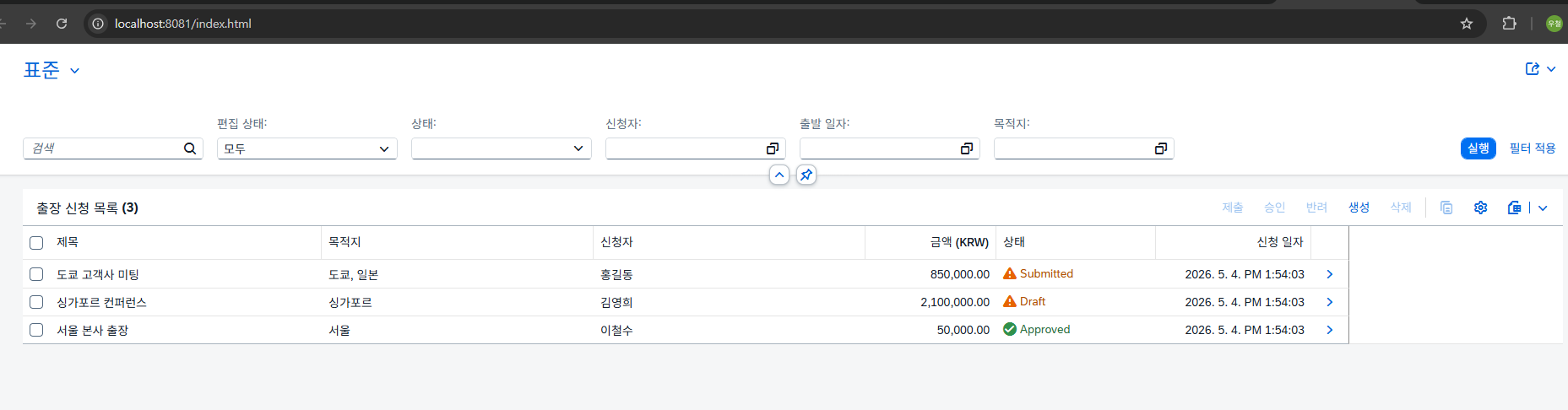
3-2. 권한 검증 로직 테스트
# Java 서버 실행
mvn spring-boot:run

# 로컬에서는 모든 요청이 통과됩니다 (테스트용)
# 클라우드에서는 XSUAA가 권한을 검증합니다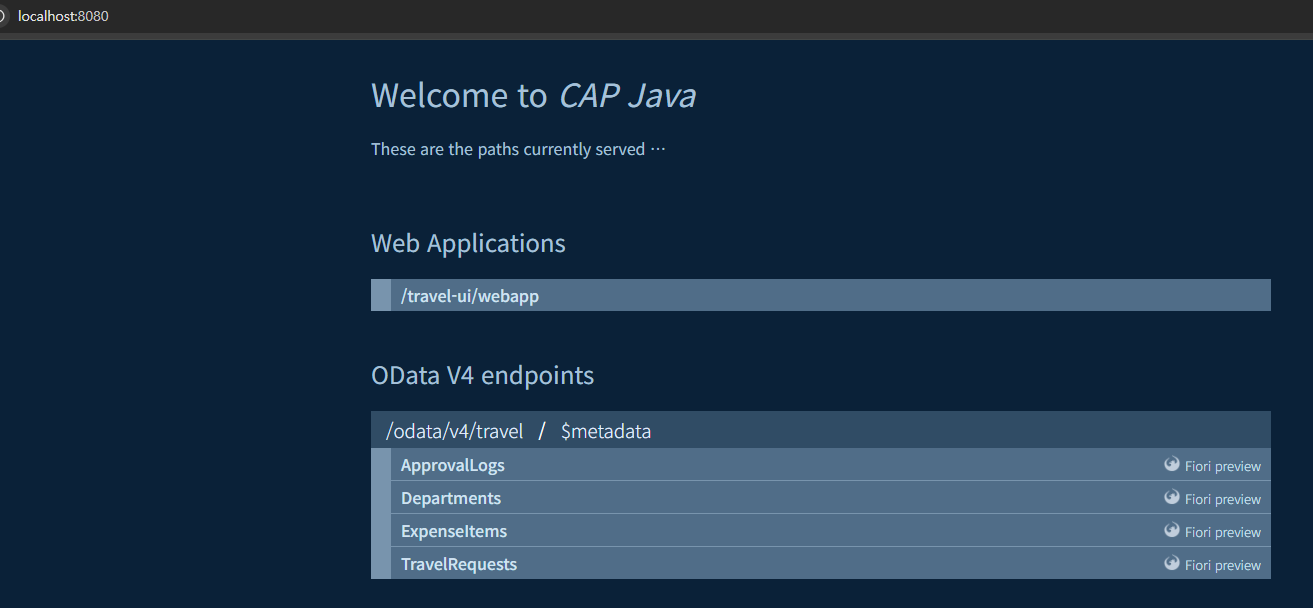
실습 4. Cloud Foundry에 배포
4-1. CF CLI 로그인
# CF 로그인
cf login -a https://api.cf.ap21.hana.ondemand.com

# 대화형 입력:
# Email: [BTP 계정]
# Password: [BTP 비밀번호]
# Organization: trial
# Space: dev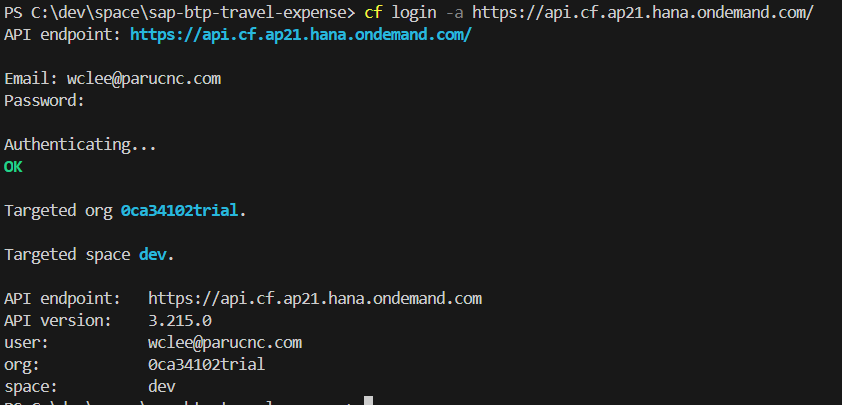
4-2. MTA 빌드 (Java 컴파일 포함)
# 프로젝트 루트에서:
mbt build

# 예상 시간: 5-10분 (Java mvn clean install 포함)
# 생성 결과: mta_archives/travel-expense-java-1.0.0.mtar
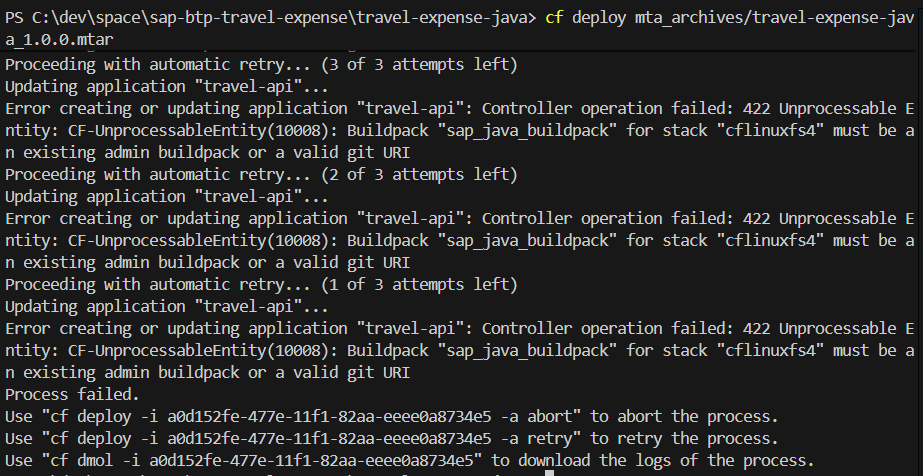
4-3. Cloud Foundry에 배포
# 배포 실행
cf deploy mta_archives/travel-expense-java-1.0.0.mtar

# 또는 한 번에:
mbt build-push

# 완료까지 8-15분 소요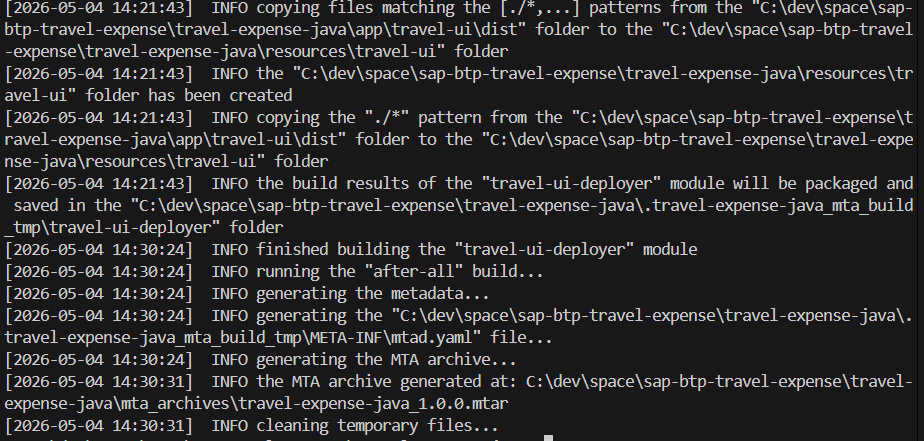
4-4. 배포 확인
# 앱 목록
cf apps

# 예상 출력:
# name                    requested state   instances
# travel-api              started           1/1
# travel-approuter        started           1/1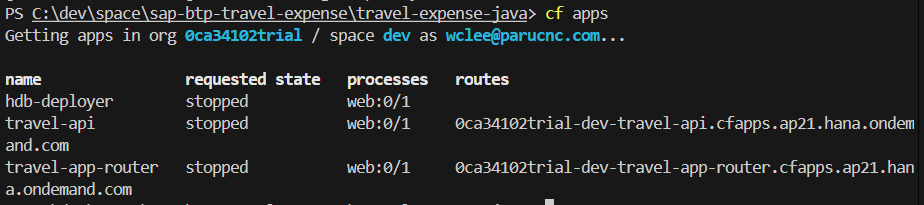
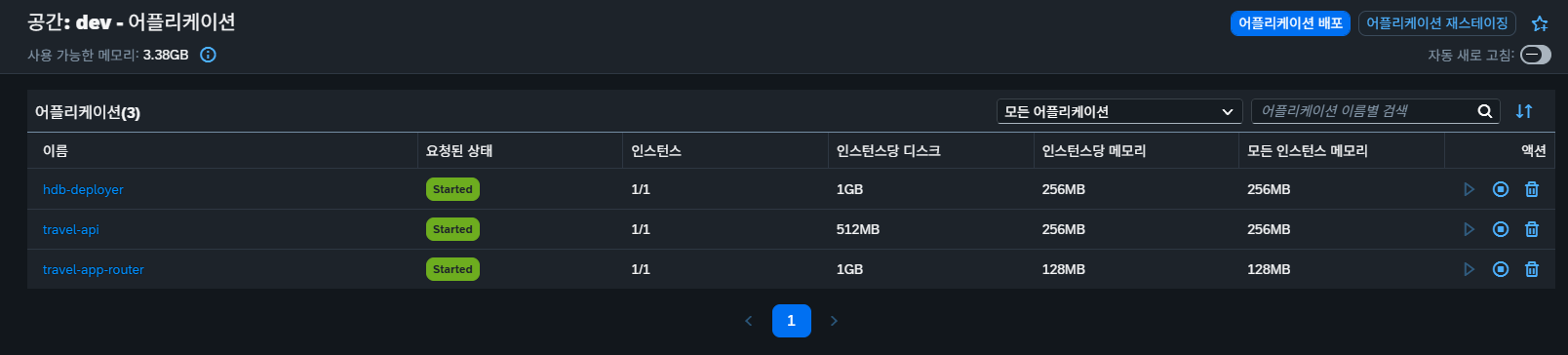
실습 5. BTP Cockpit에서 확인
Cockpit → trial Subaccount → Cloud Foundry → Applications
확인 항목:
- travel-api (Running) ✓
- 메모리 사용량
- 로그 스트림 (cf logs travel-api --recent)
실습 7. Git 커밋
cd /home/user/projects/sap-btp-travel-expense

# 배포 관련 파일 추가
git add xs-security.json mta.yaml pom.xml

# 커밋
git commit -m "day4: XSUAA 보안 + MTA 배포 설정 (Java)"

git push origin main
트러블슈팅
Maven 빌드 오류
# 캐시 삭제 후 재시도
rm -rf ~/.m2/repository
mbt build
XSUAA 서비스 바인딩 오류
# 서비스 확인
cf services

# XSUAA가 생성되었는지 확인
# xs-security.json 경로가 mta.yaml에서 정확한지 확인
4일차 마무리 체크
[ ] xs-security.json 작성
[ ] pom.xml에 XSUAA 의존성 추가
[ ] Java Handler에 권한 검증 추가
[ ] mta.yaml 생성
[ ] mbt build 성공 (Java 컴파일 포함)
[ ] cf deploy 성공
[ ] travel-api 앱 Running 확인
[ ] 사용자 역할 할당
[ ] 클라우드 앱 접근 테스트
[ ] XSUAA 로그인 동작 확인
[ ] Git 커밋
다음: [5일차] 자동화 + 마무리 (SAP Build PA 통합)

개발 정리 공간 - 업무일때도 있고, 공부일때도 있고...