The Report 문제
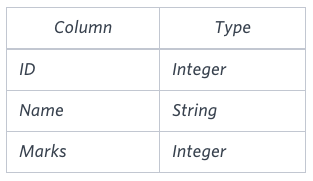
You are given two tables: Students and Grades. Students contains three columns ID, Name and Marks.
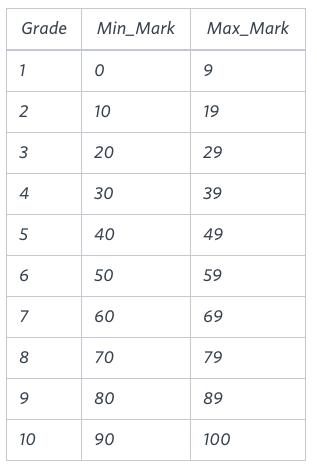
Grades contains the following data:
Q.
Ketty gives Eve a task to generate a report containing three columns: Name, Grade and Mark. Ketty doesn't want the NAMES of those students who received a grade lower than 8. The report must be in descending order by grade -- i.e. higher grades are entered first. If there is more than one student with the same grade (8-10) assigned to them, order those particular students by their name alphabetically. Finally, if the grade is lower than 8, use "NULL" as their name and list them by their grades in descending order. If there is more than one student with the same grade (1-7) assigned to them, order those particular students by their marks in ascending order.
Write a query to help Eve.
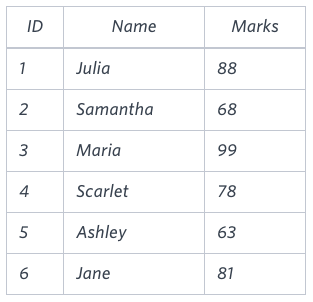
Sample Input
Sample Output
Maria 10 99
Jane 9 81
Julia 9 88
Scarlet 8 78
NULL 7 63
NULL 7 68
즉, Students와 Grades 테이블을 활용하여
Grade가 8미만인 학생들 이름은 NULL 값으로 만들고,
Grade 순으로 내림차순, 이름순으로 오름차순을 진행하라는걸 의미!
내 답안 📕
SELECT CASE
            WHEN s.Marks >= 70 THEN s.Name
            ELSE NULL
       END AS Name
     , g.Grade
     , s.Marks
FROM Students AS s
INNER JOIN Grades AS g
ON s.Marks BETWEEN g.Min_Mark AND g.Max_Mark
ORDER BY g.Grade DESC, s.Name ASC
Britney 10 95
Heraldo 10 94
Julia 10 96
Kristeen 10 100
Stuart 10 99
Amina 9 89
Christene 9 88
Salma 9 81
Samantha 9 87
Scarlet 9 80
Vivek 9 84
Aamina 8 77
Belvet 8 78
Paige 8 74
Priya 8 76
Priyanka 8 77
NULL 7 64
NULL 7 66
NULL 6 55
NULL 4 34
NULL 3 24