3. (Thread)사용자 정보 가져오기
- 이 포스트는 자바의 스레드를 시나리오 형식으로 공부한 코드 내용입니다.
시나리오3
은행 앱을 만들려고 한다.
특정 사용자가 로그인했을 때 해당 사용자의 계좌 , 계좌별 잔액 , 지출 내역을 가져오도록 하자.
what do yo get
- Callable , Future 등의 스레드 관련 기술을 확인할 수 있습니다.
- Thread 에서 결과값을 출력해 사용하도록 콜백 처리를 확인할 수 있습니다.
사전 지식
- Callable 인터페이스 : 쓰레드에서 실행한 결과를 리턴받을 수 있다.
Runnable과 비슷하게 구현하며, 리턴 객체가 있다는 것이 차이점이다.
-
Future 객체 : 작업의 결과를 받을 수 있다.
@ future.get() 메서드로 작업이 완료될 때 까지 기다린다.그럼 get() 과 Thread의 join은 똑같은 기능을 하는가?
=> 역할은 비슷하지만 원리가 다르다.
join() : 호출한 스레드가 다른 스레드 작업 완료까지 대기함
get() :
- ExecutorService 인터페이스 : Callable을 실행하고 , Future로 작업의 결과를 받는다.
형태 ) Future<?> submit(Runnable task); //task 실행 후 Future로 받음
Callable 로 구현해보기
<실행 결과>
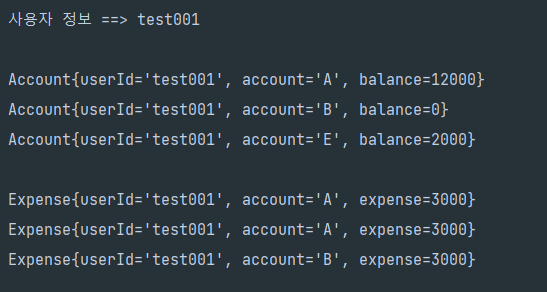
Callable을 활용한 테스트 코드
    @Test
    @DisplayName("Callable로 사용자 앱 정보 구성 가져오기")
    public void test()  {

        String userId = "test001" ;
        String userPw = "pw111";

        /*1. 사용자를 검색한다. (미존재하거나 비밀번호가 다르면 예외처리됨*/
        User user = userService.getUser(userId, userPw);

        /*2. 사용자가 존재하면 사용자의 계좌 , 계좌별 잔액 , 지출 내역을 가져온다. (쓰레드 이용)*/

        //사용가능 한 스레드 풀 개수 고정
        ExecutorService executor = Executors.newFixedThreadPool(2);

        //Callable 인터페이스 사용
        Callable<List<Account>> findAccounts = () -> {
		    sleep(5000); //5초 걸리는 작업
            return accountRepository.findAccoutByUserId(userId);
        };

        Callable<List<Expense>> findExpense = () -> {
		    sleep(7000); //7초 걸리는 작업
            return expenseRepository.findExpenseByUserId(userId);
        };

        Future<List<Account>> accountFuture = executor.submit(findAccounts);
        Future<List<Expense>> expenseFuture = executor.submit(findExpense);

        try {
            List<Account> accountList = accountFuture.get();
            List<Expense> expenseList = expenseFuture.get();

            System.out.println("사용자 정보 ==> " + userId );
            System.out.println();

            for(Account account : accountList) {
                System.out.println(account.toString());
            }
            System.out.println();
            for(Expense expense : expenseList) {
                System.out.println(expense.toString());
            }


        } catch (ExecutionException | InterruptedException e) {
            throw new RuntimeException(e);
        }


    }
이 경우 속도가 7초 정도로 나왔다.
한 작업이 5초 , 다른 작업이 7초 일때 future.get을 통해서
이를 호출한 쓰레드가 대기 후 7초 작업이 완료된 시점에 종료되었다.
그냥 동기적으로 실행해보기
@Test
public void 동기적으로_가져와보기() throws InterruptedException {
String userId = "test001" ;
String userPw = "pw111";
    /*1. 사용자를 검색한다. (미존재하거나 비밀번호가 다르면 예외처리됨*/
    User user = userService.getUser(userId, userPw);

    sleep(5000);
    List<Account> accountList = accountRepository.findAccoutByUserId(user.getUserId());
    sleep(7000);
    List<Expense> expenseList = expenseRepository.findExpenseByUserId(user.getUserId());

    System.out.println("사용자 정보 ==> " + userId );
    System.out.println();

    for(Account account : accountList) {
        System.out.println(account.toString());
    }
    System.out.println();
    for(Expense expense : expenseList) {
        System.out.println(expense.toString());
    }
}
이 경우에는 12초정도 걸렸다.
동기적이므로 순차적으로 5초 , 7초 작업이 걸려 5+7초로 실행된 결과이다.
기존 Thread 방식으로 리턴 구현하기
	@Test
	public void 기존_thread방식으로_리턴구현하기() {

        String userId = "test001" ;
        String userPw = "pw111";

        /*1. 사용자를 검색한다. (미존재하거나 비밀번호가 다르면 예외처리됨*/
        User user = userService.getUser(userId, userPw);

        AccountThread accountThread = new AccountThread(userId);
        accountThread.start();

        ExpenseThread expenseThread = new ExpenseThread(userId);
        expenseThread.start();

        try {
            accountThread.join();
            expenseThread.join();

            List<Account> accountList = accountThread.getResult();
            List<Expense> expenseList = expenseThread.getResult();

            System.out.println("사용자 정보 ==> " + userId );
            System.out.println();

            for(Account account : accountList) {
                System.out.println(account.toString());
            }
            System.out.println();
            for(Expense expense : expenseList) {
                System.out.println(expense.toString());
            }

        } catch(InterruptedException e) {
            e.printStackTrace();
        }


    }
    private class AccountThread extends Thread {

        private List<Account> accountList;
        private String userId;

        public AccountThread(String userId) {
            this.userId = userId;
        }

        @Override
        public void run() {
            try {
                sleep(5000);
               accountList = accountRepository.findAccoutByUserId(userId);
            } catch (InterruptedException e) {
                throw new RuntimeException(e);
            }
        }
        public List<Account> getResult() {
            return this.accountList;
        }
    }

    private class ExpenseThread extends Thread {

        private List<Expense> expenseList;
        private String userId;

        public ExpenseThread(String userId) {
            this.userId = userId;
        }

        @Override
        public void run() {
            try {
                sleep(7000);
                expenseList = expenseRepository.findExpenseByUserId(userId);
            } catch(InterruptedException e) {
                e.printStackTrace();
            }
        }

        public List<Expense> getResult() {
            return this.expenseList;
        }
    }
Thread를 상속하는 구현체 클래스를 만들면서 생성자를 이용해 외부 입력값을 주입할 수 있고 (이 경우 userId) , 또한 별도의 메서드를 추가로 구현하여 결과값을 리턴할 수 있었다.
끝 , (하단은 기타 클래스 입니다)
    //사용자 클래스
    private class User {
        private String userId ;
        private String userPw ;
        private User(String userId , String userPw) {
            Assertions.assertNotNull(userId ,"사용자ID는 필수입니다.");
            Assertions.assertNotNull(userPw ,"패스워드는 필수입니다.");
            this.userId = userId ;
            this.userPw = userPw;
        }
        public String getUserId() {
            return this.userId;
        }
        public String getUserPw() {
            return this.userPw;
        }
    }

    //사용자 서비스
    private class UserService {
        UserRepository userRepository;

        public UserService(UserRepository userRepository) {
            this.userRepository = userRepository;
        }
        private User getUser(String userId , String userPw) {
            return userRepository.findByUserId(userId , userPw);
        }
    }

    private class UserRepository {
        Map<String , User> users = new HashMap<>();

        public UserRepository() {
            users.put("test001" , new User("test001" , "pw111"));
            users.put("test002" , new User("test002" , "pw222"));
            users.put("test003" , new User("test003" , "pw333"));
        }

        public User findByUserId(String userId , String userPw) {

            User user = Optional.ofNullable(users.get(userId)).orElseThrow( () -> new IllegalArgumentException("사용자 없음"));
            if(userPw.equals(user.userPw)) {
                return user;
            } else {
                throw new IllegalArgumentException("비밀번호가 일치하지 않음");
            }
        }
    }

    private class Account {
        private String userId ;
        private String account ;
        private int balance;
        public Account(String userId , String account , int balance) {
            this.userId = userId;
            this.account = account;
            this.balance = balance;
        }

        @Override
        public String toString() {
            return "Account{" +
                    "userId='" + userId + '\'' +
                    ", account='" + account + '\'' +
                    ", balance=" + balance +
                    '}';
        }
    }

    private class AccountRepository {
        List<Account> accountList = new ArrayList<>();
        public AccountRepository() {
            accountList.add(new Account("test001" , "A" , 12000));
            accountList.add(new Account("test001" , "B" , 0));
            accountList.add(new Account("test002" , "C" , 400000));
            accountList.add(new Account("test002" , "D" , 20000));
            accountList.add(new Account("test001" , "E" , 2000));
        }
        public List<Account> findAccoutByUserId(String userId) {
            return accountList.stream().filter(account -> account.userId.equals(userId)).toList();
        }
    }

    private class Expense {
        private String userId ;
        private String account ;
        private int expense ;

        public Expense(String userId , String account, int expense) {
            this.userId = userId;
            this.account = account;
            this.expense = expense;
        }

        @Override
        public String toString() {
            return "Expense{" +
                    "userId='" + userId + '\'' +
                    ", account='" + account + '\'' +
                    ", expense=" + expense +
                    '}';
        }
    }
    private class ExpenseRepository {

        List<Expense> expenseList = new ArrayList<>();
        public ExpenseRepository() {
            expenseList.add(new Expense("test001" , "A" , 3000));
            expenseList.add(new Expense("test001" , "A" , 3000));
            expenseList.add(new Expense("test001" , "B" , 3000));
            expenseList.add(new Expense("test002" , "C" , 400000));
            expenseList.add(new Expense("test002" , "C" , 20000));
            expenseList.add(new Expense("test002" , "D" , 2000));
        }

        public List<Expense> findExpenseByUserId(String userId) {
            return expenseList.stream().filter(account -> account.userId.equals(userId)).toList();
        }
    }
#SQLD강사 #AI개발 #AI강사 #개발자 개발도 하고 강의도 하지만 고민을 제일 많이 합니다