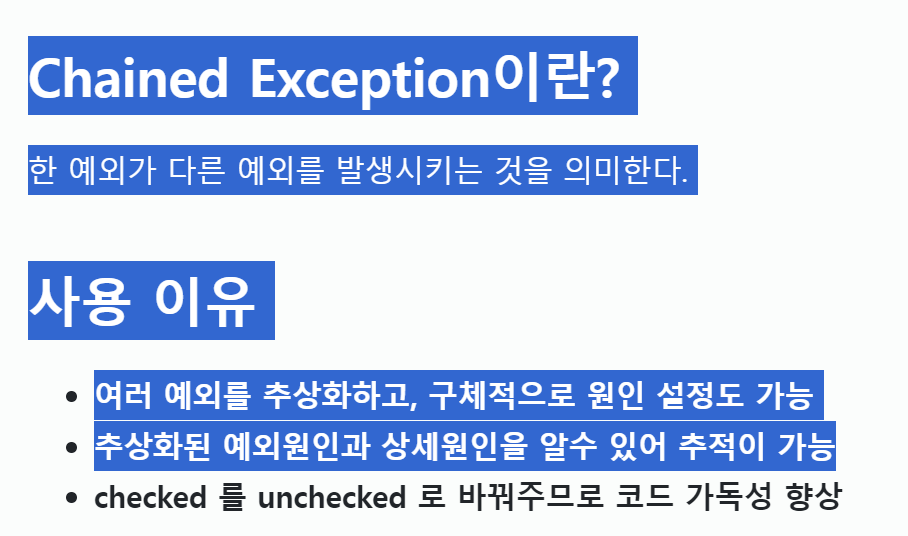
Chained Exception이란?
한 예외가 다른 예외를 발생시키는 것을 의미한다.
사용 이유
- 여러 예외를 추상화하고, 구체적으로 원인 설정도 가능
- 추상화된 예외원인과 상세원인을 알수 있어 추적이 가능
- checked 를 unchecked 로 바꿔주므로 코드 가독성 향상
만약 chained Exception을 처음 듣는다면 이 말이 잘 이해가 가지 않을것이다.
아래 코드를 보고나면 충분히 이해할 수 있을 것이며,
단, 이 자료는 Exception에 대해 기본 개념을 알고있다는 전제를 깔고 시작한다.
Chained Exception 예시
만약 우리가 계산기를 구현하고 있다고 하자.
계산기를 구현하다보니 연산 관련 예외처리 할 것이 너무 많아졌다.
[발생한 예외]
- 0으로 나눌 수 없으면 ArithmeticException 예외가 발생한다.
- 입력값(int)가 100000을 초과하면 사용자 예외(TooLargeNumberException)
- 입력값으로 숫자가 아닌 값이 들어온경우(NumberFormatException)
이 상태에서 예외처리를 한다면 아래 코드와 같을 것이다.
public class CalculatorService {

    //NumberFormatException은 RuntimeException 을 상속함
    //ArithmeticException은 RuntimeException을 상속함
    //TooLargeNumberException은 Exception을 상속함

    public int divide(String num1 , String num2)  {

        int result = 0;
        try {
            int number1 = Integer.parseInt(num1);
            int number2 = Integer.parseInt(num2);

            if (number1 > 100000 || number2 > 100000) {
                throw new TooLargeNumberException("숫자는 100000이하로만 입력가능합니다.");
            }
            number2 = 0; //강제 예외를 만들기 위해 임의로 넣음
            result = number1/number2 ;

        } catch(NumberFormatException numberFormatException) {
            System.out.println("숫자형이 아닙니다!!");
        } catch(TooLargeNumberException tooLargeNumberException) {
            System.out.println("숫자는 100000이하로만 가능합니다!!");
        } catch(ArithmeticException arithmeticException) {
            System.out.println("0으로 나누지 말라고!!");
        }
        return result;
    }
}

class TooLargeNumberException extends Exception {
    public TooLargeNumberException(String msg) {
        super(msg);
    }
}
소스를 천천히 뜯어보자.
만약 입력파라미터 String num1 , num2 가 "A" 나 숫자가 아닌 값으로 들어올 경우
Integer.parseInt() 부분에서 NumberFormatException이 발생한다.
그리고 입력받은 값이 숫자이지만 100000을 초과하면
TooLargeNumberException 라는 사용자 예외가 발생한다.
마지막으로 divide 결과를 리턴할 때 나눌 값이 0이면
ArithmeticException 이 발생하게 되어있다.
그런데 나는 @Service 부분에서 이렇게 예외를 전부 처리하려니 로직이 복잡해진다는 생각이 들었다 (코드 가독성이 떨어진다.)
그래서 @Controller 부분에 이 예외를 옮기기로 했다.
[Service 부분 코드]
public class CalculatorService {
    public int divide(String num1 , String num2) throws NumberFormatException , TooLargeNumberException , ArithmeticException {
    //throws 를 이용해서 예외를 호출한 컨트롤러에게 예외처리 책임을 전가했다.
    //Service 부분의 코드가 깔끔해졌다.

        int number1 = Integer.parseInt(num1);
        int number2 = Integer.parseInt(num2);
        if (number1 > 100000 || number2 > 100000) {
            throw new TooLargeNumberException("숫자는 100000이하로만 입력가능합니다.");
        }
        number2 = 0; //강제 예외를 만들기 위해 임의로 넣음
        return  number1/number2 ;
    }
}
[Controller 부분 코드]
public class CalculatorController {

    public static void main( String[] args) {

  CalculatorService calculatorService = new CalculatorService();

        try {
            String num1 = "aaa";
            String num2 = "12312";
            calculatorService.divide(num1 , num2) ;

        } catch(NumberFormatException numberFormatException) {
            System.out.println("숫자형이 아닙니다!!");
        } catch(TooLargeNumberException tooLargeNumberException) {
            System.out.println("숫자는 100000이하로만 가능합니다!!");
        } catch(ArithmeticException arithmeticException) {
            System.out.println("0으로 나누지 말라고!!");
        }
    }
}
"엥.. Service에서 하나 Controller에서 하나 다를게 없넹 ?
그리고 혹시모르니 Exception도 추가해야 할 거 같은데?
그러니까 이방법은 실패!!
이번에는 예외를 좀 추상화 시켜보자.
아이디어는 다음과 같다.
"어차피 세 예외 모두 연산에 관련된 오류니까 하나로 묶을 수 없을까?"
이 아이디어를 Chained Exception으로 한번 구현해보겠다.
[Service 부분 코드]
public class CalculatorService {

    //NumberFormatException은 RuntimeException 을 상속함
    //TooLargeNumberException은 Exception을 상속하기로 함
    public int divide(String num1 , String num2) throws DivideOperationException {

        int result = 0;

        try {
            int number1 = Integer.parseInt(num1);
            int number2 = Integer.parseInt(num2);

            if (number1 > 100000 || number2 > 100000) {
                throw new TooLargeNumberException("");
            }
            number2 = 0; //강제 예외를 만들기 위해 임의로 넣음
            return  number1/number2 ;

        } catch(NumberFormatException numberFormatException) {

            DivideOperationException divideOperationException = new DivideOperationException("숫자만 입력가능합니다!");
            divideOperationException.initCause(numberFormatException); //여기서 중요! 원래 예외였던 원인을 initCause로 원인으로 초기화했다.
            throw divideOperationException; //그리고 새롭게 연결시킨(chain) divideOperationException 다시 던지고 있다. (즉 연쇄적으로 감싸서 던졌다.)

        } catch(TooLargeNumberException tooLargeNumberException) {

            DivideOperationException divideOperationException = new DivideOperationException("숫자는 10000만 이하로만 가능합니다!!");
            divideOperationException.initCause(tooLargeNumberException);
            throw divideOperationException;

        } catch(ArithmeticException arithmeticException) {
            DivideOperationException divideOperationException = new DivideOperationException("0으로 나누지 말라고!!");
            divideOperationException.initCause(arithmeticException);
            throw divideOperationException;
        }
    }
}

class TooLargeNumberException extends Exception {
    public TooLargeNumberException(String msg) {
        super(msg);
    }
}

class DivideOperationException extends RuntimeException {
    public DivideOperationException(String msg) {
        super(msg);
    }
}
catch(NumberFormatException numberFormatException) { ...
부분을 보면 발생한 예외 NumberFormatException 을 던지는게 아니라
새롭게 DivideOperationException 을 던지고 있다.
(이 예외는 하단에 내가 사용자 정의로 만든 것이다)
그리고 새롭게 만든 예외에 initCause() 메서드를 이용해서
"원래 예외는 이놈이에요." 라고 알려주는 것이다.
즉 요지는 이렇다.
[기존]
- 0으로 나눌 수 없으면 ArithmeticException 예외가 발생한다.
- 입력값(int)가 100000을 초과하면 사용자 예외(TooLargeNumberException)
- 입력값으로 숫자가 아닌 값이 들어온경우(NumberFormatException)
[chained Exception 적용]
- DivideOperationException 예외 발생
- 그 안에 실제 예외가 있음 (예: NumberFormatException )
그럼 이제 Controller 쪽은??
[ControllerS 부분 코드]
public class CalculatorController {
    public static void main( String[] args) {

        CalculatorService calculatorService = new CalculatorService();

        try {
            String num1 = "aaa";
            String num2 = "12312";
            calculatorService.divide(num1, num2);
        } catch (DivideOperationException divideOperationException) {
            System.out.println("에러 메시지: " + divideOperationException.getMessage()); // 에러 메시지: 숫자만 입력가능합니다!
            System.out.println("원인: " + divideOperationException.getCause());  // 원인: java.lang.NumberFormatException: For input string: "aaa"
        }
    }
}
Controller 입장에서는 DivideOperationException 만 신경쓰면 되고, 또 실제 원인도 아까 initCause() 세팅했던 것을 getCause()로 가져올 수 있다.

여기까지 읽었다면
이부분까지는 이해가 되었을 것이다.
그럼 checked 를 unchecked로 바꿔서 코드 가독성 향상은 무슨 말일까?
checked ? unchecked?
먼저 checked 와 unchecked 예외의 차이는 컴파일 하기 전에 예외 가능성을 알 수 있냐 없냐이다.
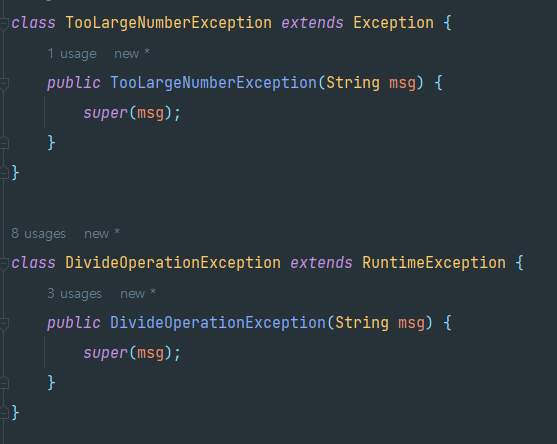
기본적으로 Exception을 상속한 예외는 Checked Exception 이므로
컴파일 전부터 빨간줄이 떠서 "고쳐주세욧!" 하고 알려준다.
하지만 RuntimeException을 상속한 예외는 실행 중에 발생하는 예외이므로
컴파일 전에 예외상황인지 알 수 가 없다.
문제는...
과거 자바 언어는 실행중에 처리해도 될 예외도 checked로 설정을 했다.
(그러니까 안전 코딩을 위해 그냥 무조건 다 잡으라고 한 것 같다)
그래서 예외를 세팅할 때 checked는 무조건 try - catch 을 사용해야한다.
(코드 가독성이 아주 감소)
그런데 만약 checked예외를 unchecked로 감싸서 새로 던질 수 있다면?
예시를 한번 보도록 하자
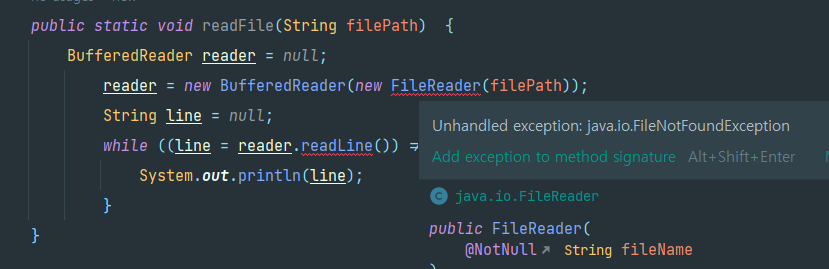



위에서 FileReader()를 생성하는데 예외 (FileNotFoundException)
가 세팅되어있는데 결과적으로 Exception을 상속받고 있다.
그래서 이때는 무조건 try - catch 를 통해 예외 처리를 해줘야 한다.
[예외 처리 후 코드 예]
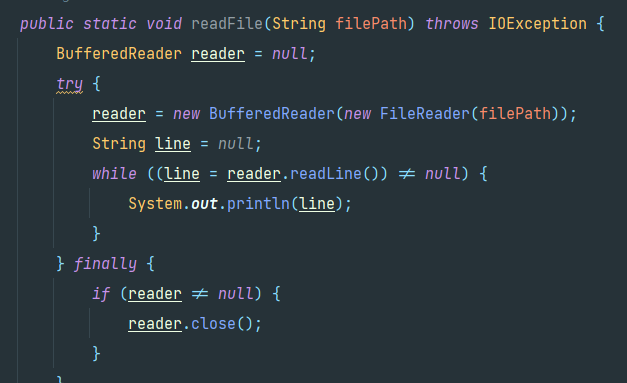
물론 사전에 예외를 처리하는게 안정성에 큰 도움이 되겠지만 ,
쓸데없는 checked예외까지 try - catch 하려면 코드 가독성이 떨어진다.
이때 이 IOException을 RuntimeException으로 감싸보면
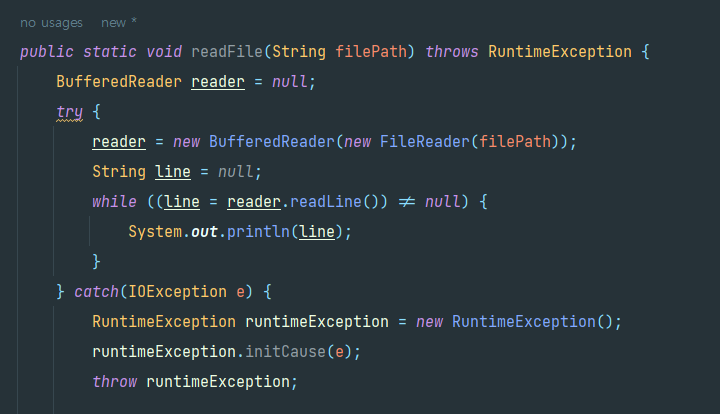
이후에 Controller 단에서는 RuntimeException을 받아 처리하게 되므로
예외 처리에 대한 코드 가독성이 향상될 수 있다.
물론 정말 checked 가 필요없는 경우에만 괜찮을 것 같다
결론
음... 추상화한다는 개념은 좋은 거 같다.
다양한 구체적인 예외를 하나의 분류를 해서 관리하기도 편하고
실제 원인도 세팅이 가능하니 추적도 용이할 것 같다.
그런데 checked를 unchecked로 바꾸는 거는 좀더 경험해봐야 할 것 같다.
더 많은 내용을 아시는 분은 댓글로 공유과 가르침 부탁드립니다 👍👍👍
참고 사이트
https://inpa.tistory.com/entry/JAVA-%E2%98%95-%EC%98%88%EC%99%B8-%EB%8D%98%EC%A7%80%EA%B8%B0throw-%EC%98%88%EC%99%B8-%EC%97%B0%EA%B2%B0Chained-Exception#%EC%97%B0%EA%B2%B0%EB%90%9C_%EC%98%88%EC%99%B8_chained_exception (inpa Dev님의 사이트)
그리고 나의 소스코드