
Astro는 파일기반 라우팅 사용
페이지간 이동
Link태그 사용x
정적 경로
src/pages/directory/.astro, .md ...
동적 경로
src/pages/authors/[author].astro
정적(SSG)모드 - default
빌드시 페이지 생성
-> Astro가 어떤 경로를 미리 렌더링할지 결정하기 위해 객체 배열 반환 필수!
---
//src/pages/[dog].astro
export function getStaticPaths() { //함수명 고정
  return [
    {params: {dog: 'clifford'}}, //만들고자 하는 모든 페이지에 대해 만들어야 함
    {params: {dog: 'rover'}, props:{age:13}}, //이렇게 props도 넘길 수 있음
    {params: {dog: 'spot', name: 'bob' }}, //src/pages/[dog]-[name]/info.astro
  ];
}

const { dog } = Astro.params;
---
<div>Good dog, {dog}!</div>
이렇게 모든 매개변수를 한꺼번에 넣을수도 있다!
---
//src/pages/set/[...path].astro
export function getStaticPaths() {
  return [
    {params: {path: 'one/two/three'}}, ///set/one/two/three
    {params: {path: 'four'}}, //set/four
    {params: {path: undefined }} //set
  ]
}

const { path } = Astro.params;
---
...
서버(SSR)모드
일치하는 경로에 대한 요청이 있을 때 페이지 생성
-> 경로가 더 이상 미리 빌드되지 않기 때문에 페이지는 일치하는 모든 경로에 제공
---
//src/pages/resources/[resource]/[id].astro
const { resource, id } = Astro.params;
---
<h1>{resource}: {id}</h1>
-> getStaticPaths() 사용x = props 못 받음
-> 객체에 값이 없으면 404 페이지로 리디렉션
---
const pages = [
  {
    slug: undefined,
    title: 'Astro Store',
    text: 'Welcome to the Astro store!',
  },
  {
    slug: 'products',
    title: 'Astro products',
    text: 'We have lots of products for you',
  },
  {
    slug: 'products/astro-handbook',
    title: 'The ultimate Astro handbook',
    text: 'If you want to learn Astro, you must read this book.',
  }
];

const { slug } = Astro.params;
//props를 못 받으므로 스스로 해당하는 page를 찾아서 props에 해당하는 값을 꺼내와야 함
const page = pages.find((page) => page.slug === slug);
if (!page) return Astro.redirect("/404");
const { title, text } = page;
---
<html>
<head>
  <title>{title}</title>
</head>
<body>
  <h1>{title}</h1>
  <p>{text}</p>
</body>
</html>
리디렉션
구성된 리디렉션
상태 코드는 기본적으로 301
-> HTML 파일로 빌드하는 경우는 상태코드 x
//astro.config.mjs

import { defineConfig } from 'astro/config';

export default defineConfig({
  redirects: {
    '/old-page': '/new-page', //예전 링크를 새 링크로 영구 매핑하기
    '/blog/[...slug]": "/articles/[...slug]', //동적 경로 사용 가능

    '/old-page2': {
      status: 302, //status 지정도 가능
      destination: '/new-page'
    }
  }
});
동적 리디렉션
Astro.redirect(url)로 코드 내에서 리디렉션 가능
---
import { isLoggedIn } from '../utils';

const cookie = Astro.request.headers.get('cookie');

if (!isLoggedIn(cookie)) {
  return Astro.redirect('/login');
}
---
<html>
  <!-- 페이지... -->
</html>
경로 우선순위
우선순위 조건
- 더 많은 경로 세그먼트를 가질수록 우선순위 높음
- 명명된 매개변수를 사용하는 동적 경로는 나머지 매개변수(...param, ...slug)보다 우선
- 사전 렌더링된 동적 경로는 서버 동적 경로보다 우선
- 엔드포인트가 페이지보다 우선
예시
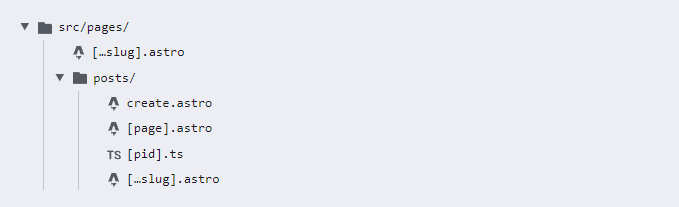
| 경로 | 빌드 O | 빌드 X |
|---|---|---|
| pages/posts/create.astro | /posts/create | |
| pages/posts/[pid].ts | /posts/abc, /posts/xyz | /posts/create |
| pages/posts/[page].astro | /posts/1, /posts/2 | /posts/create, /posts/abc, /posts/xyz |
| pages/posts/[...slug].astro | /posts/1/2, /posts/a/b/c | /posts/create, /posts/1, /posts/abc |
| pages/[...slug].astro | /abc, /xyz, /abc/xyz | /posts/create, /posts/1, /posts/abc |
페이지네이션
---
export async function getStaticPaths({ paginate }) {
  const astronautPages = [
    {astronaut: 'Neil Armstrong'},
    {astronaut: 'Buzz Aldrin'},
    {astronaut: 'Sally Ride'},
    {astronaut: 'John Glenn'}];

  return paginate(astronautPages, { pageSize: 2 });
 // /astronauts/1 - 페이지 1: “Neil Armstrong” 및 “Buzz Aldrin” 표시
 // /astronauts/2 - 페이지 2: “Sally Ride” 및 “John Glenn” 표시
}

const { page } = Astro.props;
---

<h1>Page {page.currentPage}</h1>
<ul>
  {page.data.map(({ astronaut }) => <li>{astronaut}</li>)}
</ul>
{page.url.prev && <a href={page.url.prev}>Previous</a>}
{page.url.next && <a href={page.url.next}>Next</a>}
page
interface Page<T = any> {
  data: T[]; //메타데이터
  start: number;
  end: number;
  total: number;
  currentPage: number;
  size: number; //페이지당 항목수
  lastPage: number;
  url: {
    current: string;
    prev: string | undefined;
    next: string | undefined;
  };
}
중첩 페이지네이션
페이지네이션 + 동적 경로 매개변수 ex)/src/pages/[tag]/[page]
-> 페이지가 매겨진 컬렉션을 일부 속성이나 태그별로 그룹화 가능
-> getStaticPaths()에서 paginate() 결과 배열을 각 그룹마다 하나씩 반환
---
export async function getStaticPaths({ paginate }) {
  const allTags = ['red', 'blue', 'green'];
  const allPosts = await Astro.glob('../../posts/*.md');

  // 모든 태그 각각에서 paginate()함수를 반환해야 함
  return allTags.flatMap((tag) => {
    const filteredPosts = allPosts.filter((post) => post.frontmatter.tag === tag);
    return paginate(filteredPosts, {
      params: { tag },
      pageSize: 10
    });
  });
}
const { page } = Astro.props;
const params = Astro.params;
페이지 제외
_ 접두사가 붙은 파일/디렉터리는 라우터에서 인식x
-> dist/ 디렉터리에 배치x
-> 페이지를 일시적으로 비활성화 가능

중요한 건 꺾여도 그냥 하는 마음