NestJS + Prisma로 Course CRUD API 구현하기
이 글에서는 NestJS와 Prisma를 연동해 Course 리소스에 대한 CRUD API를 구현하는 과정을 다룹니다. Prisma 설정부터 Module, Service, Controller, DTO 구성, 그리고 시드 데이터 생성까지 전체 흐름을 순서대로 정리합니다.
전체 흐름
PrismaModule (글로벌 등록)
    └── CoursesModule
            ├── CoursesController  ← HTTP 요청 수신
            ├── CoursesService     ← 비즈니스 로직 처리
            └── PrismaService      ← DB 접근
1. Prisma 설정
PrismaService
import { Injectable, OnModuleInit } from '@nestjs/common';
import { PrismaClient } from '@prisma/client';

@Injectable()
export class PrismaService extends PrismaClient implements OnModuleInit {
  async onModuleInit() {
    await this.$connect();
  }
}PrismaClient를 상속받아 NestJS의 DI 컨테이너에 등록합니다. onModuleInit 훅을 통해 모듈이 초기화될 때 DB 연결을 자동으로 수립하도록 해줍니다.
PrismaModule
import { Global, Module } from '@nestjs/common';
import { PrismaService } from './prisma.service';

@Global()
@Module({
  providers: [PrismaService],
  exports: [PrismaService],
})
export class PrismaModule {}
@Global() 데코레이터를 적용해 앱 전역에서 PrismaService를 별도 import 없이 주입받을 수 있도록 합니다. 다만 명시적인 의존관계를 선호한다면 글로벌 설정 없이 각 모듈에서 import하는 방식도 유효합니다.
2. CoursesModule
import { Module } from '@nestjs/common';
import { CoursesService } from './courses.service';
import { CoursesController } from './courses.controller';
import { PrismaModule } from 'src/prisma/prisma.module';

@Module({
  imports: [PrismaModule],
  controllers: [CoursesController],
  providers: [CoursesService],
  exports: [CoursesService],
})
export class CoursesModule {}PrismaModule을 import해 CoursesService에서 PrismaService를 사용할 수 있게 합니다. CoursesService를 exports에 포함해 다른 모듈에서 재사용할 수 있도록 열어둡니다.
3. DTO 정의
CreateCourseDto
import { ApiProperty } from '@nestjs/swagger';
import { IsArray, IsBoolean, IsNumber, IsOptional, IsString, IsUUID } from 'class-validator';

export class CreateCourseDto {
  @ApiProperty({ description: '코스 제목' })
  @IsString()
  title: string;

  @ApiProperty({ description: '코스 슬러그(URL에 사용)' })
  @IsString()
  slug: string;

  @ApiProperty({ description: '코스 짧은소개' })
  @IsString()
  @IsOptional()
  shortDescription?: string;

  @ApiProperty({ description: '코스 상세 페이지 설명' })
  @IsString()
  @IsOptional()
  description?: string;

  @ApiProperty({ description: '코스 썸네일 이미지 URL' })
  @IsString()
  @IsOptional()
  thumbnailUrl?: string;

  @ApiProperty({ description: '코스 가격' })
  @IsNumber()
  price: number;

  @ApiProperty({ description: '코스 할인 가격' })
  @IsNumber()
  @IsOptional()
  discountPrice?: number;

  @ApiProperty({ description: '코스 난이도' })
  @IsString()
  @IsOptional()
  level?: string;

  @ApiProperty({ description: '코스 게시 여부' })
  @IsBoolean()
  @IsOptional()
  isPublished?: boolean;

  @ApiProperty({ description: '코스 카테고리 ID 배열' })
  @IsArray()
  @IsUUID(undefined, { each: true })
  @IsOptional()
  categoryIds?: string[];
}
class-validator를 통해 validator를 검사한다.
title, slug, price는 필수 필드이며, 나머지는 @IsOptional()로 선택 처리합니다. categoryIds는 UUID 배열로 받아 Prisma의 connect 구문과 연결됩니다.
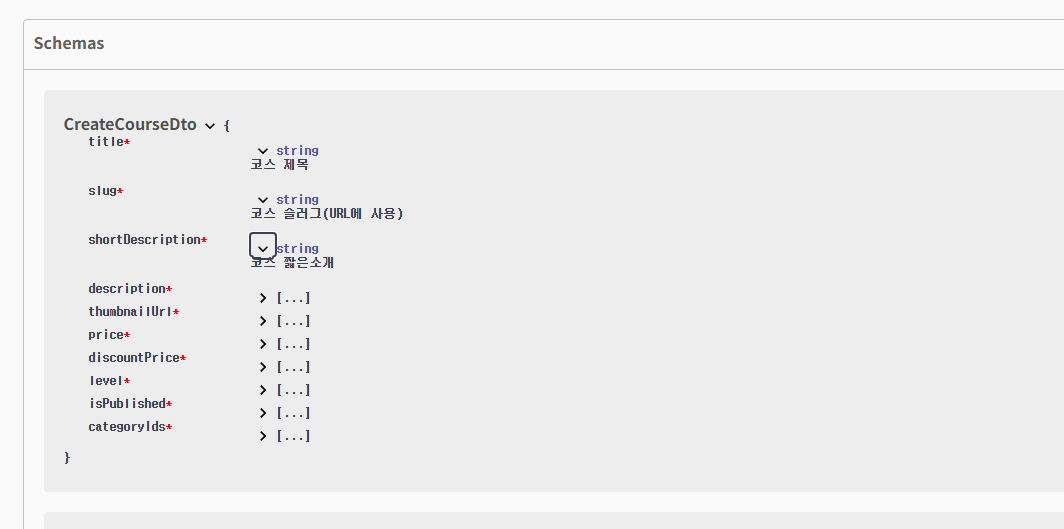
ApiProperty는 아래의 사진과 같이 swagger를 통해 어떠한 property 인지 아기 쉽게 도와준다.
UpdateCourseDto
import { PartialType } from '@nestjs/swagger';
import { CreateCourseDto } from './create-course-dto';

export class UpdateCourseDto extends PartialType(CreateCourseDto) {}PartialType을 활용해 CreateCourseDto의 모든 필드를 선택적으로 만듭니다. @nestjs/swagger의 PartialType을 사용하면 Swagger 문서에도 동일하게 반영됩니다.
4. CoursesService
import { ForbiddenException, Injectable, NotFoundException } from '@nestjs/common';
import { PrismaService } from 'src/prisma/prisma.service';
import { CreateCourseDto } from './dto/create-course-dto';
import { Course, Prisma } from '@prisma/client';
import { UpdateCourseDto } from './dto/update-course-dto';

@Injectable()
export class CoursesService {
  constructor(private readonly prisma: PrismaService) {}

  async create(userId: string, createCourseDto: CreateCourseDto): Promise<Course> {
    const { categoryIds, ...rest } = createCourseDto;
    return this.prisma.course.create({
      data: {
        ...rest,
        categories: {
          connect: categoryIds?.map((id) => ({ id })) || [],
        },
        instructorId: userId,
      },
    });
  }

  async findAll(params: {
    skip?: number;
    take?: number;
    cursor?: Prisma.CourseWhereUniqueInput;
    where?: Prisma.CourseWhereInput;
    orderBy?: Prisma.CourseOrderByWithRelationInput;
  }): Promise<Course[]> {
    const { skip, take, cursor, where, orderBy } = params;
    return this.prisma.course.findMany({ skip, take, cursor, where, orderBy });
  }

  async findOne(id: string, include?: string[]): Promise<Course | null> {
    const includeObject = {};
    if (include) {
      include.forEach((item) => {
        includeObject[item] = true;
      });
    }
    const course = await this.prisma.course.findUnique({
      where: { id },
      include: include && include?.length > 0 ? includeObject : undefined,
    });

    if (!course) throw new NotFoundException('course를 찾을 수 없습니다.');
    return course;
  }

  async update(id: string, userId: string, updateCourseDto: UpdateCourseDto): Promise<Course | null> {
    const course = await this.findOne(id);
    if (course.instructorId !== userId) {
      throw new ForbiddenException('소유자만 수정이 가능합니다.');
    }
    return this.prisma.course.update({ where: { id }, data: updateCourseDto });
  }

  async remove(id: string, userId: string): Promise<Course | null> {
    const course = await this.findOne(id);
    if (course.instructorId !== userId) {
      throw new ForbiddenException('소유자만 삭제가 가능합니다.');
    }
    return this.prisma.course.delete({ where: { id } });
  }
}
핵심 포인트
create: categoryIds를 구조 분해해 Prisma의 categories.connect로 다대다 관계를 연결합니다. instructorId는 JWT 토큰에서 추출한 userId를 사용합니다.
findAll: Prisma 공식 문서에서 권장하는 페이지네이션 패턴을 그대로 따릅니다. where, orderBy 등의 필터링 조건은 Controller에서 조립해 전달합니다.
findOne: 받아온 id에 따라 하나의 course를 가져오며 include 파라미터를 문자열 배열로 받아 동적으로 관계 포함 여부를 설정합니다. sections, lectures, reviews 등을 필요에 따라 선택적으로 조회할 수 있습니다.
update / remove: findOne을 먼저 호출해 존재 여부를 확인하고, instructorId 비교로 소유자 권한을 검증합니다. 존재하지 않는 경우 findOne 내부에서 NotFoundException이 발생하므로 중복 체크가 없습니다.
5. CoursesController
import {
  Body, Controller, Delete, Get, Param,
  ParseUUIDPipe, Patch, Post, Query, Req, UseGuards,
} from '@nestjs/common';
import { CoursesService } from './courses.service';
import { ApiBearerAuth, ApiParam, ApiQuery, ApiTags } from '@nestjs/swagger';
import { AccessTokenGuard } from 'src/auth/guards/access-token.guard';
import { CreateCourseDto } from './dto/create-course-dto';
import { JwtPayload } from 'src/types/express';
import { Course, Prisma } from '@prisma/client';
import { UpdateCourseDto } from './dto/update-course-dto';

@ApiTags('courses')
@Controller('courses')
export class CoursesController {
  constructor(private readonly coursesService: CoursesService) {}

  @Post()
  @UseGuards(AccessTokenGuard)
  @ApiBearerAuth('access-token')
  create(
    @Req() req: Request & { user: JwtPayload },
    @Body() createCourseDto: CreateCourseDto,
  ): Promise<Course> {
    return this.coursesService.create(req.user.sub, createCourseDto);
  }

  @Get()
  @ApiQuery({ name: 'title', required: false })
  @ApiQuery({ name: 'level', required: false })
  @ApiQuery({ name: 'categoryId', required: false })
  @ApiQuery({ name: 'skip', required: false })
  @ApiQuery({ name: 'take', required: false })
  findAll(
    @Query('title') title?: string,
    @Query('level') level?: string,
    @Query('categoryId') categoryId?: string,
    @Query('skip') skip?: string,
    @Query('take') take?: string,
  ) {
    const where: Prisma.CourseWhereInput = {};
    if (title) where.title = { contains: title, mode: 'insensitive' };
    if (level) where.level = level;
    if (categoryId) where.categories = { some: { id: categoryId } };

    return this.coursesService.findAll({
      where,
      skip: skip ? parseInt(skip) : undefined,
      take: take ? parseInt(take) : undefined,
      orderBy: { createdAt: 'desc' },
    });
  }

  @Get(':id')
  @ApiParam({ name: 'include', required: true, description: 'section,lectures, review 포함 관계 지정' })
  findOne(
    @Param('id', ParseUUIDPipe) id: string,
    @Query('include') include?: string,
  ) {
    const includeArray = include ? include.split(',') : undefined;
    return this.coursesService.findOne(id, includeArray);
  }

  @Patch(':id')
  @UseGuards(AccessTokenGuard)
  @ApiBearerAuth('access-token')
  update(
    @Param('id', ParseUUIDPipe) id: string,
    @Body() updateCourseDto: UpdateCourseDto,
    @Req() req: Request & { user: JwtPayload },
  ) {
    return this.coursesService.update(id, req.user.sub, updateCourseDto);
  }

  @Delete(':id')
  @UseGuards(AccessTokenGuard)
  @ApiBearerAuth('access-token')
  remove(
    @Param('id', ParseUUIDPipe) id: string,
    @Req() req: Request & { user: JwtPayload },
  ) {
    return this.coursesService.remove(id, req.user.sub);
  }
}
핵심 포인트
@ParseUUIDPipe: :id 파라미터가 유효한 UUID 형식인지 파이프 레벨에서 검증합니다. 형식이 맞지 않으면 서비스 로직 진입 전에 400 에러를 반환합니다.
findAll의 필터 조립: 쿼리 파라미터를 받아 Prisma.CourseWhereInput 객체를 직접 조립합니다. 카테고리 필터는 categories.some을 사용해 다대다 관계를 필터링합니다.
include 쿼리 파라미터: 콤마로 구분된 문자열(sections,lectures)을 배열로 파싱해 서비스에 전달합니다. 동적 include는 편리하지만 타입 안정성이 낮으므로, 허용 가능한 관계 목록을 화이트리스트로 검증하는 로직을 추가하면 더 안전합니다.
6. 카테고리 시드 데이터
개발 초기에 카테고리 데이터를 미리 채워두기 위한 시드 스크립트입니다.
import { PrismaClient } from '@prisma/client';
import { v4 as uuidv4 } from 'uuid';

const prisma = new PrismaClient();

async function main() {
  await prisma.$connect();

  await prisma.courseCategory.deleteMany({});

  const categories = [
    { id: uuidv4(), name: '개발 · 프로그래밍', slug: 'it-programming', description: '' },
    { id: uuidv4(), name: '게임 개발',          slug: 'game-dev-all',          description: '' },
    { id: uuidv4(), name: '데이터 사이언스',     slug: 'data-science',          description: '' },
    { id: uuidv4(), name: '인공지능',            slug: 'artificial-intelligence', description: '' },
    { id: uuidv4(), name: '보안 · 네트워크',     slug: 'it',                    description: '' },
    { id: uuidv4(), name: '하드웨어',            slug: 'hardware',              description: '' },
    { id: uuidv4(), name: '디자인 · 아트',       slug: 'design',                description: '' },
    { id: uuidv4(), name: '기획 · 경영 · 마케팅', slug: 'business',             description: '' },
    { id: uuidv4(), name: '업무 생산성',         slug: 'productivity',          description: '' },
    { id: uuidv4(), name: '커리어 · 자기계발',   slug: 'career',                description: '' },
    { id: uuidv4(), name: '대학 교육',           slug: 'academics',             description: '' },
  ];

  await prisma.courseCategory.createMany({ data: categories });
  console.log('카테고리 시드 데이터가 성공적으로 생성되었습니다.');
}

main()
  .catch((error) => {
    console.error('시드 데이터 생성 중 오류가 발생했습니다', error);
    process.exit(1);
  })
  .finally(async () => {
    await prisma.$disconnect();
  });
deleteMany → createMany 순서로 실행해 멱등성을 보장합니다. 시드를 여러 번 실행해도 중복 없이 동일한 상태를 유지합니다. prisma/seed.ts에 작성하고 package.json에 아래와 같이 등록해두면 npx prisma db seed로 실행할 수 있습니다.
"prisma": {
  "seed": "ts-node prisma/seed.ts"
}