오늘 목표
- 수업 전 7시 기상 후 운동(O)
- 수업 내용 모르는 거 및 공부내용 정리(O)
- JS 강의 듣기(O)
공부내용
loader
매번 userParams를 이용해 동적 데이터를 불러왔지만. 오늘 강사님이 새로운 방법을 알려주셨다. loader라는 React Router에서 등장한 방법이다.
{
        path: '/detail/:productId',
        element: <DetailPage />,
        loader: async ({ params }) => {
          try {
            const product = await getProductById(params.productId)
            return product
          } catch (error) {
            console.log(error)
          }
        },
      },
loder의 장점
- 페이지 진입 전에 데이터를 로드하기 때문에 페이지 이동 시 깜빡임이 없고 부드럽게 사용자 경험 제공
- 서버사이드 렌더링(SSR) 또는 데이터 prefetching에 유리함
loder의 단점
- 단일 페이지 내에서 param이 바뀌는 경우(loader는 다시 실행되지 않음)에는 수동으로 reload를 유도해야 함. 어떠한 방법이 있을까?
shouldRevalidate 사용
<Route
  path="/detail/:productId"
  loader={async ({ params }) => {
    return await getProductById(params.productId);
  }}
  shouldRevalidate={({ currentParams, nextParams }) =>
    currentParams.productId !== nextParams.productId
  }
/>
컴포넌트 키 사용
<Route
  path="/detail/:productId"
  element={<DetailPage key={location.pathname} />}
/>
useParams + useEffect
const { productId } = useParams();

useEffect(() => {
  const fetchData = async () => {
    const product = await getProductById(productId);
    setProduct(product);
  };
  fetchData();
}, [productId]);
어떤 방법을 써야할까?
loader는 컴포넌트가 재마운트되지 않으면 재실행되지 않는다는 단점이 있지만, key 또는 shouldRevalidate 옵션을 통해 해결할 수 있습니다.
반면 useParams와 useEffect를 사용하면 라우트 파라미터가 변경될 때 자동으로 데이터 로딩이 이루어져 구현이 간단하고 빠릅니다.
하지만 저는 loader를 사용하면 라우터 단계에서 데이터를 미리 받아올 수 있어 렌더링 성능이 더 좋고,
데이터 로딩 로직이 컴포넌트 외부로 분리되므로 DetailPage는 순수하게 UI만 책임지는 구조가 되어 역할이 더 명확해진다고 생각합니다.
자주 사용함수 분리하기
자주 사용되거나 컴포넌트 안에 넣기에는 긴 코드는 util이라는 폴더를 만들어 js파일을 하나 만든 후에 따로 관리해주는 것이 재사용성과 유지보수에 좋기 때문에 그렇게 해보자!
export const formmatCurrency = number => {
return number.toLocaleString() + '원'
}
export const formatDate = date => {
const d = new Date(date)
const year = d.getFullYear()
// getMonth()는 0부터 시작하므로 1을 더하고, 10보다 작으면 앞에 0 추가
const month = String(d.getMonth() + 1).padStart(2, '0')
const day = String(d.getDate()).padStart(2, '0')
return `${year}. ${month}. ${day}`
}
// 디바운스 : 연속된 호출을 지연시켜 한번만 실행. 함수(함수, 대시시간)
export const debounce = (func, delay = 300) => {
let timerId
return function (...args) {
if (timerId) clearTimeout(timerId)
timerId = setTimeout(() => {
func.apply(this, args)
}, delay)
}
}
// 쓰로틀 : 일정 시간 동안 한 번만 실행. 함수(함수, 대시시간)
export const throttle = (func, limit = 300) => {
let inThrottle
return function (...args) {
// 일반 함수로 변경
if (!inThrottle) {
func.apply(this, args)
inThrottle = true
setTimeout(() => (inThrottle = false), limit)
}
useEffect(() => {
const fetchData = async () => {
const product = await getProductById(productId);
setProduct(product);
};
fetchData();
}, [productId]);
디테일 페이지 꾸미기
import React, { useState } from 'react'
import { useLoaderData } from 'react-router-dom'
import styles from './DetailPage.module.css'
import { formmatCurrency } from '../utils/features'
import InfoArea from '@/components/InfoArea'
import InfoAdditional from '@/components/InfoAdditional'
import InfoReviews from '@/components/InfoReviews'
import ProductCard from '@/components/ProductCard'

const DetailPage = () => {
  const { product, relatiedProducts } = useLoaderData()
  const [tabMenu, setTabMenu] = useState('Description')
  const arr = ['Description', 'Aditional information', 'Review']

  console.log(relatiedProducts)
  const selectTab = e => {
    setTabMenu(e.target.innerText)
  }
  return (
    <main>
      <h2>DetailPage</h2>
      <div className={styles.container}>
        <div className={styles.imgWrap}>
          <img src={`/public/img/${product.img}`} alt={product.title} />
          {product.discount && <p className={styles.discount}>{product.discount} %</p>}
        </div>
        <div className={styles.infoWrap}>
          <p className={styles.title}>{product.title}</p>
          <p className={styles.price}>{formmatCurrency(product.price)}</p>
          <p className={styles.category}>{product.category}</p>
          <div className={styles.btnWrap}>
            <div className={styles.counterArea}>
              <button>-</button>
              <span>1</span>
              <button>+</button>
            </div>
            <button className={styles.addBtn}>Add To Cart</button>
          </div>
        </div>
      </div>
      <div>
        <ul className={styles.tabList}>
          {arr.map((item, index) => (
            <li
              className={`${tabMenu === item ? styles.active : ''} `}
              onClick={selectTab}
              key={index}
            >
              {item}
            </li>
          ))}
        </ul>
        {tabMenu === 'Description' && <InfoArea />}
        {tabMenu === 'Aditional information' && <InfoAdditional />}
        {tabMenu === 'Review' && <InfoReviews />}
      </div>
      <h2>Similar Items</h2>
      <div className={styles.similarList}>
        {relatiedProducts.map(products => (
          <ProductCard product={products} />
        ))}
      </div>
    </main>
  )
}

export default DetailPage
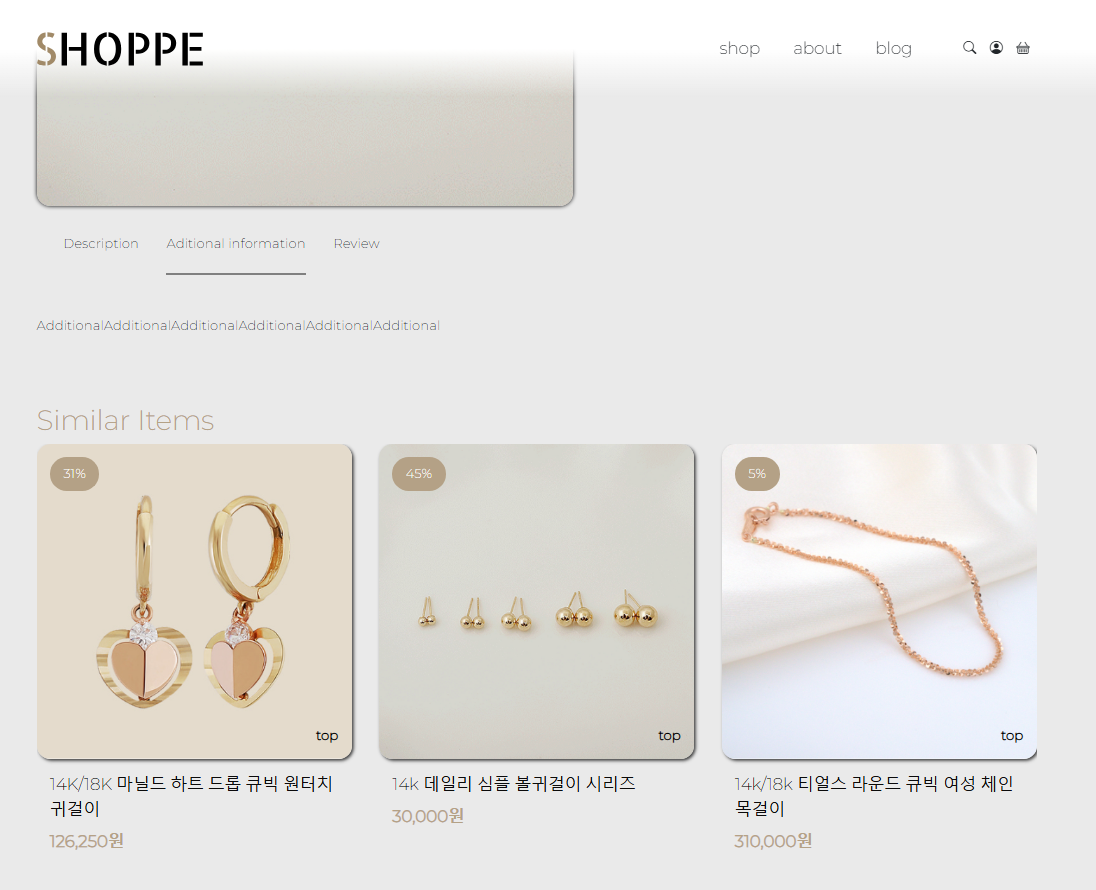
tabMenu 부분과 Similar Items부분을 과제(?)로 주셨다 api를 받아오는 부분은 같이 하였지만 Css에 익숙해지기 위해서 혼자 해보라고 해주셨당
먼저 TabMenu는 Description,Aditional information,Review가 있다.
Menu중 하나를 클릭하면 SetTabMenu에 클릭한 InnerText를 안에 넣어주었다. TabMenu와 현재 탭이 같은 메뉴(선택 된 메뉴)는 active class를 추가로 넣어줬다. active 클래스에는 가상요소 ::after를 사용해 클릭한 메뉴에 효과를 주어 사용자 경험을 높였습니다.
.active {
  position: relative;
  height: 50px;
}
.active::after {
  content: '';
  position: absolute;
  width: 100%;
  bottom: 0;
  left: 0;
  border: 1px solid gray;
}
또한 Menu클릭 시 TabMenu의 상태가 달라짐으로 그 메뉴에 따라 다른 컴포넌트를 불러오게 구현하였습니다.
또한 같은 카테고리를 가진 상품들을 보여주는 Similar Items는
export const getProductByCategory = async (category, limit = 10) => {
  try {
    const response = await axios.get(`/api/products/`, {
      params: {
        category,
        _limit: limit,
      },
    })
    return response.data
  } catch (error) {
    console.log('ProductByCategory', error)
    throw error
  }
}
상품을 받아올 때 limit를 정할 수 있게 구현하여 loader할때 limit를 정해 불러 왔습니다.
const relatiedProducts = await getProductByCategory(product.category, 3)