
오늘 목표
- 수업전 7시 기상 후 운동(O)
- 수업내용 정리 및 모르는 내용 복습(O)
- 프로그래머스 문제 풀기(O)
- js프로젝트에 배운내용 적용해보기(O)
배운 내용
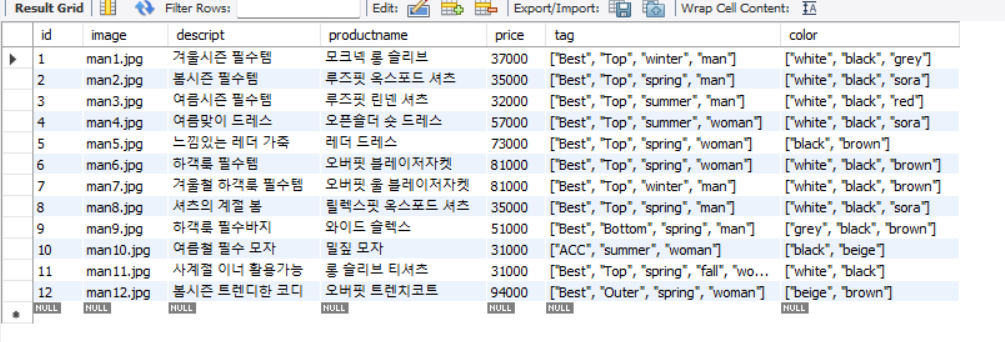
배운 mysql을 활용하여 개인 js 프로젝트에 적용해볼 table을 구성해 보았다.
use shop;

create table product(
id INT PRIMARY KEY AUTO_INCREMENT,
image varchar(50),
descript varchar(50),
productname varchar(50) unique not null,
price int not null,
tag JSON NOT NULL,
color JSON NOT NULL
);

INSERT INTO `product` (`image`,`descript`,`productname`,`price`,`tag`,`color`)
VALUES
('man1.jpg','겨울시즌 필수템','모크넥 롱 슬리브',37000,'["Best","Top","winter","man"]','["white","black","grey"]'),
('man2.jpg','봄시즌 필수템','루즈핏 옥스포드 셔츠',35000,'["Best","Top","spring","man"]','["white","black","sora"]'),
('man3.jpg','여름시즌 필수템','루즈핏 린넨 셔츠',32000,'["Best","Top","summer","man"]','["white","black","red"]'),
('man4.jpg','여름맞이 드레스','오픈숄더 숏 드레스',57000,'["Best","Top","summer","woman"]','["white","black","sora"]'),
('man5.jpg','느낌있는 레더 가죽','레더 드레스',73000,'["Best","Top","spring","woman"]','["black","brown"]'),
('man6.jpg','하객룩 필수템','오버핏 블레이저자켓',81000,'["Best","Top","spring","woman"]','["white","black","brown"]'),
('man7.jpg','겨울철 하객룩 필수템','오버핏 울 블레이저자켓',81000,'["Best","Top","winter","man"]','["white","black","brown"]'),
('man8.jpg','셔츠의 계절 봄','릴렉스핏 옥스포드 셔츠',35000,'["Best","Top","spring","man"]','["white","black","sora"]'),
('man9.jpg','하객룩 필수바지','와이드 슬렉스 ',51000,'["Best","Bottom","spring","man"]','["grey","black","brown"]'),
('man10.jpg','여름철 필수 모자','밀짚 모자',31000,'["ACC","summer","woman"]','["black","beige"]'),
('man11.jpg','사계절 이너 활용가능','롱 슬리브 티셔츠',31000,'["Best","Top","spring","fall","woman"]','["white","black"]'),
('man12.jpg','봄시즌 트렌디한 코디','오버핏 트렌치코트',94000,'["Best","Outer","spring","woman"]','["beige","brown"]')
중요정보 처리하는 방법
resources/config 폴더에 중요정보 넣기
DB_DRIVER= // dirver
DB_URL=
DB_USER=
DB_PW=
resources/application.properties에 정보 넣기
spring.datasource.driver-class-name=${DB_DRIVER}
spring.datasource.url=${DB_URL}
spring.datasource.username=${DB_USER}
spring.datasource.password=${DB_PW}
main class에@PropertySource("classpath:")사용
@SpringBootApplication
@PropertySource("classpath:") // 여기다  config폴더에 있는 파일 적기

public class Project1CafeApplication{

	public static void main(String[] args) {
		SpringApplication.run(UrecafeApplication.class, args);
	}

}
gitignore에 추가
git에 올리고 싶지 않은 폴더 및 파일의 내용 추가함.
Product.Dao 파일
package com.shop.cafe.dao;

import java.sql.*;
import java.util.*;

import org.springframework.beans.factory.annotation.Value;
import org.springframework.stereotype.Component;

import com.shop.cafe.dto.Product;

@Component
public class ProductDao {

	@Value("${spring.datasource.driver-class-name}")
	private String DB_DRIVER;

	@Value("${spring.datasource.url}")
	private String DB_URL;

	@Value("${spring.datasource.username}")
	private String DB_USER;

	@Value("${spring.datasource.password}")
	private String DB_PW;


	public List<Product> getAllProducts() throws Exception{

		Class.forName(DB_DRIVER);

		String sql="select * from product";

		try(
		Connection con=DriverManager.getConnection(DB_URL,DB_USER,DB_PW);
		PreparedStatement stmt=con.prepareStatement(sql);
		ResultSet rs=stmt.executeQuery();
				){

			List<Product> list=new ArrayList();
			while(rs.next()) {
				int prodcode=rs.getInt("prodcode");
				String prodname=rs.getString("prodname");
				String pimg=rs.getString("pimg");
				int price=rs.getInt("price");
				list.add(new Product(prodcode, prodname, price, pimg));
			}

			return list;

		}
	}

}
@Value("${spring.datasource.driver-class-name}")
private String DB_DRIVER;
@Value로 application.propertices에 정의한 파일을 받아와 DB_DRIVER에 넣어 사용
Postmapping requestbody 사용
Getmappping 은 사용 x

나만의 기록장